
The Model-Driven Programmability Stack
The Evolution
Model-driven programmability fundamentally changed how Cisco devices are configured and monitored. Instead of relying on legacy CLI scraping or clunky SNMP polling, the model-driven stack relies on structured YANG data models (which define what data looks like) transported over modern APIs like NETCONF (XML over SSH), RESTCONF (JSON/XML over HTTPS), and gNMI/gRPC (Protobuf over HTTP/2).
When Was It Introduced?
Cisco introduced model-driven architectures between 2015 and 2017, aligning with a major ground-up rewrite across their core operating systems:
-
IOS XR (Service Provider): Introduced in late 2015 with IOS XR 6.0.0. Cisco rebuilt XR on a 64-bit Linux kernel, introducing native YANG modeling and gRPC-based Model-Driven Telemetry (MDT).
-
NX-OS (Data Center): Rollout began around 2015–2016 starting with NX-OS 7.0(3) on the Nexus 9000 series. It featured Open NX-OS and an internal state store called the Data Management Engine (DME).
-
IOS XE (Enterprise & Campus): Rolled out between 2016 and 2017 with the IOS XE 16.3 / 16.6 (Everest) releases (internally known as Project Polaris). This refactored the monolithic IOS architecture into a modular, Linux-based daemon (
IOSd) running alongside native YANG parsers.
Can It Be Used with Old Devices?
On-Box: No
Legacy operating systems like Classic Cisco IOS (12.x, 15.x) or older IOS XE 3.x do not support model-driven programmability natively. They lack the underlying Linux subsystem, centralized state database, and local YANG execution engines required to process NETCONF, RESTCONF, or gNMI payloads.
Off-Box Workaround (Abstraction)
If you need to manage legacy devices alongside modern ones using a single model-driven workflow, you can place an abstraction layer like Cisco NSO (Network Services Orchestrator) or Ansible in front of them:
-
You send YANG-formatted data to Cisco NSO.
-
NSO uses Network Element Drivers (NEDs) to dynamically translate those YANG models into legacy CLI commands over SSH behind the scenes.
Compatible Device Series
To run on-box model-driven APIs, hardware must be capable of running modern 64-bit/modular OS builds (IOS XE 16.x/17.x+, NX-OS 7.x/9.x+, or IOS XR 6.x/7.x+):
| Operating System | Compatible Hardware Platforms |
|
Cisco IOS XE (Enterprise / Campus) |
* Catalyst Switches: 9200, 9300, 9400, 9500, 9600 * Legacy Catalyst: 3650 / 3850 (when running IOS XE 16.x train) * Routers: Catalyst 8000 Edge, ISR 4000 Series (4200/4300/4400), ASR 1000 Series * Wireless: Catalyst 9800 Series Controllers |
|
Cisco NX-OS (Data Center) |
* Nexus Switches: Nexus 9000 Series (9200, 9300, 9500) * Nexus 3000 Series * Nexus 7000 / 7700 Series (with newer F3/M3 line cards) |
|
Cisco IOS XR (Service Provider) |
* Routers: ASR 9000 Series * NCS 5000 / 5500 Series * Cisco 8000 Series |
Before diving directly into writing scripts or learning YANG syntax, it helps to step back and look at how network device management evolved to get here. Understanding why the industry moved away from old habits makes learning the model-driven stack significantly easier.
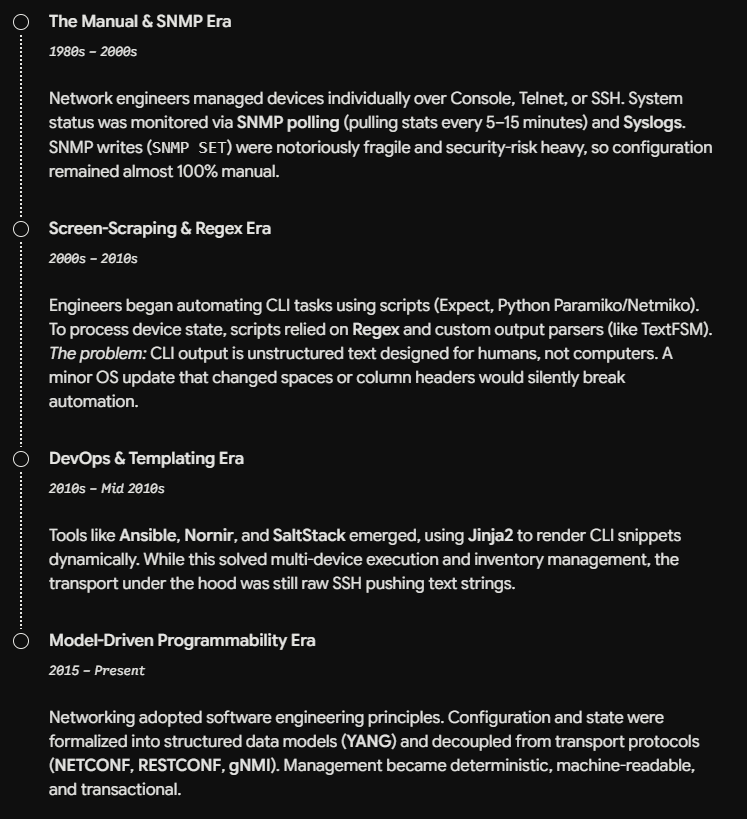
4 Paradigm Shifts to Keep in Mind
1. Data Structure: Unstructured Text vs. Strict Schemas
-
Old Way (CLI): You run
show ip interface briefover SSH and use Python/Regex to parse raw text strings. If a software update adds a space or changes a column header, your parsing script breaks silently. -
New Way (YANG): The device's entire configuration and operational state are defined by a strict schema (YANG). Data is exchanged as structured JSON or XML. You never parse text strings again; you simply read key-value pairs where data types (integers, IP subnets, VLAN IDs) are strictly enforced by the device.
2. Transport vs. Model (Decoupling)
-
Old Way: Data format was tied to the protocol. SNMP meant MIB OIDs over UDP 161. CLI meant text strings over SSH.
-
New Way: The Data Model (YANG) is completely independent of the Transport Protocol:
-
NETCONF: Sends XML payloads over SSH. Includes datastore locking and RPC operations.
-
RESTCONF: Sends JSON or XML over HTTPS. Fits standard web API workflows (
GET,POST,PUT,DELETE). -
gNMI: Sends binary Protobuf over HTTP/2. Engineered for high-speed, low-overhead streaming.
-
3. Execution: Line-by-Line vs. Atomic Transactions
-
Old Way (CLI Scripting): Commands are executed line-by-line. If your script enters
config tand fails halfway through an ACL or BGP configuration, the first half stays inrunning-config. You are left with a half-configured, broken state. -
New Way (Model-Driven): You send the intended state as a single payload into a Candidate Datastore.
-
The router validates the entire payload against the YANG schema before applying it.
-
You run a
diffcheck against the running configuration. -
You commit the change atomically. If a single line fails, the entire transaction rolls back automatically.
-
4. Telemetry: Polling vs. Streaming
-
Old Way (SNMP): A central server runs a cron job to poll device OIDs every 5 or 15 minutes. This creates CPU overhead on the router's control plane, and you are blind to micro-bursts or link flaps happening between polls.
-
New Way (Model-Driven Telemetry): You configure a subscription once, and the router opens a persistent connection to push structured state updates directly to your collector. You can set updates on a timer (e.g., interface counters every 1 second) or on-change (e.g., instant notification the millisecond a BGP neighbor drops).
Cisco Native vs. OpenConfig Models
When you construct a configuration payload, you choose between two model types depending on your environment:
| Model Type | Purpose | Trade-Off |
|
Cisco Native
|
Direct 1:1 mapping of Cisco CLI syntax and platform features. | Supports 100% of Cisco features, but the payload only works on Cisco OS. |
|
OpenConfig
|
Vendor-neutral schemas defined by an industry consortium. | Same payload works across Cisco, Juniper, and Arista, but only covers common (~80%) network features. |
Model-Driven Programmability Stack
|
|
|
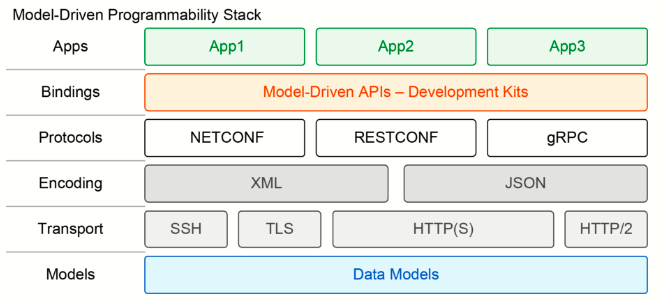
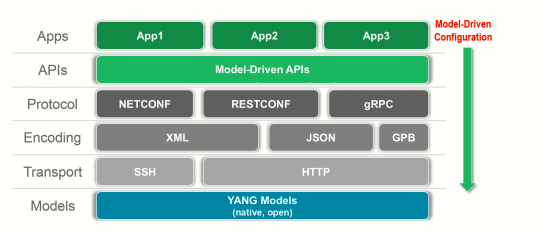
Model-driven programmability is a modern approach to network management that replaces traditional text-based CLI commands with standardized, computer-readable data blueprints.
In earlier eras, managing devices required typing commands line-by-line or writing fragile scripts to parse unstructured text outputs. Model-driven management replaces that manual process by organizing a device's entire setup into clear, pre-defined templates where every setting—like an IP address or VLAN—follows strict formatting rules.
This allows automation tools to check, update, and monitor network configurations directly and reliably, eliminating the guesswork and errors common with old-school text scraping.
Unlike traditional management—where you send unstructured text commands over SSH and parse raw text output—model-driven management interacts directly with on-box software datastores using structured, machine-readable APIs.
It is called the Model-Driven Programmability Stack because the Data Model (Layer 1) sits at the absolute center of the entire architecture. Everything above it—the encoding formats, transport protocols, and code libraries—is programmatically generated and driven directly by what that data model defines.
It is called the Model-Driven Network Programmability Stack because it is a layered software system (Stack) that enables automated software control (Programmability) of network hardware, where all operations and API structures are generated and enforced by predefined schemas (Model-Driven).
Deep-Dive Step-by-Step - Example
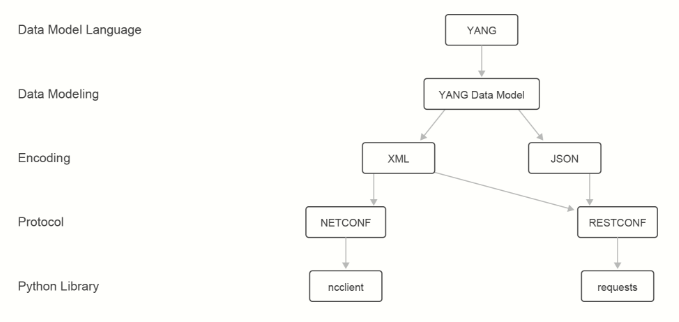
Master Scenario
-
Goal: Set interface
GigabitEthernet1description to"Link_to_Core" -
Protocol: RESTCONF
-
Target: Cisco Catalyst Switch (
192.168.1.1)
Step 1: Data Model / Schema (YANG)
At the foundation of the Model-Driven Programmability Stack is YANG (Yet Another Next Generation). Standardized by the IETF in RFC 7950 (2016), YANG is a network-centric data modeling language designed specifically to model "network data"—defining what can be configured, monitored, and administratively executed on a device. Everything starts here. Before writing a single line of code or sending a single packet, the device relies on a .yang schema file compiled into its operating system (ietf-interfaces.yang). This is the root authority defining allowable paths, keys, and data types. Characteristics:
-
Readability: Human-readable and straightforward to learn.
-
Hierarchical Structure: Models data in a top-level hierarchy of nodes (modules and submodules).
-
Reusable Components: Supports reusable structured types and groupings.
-
Extensibility: Enables feature expansion through model augmentation.
-
Formal Validation: Implements formal constraints to enforce valid configuration inputs (e.g., restricting a BGP Autonomous System number to a range of
0..65535). -
Modularity & Versioning: Structures data into self-contained modules with well-defined versioning rules.
YANG itself is strictly a modeling language—it defines syntax, semantics, constraints, and data structure, but does not handle transport or data transmission.
-
Analogy: YANG modules are to NETCONF/RESTCONF what MIBs are to SNMP.
-
Transport Protocols: While originally designed for NETCONF, YANG models are protocol-independent and are used by RESTCONF, gRPC, and others.
-
Encodings: YANG structures data logically into a schema tree. Actual live instances are called data trees, which are serialized and transported as XML or JSON.
CLI behavior and CLI errors map directly to underlying device models:
-
Entering an invalid value (e.g.,
speed 1000000) triggers an error because it violates the constraints defined in the interface model. -
Commands missing on certain modes (e.g.,
speedbeing unavailable underinterface Loopback100) occur because the model explicitly excludes physical attributes from logical interface instances.
The 4 Structural Building Block Statements with an Example
interface GigabitEthernet1
 description Trunk_To_Distribution
 allowed vlans 10, 20, 30, 99
!
interface GigabitEthernet2
 description Server_Access_Port
 allowed vlans 100, 200
YANG models utilize four basic statements to describe data trees and metadata:
| Statement | Purpose & Value Characteristic | Example in Network CLI | Code Example |
leaf |
Holds a single data point of a specific type. Cannot have child nodes. | description Trunk_To_Distribution |
leaf name {
        type string;
} |
leaf-list |
A collection of single items of the same data type. A flat array/list of values of the SAME data type for ONE record. | allowed vlans 10, 20, 30, 99 |
leaf-list allowed-vlans {
        type uint16 {
          range "1..4094";
} |
list |
A table/spreadsheet of records (a collection of items) with multiple child nodes/leaves. Requires a unique key, like SQL Primary Key. |
interface GigabitEthernet1 |
//LIST: The table of interfaces (Keyed by unique interface name) //LEAF 1: The unique Key (STR) //LEAF 2: Interface Description (STR) |
container |
An empty, organizational node used to group related child nodes. Has no data value itself. | Entering config t / section grouping. |
container system { container services { ... } } |
module switch-ports {
  namespace "urn:example:switch-ports";
  prefix "sw";

  // --- CONTAINER: The top-level folder (Holds no values) ---
  container network-ports {

    // --- LIST: The table of interfaces (Keyed by unique interface name) ---
    list interface {
      key "name";

      // --- LEAF 1: The unique Key (Single String Value) ---
      leaf name {
        type string;
      }

      // --- LEAF 2: Interface Description (Single String Value) ---
      leaf description {
        type string;
      }

      // --- LEAF-LIST: Allowed VLANs (An ARRAY of integers on this port) ---
      leaf-list allowed-vlans {
        type uint16 {
          range "1..4094";
        }
      }

    } // End of List
  } // End of Container
}
Why use a leaf?
When there is only ever ONE value for that setting.
-
Example: An interface can only have one
name("GigabitEthernet1"), onedescription("Link to Core"), or onemtu(1500).
Why use a leaf-list?
When a single setting accepts multiple simple values of the exact same type (a flat list of numbers or strings).
-
Example: A trunk port allowing multiple VLAN IDs (
[10, 20, 30]), a device having multiple NTP servers (["192.168.1.1", "192.168.1.2"]), or a router having multiple DNS nameservers.
Why use a list?
When you have a collection of complex objects that contain multiple different fields.
-
Example: An interface list where each interface entry contains a name, a description, an IP address, AND a leaf-list of allowed VLANs.
In YANG, the key statement is the required syntax inside a list node that uniquely identifies each individual instance of that list in the device's memory and API path.
The previous example converted to JSON looks like:
{
  "switch-ports:network-ports": {          // <-- CONTAINER (Object: { })
    "interface": [                         // <-- LIST (Array of Objects: [ { }, { } ])
      {
        "name": "GigabitEthernet1",        // <-- LEAF (Single Key-Value string)
        "description": "Trunk_To_Switch2", // <-- LEAF (Single Key-Value string)
        "allowed-vlans": [10, 20, 30, 99]  // <-- LEAF-LIST (Array of simple numbers: [ ])
      },
      {
        "name": "GigabitEthernet2",        // <-- LEAF
        "description": "Server_Port",      // <-- LEAF
        "allowed-vlans": [100, 200]        // <-- LEAF-LIST
      }
    ]
  }
}
YANG Model Classifications & Comparisons
Network models fall into three major domain classifications:
1. Vendor-Native Models (e.g., Cisco-IOS-XE-native.yang)
-
Scope: Proprietary, vendor-specific models built by Cisco.
-
Features: Maps line-for-line to 100% of CLI features and proprietary capabilities (e.g., CDP, MOP, Ethernet negotiation, OTV).
2. IETF Models (e.g., ietf-interfaces.yang)
-
Scope: Standardized, vendor-neutral models maintained by the IETF.
-
Features: Focuses on baseline, core networking functionality (interface names, IP addressing, basic operational enable/disable state) that works identically across different vendors.
3. OpenConfig Models (e.g., openconfig-interfaces.yang)
-
Scope: Vendor-neutral models created by an informal operator working group (initiated by Google).
-
Features: Designed for real-world operator workflows. Uniquely incorporates live operational state counters directly alongside configuration nodes (
configvs.statesubtrees) and structures IP addressing under a distinctsubinterfaceshierarchy.
Vendor-native YANG models are auto-generated during the software compilation build process, whereas standard models (IETF and OpenConfig) are written manually by engineering committees.
Storage: YANG files are compiled into the operating system binary and loaded into RAM at boot. They do not exist as plain text .yang files in flash storage. To access them on a live device, management processes read the schemas from RAM and return them dynamically via protocol requests like NETCONF's <get-schema> RPC or RESTCONF schema endpoints (the specific HTTP URI path on the device designated to serve YANG models). For offline development, the plain text .yang files are downloaded directly from vendor repositories like Cisco's GitHub.
┌─────────────────────────────────────────────────────────────────────────┐
│                          YANG MODEL DOMAINS                             │
├──────────────────────────┬──────────────────────────┬───────────────────┤
│    Industry Standard     │       Cisco Common       │ Cisco Platform    │
│    (IETF / OpenConfig)   │       (Cross-OS)         │ (IOS-XE Native)   │
└──────────────────────────┴──────────────────────────┴───────────────────┘
Master Scenario - Step #1
Schema Blueprint (ietf-interfaces.yang snippet
For our target task (setting GigabitEthernet1 description to "Link_to_Core"), Layer 1 relies on the ietf-interfaces schema tree defined below:
module ietf-interfaces {
  yang-version 1.1;
  namespace "urn:ietf:params:xml:ns:yang:ietf-interfaces";
  prefix "if";

  // --- CONTAINER NODE (Organizational group) ---
  container interfaces {
    description "Top-level container for all system interfaces.";

    // --- LIST NODE (Collection of interface entries) ---
    list interface {
      key "name"; // Unique identifier key for each interface row

      // --- LEAF 1: Key Leaf ---
      leaf name {
        type string;
        description "System name of the interface (e.g., GigabitEthernet1).";
      }

      // --- LEAF 2: Target Leaf ---
      leaf description {
        type string; // Enforces that the input value MUST be text
        description "Administrative description string.";
      }

      // --- LEAF 3: Administrative State ---
      leaf enabled {
        type boolean;
        default "true";
      }
    }
  }
}-
What happens at Step 1: The switch loads this compiled schema file into RAM. It now knows that
/ietf-interfaces:interfaces/interfaceexists. The schema establishes that a list calledinterfaceexists under the top-level containerinterfaces. It dictates that each interface is indexed by itsnamekey, and accepts adescriptionleaf of typestring.
Step 2: Encoding & Serialization (JSON)
Layer 2 takes the abstract data trees defined in Layer 1 (YANG Data Modeling) and serializes them into structured text streams that can be transmitted over HTTP/SSH APIs. While YANG defines the rules, constraints, and hierarchy, Layer 2 defines the syntax and encoding used on the wire.
1. Overview & Core Characteristics
Data formats define the syntax, semantics, and constraints of API interactions. While Layer 1 establishes the abstract data hierarchy and type validation rules, Layer 2 converts that data into machine-readable and human-readable text representations.
Common Structural Concepts
-
Objects: Abstract packets of information representing an entity with specific characteristics.
-
Key-Value Pairs: The primary data representation layout across formats. Keys must be strings located on the left of a delimiter (usually a colon), while values appear on the right side.
-
Supported Value Types:
-
Scalars: Strings, numbers, booleans (
true/false). -
Complex Structures: Arrays/lists, or nested child objects.
-
2. Technical Comparison of Serialization Formats
| Feature / Metric | YAML (YAML Ain't Markup Language) | JSON (JavaScript Object Notation) | XML (eXtensible Markup Language) |
| File Extension | .yaml / .yml |
.json |
.xml |
| Primary Use Cases | Configuration files, Ansible playbooks, CI/CD pipelines. | RESTCONF, gNMI, REST APIs, Web/Server communication. | NETCONF, Machine-to-Machine data exchange, Java applications. |
| Syntax Elements | Indentation, colons, hyphens (-). |
Curly braces {} , Square brackets [], Quotes "", Commas ,. |
Enclosing tags <tag>value</tag>. |
| Whitespace Rules | Strictly Significant. Whitespace indentation defines structure. Tabs are forbidden. | Insignificant outside string values. Formatting is for human readability only. | Mixed. Significant inside tag content/values; insignificant between tags. |
| Case Sensitivity | Strictly Case-Sensitive. | Strictly Case-Sensitive. | Strictly Case-Sensitive (<tag> ≠ </TAG>). |
| Type Inference | Auto-inferred (quotes optional for standard strings/numbers). | Explicit typing via syntax (quoted strings, unquoted numbers/booleans). | Untyped text strings (type validation enforced via external XML Schemas or YANG). |
| Structural Relationship | Superset of JSON. | Subset of YAML (Parsable by YAML parsers). | Independent markup language specification. |
3. Comprehensive Format Analysis & Cisco Documentation Context
A. YAML
YAML is designed for human-writable configurations and minimalistic syntax:
-
Indentation Mechanics: Structural hierarchy is dictated by indentation levels (typically 2 spaces). Tabs are explicitly disallowed because different editing environments render tab widths inconsistently.
-
Key-Value Syntax: Keys and values are separated by a colon and a space (
key: value). No trailing commas are used. -
List Syntax: Elements in a list are indicated by a leading hyphen (
-) at the same indentation level.
user:
  name: john
  location:
    city: Austin
    state: TX
  roles:
    - admin
    - user
B. JSON & Cisco NX-OS Integration
Derived from JavaScript, JSON structures data using objects bounded by curly braces {} and arrays bounded by square brackets [].
Python Integration & API Mechanics
APIs return JSON data as flat raw text strings (str), not native Python dictionaries. Working directly with an raw API response string using dictionary key indexing raises a TypeError: string indices must be integers.
-
json.loads()(Deserialization): Parses an incoming JSON string into a native Python dictionary memory structure. -
json.dumps()(Serialization): Flattens an in-memory Python dictionary into a formatted JSON string stream.
import json

# Simulated JSON string received from an API response
facts_str = '{"hostname": "nxosv", "os": "7.3", "location": "San_Jose"}'

# Deserialization: Convert JSON string -> Python dictionary
facts_dict = json.loads(facts_str)
print(facts_dict['os'])  # Returns: '7.3'

# Serialization: Convert Python dictionary -> Formatted JSON string
json_payload = json.dumps(facts_dict, indent=4)
CLI Command Piping on Cisco Devices
nxosv# show vlan brief | json
{
  "TABLE_vlanbriefxbrief": {
    "ROW_vlanbriefxbrief": [
      {
        "vlanshowbr-vlanid-utf": 1,
        "vlanshowbr-vlanname": "default",
        "vlanshowbr-vlanstate": "active"
      },
      {
        "vlanshowbr-vlanid-utf": 100,
        "vlanshowbr-vlanname": "web_vlan",
        "vlanshowbr-vlanstate": "active"
      }
    ]
  }
}
JSON Schema Validation
Input parameters submitted to JSON APIs can be validated client-side or server-side using a JSON Schema document, which defines explicit data constraints:
{
  "$schema": "http://json-schema.org/draft-04/schema#",
  "title": "VLAN Table",
  "type": "array",
  "items": {
    "type": "object",
    "properties": {
      "id": {
        "description": "The unique VLAN identifier",
        "type": "number",
        "minimum": 1,
        "maximum": 4096
      },
      "name": {
        "type": "string"
      },
      "state": {
        "type": "string",
        "enum": ["up", "down"]
      }
    },
    "required": ["id"]
  }
}
C. XML & Namespace Resolution
XML uses enclosing tags (<tag>value</tag>) to delimit data elements. Opening and closing tag names and letter casing must match exactly (<name>john</name> is valid; <name>john</NAME> causes a parsing error).
Solving Tag Collision via XML Namespaces
When different applications interchange XML documents, identical tag names may represent completely different objects (for example, an HTML layout <table> vs. a furniture dimensions <table>).
To resolve collisions, XML uses prefixes mapped to Namespaces:
-
Prefix: A string prepended to a tag name followed by a colon (
<a:table>). -
Namespace Declaration: Declared via the
xmlnsattribute:xmlns:prefix="URI". -
URI Function: The Uniform Resource Identifier serves solely as a unique logical string key within the parser engine; physical network accessibility of the URI path is not required.
<?xml version="1.0" encoding="UTF-8" ?>
<root>
  <!-- Namespace A: HTML Table Definition -->
  <a:table xmlns:a="http://www.w3.org/TR/html4/">
    <a:tr>
      <a:td>Router</a:td>
    </a:tr>
  </a:table>

  <!-- Namespace B: Furniture Definition -->
  <b:table xmlns:b="http://www.company.com/furniture">
    <b:name>Coffee Table</b:name>
    <b:length>180</b:length>
  </b:table>
</root>
Namespaces in RESTCONF (JSON & YAML)
While XML natively uses xmlns attributes, RESTCONF enforces module disambiguation in JSON and YAML by prepending the YANG module name as a prefix to the root key:
-
JSON RESTCONF Payload:
"ietf-interfaces:interface": { "name": "GigabitEthernet1" } -
YAML RESTCONF Payload:
ietf-interfaces:interface:
4. Step-by-Step Guide: The Serialization & Encoding Execution Pipeline
The execution sequence converts in-memory data structures into network bitstreams and back.
[ CLIENT ]                                                               [ ROUTER ]
1. In-Memory RAM Object (Dict)                                            6. Native C Structure (RAM)
      │                                                                         ▲
2. Serialization (json.dumps)                                            5. Deserialization (cJSON Parser)
      │                                                                         ▲
3. Encoding (.encode('utf-8'))                                            4. Decoding (.decode('utf-8'))
      │                                                                         ▲
      └───────► [ Socket Transmission: Raw Bytes over TCP Port 443 ] ───────────┘
Step 1: In-Memory Data Allocation (Client RAM)
A management script defines configuration parameters inside an in-memory dictionary data structure:
# Allocated in-memory data structure (Python Dict Object)
data_structure = {
    "ietf-interfaces:interface": {
        "name": "GigabitEthernet1",
        "enabled": True
    }
}
Step 2: Serialization (Object -> Text String)
The script executes a serialization method (json.dumps()). The interpreter traverses the memory pointers of the dictionary and converts the structure into a linear ASCII string conforming to JSON syntax rules:
# SERIALIZATION
serialized_string = json.dumps(data_structure)
# Result: '{"ietf-interfaces:interface": {"name": "GigabitEthernet1", "enabled": true}}'
# Data Type: str
Step 3: Encoding (Text String -> Wire Byte Stream)
The ASCII text string is transformed into a stream of raw bytes using character set rules (UTF-8) so it can be committed to a network socket buffer:
# ENCODING
encoded_payload = serialized_string.encode('utf-8')
# Result: b'{"ietf-interfaces:interface": {"name": "GigabitEthernet1", "enabled": true}}'
# Hex Bytes: 7b 22 69 65 74 66 2d 69 6e 74 65 72 66 61 63 65 73 ... 7d
Step 4: Socket Transmission (TCP Layer)
The encoded byte stream is written to the TCP socket buffer and transmitted across port 443 via an HTTP PATCH request.
Step 5: Decoding (Router Ingress)
The web daemon on the router (nginx/restconf) receives the raw byte stream from the network interface card ring buffer and decodes the UTF-8 bytes back into an in-memory text string stream.
Step 6: Deserialization & Schema Validation (Router RAM)
-
Deserialization: The router passes the decoded text string to an internal C-based parsing library (
cJSON), allocating system RAM to convert the text into native C structures. -
Layer 1 Validation: The
restconfdaemon compares the deserialized C structures against the compiled YANG binary schema (ietf-interfaces.yang) held in RAM to confirm that:-
Node
ietf-interfaces:interfaceexists in the schema. -
enabledmatches the required boolean type. -
Required key
nameis present.
-
-
Execution: Upon successful schema validation, the daemon writes the configuration to the system database, triggering drivers to update device ASICs.
The Relationship Between Layer 1 and Layer 2
In the Model-Driven Network Programmability Stack, the relationship between Layer 1 (YANG Data Modeling) and Layer 2 (Data Serialization & Encoding) is that of a Schema Contract vs. an Instantiated Data Payload:
-
Layer 1 (YANG) defines the abstract structural rules, types, constraints, keys, and hierarchies. It carries no real operational data values; it is an abstract metadata model compiled into device system memory.
-
Layer 2 (JSON/XML/YAML) provides the concrete, instantiated key-value data syntax generated according to the Layer 1 schema. It carries actual operational values (e.g.,
GigabitEthernet1, VLAN100, IP192.168.1.1).
Technical Example
To demonstrate this relationship, consider configuring a custom network service (a VLAN interface) on a router.
Step 1: Layer 1 (YANG Schema Contract)
The device loads a compiled YANG module into RAM at boot. This model defines what a valid interface payload must look like:
module custom-vlan {
  namespace "http://example.com/ns/custom-vlan";
  prefix cvlan;

  container vlan-configuration {
    list vlan {
      key "vlan-id";                     // Mandatory key element

      leaf vlan-id {
        type uint16 {
          range "1..4094";             // Explicit boundary constraint
        }
      }

      leaf name {
        type string {
          length "1..32";               // String length constraint
        }
      }

      leaf enabled {
        type boolean;                   // Boolean type enforcement
        default "true";
      }
    }
  }
}
Step 2: Layer 2 (Valid Serialized Payloads)
Layer 2 instantiates actual data that strictly adheres to the Layer 1 YANG schema definitions.
JSON Representation (RESTCONF)
The key names, nesting hierarchy, and scalar types directly map from the Layer 1 YANG statements:
{
  "custom-vlan:vlan-configuration": {
    "vlan": [
      {
        "vlan-id": 100,
        "name": "ENGINEERING_NET",
        "enabled": true
      }
    ]
  }
}
XML Representation (NETCONF)
The same Layer 1 structure serialized as XML with namespace mapping:
<vlan-configuration xmlns="http://example.com/ns/custom-vlan">
  <vlan>
    <vlan-id>100</vlan-id>
    <name>ENGINEERING_NET</name>
    <enabled>true</enabled>
  </vlan>
</vlan-configuration>
Step 3: Layer 1 Enforcement During Layer 2 Deserialization
When the router receives the Layer 2 byte stream over the API socket, it deserializes the JSON/XML text into system C structures and compares them directly against the Layer 1 compiled YANG model. If the Layer 2 payload violates the Layer 1 definition, the parser fails validation at the execution engine.
Invalid Payload Scenario 1 (JSON): Boundary Constraint Violation
{
  "custom-vlan:vlan-configuration": {
    "vlan": [
      {
        "vlan-id": 5000,
        "name": "TEST_VLAN"
      }
    ]
  }
}-
Validation Outcome: REJECTED.
-
Layer 1 Check:
vlan-idspecifiesrange "1..4094". Value5000exceeds theuint16boundary defined in the YANG model. -
API Error Response: HTTP
400 Bad Request/invalid-value.
Invalid Payload Scenario 2: Data Type Mismatch
{
  "custom-vlan:vlan-configuration": {
    "vlan": [
      {
        "vlan-id": 100,
        "name": "TEST_VLAN",
        "enabled": "yes"
      }
    ]
  }
}-
Validation Outcome: REJECTED.
-
Layer 1 Check:
leaf enabledspecifiestype boolean. The string"yes"is not a valid boolean literal (trueorfalse). -
API Error Response: HTTP
400 Bad Request/bad-element.
Invalid Payload Scenario 3: Missing List Key
{
  "custom-vlan:vlan-configuration": {
    "vlan": [
      {
        "name": "TEST_VLAN",
        "enabled": true
      }
    ]
  }
}
-
Validation Outcome: REJECTED.
-
Layer 1 Check:
list vlanexplicitly declareskey "vlan-id". Omitting the list key breaks the indexing rule required for item-level CRUD operations. -
API Error Response: HTTP
400 Bad Request/missing-key.
Master Scenario - Step #2
Serialized Payload
{
  "ietf-interfaces:interface": [
    {
      "name": "GigabitEthernet1",
      "description": "Link_to_Core"
    }
  ]
}-
What happens at Step 2: The in-memory data structures are converted into a JSON string stream. The key names (
ietf-interfaces:interface,name,description) directly mirror the nodes defined in the Step 1 YANG schema.
Step 3: Protocol Operations (RESTCONF and NETCONF)
Now that the payload is serialized, it needs protocol operation rules (like HTTP methods, headers, and target URIs for RESTCONF) to define what action to perform on the router. Layer 3 of the stack governs how management operations, configuration changes, and state queries are packaged and transported across the wire. When applying our master scenario—updating the description of interface GigabitEthernet1 to "Uplink to Core"—the execution mechanics differ fundamentally depending on whether RESTCONF or NETCONF is selected as the operational protocol.
Comparative Architecture Overview
| Dimension | RESTCONF | NETCONF |
| Standard RFC | RFC 8040 | RFC 6241 |
| Transport & Port | HTTPS / TCP 443 | SSHv2 / TCP 830 (or TLS) |
| Session Model | Stateless (Request/Response) | Stateful (Persistent SSH Session) |
| Data Encoding | JSON or XML | XML only |
| Target Datastores | Conceptual Unified Datastore (/data) |
Explicit Datastores (<running>, <candidate>, <startup>) |
| Transaction Model | Single HTTP Request Scope | Multi-stage Transactional (<lock> -> <edit-config> -> <validate> -> <commit>) |
Path A: RESTCONF Protocol Operation
RESTCONF (standardized in RFC 8040) is an IETF specification that provides a REST-like interface over HTTP/HTTPS to access data defined in NETCONF datastores and modeled in YANG. It combines HTTP protocol simplicity with the predictability of schema-driven data modeling, serving as a lightweight, stateless alternative to NETCONF.
1. Architectural Foundations: REST vs. RESTCONF
REST (Representational State Transfer), originally defined by Roy Fielding in 2000, establishes a stateless client-server communication model using standard HTTP methods. RESTCONF applies these principles directly to network management and YANG data models.
-
Stateless Client-Server Model: Each HTTP request sent to a network device is processed independently. No persistent control session state is maintained on the server between requests.
-
Standardized Transport: Operates over HTTPS on TCP port 443.
-
Predictable URI Addressing: Target resources are derived deterministically from the underlying YANG module structure, ensuring predictable URI paths for any device implementing the schema.
-
Payload Encodings: Supports both JSON (
application/yang-data+json) and XML (application/yang-data+xml).
2. RESTCONF Target Resource Hierarchy ({+restconf})
The top-level entry point for a RESTCONF API is denoted as {+restconf} (media types: application/yang.api+json or application/yang.api+xml). It exposes three mandatory and optional resources:
+--rw restconf
   +--rw data
   +--rw operations
   +--ro yang-library-version
Resource Definitions
-
{+restconf}/data(Mandatory): The entry point for configuration and operational state data. Represents the combined datastore contents accessible to the client. -
{+restconf}/operations(Optional): The entry point for invoking protocol operations (YANG RPCs oractionstatements) using HTTPPOST. -
{+restconf}/yang-library-version(Mandatory Leaf): A read-only leaf identifying the revision date of the implementedietf-yang-librarymodule, allowing clients to query server capabilities and supported models.
3. Mapping HTTP Verbs to CRUD & NETCONF Semantics
RESTCONF maps standard HTTP methods directly to CRUD (Create, Read, Update, Delete) database operations and corresponding NETCONF protocol equivalents:
| HTTP Verb | CRUD Function | RESTCONF Operation Semantics | NETCONF Equivalent | Data Safety |
GET |
Read | Retrieves data and metadata for a resource | <get-config>, <get> |
Safe (Read-only; cannot alter state) |
POST |
Create / Execute | Creates a child data resource or invokes a YANG RPC/action | <edit-config> (create) / RPC |
Unsafe |
PUT |
Create / Replace | Creates or replaces an entire target resource | <copy-config> / <edit-config> (replace) |
Unsafe |
PATCH |
Update / Modify | Merges partial configuration updates into an existing resource | <edit-config> (operation="merge") |
Unsafe |
DELETE |
Delete | Removes the specified target resource | <edit-config> (operation="delete") |
4. Operational Feature Differences: RESTCONF vs. NETCONF
Because RESTCONF is optimized for lightweight HTTP interactions, it intentionally omits several complex, stateful NETCONF protocol capabilities:
NETCONF Features NOT Supported in RESTCONF:
❌ Configuration Locking (<lock> / <unlock>)
❌ Candidate Datastore (<candidate>)
❌ Startup Datastore (<startup>)
❌ Explicit Client-Side Validation (<validate>)
❌ Confirmed Commit (<confirmed-commit>)
5. Anatomy of a RESTCONF Request & Filtering Parameters
Every RESTCONF API call requires five primary components:
-
HTTP Verb: Defines the action (
GET,POST,PUT,PATCH,DELETE). -
Resource URI: The exact path to the target YANG data node.
-
HTTP Headers:
-
Content-Type: Specifies the encoding of the sent body (e.g.,application/yang-data+json). -
Accept: Specifies the expected response encoding (e.g.,application/yang-data+json).
-
-
Authentication: HTTP Basic (
username:password) or Bearer tokens. -
Request Body (Optional): The serialized JSON or XML payload for write operations.
Query Parameters for Data Filtering
-
depth: Limits the number of nested subtree levels returned during aGETrequest.-
Syntax:
?depth=N(whereNis an integer from1to65535, orunbounded). -
Default:
unbounded.
-
-
fields: Selects explicit descendant leaf nodes from within a complex model structure, returning only the requested fields and their parent hierarchy.
6. Master Scenario Implementation (Updating Interface Description)
The following operational workflow demonstrates reading, modifying, and executing operations on interface GigabitEthernet1 via RESTCONF.
Action 1: Modify Description via PATCH (Partial Update)
Modifies the description of GigabitEthernet1 without replacing the entire interface container:
PATCH /restconf/data/ietf-interfaces:interfaces/interface=GigabitEthernet1 HTTP/1.1
Host: 10.1.1.1
Authorization: Basic YWRtaW46Y2lzY28xMjM=
Content-Type: application/yang-data+json
Accept: application/yang-data+json

{
  "ietf-interfaces:interface": {
    "name": "GigabitEthernet1",
    "description": "Uplink to Core"
  }
}- Server Response:
HTTP/1.1 204 No Content(Operation succeeded; no response body returned).
Action 2: Retrieve Configuration via GET with Depth Constraint
Queries the modified interface status while restricting the output to immediate child attributes (depth=1):
GET /restconf/data/ietf-interfaces:interfaces/interface=GigabitEthernet1?depth=1 HTTP/1.1
Host: 10.1.1.1
Authorization: Basic YWRtaW46Y2lzY28xMjM=
Accept: application/yang-data+json

--

HTTP/1.1 200 OK
Content-Type: application/yang-data+json

{
  "ietf-interfaces:interface": {
    "name": "GigabitEthernet1",
    "description": "Uplink to Core",
    "type": "ianaift:ethernetCsmacd",
    "enabled": true
  }
}
Action 3: Invoke a RPC Operation via POST
Invokes a model-defined RPC operation (e.g., resetting interface counters) under the {+restconf}/operations path:
POST /restconf/operations/ietf-interfaces:clear-statistics HTTP/1.1
Host: 10.1.1.1
Authorization: Basic YWRtaW46Y2lzY28xMjM=
Content-Type: application/yang-data+json

{
  "ietf-interfaces:input": {
    "name": "GigabitEthernet1"
  }
}- Server Response:
HTTP/1.1 204 No Content(RPC executed successfully with no output parameters).
7. HTTP Response Codes & Troubleshooting Metrics
RESTCONF relies on standard IETF HTTP response status codes to convey execution outcomes:
Success Codes (2xx)
-
200 OK: Request succeeded; payload returned in body (e.g., successfulGET). -
201 Created: Request fulfilled; new resource created (e.g., successfulPOST). -
202 Accepted: Request accepted for asynchronous processing; execution incomplete. -
204 No Content: Server fulfilled request successfully; no response body returned (e.g., successfulPATCHorDELETE).
Client Error Codes (4xx)
-
400 Bad Request: Malformed request syntax or YANG schema validation failure (e.g., missing required key or out-of-range value). -
401 Unauthorized: Authentication failed or credentials omitted. -
403 Forbidden: Authenticated user lacks permission to access or modify the specified resource. -
404 Not Found: Target URI does not exist in the device schema tree.
Server Error Codes (5xx)
-
500 Internal Server Error: Internal device or daemon failure during request execution. -
501 Not Implemented: Target operation or URI path is not supported by the device.
8. Client Ecosystem & Tooling
-
cURL (CLI): Command-line tool for transmitting raw HTTP requests with explicit headers and verbs within shell scripts.
-
Postman (GUI): Desktop/browser application providing an interactive interface for constructing requests, managing environments, and testing API payloads.
-
Python
requests: Native Python HTTP client library used to programmatically automate RESTCONF workflows.
Path B: NETCONF Protocol Operation
NETCONF is an IETF session-oriented, stateful network management protocol operating over a 4-layer architecture stack:
|
Layer |
Example |
|
Protocols |
SSHv2, SOAP, TLS |
|
Messages |
<rpc>,<rpc-reply> |
|
Operations (device-dependent) |
<get-config>, <get>, <copy-config>, <commit>, <validate>, <lock>, <unlock>, <edit-config>, <delete-config> |
|
Content |
XML Documents (XSD, YANG, and so on) |
1. Session Establishment & Capability Exchange
-
Subsystem Connection: The client initiates an SSH connection directly to the device's NETCONF subsystem on TCP port 830:
ssh -p 830 cisco@10.1.1.1 -s netconf- Server Capability Hello: The router responds with an XML
<hello>message containing itssession-idand supported features, including supported YANG module URIs and datastore capabilities (such asurn:ietf:params:netconf:capability:candidate:1.0androllback-on-error). All NETCONF 1.0 framing messages strictly terminate with the delimiter string]]>]]>:
<?xml version="1.0" encoding="UTF-8"?>
<hello xmlns="urn:ietf:params:xml:ns:netconf:base:1.0">
  <capabilities>
    <capability>urn:ietf:params:netconf:base:1.0</capability>
    <capability>urn:ietf:params:netconf:capability:candidate:1.0</capability>
    <capability>urn:ietf:params:netconf:capability:validate:1.0</capability>
    <capability>urn:ietf:params:netconf:capability:rollback-on-error:1.0</capability>
  </capabilities>
  <session-id>203499</session-id>
</hello>]]>]]>- Client Capability Hello: The client responds with its supported capabilities to complete the stateful handshake.
2. NETCONF Datastore Management & Transactional Lifecycle
NETCONF explicitly separates data storage locations into distinct Datastores:
-
<running>: Holds the complete active configuration running on the device. Mandatory on all devices. -
<candidate>: A temporary staging datastore where changes are applied in an uncommitted state without impacting active traffic. -
<startup>: Holds the configuration loaded by the device upon boot.
To execute our master scenario using an all-or-nothing transaction, the client operates against the <candidate> datastore:
-
Datastore Locking (
<lock>): The client locks the<candidate>datastore to prevent race conditions from concurrent management sessions. -
Staging Configuration (
<edit-config>): The client issues an<rpc>wrapping an<edit-config>operation targeting the<candidate>datastore:<?xml version="1.0" encoding="UTF-8"?> <rpc message-id="101" xmlns="urn:ietf:params:xml:ns:netconf:base:1.0"> <edit-config> <target> <candidate/> </target> <config> <interfaces xmlns="urn:ietf:params:xml:ns:yang:ietf-interfaces"> <interface> <name>GigabitEthernet1</name> <description>Uplink to Core</description> </interface> </interfaces> </config> </edit-config> </rpc>]]>]]> -
Server Validation (
<validate>): The client requests the server to validate the staged<candidate>data against compiled YANG model boundaries. -
Atomic Commit (
<commit>): The client sends a<commit>operation. The device atomically merges the staged<candidate>configuration into the active<running>datastore. If any parameter fails during activation, the entire transaction rolls back (rollback-on-error), preventing partial configuration states. -
Session Release (
<unlock>/<close-session>): The client releases the lock on the datastore and gracefully closes the SSH session.
3. Data Retrieval: Configuration vs. Operational State Data
NETCONF strictly differentiates writable parameters from read-only operational statistics:
-
<get-config>: Retrieves writable configuration data only from a specified datastore (<running>,<candidate>, or<startup>). -
<get>: Retrieves both writable configuration data and read-only operational state data (e.g., interface packet counters, link state, duplex mode). -
Subtree Filtering: Selective data retrieval is achieved by embedding an XML
<filter type="subtree">inside the query to extract only the target node (GigabitEthernet1) rather than parsing the entire router configuration:
<rpc message-id="102" xmlns="urn:ietf:params:xml:ns:netconf:base:1.0">
  <get>
    <filter type="subtree">
      <interfaces xmlns="urn:ietf:params:xml:ns:yang:ietf-interfaces">
        <interface>
          <name>GigabitEthernet1</name>
        </interface>
      </interfaces>
    </filter>
  </get>
</rpc>]]>]]>
4. Python Client Automation Integration (ncclient)
In Python, the ncclient library abstracts lower-level XML RPC construction and SSH framing while maintaining a direct 1:1 mapping to NETCONF protocol operations:
from ncclient import manager

# Establish stateful SSH connection to NETCONF subsystem (Port 830)
with manager.connect(
    host='10.1.1.1',
    port=830,
    username='admin',
    password='Password123',
    hostkey_verify=False,
    device_params={'name': 'csr'}
) as device:

    # Define XML Content Payload matching Layer 1 YANG
    xml_payload = """
    <config>
      <interfaces xmlns="urn:ietf:params:xml:ns:yang:ietf-interfaces">
        <interface>
          <name>GigabitEthernet1</name>
          <description>Uplink to Core</description>
        </interface>
      </interfaces>
    </config>
    """

    # 1. Stage change in Candidate Datastore via <edit-config>
    device.edit_config(target='candidate', config=xml_payload)

    # 2. Execute atomic commit to push Candidate -> Running
    device.commit()
Step 4: Transport Layer (HTTPS/TLS vs. SSHv2)
To transmit protocol operations and serialized payloads across a physical network, a secure, connection-oriented transport channel must be established between the automation client and the target network device. Layer 4 provides end-to-end reliability, cryptographic transport encryption, mutual identity verification, and port-based session multiplexing.
Transport Parameter Comparison
| Metric / Parameter | RESTCONF Transport | NETCONF Transport |
| Transport Protocol | TCP | TCP |
| Standard Service Port | 443 (HTTPS) | 830 (NETCONF-over-SSH standard) / 22 (Legacy) |
| Security / Encryption | TLS 1.2 / TLS 1.3 | SSHv2 (or RFC 7589 TLS) |
| Application Encapsulation | HTTP/1.1 or HTTP/2 over TLS | SSH Channel Subsystem (netconf) |
| Session State | Stateless per HTTP Request (TCP/TLS session may be reused via HTTP Keep-Alive, but each request is handled independently) | Stateful Session (Persistent SSH control channel bound to a specific session-id) |
| Framing Mechanism | HTTP Content-Length or Chunked Transfer Encoding |
NETCONF 1.0 (]]>]]>) or NETCONF 1.1 Chunked Framing (\n#<length>\n<payload>) |
Path A: RESTCONF Transport Pipeline (TCP 443 / TLS)
[ Automation Client: 192.168.1.50 ]                         [ Router: 192.168.1.1 ]
         │                                                            │
         ├──────── 1. TCP 3-Way Handshake (SYN, SYN-ACK, ACK) ───────>│
         ├──────── 2. TLS Handshake (ClientHello, ServerHello) ──────>│
         ├──────── 3. Certificate Validation & Key Exchange ─────────>│
         │<======= 4. Encrypted TLS Tunnel Established (Port 443) ===>│
         │                                                            │
         ├──────── 5. Encrypted RESTCONF PATCH Request Payload ──────>│
         │<─────── 6. Encrypted HTTP 204 No Content Response ─────────┤
Execution Steps:
-
TCP Connection Establishment: The client initiates a standard TCP 3-way handshake to destination port
443. -
TLS Session Negotiation:
-
ClientHello: Client advertises supported TLS versions (TLS 1.2/1.3) and cipher suites.
-
ServerHello & Certificate Exchange: Router returns its X.509 digital certificate containing its public key.
-
Key Exchange & Authentication: Client verifies the router's certificate against its local Certificate Authority (CA) bundle and executes a Diffie-Hellman/ECDHE key exchange to derive symmetric session keys.
-
-
Encrypted Data Transport: The serialized JSON
PATCHpayload for interfaceGigabitEthernet1is encrypted into TLS Application Data records and transmitted over the TCP socket. -
Session Termination: HTTP connections terminate or remain open via HTTP Keep-Alive headers without persisting application state.
Path B: NETCONF Transport Pipeline (TCP 830 / SSHv2)
NETCONF relies on SSHv2 to establish an encrypted, stateful session and explicitly requests execution of the netconf SSH subsystem.
[ Automation Client: 192.168.1.50 ]                         [ Router: 192.168.1.1 ]
         │                                                            │
         ├──────── 1. TCP 3-Way Handshake (SYN, SYN-ACK, ACK) ───────>│
         ├──────── 2. SSH Protocol Version & Key Exchange (KEX) ─────>│
         ├──────── 3. User Authentication (PubKey / Password) ───────>│
         ├──────── 4. SSH Subsystem Request ("netconf") ─────────────>│
         │<======= 5. Stateful SSH Channel Established (Port 830) ====>│
         │                                                            │
         ├──────── 6. NETCONF Capability Exchange (<hello>) ──────────>│
         ├──────── 7. Encrypted NETCONF <rpc> Payload (<edit-config>)>│
         │<─────── 8. Encrypted NETCONF <rpc-reply> (<ok/>) ──────────┤
Execution Steps:
-
TCP Connection Establishment: Client initiates a TCP 3-way handshake targeting destination port
830. -
SSH Session Setup:
-
Key Exchange: Client and server negotiate symmetric encryption keys and verify host key identity.
-
User Authentication: Client authenticates using AAA credentials (username/password) or SSH public key pairs.
-
-
Subsystem Invocation: The client issues an
SSH_MSG_CHANNEL_OPENrequest followed by anSSH_MSG_CHANNEL_REQUESTspecifying the subsystem stringnetconf:SSH_MSG_CHANNEL_REQUEST -> Subsystem Name: "netconf" -
Stateful Protocol Initialization: Once the channel is confirmed (
SSH_MSG_CHANNEL_SUCCESS), both endpoints exchange initial XML<hello>capability messages over the persistent SSH stream. -
Encrypted Framing Transport: XML
<rpc>requests (such as<edit-config>) are encapsulated into SSH channel data packets, delimited by standard NETCONF framing markers (]]>]]>for 1.0 or Chunked framing for 1.1).
Step 5: Infrastructure & Device Execution
The physical network hardware receives the encrypted stream (over TLS or SSH), decrypts it, deserializes the payload, validates the request against the Layer 1 YANG schema compiled in RAM, and applies the change to system configuration datastores and physical port ASICs.
Device Subsystem Configuration (IOS-XE)
To allow the router to accept and process incoming RESTCONF or NETCONF connections, the respective management daemons must be enabled:
! Path A: Enable RESTCONF Engine (HTTPS / TCP Port 443)
ip http server
ip http secure-server
restconf

! Path B: Enable NETCONF Engine (SSH / TCP Port 830)
netconf-yang
Internal Processing Flow Inside the Device
Path A: RESTCONF Processing Flow (TCP 443)
1. TCP 443 Packet Arrives
       │
       ▼
2. TLS Decryption (Extracts HTTP PATCH payload)
       │
       ▼
3. RESTCONF Engine parses HTTP Request
   (URI: /restconf/data/ietf-interfaces:interfaces/interface=GigabitEthernet1)
       │
       ▼
4. Schema Validation Engine
   (Deserializes JSON and checks structure against ietf-interfaces.yang)
       │
       ├─► IF INVALID: Aborts & returns HTTP 400 Bad Request
       │
       └─► IF VALID: Writes change directly to active running-config in RAM
             │
             ▼
5. ASIC Hardware Driver
   (Applies "Uplink to Core" description to physical port GigabitEthernet1 and returns HTTP 204)
Path B: NETCONF Processing Flow (TCP 830)
1. TCP 830 Packet Arrives (SSH session routed to 'netconf' subsystem)
       │
       ▼
2. SSH Decryption & Framing Stripping
   (Removes SSH layer and ]]>]]> framing delimiters)
       │
       ▼
3. NETCONF Engine parses RPC Operation
   (Identifies <edit-config> targeting the <candidate> datastore)
       │
       ▼
4. Schema Validation Engine
   (Deserializes XML DOM tree and checks structure against ietf-interfaces.yang)
       │
       ├─► IF INVALID: Aborts & returns <rpc-error>
       │
       └─► IF VALID: Writes staged change to <candidate> datastore in RAM
             │
             ▼
5. Transaction Commit Phase
   (Receives subsequent <commit> RPC, merges <candidate> into <running> datastore)
             │
             ▼
6. ASIC Hardware Driver
   (Applies "Uplink to Core" description to physical port GigabitEthernet1 and returns <rpc-reply><ok/></rpc-reply>)
What Happens at Step 5
-
Path A (RESTCONF): The switch's internal
restconfdaemon receives the HTTPS request over port 443, decrypts the TLS layer, parses the JSON payload, checks it against theietf-interfaces.yangschema, and immediately applies"Uplink to Core"to the running configuration and physical interface hardware. -
Path B (NETCONF): The switch's SSH daemon receives the connection over port 830, passes the payload to the
netconf-yangprocess, parses the XML payload, checks it againstietf-interfaces.yang, stages"Uplink to Core"in the<candidate>datastore, and upon receiving a<commit>operation, pushes the change to the running configuration and physical interface hardware.
Step 6: Application & Automation (Python)
At the top of the stack sits Layer 6 (Application & Automation). This layer consists of the client-side script or software engine (e.g., Python, Ansible, Nornir) that orchestrates Layers 1 through 5 into a single executable automation workflow.
Layer 6 binds the entire stack together:
-
References Layer 1 (YANG): Structures the payload attributes and URI paths according to compiled model nodes (
ietf-interfaces). -
Triggers Layer 2 (Serialization & Encoding): Transforms in-memory Python objects (
dictor XML string) into flat JSON/XML byte streams. -
Invokes Layer 3 (Protocol Operations): Issues the operational method (
PATCHvia HTTP or<edit-config>/<commit>via RPC). -
Configures Layer 4 (Transport): Defines target parameters (IP address, TLS port 443 vs. SSH port 830, and authentication credentials).
-
Evaluates Layer 5 (Device Execution): Parses the server's response payload or status code (
204 No Contentor<ok/>) to confirm that ASIC hardware programming succeeded.
Executable Python Implementation: Path A (RESTCONF)
Path A uses the Python requests library to execute a stateless HTTPS operation over TCP port 443.
import requests
from requests.auth import HTTPBasicAuth
import urllib3

# Suppress self-signed certificate warnings for lab environments
urllib3.disable_warnings(urllib3.exceptions.InsecureRequestWarning)

# ==============================================================================
# LAYER 4 PARAMETERS: Target IP, Port 443, Authentication, TLS
# ==============================================================================
TARGET_IP = "192.168.1.1"
PORT = 443
CREDENTIALS = HTTPBasicAuth("admin", "cisco123")

# ==============================================================================
# LAYER 1 & 3 PARAMETERS: URI Path derived from YANG Model (ietf-interfaces)
# ==============================================================================
INTF_NAME = "GigabitEthernet1"
RESTCONF_URI = f"https://{TARGET_IP}:{PORT}/restconf/data/ietf-interfaces:interfaces/interface={INTF_NAME}"

# ==============================================================================
# LAYER 3 HEADERS: Media Types for RESTCONF JSON
# ==============================================================================
HEADERS = {
    "Content-Type": "application/yang-data+json",
    "Accept": "application/yang-data+json"
}

# ==============================================================================
# LAYER 1 & 2 PAYLOAD: In-Memory Python Dict matching ietf-interfaces.yang
# (Serialized to JSON text by the 'json=' parameter during transmission)
# ==============================================================================
PAYLOAD = {
    "ietf-interfaces:interface": {
        "name": INTF_NAME,
        "description": "Uplink to Core"
    }
}

# ==============================================================================
# STACK EXECUTION: Issue HTTP PATCH Request
# ==============================================================================
try:
    response = requests.patch(
        url=RESTCONF_URI,
        headers=HEADERS,
        json=PAYLOAD,  # Triggers Layer 2 Serialization (dict -> JSON) & UTF-8 Encoding
        auth=CREDENTIALS,
        verify=False   # Layer 4 TLS certificate verification bypass
    )

    # ==========================================================================
    # LAYER 5 RESPONSE VALIDATION
    # ==========================================================================
    if response.status_code == 204:
        print(f"[SUCCESS] HTTP {response.status_code}: Interface {INTF_NAME} description updated.")
    else:
        print(f"[ERROR] HTTP {response.status_code}: {response.text}")

except Exception as e:
    print(f"[EXECUTION FAILED] Transport or connection error: {e}")
Executable Python Implementation: Path B (NETCONF)
Path B uses the ncclient library to establish a stateful SSH session over TCP port 830, executing a transactional write to the <candidate> datastore followed by an atomic <commit>.
from ncclient import manager
from ncclient.xml_ import to_xml
import xml.dom.minidom

# ==============================================================================
# LAYER 4 PARAMETERS: Target IP, SSH Port 830, Authentication Subsystem
# ==============================================================================
TARGET_IP = "192.168.1.1"
SSH_PORT = 830
USER = "admin"
PASS = "cisco123"

# ==============================================================================
# LAYER 1 & 2 PAYLOAD: XML Serialized Content matching ietf-interfaces.yang
# Explicitly declares the XML Namespace (xmlns) to prevent tag collision
# ==============================================================================
INTF_NAME = "GigabitEthernet1"
XML_PAYLOAD = f"""
<config>
  <interfaces xmlns="urn:ietf:params:xml:ns:yang:ietf-interfaces">
    <interface>
      <name>{INTF_NAME}</name>
      <description>Uplink to Core</description>
    </interface>
  </interfaces>
</config>
"""

# ==============================================================================
# STACK EXECUTION: Stateful SSH Connection & RPC Pipeline
# ==============================================================================
try:
    # Layer 4: Establish SSH connection to 'netconf' subsystem
    with manager.connect(
        host=TARGET_IP,
        port=SSH_PORT,
        username=USER,
        password=PASS,
        hostkey_verify=False,
        device_params={'name': 'csr'}
    ) as device:

        # Layer 3: Send <edit-config> RPC targeting the <candidate> Datastore
        rpc_edit_reply = device.edit_config(
            target='candidate',
            config=XML_PAYLOAD
        )
        print("[STAGE 1] <edit-config> applied to Candidate Datastore.")

        # Layer 3: Send <commit> RPC to push Candidate -> Running Datastore
        rpc_commit_reply = device.commit()

        # ======================================================================
        # LAYER 5 RESPONSE VALIDATION
        # ======================================================================
        if "<ok/>" in str(rpc_commit_reply):
            print(f"[SUCCESS] NETCONF RPC Commit Succeeded: Interface {INTF_NAME} description updated.")
        else:
            print(f"[ERROR] RPC Execution Failed: {rpc_commit_reply}")

except Exception as e:
    print(f"[EXECUTION FAILED] NETCONF session or RPC error: {e}")