
Flexible NetFlow
NetFlow is an embedded Cisco IOS Software tool that reports the usage statistics of measured resources within the network, giving network managers clear insight into the traffic for analysis.
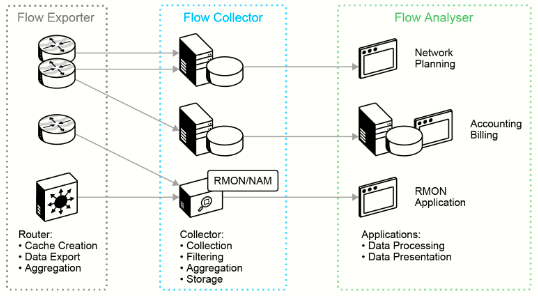
NetFlow requires three components, as shown in the preceding figure:
- Flow Exporter: The router or network device in charge of collecting flow information and exporting it to a flow collector
- Flow Collector: A server that receives the exported flow information.
- Flow Analyser: An application that analyzes flow information collected by the flow collector.
Routers and switches that support NetFlow can collect IP traffic statistics on all interfaces where NetFlow is enabled. They can then later export those statistics as NetFlow records toward at least one NetFlow collector—typically a server that does the actual traffic analysis.
NetFlow export version 9 has some advantages for important technologies, such as security, traffic analysis, and multicast. The main feature of the NetFlow version 9 export format is that it is template-based. A template describes a NetFlow record format and attributes of fields (such as type and length) within the record. The router assigns each template an ID, which is communicated to the NetFlow Collection Engine along with the template description. The template ID is used for all further communication from the router to the NetFlow Collection Engine. These templates alloe NetFlow v9 to accomodate multicast, MPLS and BGP next hop.
Location of NetFlow Implementation in the Network
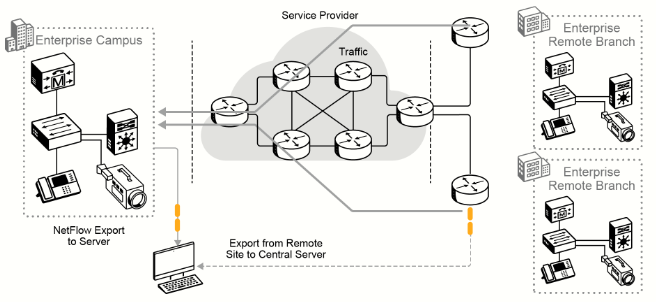
NetFlow is typically used on a central site aggregate connection because all traffic from the remote sites is characterized and is available within NetFlow. The location where NetFlow is deployed may depend on the location of the reporting solution and the topology of the network. If the reporting collection server is centrally located, then implementing NetFlow close to the reporting collector server is optimal. NetFlow can also be enabled at remote branch locations with the understanding that the export data will utilize bandwidth. About 15 percent of the switched traffic is used for export to the collection server.
Flexible NetFlow Components
| Component Name | Description |
| Flow Records | Combination of key and non-key fields. There are predefined and user-defined records. |
| Flow Monitors | Applied to the interface to perform network traffic monitoring. |
| Flow Exporters | Exports NetFlow v9 data from the flow monitor cache to a remote host or NetFlow collector. |
| Flow Samplers | Samples partial NetFlow data rather than analyzing all NetFlow data. |
There are trade-offs in using sampled NetFlow data. The biggest one is that there is a reduced load on the device in terms of memory and CPU. However, by sampling NetFlow data only at specific intervals, something could be missed because the accuracy goes down with sampling compared to when gathering all data. Depending on the use case and the environment, however, sampling may be perfectly acceptable. It all depends on the business and its priorities.
Creating a Flow in NetFlow Cache
NetFlow delivers detailed usage information about IP traffic flows that are traversing a device such as a Cisco router. An IP traffic flow can be described as a stream of packets that are related to the same conversation between two devices.
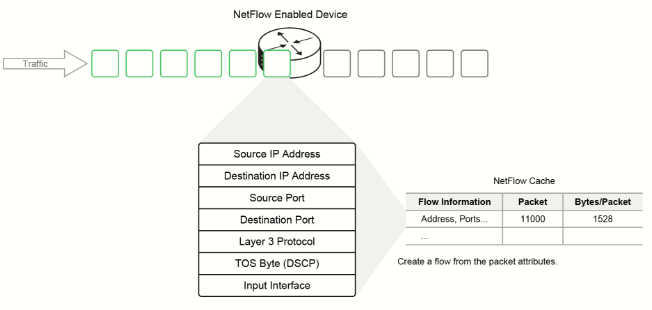
NetFlow identifies a traffic flow by identifying several characteristics within the packet header, such as source and destination IP addresses, source and destination ports, and differentiated services code point (DSCP) or type of service (ToS) markings. Once the traffic flow is identified, subsequent packets that match those attributes are regarded as part of that flow.
Each packet that is forwarded within a router or switch is examined for a set of IP packet attributes. These attributes are the IP packet identity or fingerprint of the packet, and they determine whether the packet is unique or similar to other packets.
Traditionally, an IP flow is based on a set of five to seven IP packet attributes:
- IP source address
- IP destination address
- Source port
- Destination port
- Layer 3 protocol type
- ToS
- Router or switch interface
All packets with the same source and destination IP address, source and destination ports, protocol interface, and CoS are grouped into a flow, and then packets and bytes are tallied. This methodology of fingerprinting or determining a flow is scalable because a large amount of network information is condensed into a database of NetFlow information that is called the NetFlow cache.
Additional information added to a flow includes the following:
- Flow time stamps to understand the life of a flow; time stamps are useful for calculating packets and bytes per second.
- Next-hop IP addresses, including BGP routing Autonomous systems.
- Subnet mask for the source and destination addresses to calculate prefixes.
- TCP flags to examine TCP handshakes.
Analyzing NetFlow Data
The flow data that is collected in the NetFlow cache is useless unless an administrator can access it. There are two primary methods to access NetFlow data: the CLI with Cisco IOS Software show commands or using an application reporting tool called a NetFlow Collector.
In general, the NetFlow cache constantly fills with flows, and software in the router or switch searches the cache for flows that have terminated or expired. These flows are exported to the NetFlow Collector server. Flows are terminated when the network communication has ended (for example, a packet contains the TCP FIN flag).
The following steps are used to implement NetFlow data reporting:
- NetFlow is configured to capture flows to the NetFlow cache; it is referred to as the "NetFlow record.”
- The NetFlow export is configured to send flows to the collector.
- The NetFlow cache is searched for flows that have terminated, which are exported to the NetFlow collector server.
- Approximately 30 to 50 flows are bundled together and transported in UDP format to the NetFlow collector server; it is referred to as the “NetFlow Monitor.”
- The NetFlow collector software creates real-time or historical reports from the data.
Once the NetFlow data is collected and cached, the switch or router must determine which flows to export to the NetFlow collector. In this configuration of the NetFlow monitor, you associate various records to the configured exporters. There can be multiple NetFlow collectors in a network, and you can send specific NetFlow record data to one or more of those collectors if necessary.
A flow is ready for export when it is inactive for a certain time (that is, no new packets are received for the flow), or if the flow is long-lived (active) and lasts greater than the active timer (for example, a long FTP download). The flow is also ready for export when a TCP flag indicates that the flow is terminated (for example, a FIN or RST flag). There are timers to determine if a flow is inactive or if a flow is lived. The default for the inactive flow timer is 15 seconds, and the default for the active flow timer is 30 minutes. All timers for export are configurable. The collector can combine flows and aggregate traffic. For example, an FTP download that lasts longer than the active timer may be broken into multiple flows, and the collector can combine these flows to show the total FTP traffic to a server at a specific time of day.
Configure and Verify Flexible Netflow
A basic Flexible NetFlow configuration consists of four steps that are shown in this example:
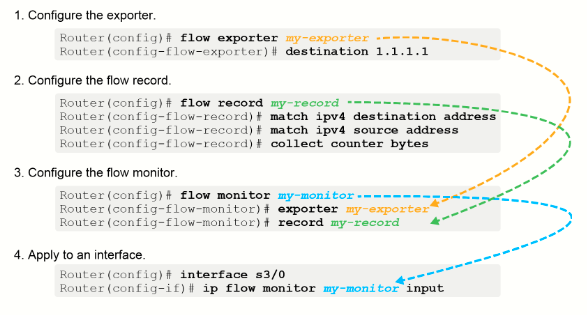
1. The exporter configuration describes where the flows are sent. This terminology is confusing because most NetFlow users (including the Stealthwatch system) refer to an “exporter” as the router itself.
2. A NetFlow record is a combination of key and nonkey fields that are used to identify flows. There are both predefined and user-defined records that can be configured. Customized user-defined flow records are used to analyze traffic data for a specific purpose. A customized flow record must have at least one match criterion for use as the key field and typically has at least one collect criterion for use as a nonkey field. You must specify a series of match and collect commands that tell the router which fields to include in the outgoing NetFlow PDU. The match fields are the key fields: they are used to determine the uniqueness of the flow. The collect fields are just extra info (nonkey) that you include to provide more detail to the collector for reporting and analysis.
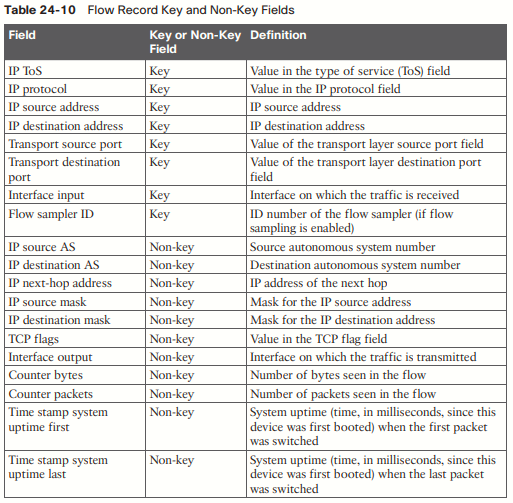
3. The monitor represents the memory-resident NetFlow database of the router. Flexible NetFlow allows you to create multiple independent monitors. While it can be useful in some situations, most users create a single main cache for collecting and exporting NetFlow data.
4. NetFlow must be enabled at each entry point to the router. In almost all cases, you want to use input monitoring. It ensures that both sides of all communications through the router are captured by Flexible NetFlow and sent to the collector.