Lab - Implement IP SLA
Topology
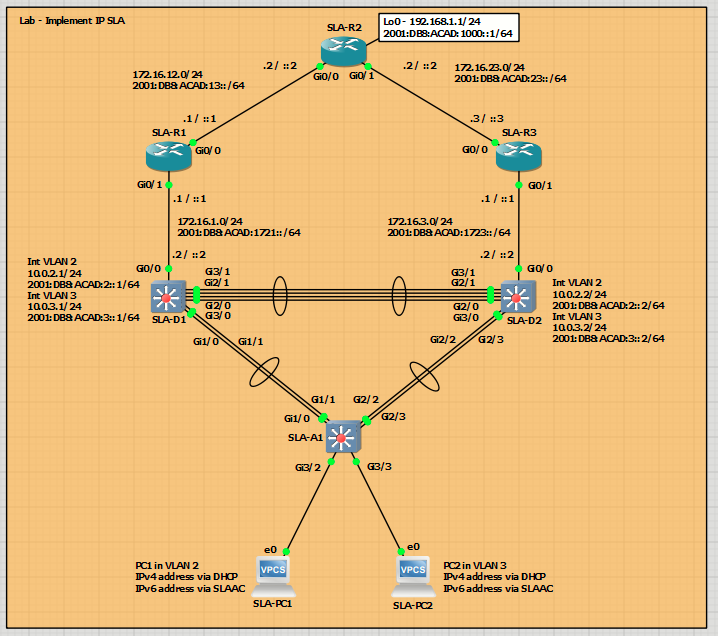
Addressing Table
| Device | Interface | IPv4 Address/Mask | IPv6 Address/Prefix | IPv6 Link Local |
| R1 | G0/0/0 | 172.16.12.1/24 | 2001:db8:acad:12::1/64 | fe80::1:1 |
| R1 | G0/0/1 | 172.16.1.1/24 | 2001:db8:acad:1721::1/64 | fe80::1:2 |
| R2 | G0/0/0 | 172.16.12.2/24 | 2001:db8:acad:12::2/64 | fe80::2:1 |
| R2 | G0/0/1 | 172.16.24.2/24 | 2001:db8:acad:23::2/64 | fe80::2:2 |
| R2 | Loopback 0 | 192.168.1.1/24 | 2001:db8:acad:1000::1/64 | fe80::2:3 |
| R3 | G0/0/0 | 172.16.23.3/24 | 2001:db8:acad:23::3/64 | fe80::3:1 |
| R3 | G0/0/1 | 172.16.3.1/24 | 2001:db8:acad:1723::1/64 | fe80::3:2 |
| D1 | G1/0/11 | 172.16.1.2/24 | 2001:db8:acad:1721::2/64 | fe80::d1:1 |
| D1 | VLAN 2 | 10.0.2.1/24 | 2001:db8:acad:2::1/64 | fe80::d1:2 |
| D1 | VLAN 3 | 10.0.3.1/24 | 2001:db8:acad:3::1/64 | fe80::d1:3 |
| D2 | G1/0/11 | 172.16.3.2/24 | 2001:db8:acad:23::3/64 | fe80::d2:1 |
| D2 | VLAN 2 | 10.0.2.2/24 | 2001:db8:acad:2::2/64 | fe80::d2:2 |
| D2 | VLAN 3 | 10.0.3.2/24 | 2001:db8:acad:3::2/64 | fe80::d2:3 |
| A1 | VLAN 2 | 10.0.2.3/24 | 2001:db8:acad:2::3/64 | fe80::a1:1 |
| PC 1 | NIC | DHCP | SLAAC | EUI-64 |
| PC 2 | NIC | DHCP | SLAAC | EUI-64 |
Objectives
- Part 1: Build the Network and Configure Basic Device Settings
- Part 2: Configure and Observe IP SLA Operations
- Part 3: Configure and Observe HSRP IP SLA Tracking
Background / Scenario
Cisco IP Service Level Agreements (IP SLAs) is a Cisco IOS feature that actively measures network performance by generating synthetic probes and timing responses. You define an operation, schedule when it runs, and can enable an IP SLA Responder on a remote Cisco device to improve accuracy. Results are stored locally and can be collected by network management systems via SNMP for reporting and alerts.
IP SLAs help monitor end-to-end performance and validate application readiness, especially for voice and video, supporting proactive monitoring, troubleshooting, and automated actions such as route failover with object tracking. Common operations include ICMP Echo for round-trip time and loss, UDP Jitter for voice quality, TCP Connect for session setup time, and HTTP/HTTPS for web response. Accuracy improves with the Responder, and one-way measurements should use NTP to synchronize device clocks.
In this lab, you will configure and schedule IP SLA operations to test IPv4 and IPv6 reachability with ICMP echo, then observe their status and behavior under failure using show commands. You will integrate those SLAs with HSRPv2 by configuring object tracking and priority decrements. Finally, you will validate controlled gateway failover when the tracked destinations become unreachable.
Note: This lab is an exercise in deploying and verifying IP SLAs and does not necessarily reflect networking best practices. The IP SLA itself is an additional task that must be performed by the switch CPU. A large number of intensive SLAs could create a significant burden on the CPU, possibly interfering with other switch functions and having detrimental impact on the overall device performance. Therefore, you should carefully evaluate the benefits of running IP SLAs. The CPU load should be monitored after the SLAs are deployed to verify that they do not stress the device’s CPU above safe limits.
Required Resources - Sergio Jimenez's Version
For this lab I am using GNS3 where I have deployed:
- 3 IOSv router
- 3 IOSvL2 switches
- 2 VPCs
Instructions
Part 1: Configure basic settings for each device.
SLA-R1
hostname R1
ipv6 unicast-routing
no ip domain lookup
banner motd # R1, Implement IP SLA #
line con 0
exec-timeout 0 0
logging synchronous
exit
line vty 0 4
privilege level 15
password cisco123
exec-timeout 0 0
logging synchronous
login
exit
interface g0/0
ip address 172.16.12.1 255.255.255.0
ipv6 address fe80::1:1 link-local
ipv6 address 2001:db8:acad:12::1/64
no shutdown
exit
interface g0/1
ip address 172.16.1.1 255.255.255.0
ipv6 address fe80::1:2 link-local
ipv6 address 2001:db8:acad:1721::1/64
no shutdown
exit
router ospf 4
router-id 1.1.1.4
network 172.16.0.0 0.0.255.255 area 0
exit
ipv6 router ospf 6
router-id 1.1.1.6
exit
interface g0/0
ipv6 ospf 6 area 0
exit
interface g0/1
ipv6 ospf 6 area 0
exit
end
SLA-R2
hostname R2
ipv6 unicast-routing
no ip domain lookup
banner motd # R2, Implement IP SLA #
line con 0
exec-timeout 0 0
logging synchronous
exit
line vty 0 4
privilege level 15
password cisco123
exec-timeout 0 0
logging synchronous
login
exit
interface g0/1
ip address 172.16.23.2 255.255.255.0
ipv6 address fe80::2:1 link-local
ipv6 address 2001:db8:acad:23::2/64
no shutdown
exit
interface g0/0
ip address 172.16.12.2 255.255.255.0
ipv6 address fe80::2:2 link-local
ipv6 address 2001:db8:acad:12::2/64
no shutdown
exit
interface loopback 0
ip address 192.168.1.1 255.255.255.0
ipv6 address fe80::2:3 link-local
ipv6 address 2001:db8:acad:1000::1/64
ip ospf network point-to-point
ipv6 ospf network point-to-point
no shutdown
exit
router ospf 4
router-id 2.2.2.4
network 172.16.0.0 0.0.255.255 area 0
network 192.168.1.0 0.0.0.255 area 0
exit
ipv6 router ospf 6
router-id 2.2.2.6
exit
interface g0/0
ipv6 ospf 6 area 0
exit
interface g0/1
ipv6 ospf 6 area 0
exit
interface Loopback 0
ipv6 ospf 6 area 0
exit
end
SLA-R3
hostname R3
ipv6 unicast-routing
no ip domain lookup
banner motd # R3, Implement IP SLA #
line con 0
exec-timeout 0 0
logging synchronous
exit
line vty 0 4
privilege level 15
password cisco123
exec-timeout 0 0
logging synchronous
login
exit
interface g0/0
ip address 172.16.23.3 255.255.255.0
ipv6 address fe80::3:1 link-local
ipv6 address 2001:db8:acad:23::3/64
no shutdown
exit
interface g0/1
ip address 172.16.3.1 255.255.255.0
ipv6 address fe80::3:2 link-local
ipv6 address 2001:db8:acad:1723::1/64
no shutdown
exit
router ospf 4
router-id 3.3.3.4
network 172.16.0.0 0.0.255.255 area 0
exit
ipv6 router ospf 6
router-id 3.3.3.6
exit
interface g0/0
ipv6 ospf 6 area 0
exit
interface g0/1
ipv6 ospf 6 area 0
exit
end
SLA-D1
hostname D1
ip routing
ipv6 unicast-routing
no ip domain lookup
banner motd # D1, Implement IP SLA #
line con 0
exec-timeout 0 0
logging synchronous
exit
line vty 0 4
privilege level 15
password cisco123
exec-timeout 0 0
logging synchronous
login
exit
interface range g2/0,g2/1,g3/0,g3/1,g1/0,g1/1
switchport trunk encapsulation dot1q
switchport mode trunk
no shutdown
exit
interface range g2/0,g2/1,g3/0,g3/1
channel-group 12 mode active
exit
interface range g1/0,g1/1
channel-group 1 mode active
exit
interface g0/0
no switchport
ip address 172.16.1.2 255.255.255.0
ipv6 address fe80::d1:1 link-local
ipv6 address 2001:db8:acad:1721::2/64
no shutdown
exit
vlan 2
name SECOND_VLAN
exit
vlan 3
name THIRD_VLAN
exit
spanning-tree vlan 2 root primary
spanning-tree vlan 3 root secondary
interface vlan 2
ip address 10.0.2.1 255.255.255.0
ipv6 address fe80::d1:2 link-local
ipv6 address 2001:db8:acad:2::1/64
no shutdown
exit
interface vlan 3
ip address 10.0.3.1 255.255.255.0
ipv6 address fe80::d1:3 link-local
ipv6 address 2001:db8:acad:3::1/64
no shutdown
exit
interface vlan 2
standby version 2
standby 2 ip 10.0.2.254
standby 2 priority 150
standby 2 preempt
standby 26 ipv6 autoconfig
standby 26 priority 150
standby 26 preempt
exit
interface vlan 3
standby version 2
standby 3 ip 10.0.3.254
standby 3 preempt
standby 36 ipv6 autoconfig
standby 36 preempt
exit
router ospf 4
router-id 0.13.1.4
network 172.16.1.0 0.0.0.255 area 0
network 10.0.0.0 0.0.255.255 area 0
passive-interface vlan 2
passive-interface vlan 3
exit
ipv6 router ospf 6
router-id 0.13.1.6
passive-interface vlan 2
passive-interface vlan 3
exit
interface g0/0
ipv6 ospf 6 area 0
exit
interface vlan 2
ipv6 ospf 6 area 0
exit
interface vlan 3
ipv6 ospf 6 area 0
exit
ip dhcp excluded-address 10.0.2.1 10.0.2.5
ip dhcp excluded-address 10.0.2.128 10.0.2.254
ip dhcp pool SECOND_VLAN_DHCP_POOL
network 10.0.2.0 255.255.255.0
default-router 10.0.2.254
exit
ip dhcp excluded-address 10.0.3.1 10.0.3.128
ip dhcp excluded-address 10.0.3.254
ip dhcp pool THIRD_VLAN_DHCP_POOL
network 10.0.3.0 255.255.255.0
default-router 10.0.3.254
exit
end
SLA-D2
hostname D2
ip routing
ipv6 unicast-routing
no ip domain lookup
banner motd # D2, Implement IP SLA #
line con 0
exec-timeout 0 0
logging synchronous
exit
line vty 0 4
privilege level 15
password cisco123
exec-timeout 0 0
logging synchronous
login
exit
interface range g2/0,g2/1,g3/0,g3/1,g2/2,g2/3
switchport trunk encapsulation dot1q
switchport mode trunk
no shutdown
exit
interface range g2/0,g2/1,g3/0,g3/1
channel-group 12 mode active
exit
interface range g2/2,g2/3
channel-group 2 mode active
exit
interface g0/0
no switchport
ip address 172.16.3.2 255.255.255.0
ipv6 address fe80::d2:1 link-local
ipv6 address 2001:db8:acad:1723::2/64
no shutdown
exit
vlan 2
name SECOND_VLAN
exit
vlan 3
name THIRD_VLAN
exit
spanning-tree vlan 2 root secondary
spanning-tree vlan 3 root primary
interface vlan 2
ip address 10.0.2.2 255.255.255.0
ipv6 address fe80::d2:2 link-local
ipv6 address 2001:db8:acad:2::2/64
no shutdown
exit
interface vlan 3
ip address 10.0.3.2 255.255.255.0
ipv6 address fe80::d2:3 link-local
ipv6 address 2001:db8:acad:3::2/64
no shutdown
exit
interface vlan 2
standby version 2
standby 2 ip 10.0.2.254
standby 2 preempt
standby 26 ipv6 autoconfig
standby 26 preempt
exit
interface vlan 3
standby version 2
standby 3 ip 10.0.3.254
standby 3 priority 150
standby 3 preempt
standby 36 ipv6 autoconfig
standby 36 priority 150
standby 36 preempt
exit
router ospf 4
router-id 0.13.2.4
network 172.16.3.0 0.0.0.255 area 0
network 10.0.0.0 0.0.255.255 area 0
passive-interface vlan 2
passive-interface vlan 3
exit
ipv6 router ospf 6
router-id 0.13.2.6
passive-interface vlan 2
passive-interface vlan 3
exit
interface g0/0
ipv6 ospf 6 area 0
exit
interface vlan 2
ipv6 ospf 6 area 0
exit
interface vlan 3
ipv6 ospf 6 area 0
exit
ip dhcp excluded-address 10.0.2.1 10.0.2.128
ip dhcp excluded-address 10.0.2.254
ip dhcp pool SECOND_VLAN_DHCP_POOL
network 10.0.2.0 255.255.255.0
default-router 10.0.2.254
exit
ip dhcp excluded-address 10.0.3.1 10.0.3.5
ip dhcp excluded-address 10.0.3.128 10.0.3.254
ip dhcp pool THIRD_VLAN_DHCP_POOL
network 10.0.3.0 255.255.255.0
default-router 10.0.3.254
exit
end
SLA-A1
hostname A1
no ip domain lookup
no ip routing
banner motd # A1, Implement IP SLA #
line con 0
exec-timeout 0 0
logging synchronous
exit
line vty 0 4
privilege level 15
password cisco123
exec-timeout 0 0
logging synchronous
login
exit
interface range g1/0,g1/1,g2/2,g2/3
switchport trunk encapsulation dot1q
switchport mode trunk
no shutdown
exit
interface range g1/0,g1/1
channel-group 1 mode active
exit
interface range g2/2,g2/3
channel-group 2 mode active
exit
vlan 2
name SECOND_VLAN
exit
vlan 3
name THIRD_VLAN
exit
interface g3/2
switchport mode access
switchport access vlan 2
spanning-tree portfast
no shutdown
exit
interface g3/3
switchport mode access
switchport access vlan 3
spanning-tree portfast
no shutdown
exit
interface vlan 2
ip address 10.0.2.3 255.255.255.0
ipv6 address fe80::a1:1 link-local
ipv6 address 2001:db8:acad:2::3/64
no shutdown
exit
ip default-gateway 10.0.2.254
end
Part 2: Configure and Observe IP SLA Operations
In Part 2 you will configure and observe IP SLA operations. The SLA itself is simply a testing mechanism. Our example will test for simple reachability with an ICMP echo, but SLAs can do a lot more with many other protocols.
For now, all you will do is configure and schedule the IP SLAs and then query their status. This way you see the SLA operation separate from any application it might be used for.
Step 1: Create IP SLAs on switch D1.
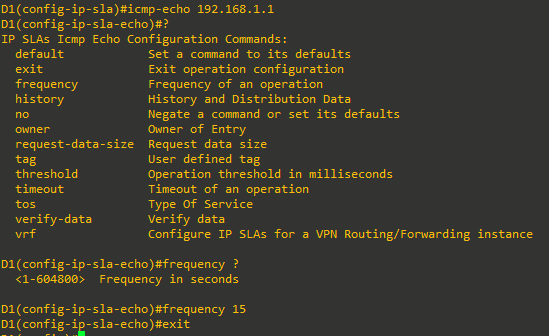
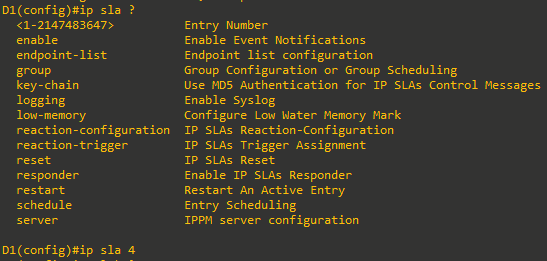
- Create IP SLA 4 using the command ip sla 4. The number 4 is locally significant and could be any number between 1 and 2147483647.
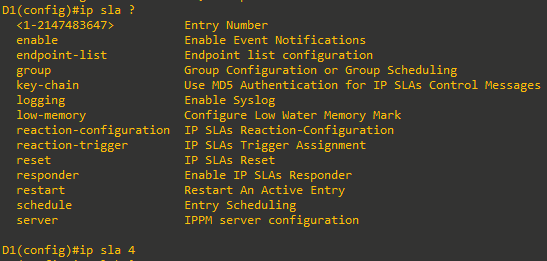
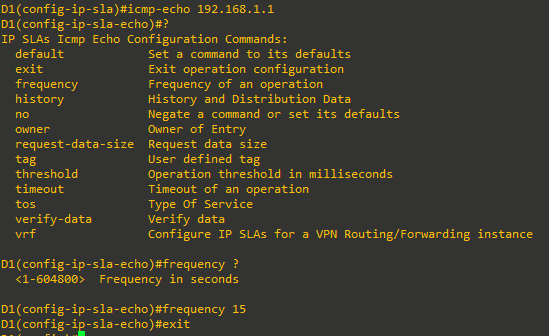
- Configure IP SLA 4 to send an icmp-echo to the IPv4 address 192.168.1.1 (R2 Loopback 0) and set the frequency for the ping to be every 15 seconds.
- Create IP SLA 6 and configure it to send an icmp-echo to the IPv4 address 2001:db8:acad:1000::1 (R2 Loopback 0) and set the frequency for the ping to be every 15 seconds.

- Use the ip sla schedule command to configure both SLA 4 and SLA 6 with a life of forever and to start immediately.



Step 2: Observe IP SLA operation.
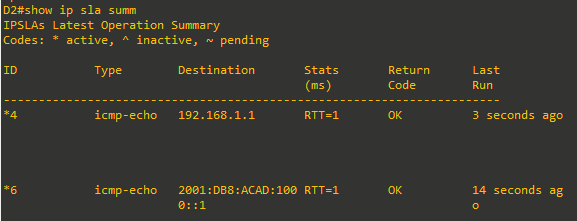
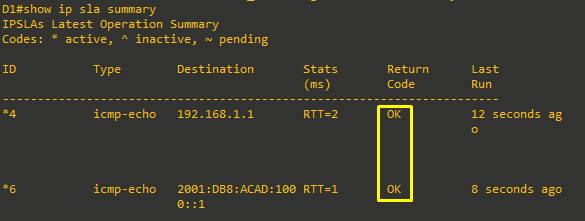
- Issue the command show ip sla summary to see a summarized status of the SLAs now that you have scheduled them.
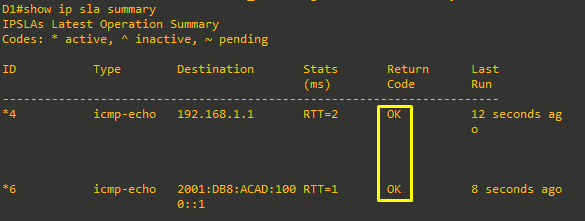
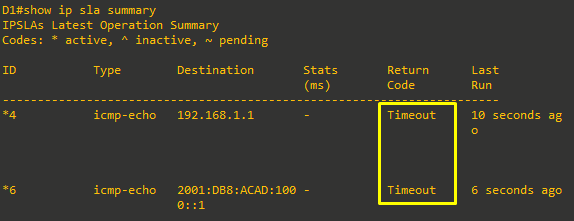
- To test and see what response the SLAs give in a failure, issue the shutdown command on R1 interface G0/0, then issue the show ip sla summary command again.
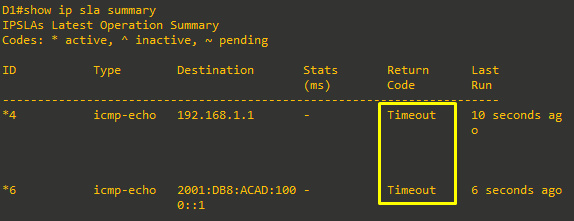
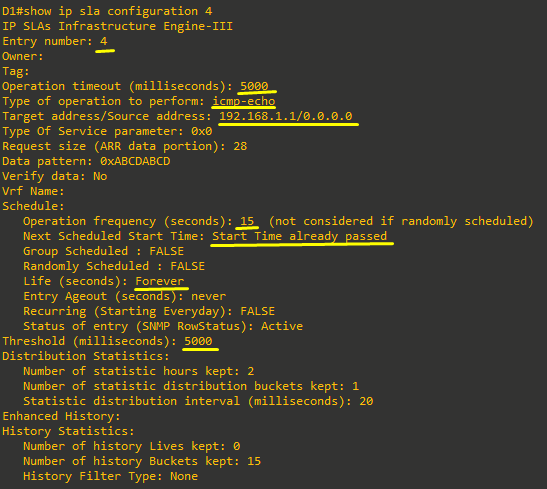
- Issue the command show ip sla configuration 4 to see details on IP SLA 4.
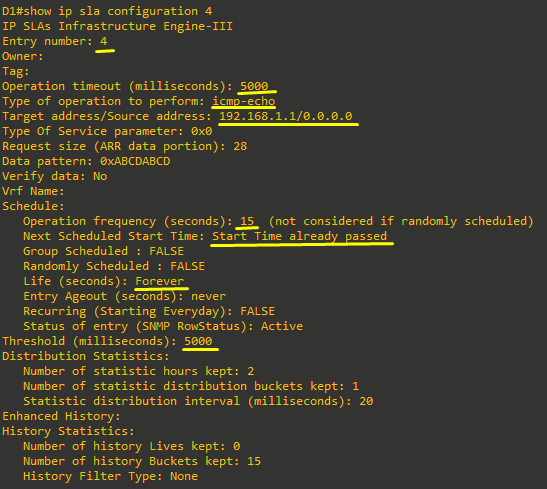
- Issue the command show ip sla statistics 4 to examine statistical information on this IP SLA. Then, issue the no shutdown command on R1 interface G0/0.
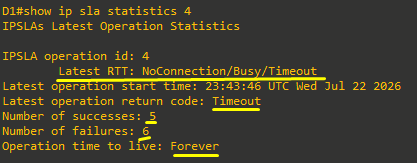
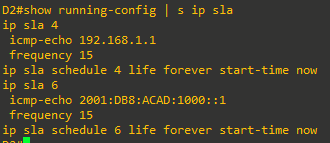
- Configure the same IP SLAs on Switch D2. Verify them in the same manner, issuing the shutdown command on R3 interface G0/0. When you have verified that SLA is tracking reachability to R2 interface Loopback 0, issue the no shutdown command on R3 interface G0/0/0.
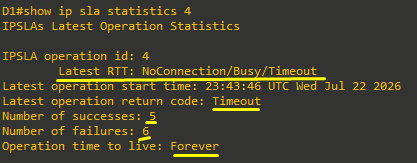
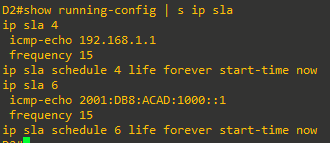
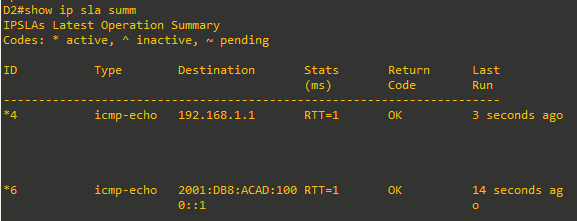
Part 3: Configure and Observe HSRP IP SLA Tracking
In this part, we will put the IP SLAs that you created into use, and you can see how they work. In this case, our network is operational and HSRP is providing first-hop redundancy. HSRP will react to a directly connected interface that is failing or coming online, as you saw in the tracking section of the HSRP lab. But what if there is an indirect link failure that makes the active HSRP router less desirable? The IP SLA will allow us to handle this scenario. For this example, we will treat R2 interface Loopback 0 as a critical entity on the internet, like a DNS server. The organizational policy is that if that DNS server is not reachable from the gateway, the gateway should not be used.
Step 1: Verify HSRPv2 is operational.
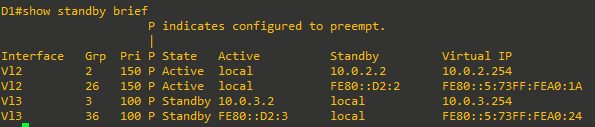
- Verify that HSRP is active and operating on Switch D1 with the show standby brief command.
As you can see from the output, switch D1 is the active virtual router for VLAN 2 and the standby for VLAN 3 for both IPv4 and IPv6.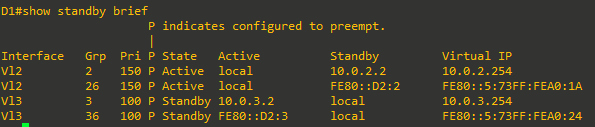
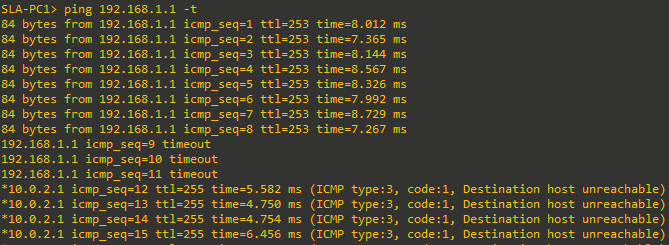
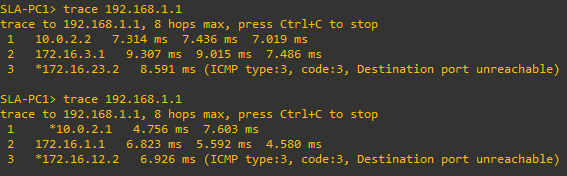
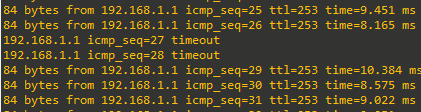
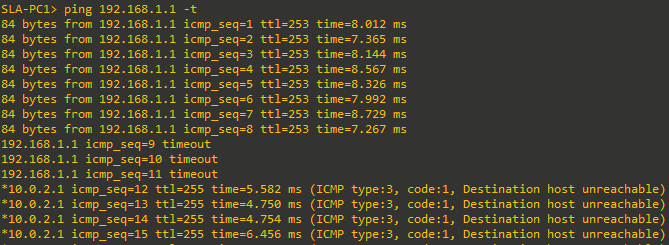
- From PC1, start a continuous ping to 192.168.1.1.

- On D1, issue the shutdown command on interface VLAN 2. You should see that HSRP fails over to D2 as the Active Virtual Router for VLAN 2, and the pings continue to succeed. When verified, issue the no shutdown command on switch D1 interface VLAN 2.
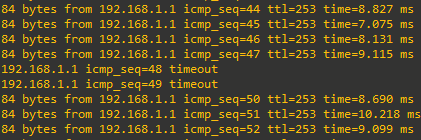
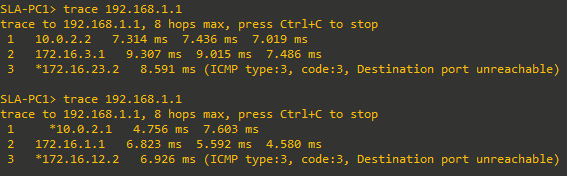
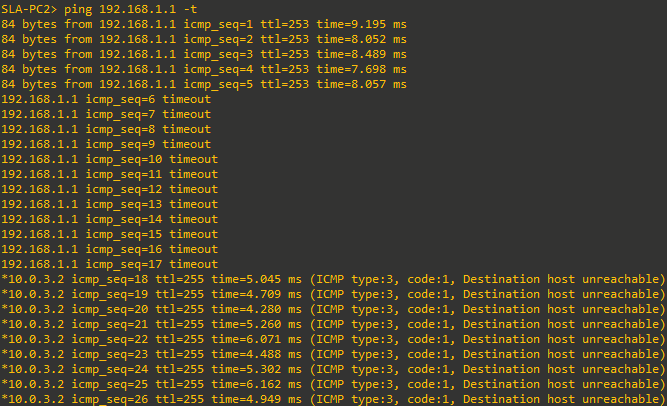
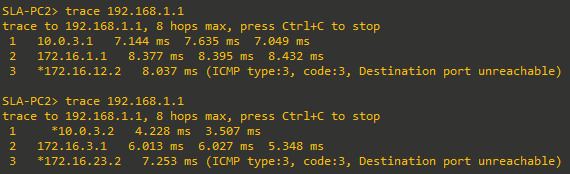
- From PC2, start a continuous ping to 192.168.1.1.

- On D2, issue the shutdown command on interface VLAN 3. You should see that HSRP fails over to D1 as the Active Virtual Router for VLAN 3, and the pings continue to succeed. When verified, issue the no shutdown command on switch D2 interface VLAN 3.
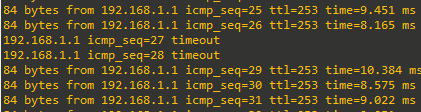
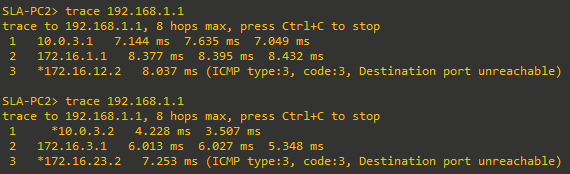
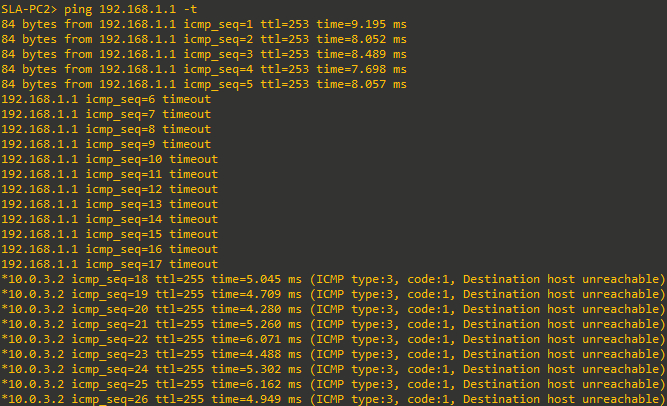
- Now issue the shutdown command on R1 interface G0/0 and R3 interface G0/0/0. Note that there is no
impact on either D1 or D2 regarding HSRP, and the pings start failing. Stop the continuous pings on PC1 and PC2 and issue the no shutdown command on R1 interface G0/0 and R3 interface G0/0/0.


Step 2: Reconfigure HSRP to use the IP SLA.
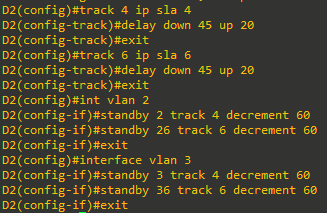
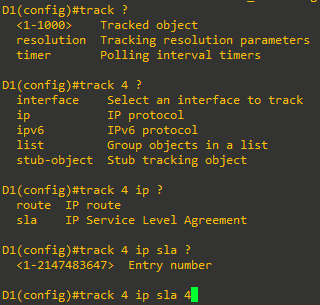
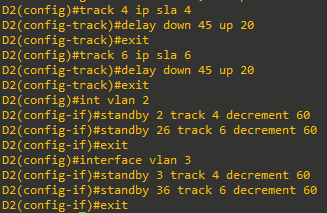
- Create a track object using the command track [number] ip sla [sla number].
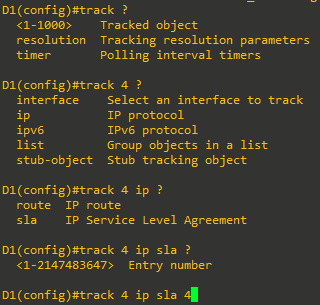
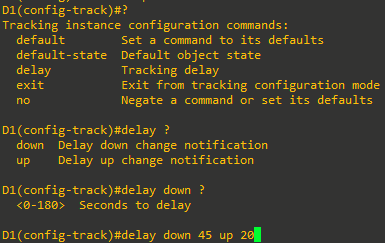
- Set the delay timers. These are used to help manage changes on flapping links. In this case, R2 interface Loopback 0 is known to D1 and D2 via OSPF, so the delay needs to take OSPF timers into account. The command is setting the SLA up so that it will wait a period of time after the first failed SLA to make sure it is actually down, and it will wait a period of time after it appears to be returned to operation to be sure it is actually operating.
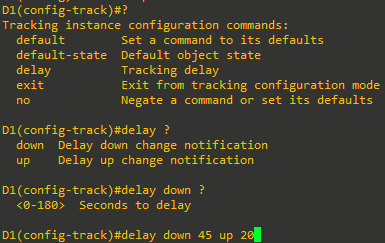
- Configure track 6 to pay attention to IP SLA 6 with the same delay values.

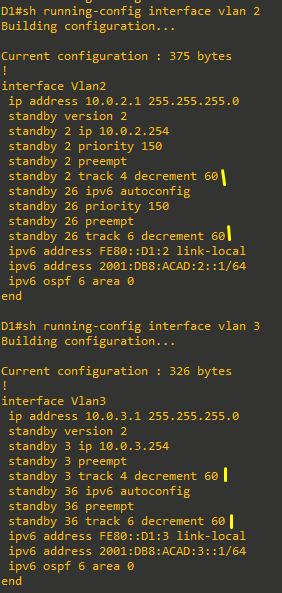
- Now that the IP SLAs are being tracked, we must associate the status of the track with the HSRP group. This is done on the VLAN interface using the standby [group] track [track number] command. As a part of that command, add a decrement value, which will drop the interface’s HSRP priority should the IP SLA fail.
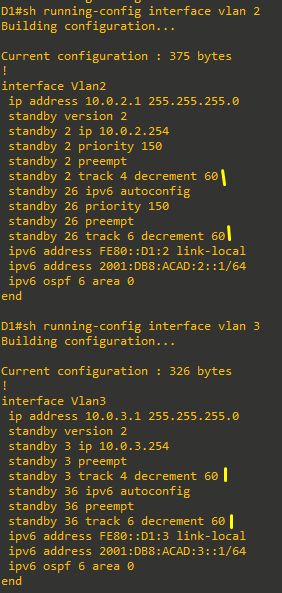
- Repeat the same commands on D2 so that HSRP is tracking IP SLAs there as well.

Step 3: Observe and validate HSRPv2 operation with IP SLAs.
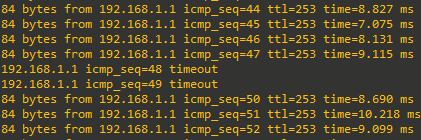
- On PC1, start a continuous ping to 192.168.1.1.

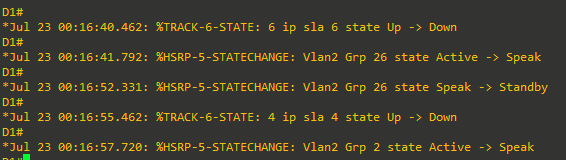
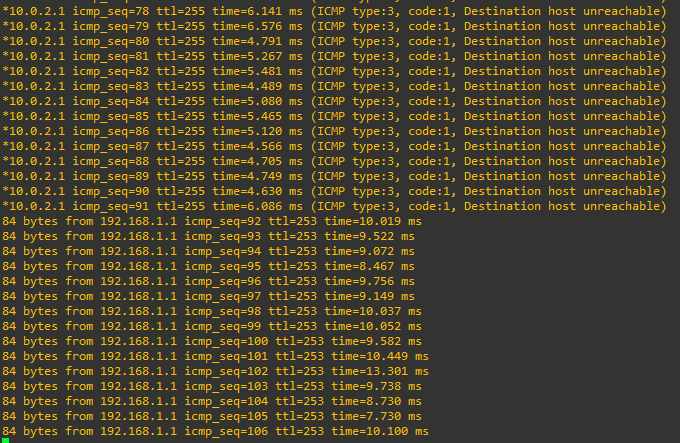
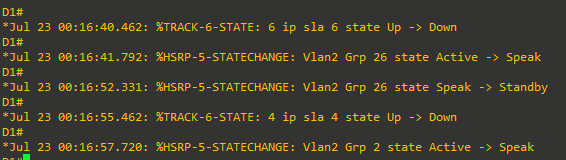
- On R1, shut down interface G0/0. After about 45 seconds, you should see that HSRP fails over for VLAN 2 from switch D1 to switch D2, and pings from PC1 work again.

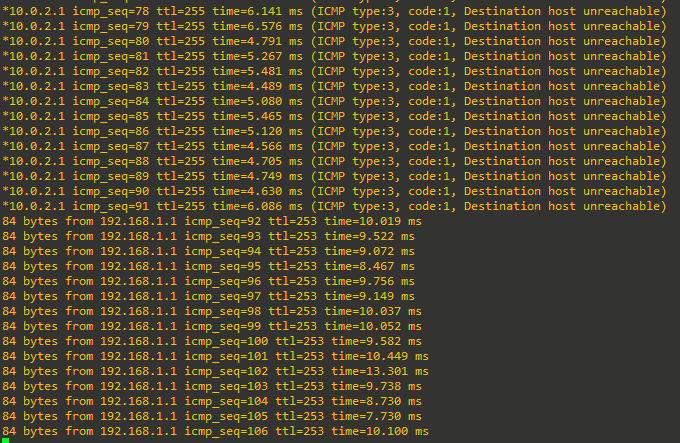
- Issue the no shutdown command on R1 interface G0/0. Switch D1 takes over again as the Active Virtual Router for VLAN 2, and the host is still able to ping 192.168.1.1 (no ping loss observed).