
SD-WAN - IOS XE and IOS XE SD-WAN Software
Cisco IOS XE is a single image that can be used to deploy both IOS XE and IOS XE SD-WAN on supported platforms.
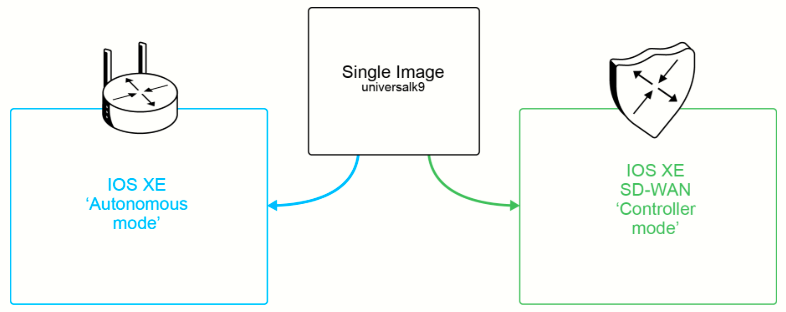
Cisco IOS XE now supports the use of a single "universalk9" image to deploy Cisco IOS XE SD-WAN and Cisco IOS XE functionality on the following devices:
- Cisco 1000 Series ASRs
- Cisco ISR 1000 Series Integrated Services Routers
- Cisco ISR 4000 Series Integrated Services Routers
- Cisco 1101 Industrial Integrated Services Router
- Cisco Catalyst 8000 Series Edge Routers
- Cisco Catalyst 8000V Edge Software
This universalk9 image is available in release 17.2.x and later and it supports two modes:
- Autonomous mode (for Cisco IOS XE features)
- Controller mode (for Cisco Catalyst SD-WAN features)
You access the Cisco IOS XE and Cisco IOS XE SD-WAN functionality through autonomous and controller execution modes, respectively. The autonomous mode is the default mode for the routers and includes the Cisco IOS XE functionality. To access the Cisco IOS XE SD-WAN functionality, switch to the controller mode.
Use the controller-mode command in the privileged EXEC mode to switch between the controller and autonomous modes.

When the device mode is switched from the autonomous mode to the controller mode, the startup configuration and the information in NVRAM (certificates) are erased. This action is the same as the write erase command.
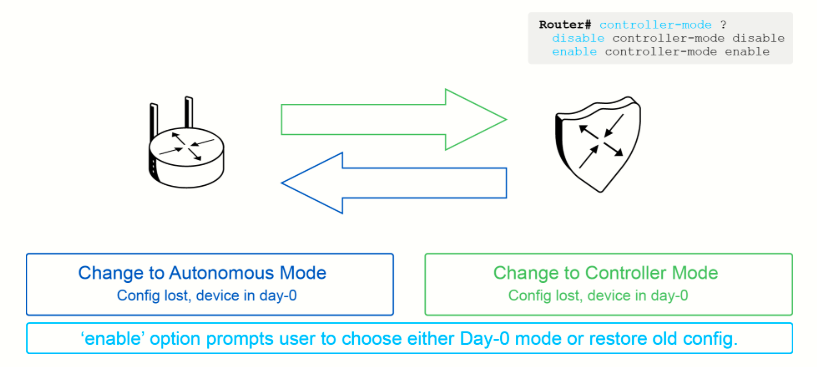
When the device mode is switched from the controller to autonomous, all YANG-based configuration is preserved and it can be reused if you switch back to the controller mode.
The following table summarizes what occurs to the router configuration during an operational mode switch:
|
Current Configuration Mode |
Mode Switched to |
Behavior |
|
Autonomous |
Controller |
Contents of NVRAM and the startup configuration are erased. The configuration is not restored. The device is reverted to Day 0 configuration. The previous running configuration is stored in bootflash. |
|
Controller |
Autonomous |
The controller database contents are not erased (for subsequent mode switches), and IOS configuration is not restored (as the startup configuration is empty). You have to manually restore the configuration from the backup. |
When you switch to the controller mode from the autonomous mode and switch back to the autonomous mode, the Cisco IOS XE configuration is not restored because the startup configuration is empty. You need to manually restore the configuration from the backup.
When you switch to the autonomous mode from the controller mode and switch back to the controller mode, the original configuration in the controller mode is preserved.
Based on the architecture data, SD-WAN Managers, SD-WAN Controllers, and SD-WAN Validators are strictly software-based virtual appliances, not physical router hardware.
While your data plane devices (WAN Edges) can be physical bare-metal routers like Catalyst 8000s or ISRs, the controller suite is completely virtualized and runs in the following environments (see next page for more info):
-
Public Clouds: Deployed as virtual instances inside Amazon Web Services (AWS) or Microsoft Azure.
-
Private Clouds / On-Premises Data Centers: Deployed as virtual machines inside an organization's own server infrastructure (typically running on hypervisors like VMware ESXi or KVM).
To build a full lab environment, you cannot convert a standard router image (like the Catalyst 8000V or an IOSv instance) into a Manager or a Controller. You must download and import the specific, dedicated virtual appliance images for the controller suite:
-
Cisco Catalyst SD-WAN Manager Image (Historically known as the vManage Qcow2/QEMU image)
-
Cisco Catalyst SD-WAN Controller Image (Historically known as the vSmart Qcow2/QEMU image)
-
Cisco Catalyst SD-WAN Validator Image (Historically known as the vBond Qcow2/QEMU image, often running the same base software code as the controller or a generic WAN edge image configured explicitly for orchestration)