
APIs - Catalyst Center APIs
Cisco customers and partners can use the Cisco Catalyst Center platform to create value-added applications that use the native capabilities of Cisco Catalyst Center. You can use Cisco Catalyst Center Intent APIs, integration flows, Events and Notification Services, and the optional Cisco Catalyst Center Multivendor software development kit (SDK) to enhance the overall network experience by optimizing end-to-end IT processes, reducing total cost of ownership (TCO), and developing new value-added networks.
Cisco Catalyst Center is a suite of applications and workflows, and a platform that can be built on top of various integrations, APIs, and SDKs. The goal of Cisco Catalyst Center platform is to deliver world-class integration capabilities and a development environment that will drive greater partner innovations, provide seamless integration with the partner ecosystems, and result in greater customer satisfaction.
Catalyst Center - Intent APIs
The Intent APIs are northbound REST APIs that allow you to use the specific capabilities of Cisco Catalyst Center platform. The Intent APIs provide a policy-based abstraction of business intent, and allow you to focus on an outcome to achieve instead of struggling with the mechanisms that implement that outcome. To view the APIs, click Platform > Developer Toolkit. The Developer Toolkit provides documentation for each API call, which is organized according to the functional areas of the Intent API.
You can click a request name to get detailed information, including the request method and URL, query parameters, request header parameters, responses, and schema, along with ways to preview or test the request. To learn about APIs supported by Cisco Catalyst Center, you can click a Swagger docs link, to open Swagger interface.
|
|
|
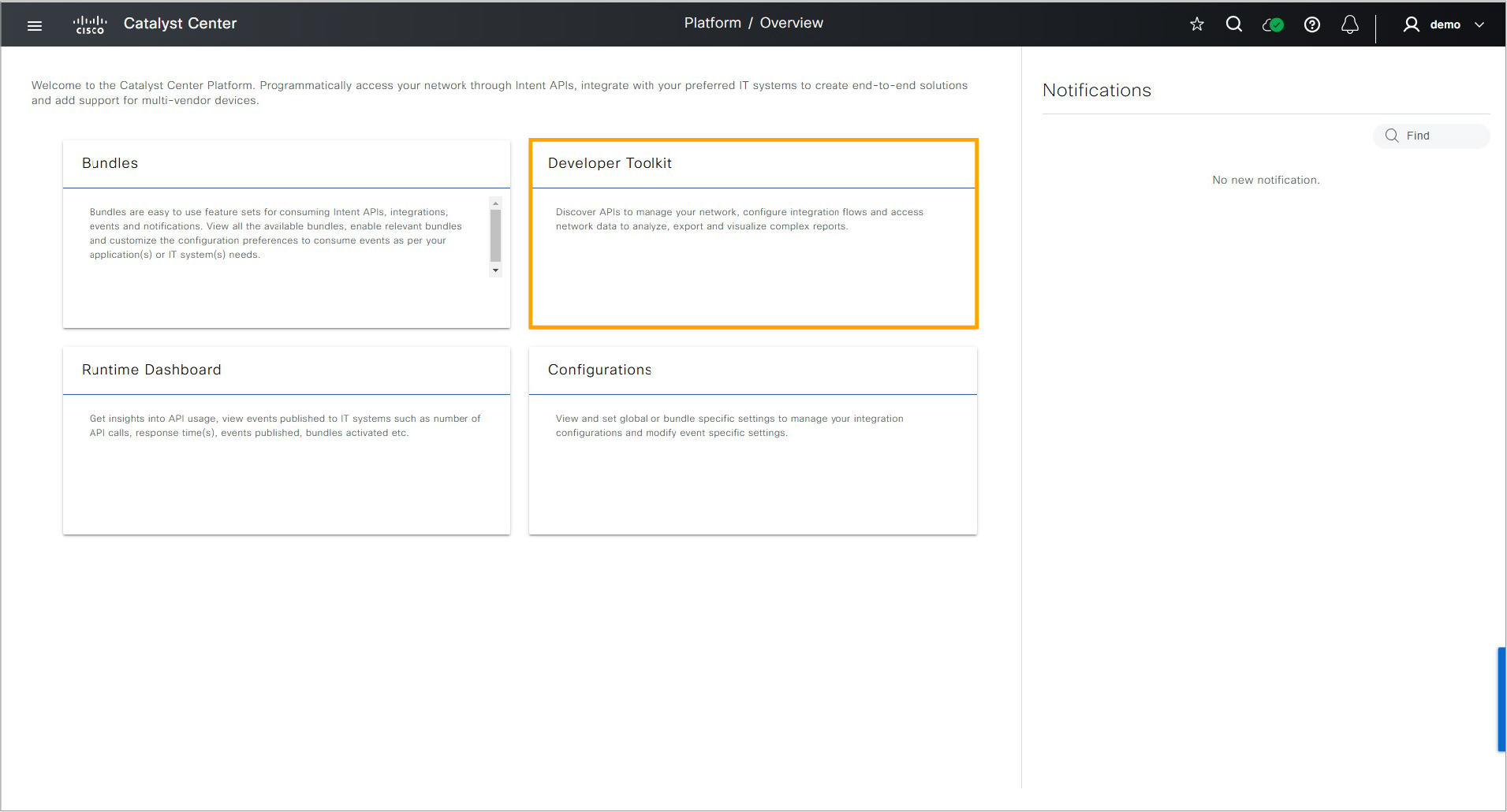
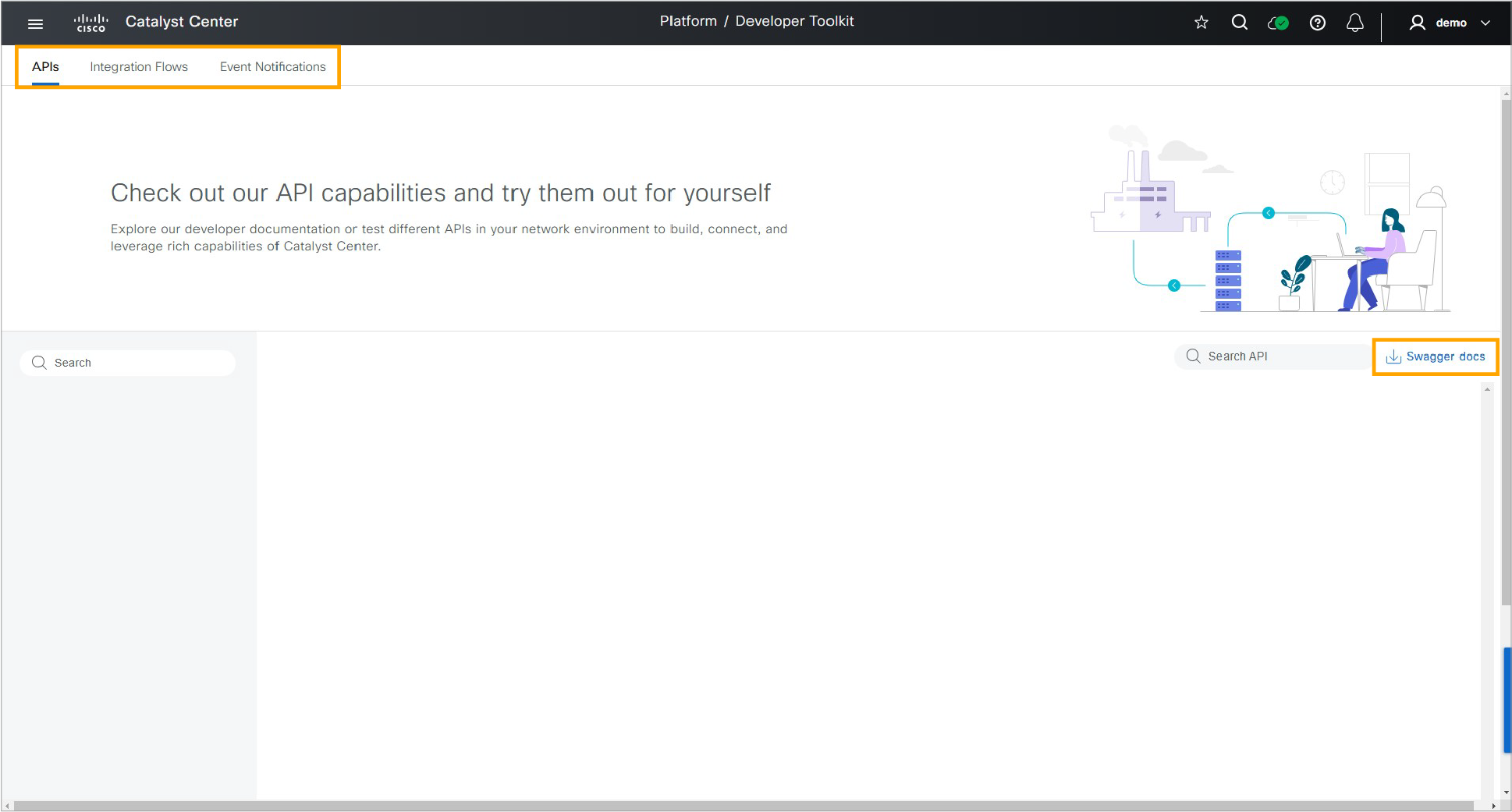
Intent API Domains
The Cisco Catalyst Center Intent APIs are grouped into the following domains:
- Authentication
- Know your network
- Site management
- Connectivity
- Operational tasks
- Policy
- Event Management
Authentication
All Cisco Catalyst Center platform REST methods require authentication. The authentication method obtains a security token that identifies the privileges of an authenticated REST caller. Cisco Catalyst Center authorizes each requested operation according to the access privileges that are associated with the security token that accompanies the request. You will use this token in subsequent calls to the intent API.
Know Your Network
The “know your network” API domain lets you view details about clients, sites, topology, devices, and issues; create (POST) and manage (PUT, DELETE) sites, devices, IP pools, edge and border devices, and authentication profiles. Your network methods are organized into the following subdomains:
- Sites: Create and manage sites, assign devices to sites, obtain site information, site count, and site membership. Sites are hierarchical collections of other sites and buildings.
- Topology: Retrieve network health information and site and network physical, Layer 2, Layer 3, and VLAN information.
- Devices: The Network Device Detail Intent API retrieves detailed information about devices by time stamp, MAC address, UUID, name, or device name. Additional queries allow you to retrieve information such as functional capabilities, interfaces, device configuration, certificate validation status, values of specified fields, modules, and VLAN data that is associated with specified interfaces. You can also add, delete, update, or sync specified devices.
- Clients: The Client Health Intent API returns overall client health information that is organized in wired and wireless categories. The Client Detail Intent API returns detailed information (including health) about a single client.
- Users: Obtain (GET) detailed information about a user, given an identifying network user ID or MAC address.
- Issues: Obtain (GET) detailed information and recommended mitigation for an issue, given an identifying issue ID or MAC address.
Site Management
The site management API domain helps provision enterprise networks with zero-touch deployment. This API domain also lets you manage the activation and distribution of software images in the network. It has the following subdomains:
- Site Design: This subdomain is used to design or provision network functions virtualization (NFV) devices to a site, area, building, or floor.
- Network Settings: This subdomain is used to get or delete device credentials, global IP pool information, and service provider details.
- SWIM: Software Image Management (SWIM) manages the software image and update repository for network devices. Software images can be stored on the Cisco Catalyst Center or imported from a designated URL. These methods support phases of SWIM, including the ability to import software images and distribute and activate images to and on devices.
- Device Onboarding (PnP): This set of methods supports management of device onboarding projects, settings, workflows, virtual accounts, and plug-and-play (PnP)-managed devices. They provide the means of zero-touch deployment of Cisco routers, switches, wireless controllers, and wireless access points.
- Configuration Templates: Configuration Templates and the Template Programmer/Editor is a centralized CLI-management tool that facilitates the design and provisioning of workflows in Cisco Catalyst Center. These methods provide management of CLI templates. CLI templates may be grouped into projects. Use this API to create, view, edit, delete, and version templates and projects.
Connectivity
The connectivity API domain provides the means for configuring and managing fabric wired and nonfabric wireless networks. It has the following subdomains:
- Fabric wired (Software Defined Access [SDA]): These methods manage fabric wired devices, including creation, update, and deletion of edge, border, user devices, and authentication profiles.
- Nonfabric Wireless: These methods manage and provision nonfabric wireless devices, including enterprise SSIDs, wireless profiles, RF profiles, and access points.
Operational Tasks
Another API domain is “operational tasks.” Operational tasks enable you to configure and manage CLI templates, discover network devices, configure network settings, and trace paths through the network. The Operational Tasks APIs are as follows:
- Command Runner: This API enables you to retrieve the keywords of all CLIs that Command Runner accepts, and lets you run read-only commands on a network device to retrieve its real-time configuration.
- Network Discovery: This API provides programmatic access to the discovery functionality of Cisco Catalyst Center. You can use this API to create, update, delete, and manage discoveries and their associated credentials. You can also use this API to retrieve the network devices that a particular discovery job acquired.
- Path Trace: This API simplifies the resolution of network performance issues by tracing application paths through the network and providing statistics for each hop along the path. You can use this API to analyze the flow between two endpoints on the network, retrieve the results of a previous flow analysis, summarize all stored flow analyses, or delete a saved flow analysis.
- File: This API enables you to retrieve files from Cisco Catalyst Center. For example, you might use this API to get a software image or a digital certificate from Cisco Catalyst Center.
- Task: This API queries Cisco Catalyst Center for more information about a specific task that your RESTful request initiated. Often, a network action may take several seconds or minutes to complete, and Cisco Catalyst Center completes most tasks asynchronously. You can use the Task API to determine if a task completed successfully. If so, you can then retrieve more information from the task itself, such as a list of provisioned devices.
- Tags: A tag is a named set of attributes that can be associated with members. Tag services provide the means to create, discover, update membership of, and remove tags.
Application Policy
The Cisco Catalyst Center platform enables the creation of application policies that reflect your organization's business intent and translates it into network-specific and device-specific configurations that the different types, makes, models, operating systems, roles, and resource constraints required by your network devices. Application Policy methods support the creation, update, and management of applications and application sets.
Event Management
The Cisco Catalyst Center platform allows you to receive custom notifications when specific events are triggered, such as Cisco Catalyst Assurance and Automation (SWIM) events. This mechanism enables third-party systems to take business actions in response to a particular event. For example, a custom application could execute a software upgrade action in response to notification of network devices that are out of compliance. Event subscriptions allow association of a notification method with a Cisco Catalyst Center event. These methods provide the means to create, read, update, and delete event subscriptions.
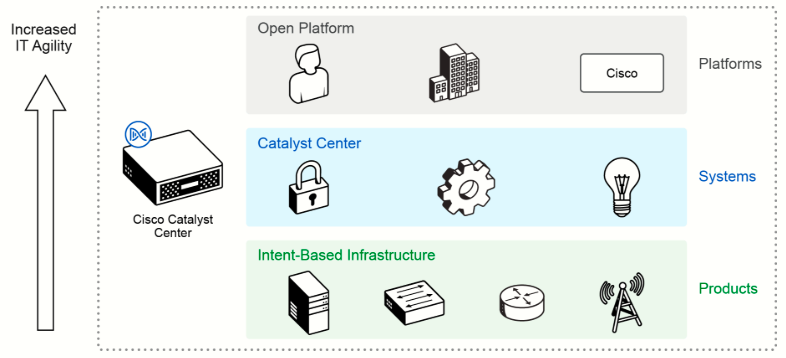
Intent API Example
You can use any modern programming language that supports REST calls with the Cisco Catalyst Center Intent API. Python is a common language that is used in network operations. To use the Intent REST API, you must first get an authentication token by providing valid credentials, and then use that token in subsequent requests to perform your Intent API requests. An example of a python snippet to get the token would be:
def get_token():
    token = requests.post(
       ‘https://<Catalyst CENTER IP>/dna/system/api/v1/auth/token’,
       auth=HTTPBasicAuth(
           username=<username>,
           password=<password>
       ),
      headers={'content-type': 'application/json'},
      verify=False,
    )
    data = token.json()
    return data[‘Token’]
The previous snippet only shows the get_token function. The file where this function is defined needs to include the appropriate code to import the requests library, and the classes defined in this library; for example, the HTTPBasicAuth class defined in the requests.auth library. Now, using the authentication token from the previous step, you could write another short Python snippet to add a new device to Cisco Catalyst Center (assuming some inputs defined for the Python function):
def add_device_to_dnac(dnac_ip, device_ip, snmp_version,
    snmp_ro_community, snmp_rw_community,
    snmp_retry, snmp_timeout,
    cli_transport, username, password, enable_password):
    device_object = {
        ‘ipAddress’: [
            device_ip
        ],
        ‘type’: ‘NETWORK_DEVICE’,
        ‘computeDevice’: False,
        ‘snmpVersion’: snmp_version,
        ‘snmpROCommunity’: snmp_ro_community,
        ‘snmpRWCommunity’: snmp_rw_community,
        ‘snmpRetry’: snmp_retry,
        ‘snmpTimeout’: snmp_timeout,
        ‘cliTransport’: cli_transport,
        ‘userName’: username,
        ‘password’: password,
        ‘enablePassword’: enable_password
    }
    response = requests.post(
        'https://{}/dna/intent/api/v1/network-device'.format(dnac_ip),
        data=json.dumps(device_object),
        headers={
            ‘X-Auth-Token’: ‘{}’.format(token),
            ‘Content-type’: ‘application/json’
        },
        verify=False
    )
    return response.json()
Upon executing the above Python snippet, within the context of a larger program, a successful response from the Cisco Catalyst Center Intent API would look like the following:
{
    'response': {
        'taskId': '6f5a724b-f922-4cec-96c3-dc5f52693934',
        'url': '/api/v1/task/6f5a724b-f922-4cec-96c3-dc5f52693934'
    },
        'version': '1.0'
}
Catalyst Center - Additional APIs and Integrations
In addition to the Intent APIs for Cisco Catalyst Center, there are other capabilities and integrations that allow Cisco Catalyst Center to be integrated with other vendors and applications.
Multivendor Support
Cisco Catalyst Center support for multiple vendors involves the use of a Java SDK, which can be used to create device packages for third-party devices. The Cisco Catalyst Center Multivendor SDK provides basic device visibility, monitoring, and the ability to interact with Command Runner. By providing basic device information, devices from a vendor other than Cisco can be identified properly, instead of appearing as an unknown device in the Cisco Catalyst Center inventory. You can also show basic details, such as the physical device chassis and software or operating system version, along with its interfaces and their operational status (up or down). By using any neighboring device's discovery protocol, such as LLDP, you can build the physical topology of multiple vendor devices in the network.
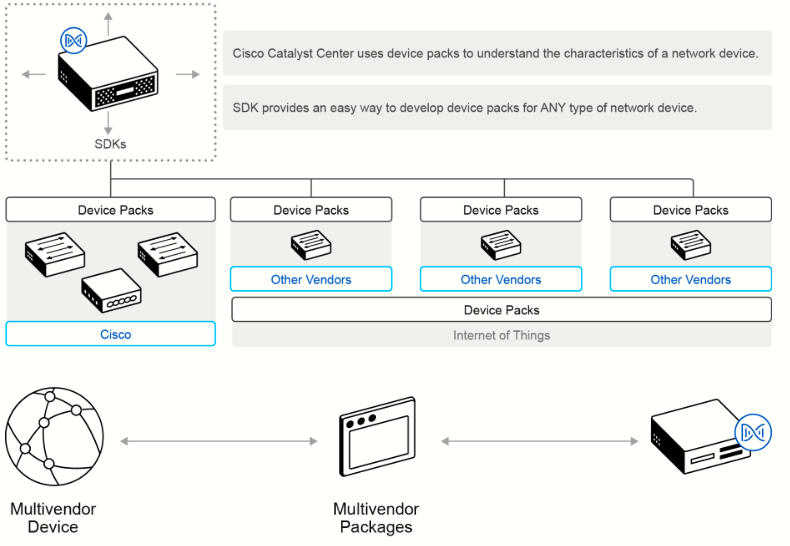
Devices by vendors other than Cisco are managed through Cisco Catalyst Center using device packages. In its simplest form, a device package uses common communication protocols (such as NETCONF, SNMP, Telnet/SSH, and others) to collect the information that is necessary to manage other vendor devices within Cisco Catalyst Center.
Integration API
The Cisco Catalyst Center Platform provides mechanisms for integrating Cisco Catalyst Center assurance workflows and data with third-party ITSM solutions. By using the REST-based Integration Adapter APIs, bidirectional interfaces can be built to allow the exchange of contextual information between Cisco Catalyst Center and external third-party IT systems. The APIs let you publish the network data, events, and notifications to external systems and consume information in Cisco Catalyst Center from the connected systems.
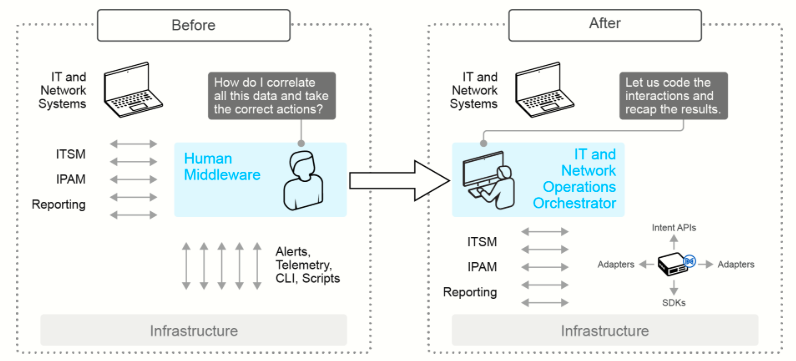
Cisco Catalyst Center can integrate with ITSM systems, and can minimize the need for handoffs, de-duplicate issues, and optimize processes for proactive insights and faster remediation. This goal is achieved by integrating Cisco Catalyst Center with the ITSM incident, change, event, and problem management workflows; the ITSM approval and preapproval chains; and the formal change and maintenance window scheduling processes. Examples of ITSM systems include ServiceNow, or an in-house ticketing system.
Cisco Catalyst Center can also integrate with IPAM systems to ensure consistent management and synchronization of IP pools between external IPAM systems and Cisco Catalyst Center. This integration allows for seamless import of IP pools for Cisco Catalyst Center workflows from external IPAM systems, synchronization of IP pool and subpool usage information, and provides critical DNS, DHCP, and IPAM (DDI) insights to enrich and help with Cisco Catalyst Center assurance issue granularity. The earlier Cisco Catalyst Center releases provide out-of-the-box integration with Infoblox and BlueCat. In the future, the Cisco Catalyst Center Platform will provide the APIs to integrate with the more external IPAM system through generic APIs.
Cisco Catalyst Center also has the option of other third-party reporting integrations, such as enabling the creation of a flexible dashboard and on-demand correlations via the Desktop as a Service (DaaS) APIs. This integration allows Cisco Catalyst Center to publish insights and data to external reporting systems. This data can then be retrofitted into the dashboard and combined with other data stores to benchmark, trend, and analyze information. The goal is to allow users to interact with data sets, augment them with other data sets, and then create business-relevant insights.
Finally, the Cisco Catalyst Center platform lets you receive custom notifications when specific events are triggered, such as Cisco Catalyst Center assurance and automation events. This mechanism enables third-party systems to take business actions in response to a particular event. For example, a custom application could execute a software upgrade action in response to notification of network devices that are out of compliance. Events that the Cisco Catalyst Center Platform generates can trigger notifications. For example, assurance events can be customized for ITSM incidents. Then the events can also be published as webhooks. A webhook is an HTTP callback, or HTTP POST, that executes in response to a particular event.