
APIs - Introduction to APIs + REST APIs + Security
Introduction to APIs
Generally speaking, an API is code that allows for two different software programs to communicate with each other. The different software programs represented in the SDN architecture are composed of three stacked layers called the data plane, control plane, and application plane.
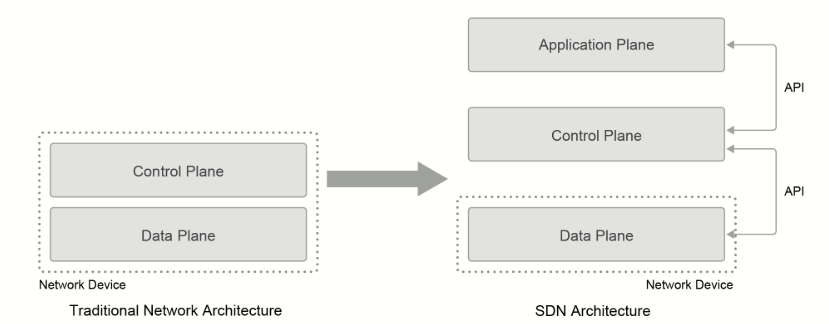
- Data (or forwarding) plane: Contains network elements (any physical or virtual device that deals with customer traffic).
- Control plane: Represents the core layer of the SDN architecture. It contains SDN controllers, which provide centralized control of the devices in the data plane.
- Application plane: Contains SDN applications that communicate their network requirements toward the controller.
The SDN controller uses APIs to communicate with the application and data planes.
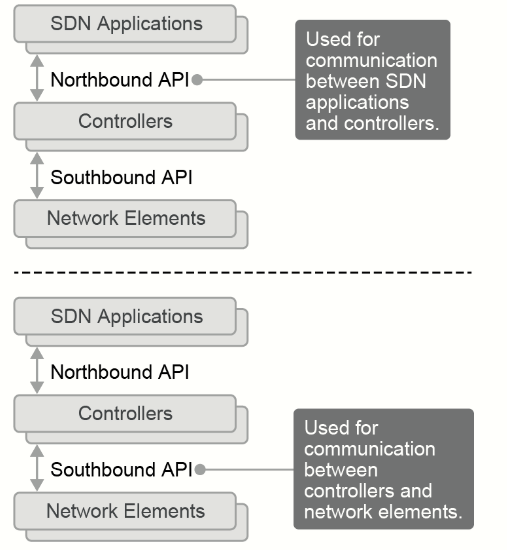
- Northbound API (to offer services to the application plane)
- Currently, very little has been done for unification; different applications use different APIs.
- Southbound API (for communication with the data plane)
- OpenFlow: Configure the flow tables in switches
- NETCONF: Configure devices with XML, transactional
- OpFlex
Northbound APIs
Responsible for the communication between the SDN controller and the services that run over the network. Northbound APIs enable your applications to manage and control the network. So rather than adjusting and tweaking your network repeatedly to get a service or application running correctly, you can set up a framework that allows the application to demand the network setup that it needs. These applications range from network virtualization and dynamic virtual network provisioning to more granular firewall monitoring, user identity management, and access policy control.
Unfortunately, there is currently no single northbound interface that you can use for communication between the controller and applications. Instead, you use various different northbound APIs, each working only with a specific set of applications.
Southbound APIs
AKA device-to-control-plane interface, are used for communication between the controllers and network devices.
- OpenFlow: OpenFlow describes an industry-standard API, which the Open Networking Foundation (ONF) defines. It configures the flow tables in the switches and, as a result, defines the flow path through the network. The actual configuration of the devices is accomplished with the use of NETCONF.
- NETCONF: NETCONF is a network management protocol that the IETF standardized. It provides mechanisms to install, manipulate, and delete the configuration of network devices via remote procedure call (RPC) mechanisms. The messages are encoded by using XML. Not all devices support NETCONF—the devices that do support it advertise their capabilities via the interface.
- OpFlex: OpFlex is an open-standard protocol that provides a distributed control system that is based on a declarative policy information model. The main difference between OpFlex and OpenFlow lies with their respective SDN models. OpenFlow uses an imperative SDN model, where a centralized controller sends detailed and complex instructions to the control plane of the network elements to implement a new application policy. In contrast, OpFlex uses a declarative SDN model. The controller, which, in this case, is called by its marketing name, Cisco APIC (Cisco Application Policy Infrastructure Controller), sends a more abstract policy to the network elements. The controller trusts the network elements to implement the required changes using their own control planes.
NETCONF is a protocol that allows you to modify the configuration of a networking device, whereas OpenFlow is a protocol that allows you to modify its forwarding table. If you need to reconfigure a device, NETCONF is the way to go. If you want to implement a new functionality that is not easily configurable within the software that your networking device is running, you should be able to modify the forwarding plane directly by using OpenFlow.
REST API Response Codes and Results
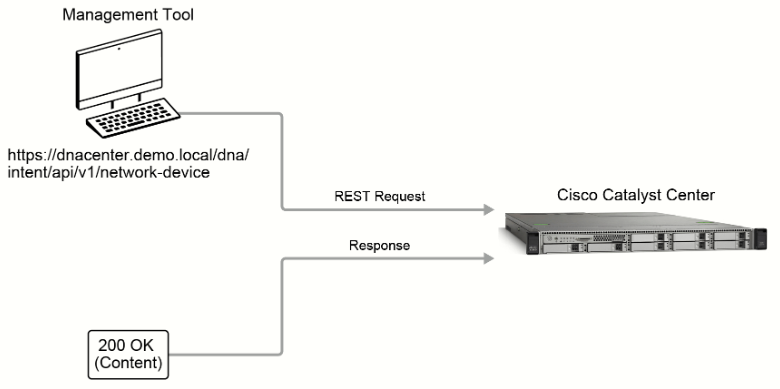
REST APIs use the status-line part of an HTTP responde to inform clients of the results of their requests.
REST is based on the HTTP request-response model. The Cisco Catalyst Center intent API uses the GET, POST, PUT, and DELETE HTTP actions only.
- GET: Retrieve data from the path that the URL specifies.
- POST: Write new data at the path that the URL specifies. Used only to create new data on the server.
- PUT: Replace existing data at the URL path. Cannot be used to create new data, only to update existing data.
- DELETE: Remove existing data at the URL path.
REST uses HTTP or HTTPS to send a request to a web service, which returns a response.
HTTP Status Codes
When the web service processes an HTTP or REST request, it returns a standard HTTP status code that indicates whether the request succeeded.
|
Status Code |
Description |
|
200 OK |
The request was successful. The result is contained in the response body. |
|
201 Created |
The POST/PUT request was fulfilled, and a new resource has been created. Information about the resource is in the response body |
|
202 Accepted |
The request was accepted for processing, but the processing has not been completed. |
|
204 No Content |
The request was successful; however no content was returned. |
|
206 Partial Content |
The GET request included a Range Header, and the server responded with the partial content matching the range. |
|
400 Bad Request |
The client made a request that the server could not understand (for example, the request syntax is incorrect). |
|
401 Unauthorized |
The client's authentication credentials included with the request are missing or invalid. |
|
403 Forbidden |
The server recognizes the authentication credentials, but the client is not authorized to perform this request. |
|
404 Not Found |
The client made a request for a resource that does not exist. |
|
409 Conflict |
The target resource is in a conflicted state (for example, an edit conflict where a resource is being edited by multiple users). Retrying the request later might succeed. |
|
415 Unsupported Media Type |
The client sent a request body in a format that the server does not support (for example, XML to a server that only accepts JSON). |
|
500 Internal Server Error |
The server could not fulfill the request. |
|
501 Not Implemented |
The server has not implemented the functionality required to fulfill the request. |
|
503 Service Unavailable |
The server is (temporarily) unavailable. |
|
504 Gateway Timeout |
The server did not respond within the time restrictions, so it timed out. |
If the error was caused by the client request, the server will return a 4xx
If the error was caused by a server error, the server will return a 5xx
REST API Security
When using automation such as APIs, you must also consider the security of the communications between the controller and applications or network devices.
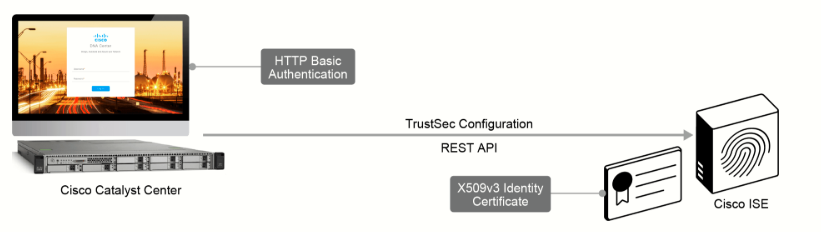
There are two parts to the security of REST API communications:
- Securing the communication channel from prying eyes.
- Verifying that the data is from a trusted source.
In the figure, Cisco Catalyst Center is using a REST API to push TrustSec configuration to the ISE. For this communication, ISE acts as the HTTPS server. Communications between Cisco Catalyst Center and ISE will be encrypted using SSL/TLS, ensuring that if the data flow is captured, data cannot be easily viewed by prying eyes.
Another security feature provided by HTTPS is the need for Cisco ISE, as the server, to provide an X509 v3 identity certificate prior to secured communications. Cisco Catalyst Center must verify the identity certificate by validating the signature attached to the certificate before the secure tunnel will be established. This can be done by installing the trusted root certificate of the root CA that signed the certificate, or in the case of a self-signed certificate, installing the identity certificate itself. The identity certificate ensures that Cisco Catalyst Center is pushing configuration to the trusted device.
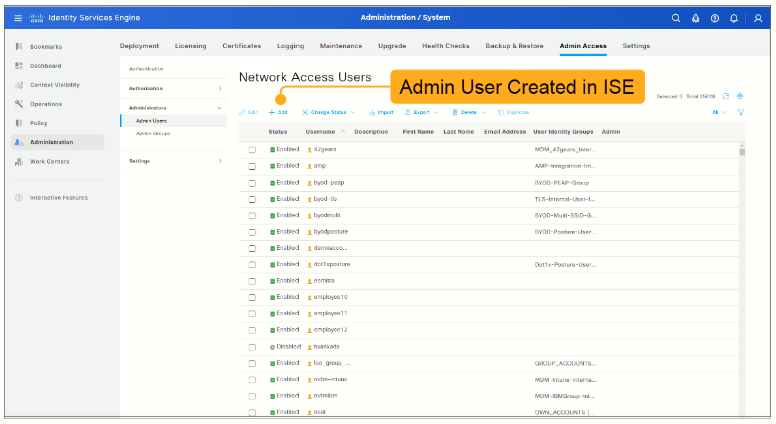
While Cisco Catalyst Center can verify the identity of Cisco ISE by the identity certificate, it is also imperative that Cisco ISE can verify the identity of Cisco Catalyst Center before applying any configuration that it receives. REST API HTTPS requests are authenticated using HTTP basic authentication. The basic authentication header must be added to every API request and authentication will be performed for every request.
For this to work, an admin user must be created in Cisco ISE that has permissions enabling access to the REST API interface. For other network devices, such as the ASA, User Privilege Levels can restrict which features can be accessed using REST APIs. As an example, on the ASA, User Privilege Level 3 or greater is needed to invoke monitoring APIs, User Privilege Level 5 is needed to invoke GET APIs, and User Privilege Level 15 or greater is needed for invoking PUT/POST/DELETE APIs.