
Multicast - Source Specific Multicast (SSM) (6)
What is Source Specific Multicast (SSM)?
In standard PIM Sparse Mode, a host joins a group using a generic (*, G) request. The network relies on a Rendezvous Point (RP) to find out who is broadcasting the traffic, which adds complexity and latency.
SSM simplifies everything by completely eliminating the RP and the shared tree. Instead of asking the network "Who is sending to this group?", the host already knows the sender's IP address beforehand. It requests a direct, immediate (S, G) Shortest Path Tree (SPT) from the very first packet.
How SSM Works? (Step-by-Step)
|
|
|
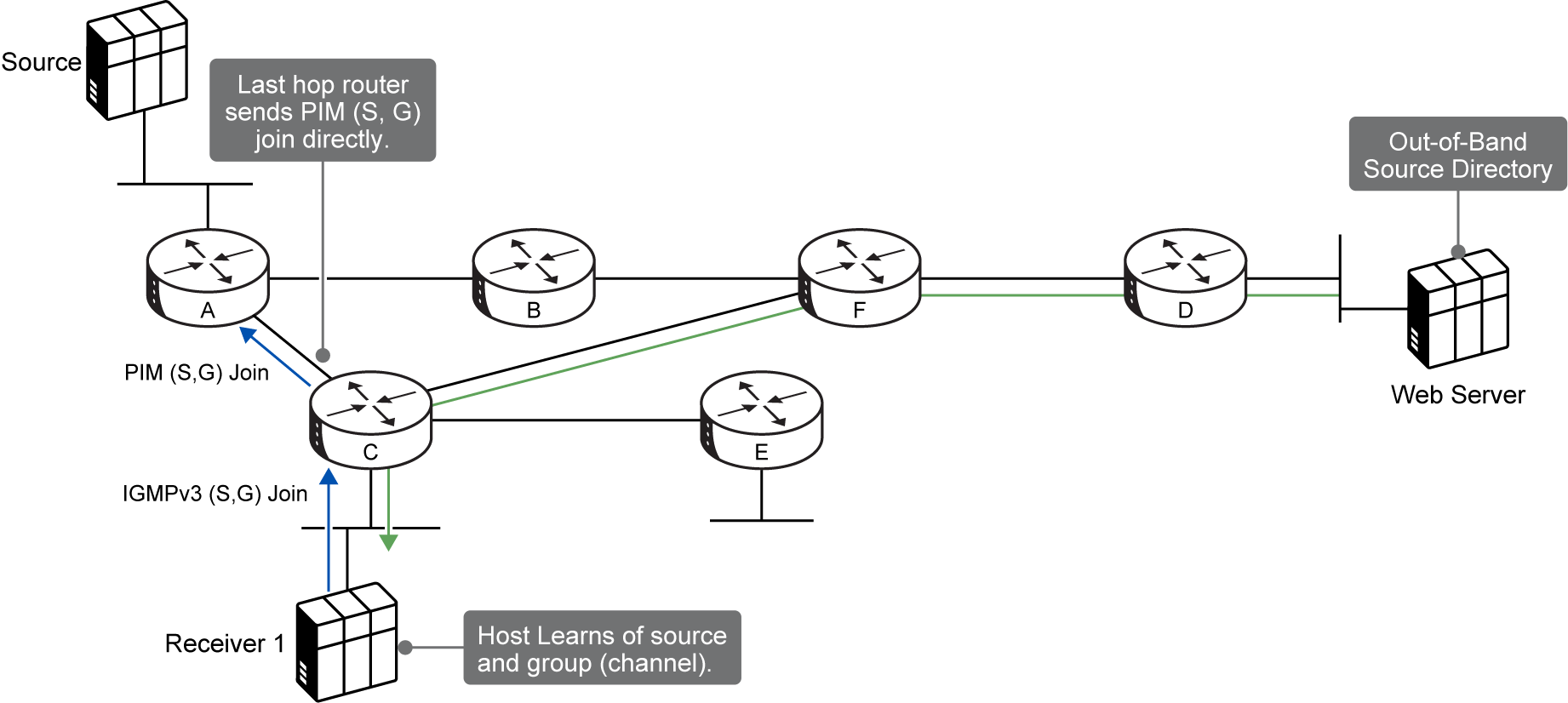
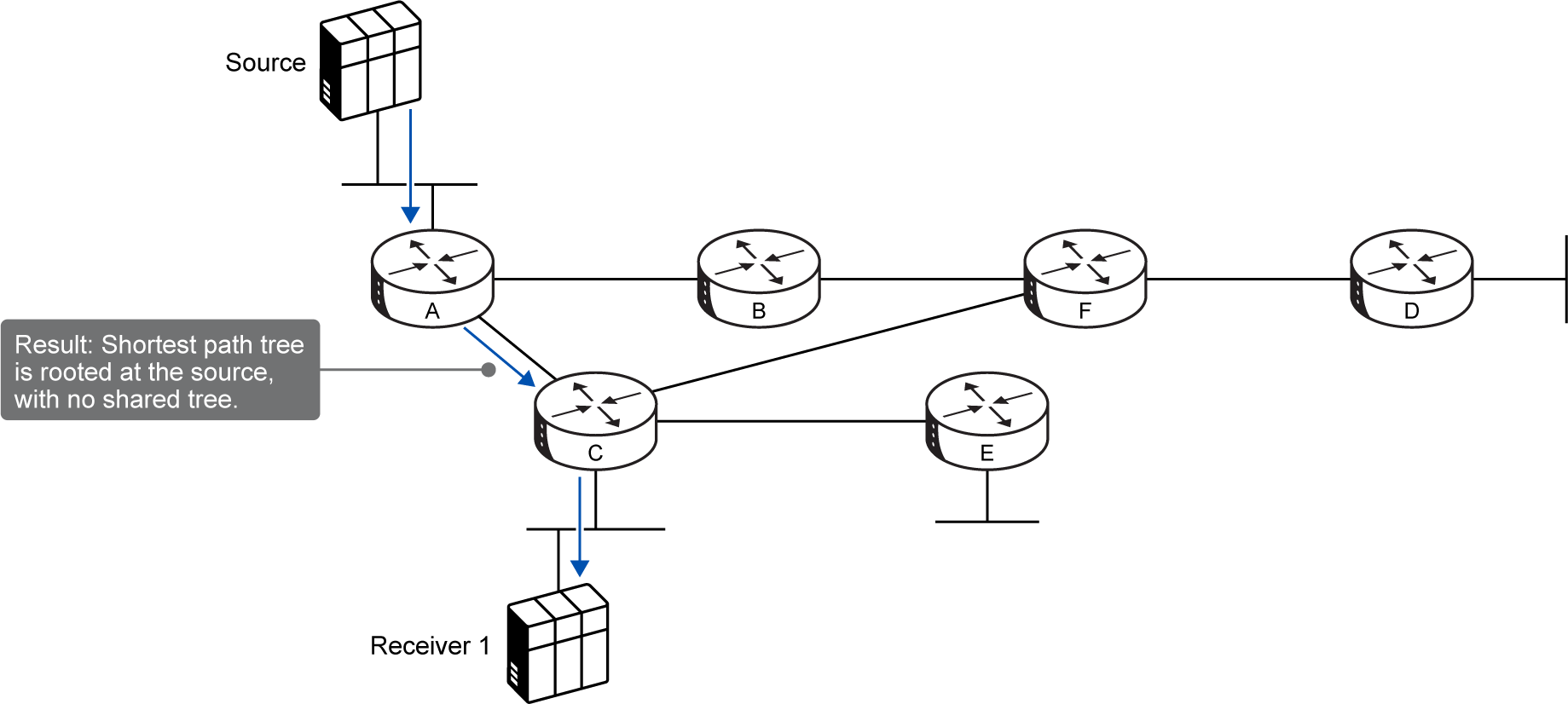
As shown across the previous images, the workflow follows a precise chain:
-
Out-of-Band Discovery: The host (Receiver 1) cannot natively discover sources via multicast. It must learn the source IP and the group IP through an external, out-of-band method, such as a website directory, a web server, or a session announcement.
-
The IGMPv3 Report: Once the host knows both pieces of information, it sends an IGMPv3 membership report specifying the group and explicitly listing the allowed source IP in the
source_list -
Immediate PIM (S, G) Join: The local last-hop router (Router C) receives the IGMPv3 report. Because it knows the exact source IP, it completely skips sending a (*, G) join to an RP. Instead, it immediately fires a PIM (S, G) join directly toward the first-hop router (Router A) connected to the source.
-
The Result: A native, direct Shortest Path Tree is built from the source straight to the receiver with zero shared tree infrastructure and no RP required
The 3 Massive Benefits of SSM
1. Infinite Address Reuse (No Address Collisions)
-
-
The Old Way: In traditional multicast, an IP group address had to be strictly unique across the network. If two different servers broadcasted different video feeds on the same group address, the traffic would smash together on the shared tree, causing total corruption.
-
The SSM Way: Because routing is explicitly locked to (S, G), traffic is kept entirely separate by the source IP. Server A (10.1.1.1) and Server B (192.168.1.1) can broadcast completely different data using the exact same multicast group IP (232.1.1.1) simultaneously. The network routes them as two separate trees: (10.1.1.1, 232.1.1.1) and (192.168.1.1, 232.1.1.1).
-
2. No RP or MSDP Needed
-
Network administration becomes significantly easier. There are no RPs to configure or maintain.
-
For networks broadcasting multicast across different internet domains, the complex Multicast Source Discovery Protocol (MSDP) is completely eliminated.
3. One-to-Many Optimization
-
-
It provides the absolute lowest latency path out of the box, making it the perfect model for one-to-many datagram delivery applications (like a single server streaming video to thousands of corporate workstations).
-
The Dedicated SSM Address Range
The Internet Assigned Numbers Authority (IANA) allocated a specific, global IPv4 range exclusively for SSM:
232.0.0.0/8
Modern routers are hardcoded to recognize this range. When a router sees traffic destined for a 232.0.0.0/8 address, it is strictly prohibited from building a shared tree or generating a (*, G) entry.
The Legacy Problem: Dealing with Old Routers
SSM relies on the assumption that every router in the network understands what the 232.0.0.0/8 range means. If legacy routers exist in the network that do not support SSM, they will treat 232.0.0.0/8 like a normal multicast group and try to build shared trees or register with an RP, causing address collisions and potential routing loops.
To safely deploy SSM in a mixed network containing legacy hardware, four specific filtering mechanisms must be manually established to force the network to drop legacy shared tree attempts for the 232.0.0.0/8 range:
-
1. At the RP (Filter Register Messages): Prevent first-hop routers from registering 232.0.0.0/8 sources to the RP. If a registration attempt is made, the RP must immediately respond with a unicast PIM Register-Stop message to kill the process.
-
2. At Last-Hop Routers (Filter Joins): Explicitly block last-hop routers from originating or forwarding (*, G) joins if the target address falls within 232.0.0.0/8.
-
3. At Intermediate Routers (Filter Prunes): Block intermediate routers from originating any (S, G) prunes by strictly overriding and setting the RP bit.
-
4. At Border Routers (Filter MSDP): In interdomain deployments utilizing MSDP, configure strict filters on the RP or border routers to block the origination and forwarding of "Source-Active" (SA) messages for any groups inside the 232.0.0.0/8 block.