
APIs - SD-WAN Rest API
Cisco Catalyst SD-WAN provides a REST API, which can be accessed through the Cisco Catalyst SD-WAN Manager.
The API provides calls for retrieving real-time and static information about the Cisco Catalyst SD-WAN overlay network and the devices in the network and for uploading device configuration templates and other configuration-related information. Using the RESTful API, you can design a custom portal to interact with the Cisco Catalyst SD-WAN Manager.
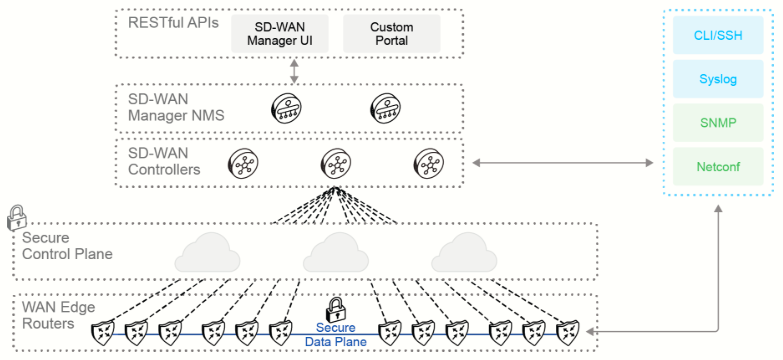
The Cisco Catalyst SD-WAN REST API calls expose the functionality of Cisco Catalyst SD-WAN software and hardware features and of the normal operations you perform to maintain Cisco Catalyst SD-WAN devices and the overlay network itself. In REST API terminology, each of these features or operations is called a resource. A resource is an object with a type, associated data, relationships to other resources, and a set of methods that operate on it.
Resources are grouped into collections. Each collection contains a single type of resource, and so is homogeneous. In the Cisco Catalyst SD-WAN REST API, the collection of resources is present at the top level of the API. The Cisco Catalyst SD-WAN REST API resources are grouped into the following collections:
- Monitoring: This collection views status, statistics, and other information about operational devices in the overlay network. WAN Edge devices collect monitoring information about themselves every 10 minutes. After collecting these statistics, each WAN Edge device places them in a zip file. The Cisco Catalyst SD-WAN Manager server retrieves these zip files every 10 minutes or, if the Cisco Catalyst SD-WAN Manager server cannot log in to the device, it retrieves them whenever it is next able to log in.
- Real-Time Monitoring: This collection retrieves, views, and manages real-time statistics and traffic information. Real-time monitoring information is gathered in real time, approximately once per second.
- Configuration: This collection creates feature and device configuration templates, retrieves the configurations in existing templates, and creates and configures Cisco Catalyst SD-WAN Manager clusters.
- Administration: This collection manages users and user groups, views audit logs, and manages the local Cisco Catalyst SD-WAN Manager server.
- Device Inventory: This collection collects device inventory information, including serial numbers and system status.
- Certificate Management: This collection manages certificates and security keys.
- Troubleshooting Tools: This collection provides tools to help troubleshoot devices, determine the effect of policy, update software, and retrieve software version information.
Advantages of Using the API
The following are advantages of using the API:
- Streamline your workflow
- Quickly deploy and manage services
- Enhance application experiences
There are several benefits of using the API. You can simplify your workflow to integrate third-party applications such as existing management tools for operational billing services and support. You can also seamlessly extend the WAN to multiple public clouds, quickly deploy and manage devices, help with centralized branch and remote site connectivity for operational simplification and security, and enable application-aware policy-based automation. With APIs, you can enhance the application experience, which leads to traffic optimization and results in a better user experience. You can also provide seamless migration of workloads to cloud providers (hybrid cloud). More specifically, using APIs can help users with network programmability and with third-party application integrations in the following ways.
Network programmability and automation:
- Automatically attach and detach templates in a large fabric.
- Modify fabric policy dynamically and automatically.
- Take advantage of DevOps tools.
- Integrate the network with ChatOps solutions.
Third-party application integration:
- Optimize operation workflows by integrating the network with customer relations management (CRM) and ticketing systems.
- Integrate the SD-WAN fabric with third-party monitoring solutions.
A common REST principle is that APIs should be self-descriptive and self-documenting. The resource collections and resources in the Cisco Catalyst SD-WAN REST API are self-documenting, and describe the data that you need to make a call and the response from each call. However, the collections and resources assume that you are familiar with the Cisco Catalyst SD-WAN overlay network concepts, software, and hardware features and capability. If you are not able to find available requests from the API documentation in the Cisco Catalyst SD-WAN website, they are also available by accessing the documentation through https://{{manager_ip}}:{{port}}/apidocs.
Making API Calls
Before making any API calls, the first step in interacting with an API is authentication. The common way to authenticate with the In the monitoring portion of Cisco Catalyst SD-WAN Manager API is using cookie-based authentication. With authentication, you want to make sure that only authenticated users have access to the API. You can further limit the access by taking advantage of role-based access control (RBAC) features with which you can assign users to specific groups (for example, admin, network-operators, custom) with limited permissions.

To authenticate, first you need to specify the endpoint, https://{{manager_ip}}:{{port}} and then the login resource, /j_security_check. The login data like username and password will be sent as a body or payload so it can be authenticated. Once the POST request has been sent, a 200 OK response and JSESSIONID cookie are returned and will be used later for other API requests. This cookie has a limited lifetime and is a temporary representation of the successful authentication of the user.
- Method: POST
- URL: https://{{manager_ip}}:{{port}}/j_security_check
- Body: x-www-form-urlencoded
- Keys:
- j_username
- j_password
- Values:
- {{ j_username }}
- {{ j_password }}
The API can also accept PUT, DELETE, and PATCH request types.
After the authentication request has been accomplished, the user can now make other API calls to either retrieve or update data. Application tools can be made to help the user customize how to make changes or view the data. The following is an example of a request to retrieve inventory data using a GET request:
- Method: GET
- URL: https://{{manager_ip}}:{{port}}/dataservice/device
- Response:
{
    "header": { ...omited..
       },
    "data": [
        {
            "deviceId": "172.27.0.5",
            "system-ip": "172.27.0.5",
            "host-name": "sd-wanmanage-1",
            "reachability": "reachable",
            "status": "normal",
            "personality": "sd-wanmanage",
            "device-type": "sd-wanmanage",
            "timezone": "America/Detroit",
            "device-groups": [sd-wan
                "\"No groups\""
            ],
            "lastupdated": 1571123443408,
            "domain-id": "0",
            "board-serial": "1235",
            "certificate-validity": "Valid",
            "max-controllers": "0",
            "uuid": "8aa58e7d-04e7-4779-8a08-7d4e375349cb",
            "controlConnections": "3",
            "device-model": "sd-wanmanage",
            "version": "18.4.1",
            "connectedsd-wanManages": [
                "\"172.27.0.5\""
            ],
<...output omitted.. >
SD-WAN Manager - Monitoring APIs (including Real-Time)
In the monitoring portion of Cisco Catalyst SD-WAN Manager, you can view the status, statistics, and other information about operational devices in the overlay network. WAN Edge devices collect monitoring information about themselves every 10 minutes.
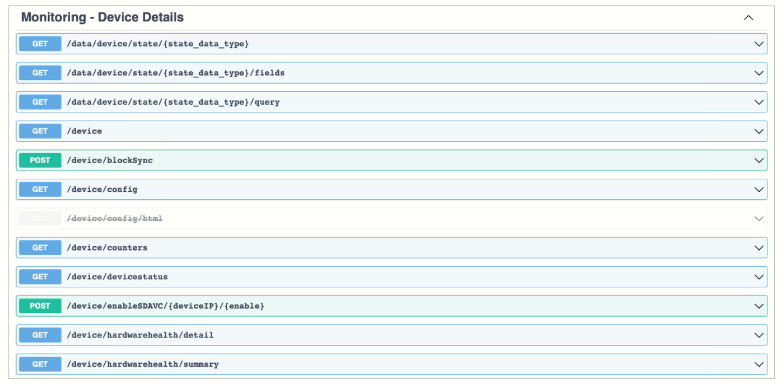
After collecting these statistics, each WAN Edge device places them in a zip file. The server retrieves these zip files every 10 minutes or, if the SD-WAN Manager server cannot log in to the device, it retrieves them whenever it is next able to log in.
Real-time monitoring can be used for retrieving, viewing, and managing real-time statistics and traffic information. Real-time monitoring information is gathered in real time, approximately once per second.
The options that can be done through the SD-WAN Manager can be done through the API if the user decides to use an external tool to capture and consume the data. Some of the options in the GUI are the following:
- Geography: This option is a map view of the entire network and displays the geographic location of the devices in the network.
- Network: This option is an inventory of all WAN Edge devices in the network with detailed information on each device.
- Alarms: This option shows details on alarms that are generated by all WAN Edge devices in the network.
- Events: This option shows details on events that are generated by all WAN Edge devices in the network.
- Audit Log: This option is an audit log of all activities on WAN Edge devices.
- ACL Log: This option shows system log messages that are related to ACLs configured on a WAN Edge router.
- Interface: This option shows API calls for real-time monitoring of interface information.
After getting inventory data, there are some other available APIs that can help gather real-time interface data. The following example will display information about IPv4 interfaces on a WAN Edge device. The equivalent CLI command to this request would be show interface.
- Method: GET
- URL: https://{{manager_ip}}:{{port}}//dataservice/device/interface?deviceId=deviceId
There are also some other optional parameters. The parameter that is shown here is deviceId, which is the IP address of a specific device. It is a required parameter. Other optional parameters would be vpn-id, ifname, and af-type. This API will respond in JSON.
SD-WAN Manager - Configuration APIs
The configuration aspect of SD-WAN Manager is used to create feature and device configuration templates, retrieve the configurations in existing templates, and create and configure SD-WAN Manager clusters.
In the SD-WAN Manager, there are also troubleshooting tools to troubleshoot devices, determine the effect of policy, update software, and retrieve software version information.
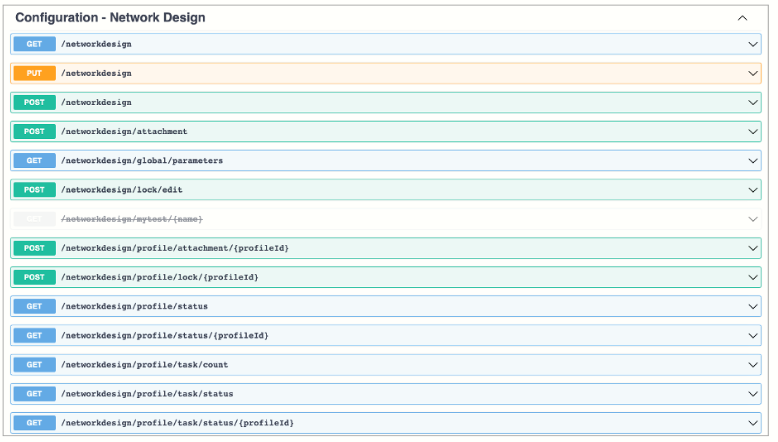
You can also create and store configurations for all devices in the Cisco Catalyst SD-WAN overlay network and the SD-WAN Managers themselves, SD-WAN Controllers, SD-WAN Validators, and the WAN Edge routers on the SD-WAN Managers. When the devices start up, they contact the SD-WAN Managers, and the NMS then downloads the configuration to the device. (A device that is starting up first contacts the SD-WAN Validators, which validates the device and then sends it the IP address of the SD-WAN Managers.)
Other options that can be done through the configuration portion of SD-WAN Validators are as follows:
- Devices: Add or delete devices from the overlay network.
- Certificates: Manage certificates and authenticate WAN Edge devices in the overlay network.
- Templates: Create configuration templates for a set of WAN Edge devices.
- Policy: Create common policies for a set of SD-WAN controllers.
- CloudExpress: Optimize access to cloud applications from direct internet access nodes in the overlay network.
- Cloud OnRamp: Create virtual private cloud instances for hosting WAN Edge cloud routers in the public internet.
The following API request example is used to generate device input variables for a CLI or feature template. To make changes, it uses a POST request and body in JSON format with the specified values in the following table.
- Method: POST
- URL: https://{{manager_ip}}:{{port}}/dataservice/template/device/config/input
- Body:
{
  "templateId":"41f6a440-c5cc-4cc6-9ca1-af18e332a781",
  "deviceIds":
    [
      "5e5f45e7-3062-44b2-b6f6-40c682149e05"
    ],
  "isEdited":false,
  "isMasterEdited":false
  }
}
|
Value |
Description |
|
deviceIds |
List of device UUIDs. |
|
isEdited |
The value true indicates that this is an existing CLI or feature template that has been modified. The value false indicates that this is a new template. |
|
isMasterEdited |
The value true indicates that a device template created from feature templates has been modified. The value false indicates that the device template created from feature templates has not been modified. |
|
templateId |
Device template identifier. |
SD-WAN Manager - Configuration APIs
The administration portion of the SD-WAN Manager component is used for managing users and user groups, viewing audit logs, and managing the local SD-WAN Manager server.
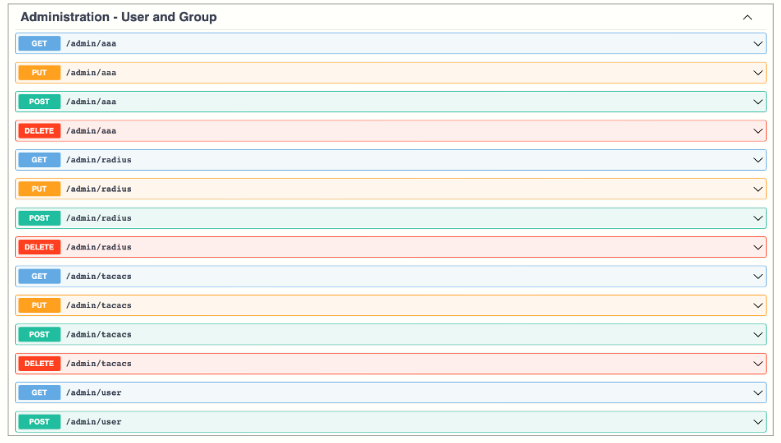
The administration portion of the API has different resources that can be managed:
- Settings: Configure the organization name, the Cisco Catalyst SD-WAN Validator’s DNS name or IP address, certificate settings, and statistics collection.
- Manage Users: Add, edit, or delete users and user groups from the SD-WAN Manager.
- Cluster Management: Create and manage a SD-WAN Manager cluster.
- Tenant Management: For a multitenant SD-WAN Manager, create and manage tenants.
The following is an API request for user data:
- Method: GET
- URL: https://{{manager_ip}}:{{port}}/dataservice/admin/user
- Response
{
  "header": {...omitted..
      },
  "data": [
    {
      "userName": "admin",
      "group": []
    }
  ]
}
SD-WAN Manager - Device Inventory APIs
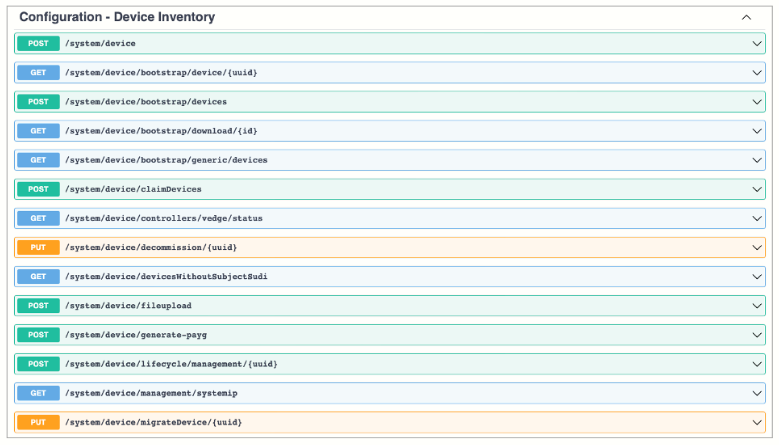
The SD-WAN Manager inventory collects device inventory information, including serial numbers and system status. To be more specific, the inventory contains data about connected devices, controllers, and WAN Edge devices.
- Connected Devices: API call for monitoring of devices that are connected to SD-WAN Manager.
- Controllers: API call for monitoring of available controllers. Display all available controllers: SD-WAN Validator, SD-WAN Manager, and SD-WAN Controllers in the overlay network.
- WAN Edge routers: API call for monitoring of available WAN Edge routers. Display all available WAN Edge routers in the overlay network.
The following is an API example for requesting device details:
- Method: GET
- URL: https://{{manage_ip}}:{{port}}//dataservice/system/device/vedges
- Response:
{
  "header": {...omitted..
    },
  "data": [
    {
      "deviceType": "vedge",
      "serialNumber": "20d139bdca0ea7bae2a26f9cf5c55894",
      "uuid": "57ab050f-2d9d-40c1-80b7-a2b507b20c68",
      "managementSystemIP": "0.0.0.0",
      "chasisNumber": "57ab050f-2d9d-40c1-80b7-a2b507b20c68",
      "configOperationMode": "cli",
      "deviceModel": "vedge-cloud",
      "deviceState": "READY",
      "validity": "invalid",
      "vedgeCertificateState": "tokengenerated",
      "personality": "vedge",
      "uploadSource": "File Upload",
      "lifeCycleRequired": true
SD-WAN Manager - Certificate Management APIs
The Certificate Management API is used to manage certificates and authenticate WAN Edge devices in the overlay network.
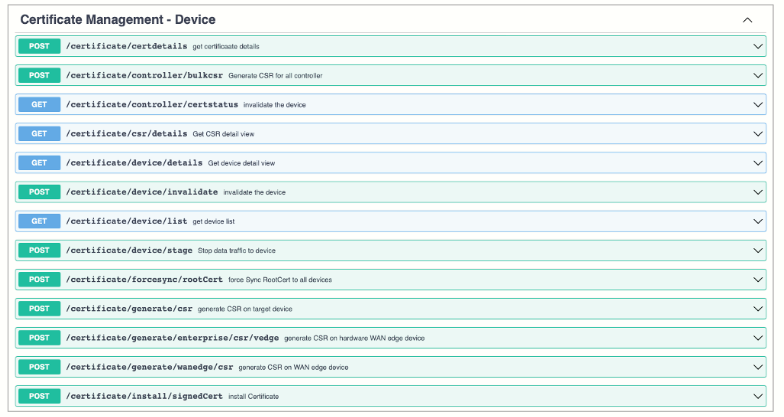
Once authenticated, devices can establish secure sessions between each other. It is from the SD-WAN Manager that you generate these certificates and install them on the SD-WAN Manager, SD-WAN Validators, and SD-WAN Controllers.
You must install the certificates and the WAN Edge authorized serial number file on the controller devices to allow the Cisco Catalyst SD-WAN overlay network components to validate and authenticate each other and to allow the overlay network to become operational.
The following is an API example for requesting certificate data:
- Method: GET
- URL: https://{{manager_ip}}:{{port}}/dataservice/certificate/view
- Response:
{
  "name": "certificateViewUI",
  "data": [
    {
      "name": "Controller",
      "uri": "dataservice/certificate/record",
      "refresh": "30",
      "detail": "dataservice/certificate/csr/details"
    },
    {
      "name": "vEdge List",
      "uri": "dataservice/certificate/vedge/list",
      "refresh": "30"
    },
    {
      "name": "History",
      "uri": "dataservice/certificate/history",
      "refresh": "30"
    }
  ]
}
Optimize Large Requests
In large networks, doing API calls for each device can be cumbersome with a lot of operational overhead. This is why Cisco Catalyst SD-WAN provides RESTful bulk API calls, which allow you to issue a single RESTful API command to collect information about multiple WAN Edge routers in the overlay network. This is especially useful when integrating with any external monitoring tools. The information is returned in batches, where you are able to specify the number of items returned.
There are two types of bulk API operations:
- State: These operations return status information about the WAN Edge devices, such as the number and state of Overlay Management Protocol (OMP) and Bidirectional Forwarding Detection (BFD) sessions. It is used for getting information about the overlay devices and their operation.
- Statistics: These operations return statistics from the WAN Edge devices, such as the number of transmitted and received data packets or flows, alarms, events, and logs.