
CoPP
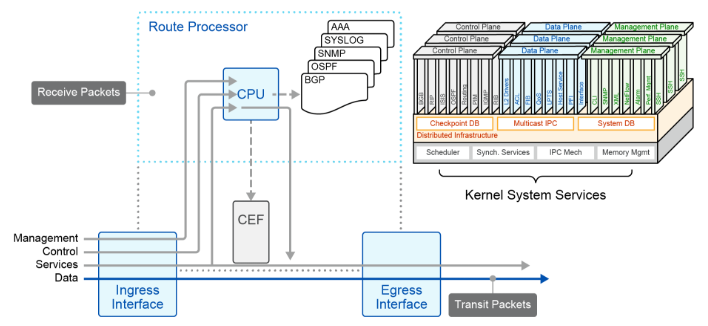
1. The 4 Logical IP Traffic Planes
Network traffic is divided into four functional planes based on packet purpose and handling requirements:
| Traffic Plane | Traffic Origin & Destination | Handling & Purpose | Protocol Examples |
| Data Plane | End-station to End-station | Standard destination IP-based forwarding through the device. | User web, voice, file transfer traffic |
| Control Plane | Device-generated or Device-destined | Processed by the Route Processor (CPU) to build and maintain network topology. | OSPF, BGP, ARP |
| Management Plane | Device <-> Management Station | Processed by the Route Processor (CPU) to configure, monitor, and manage devices. | SSH, Telnet, SNMP, NTP, TFTP |
| Services Plane | End-station to End-station | User data requiring high-touch processing beyond standard Layer 3 forwarding. | IPsec/SSL VPNs, GRE, QoS, MPLS VPNs |
2. Local Packet Processing Types
From the perspective of an individual router/switch, incoming traffic falls into three physical handling categories:
A. Transit Packets
-
Includes standard Data Plane and basic Services Plane traffic.
-
Forwarded using hardware ASIC mechanisms like Cisco Express Forwarding (CEF).
-
Referred to as the Fast Path (optimized for massive packet throughput).
B. Receive Packets
-
Includes Control Plane and Management Plane traffic addressed directly to the device's IP.
-
Must be sent to the CPU (Route Processor) for process-level IOS handling.
-
Moving a packet from hardware fast path to the CPU is called Punting.
C. Exception IP & Non-IP Packets
-
Packets that cannot be forwarded via the normal fast path and must be punted to the Route Processor:
-
Exception IP Packets: IP options set, TTL expired (TTL=1), or Unreachable destinations.
-
Non-IP Packets: Layer 2 keepalives, CDP, IS-IS, and PPP LCP.
-
3. Route Processor (RP) Vulnerability
-
Fast Path vs. Punt Path: Network devices are built to process fast-path (transit) data plane traffic in hardware at high speeds. The punt path and Route Processor CPU have significantly lower processing capacity.
-
Impact of CPU Overload: If high traffic volumes flood the punt path, the CPU becomes overwhelmed, causing loss of critical routing/management functions and network instability.
-
Causes of RP Overload:
-
Malicious Events: Crafted packet attacks, DoS/DDoS flooding directed at control/management IPs.
-
Non-Malicious Events: Network misconfigurations, software bugs, broadcast storms, or heavy routing protocol reconvergence following a failure.
-
Control Plane Policing
1. Protecting the Control Plane: Interface ACLs vs. CoPP
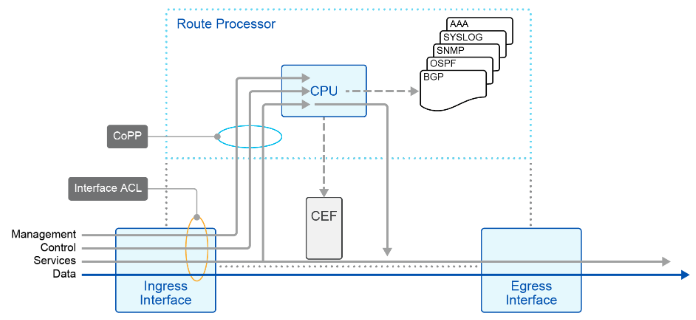
Both Interface ACLs and CoPP protect system resources, but they operate at different boundaries:
| Feature | Interface ACLs | Control Plane Policing (CoPP) |
| Enforcement Point | Individual physical or logical interfaces. | The virtual Control Plane interface (Route Processor input/output). |
| Traffic Scope | Filters all ingress/egress traffic (Data, Management, Control). | Filters and rate-limits traffic destined specifically to the CPU/Route Processor. |
| Management Overhead | High; must be applied individually to every router interface. | Low; managed globally in a single central policy. |
| Primary Function | Packet filtering (Permit/Deny). | Traffic classification, filtering, and rate-limiting (Policing). |
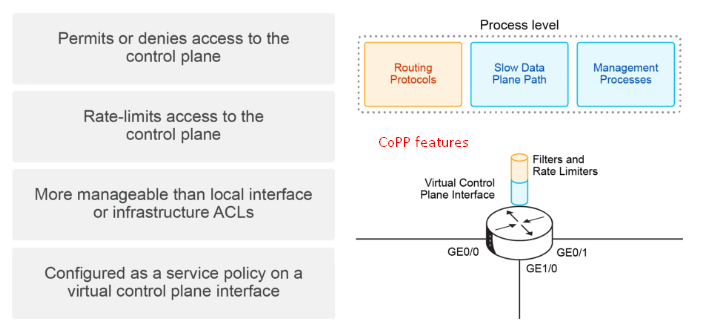
Key Goal of CoPP: Prevent low-priority or malicious traffic floods from overwhelming the Route Processor (CPU), ensuring critical management and routing protocols remain operational.
2. MQC (Modular QoS CLI) Framework
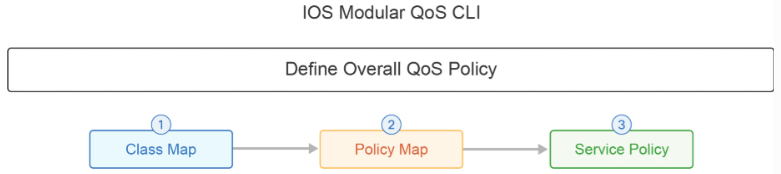
CoPP uses the standard Cisco MQC framework, which consists of three distinct components:
-
Class Map (
class-map): Categorizes and identifies target traffic (typically by referencing an Access Control List). -
Policy Map (
policy-map): Defines the QoS action (policing rates, burst sizes, and conform/exceed actions such as transmit or drop). -
Service Policy (
service-policy): Binds the policy map to the target entity (applied directly undercontrol-planemode).
3. CoPP Configuration Workflow (3 Steps)
Step 1: Define Traffic via ACL & Class Map
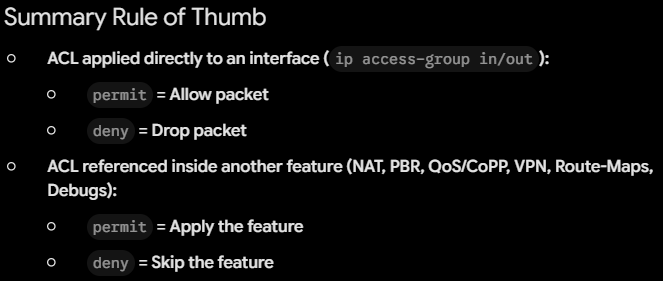
Identify management and control plane traffic using an ACL, then match it inside a class map.
R1(config)# access-list 100 permit udp any any eq snmp
R1(config)# access-list 100 permit tcp any any eq www
R1(config)# access-list 100 permit tcp any any eq 443
R1(config)# access-list 100 permit tcp any any eq 22

R1(config)# class-map COPP_class
R1(config-cmap)# match access-group 100
Step 2: Define Policy Map & Policing Rates
Specify rate limits for the defined class, as well as default limits for all unmatched traffic using class-default.
R1(config)# policy-map COPP_policy
R1(config-pmap)# class COPP_class
R1(config-pmap-c)# police 300000 conform-action transmit exceed-action drop
R1(config-pmap-c)# class class-default
R1(config-pmap-c)# police rate 50 pps conform-action transmit exceed-action drop
-
Policed Class (
COPP_class): Rate-limited to 300,000 bps (300 kbps). Exceeding traffic is dropped. -
Default Class (
class-default): Automatically matches all remaining unclassified traffic and rate-limits it to 50 packets per second (pps).
Step 3: Apply Service Policy to the Control Plane
Apply the completed policy map in the input direction under control-plane configuration mode.
R1(config)# control-plane
R1(config-cp)# service-policy input COPP_policy
4. CoPP Verification Commands
-
show access-lists [number|name]Displays configured ACLs and match counters to verify if traffic is triggering the ACL entries.
-
show class-map [name]Displays configured class maps and their match criteria.
-
show policy-map [name]Displays configured policy maps along with defined policing rates and actions.
-
show policy-map control-planeDisplays real-time CoPP operational statistics, including offered rates, drop rates, and total conformed vs. exceeded packet/byte counts.
CoPP Configuration Summary
To configure CoPP, you must complete the following tasks:
- Create ACLs that will identify the control plane traffic that needs to be policed by CoPP. The definition of these ACLs is one of the most critical steps in the CoPP process. MQC uses these ACLs to define the traffic classes, which in turn become the object of the policy actions (policing).
- Create traffic classes that describe valid control plane traffic (ACL permit statements). You can configure as many traffic classes as you need, depending on the required granularity of your policy.
- Create a traffic policy that will permit, deny, or rate-limit the configured traffic classes and therefore conserve process layer resources, or even act as a device firewall by hiding most device resources from the network.
- Apply the configured traffic policy to the control plane.