
Lab 7-2: Configuring Call Forwarding
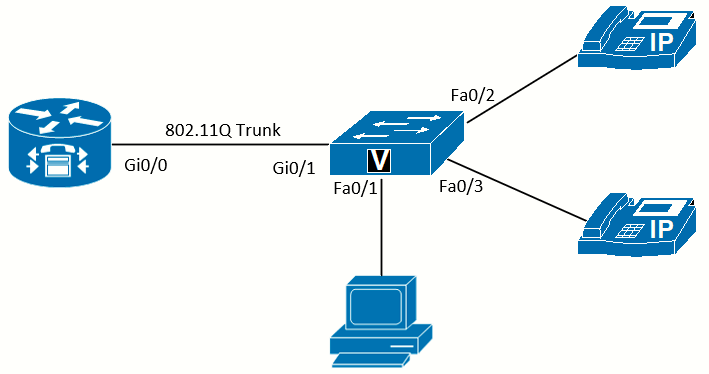 Topology diagram
Scenario
JRI wants to have calls redirected by the user from the phone and automatically forwarded when the phone line is busy or not answered.
Equipment Required
- Cisco 2821 router.
- Cisco 3560 switch.
- Lab configuration from Lab 7-1.
- Two or more IP Phones.
Objectives
- Configure phone calls to be redirected using the phone display.
- Configure phone calls to be redirected when the phone is busy or not answered.
Task 1: Load Prior Configurations
This lab is based on the configuration from Lab 7-1. If necessary, load the configuration for both the switch and router. Connect a PC to the switch and verify that it can ping the router and switch management addresses.
This lab will show both the CLI and Cisco Configuration Professional (CCP) software methods to complete the tasks.
Task 2: Configure Call Forwarding on the Phone
Cisco IP Phones have a softkey on the phone display to allow calls to be forwarded to another number. The phone user presses the CFwdAll softkey on the display, dials the extension that calls should be redirected to, and then presses the EndCall softkey. The display shows a moving arrow in the upper right, and the Status bar shows the extension that the calls are forwarded to.
While the forwarding is active, any calls to the extension will not ring on this phone, but are redirected to the specified extension. Make a call from another phone to the extension that is forwarded, and you will see that the phone display shows that the call is forwarded. To cancel the call forwarding, press the CFwdAll key again.
Task 3: Configure Call Forwarding on the Router
Allowing users to forward their own phones is great, as long as they remember to do so. Configuring call forwarding on the router allows you to establish configurations such as forwarding a call when it is not answered after a few rings, or when the phone is busy.
Configuring Call Forwarding Using the CLI
The call-forward command inside ephone-dn config mode has a variety of options, such as forwarding all calls or forwarding calls automatically after hours, but the two most common options are forwarding calls when the phone is busy and forwarding calls that are not answered after a set amount of time. The call forward when not answered (call-forward noan) option allows calls to be sent to voicemail, an operator, or an auto-attendant.
We will set ephone-dn 1 to forward calls to another extension when the ephone-dn is busy and when the ephone-dn is not answered for 12 seconds.
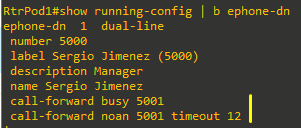
Now when you call from another phone to x5000, after 12 seconds with no answer, the call will forward to x5001.
Cisco IP Phones don’t use the traditional six seconds between rings that the PSTN uses; the IP Phones have approximately four
seconds between rings. You can use the four seconds to estimate the time to set the call forward value. However, if a user asks for the phone to ring five times before forwarding to voicemail, don’t just plug 20 (5 rings times 4 seconds) into the command. To make the user happy, test it! Verify that it gives him not four, not six, but five full rings.
Testing the forward when busy (call-forward busy) option is harder, as the ephone-dn was created as dual-line, and as a result, the second incoming call is treated as call waiting. Both channels of the dial-line would have to be in use before the call-forward busy option takes effect.
Configure Call Forwarding Using the CCP
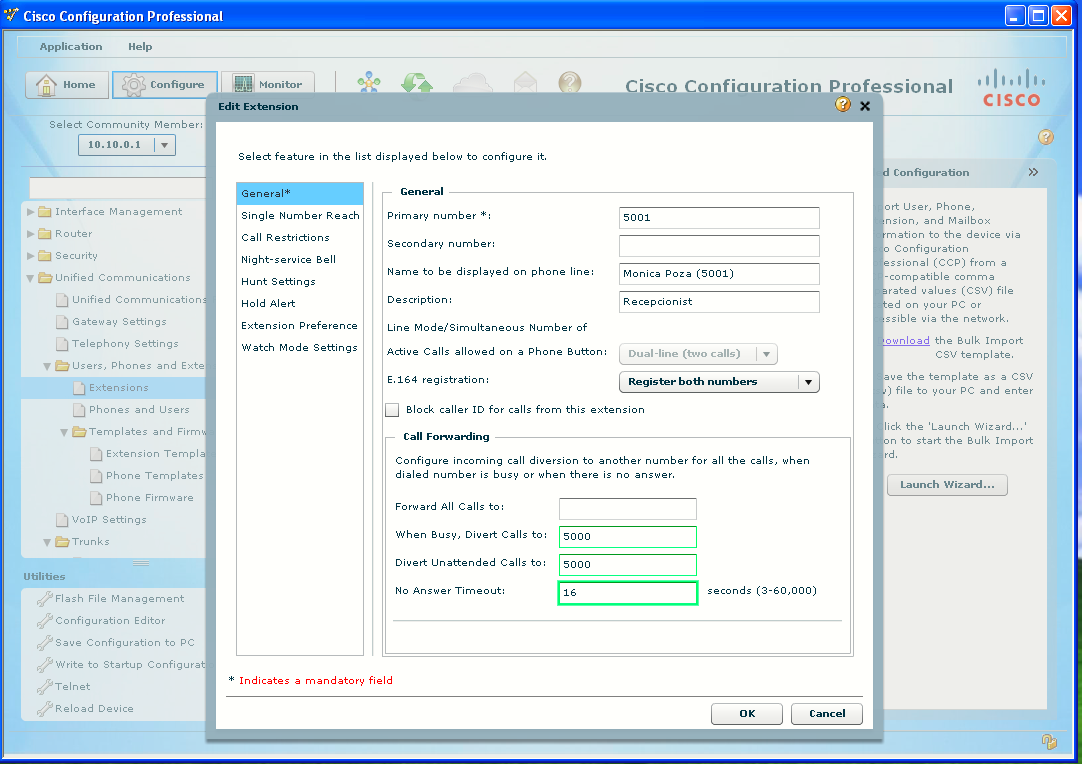
- Go to Unified Communications > Users, Phones and Extensions > Extensions. Click Extension Tag 1.
- Click the Edit button. The Edit Extension window will open. Under the General Options on the left, the bottom of the pane on the right shows the call forwarding. Enter the extension of the second ephone-dn in the When Busy, Divert Calls, and Divert Unattended Calls fields.
- Enter 16 for the No Answer Timeout field, which should give about four rings before redirecting the call.
- Click OK and deliver the configuration.
Infinite Loop Solved
Now that we have configured ephone-dn 1 to forward to ephone-dn 2 when not answered, and ephone-dn 2 to forward to ephone-dn 1 when not answered, does an incoming call bounce back and forth between the two phones forever? The answer is no. This problem is solved by the max-redirect command in telephony-service that sets the number of redirects before a call is disconnected. You should be aware of this value, because if a call is forwarded too many times, it will be dropped. The current value can be found with the show telephony-service command.
