Lab 6-3: Call Legs, Dial Peers, and Wildcards
Equipment Required
No equipment is required for this lab.
Learning Objectives
- Understand the concept of call legs.
- Understand POTS and VoIP dial peers.
- Create POTS and VoIP dial peers.
Scenario
This lab introduces the concepts of call legs, dial peers, and wildcard. Dial peers are the telephony equivalent of static IP routing in data networks; they direct calls to the proper destination. There are two main types of dial peers: POTS and VoIP. The process to create both is covered in this lab, as well as how wildcards can be used to simplify the number of dial peers needed. Before exploring dial peer creation, it is necessary to explore the concepts of dial plans and call legs.
Task 1: Call Legs
Understanding Call Legs
Anytime a call connects to or exits from a voice gateway, there needs to be a dial peer to direct the call, just as packets in a data network require the use of a routing table. These call connections into or out of the voice gateway are referred to as call legs. There are two types of connections to the voice gateway used in these labs: traditional phone service (plain old telephone service, or POTS) and VoIP.
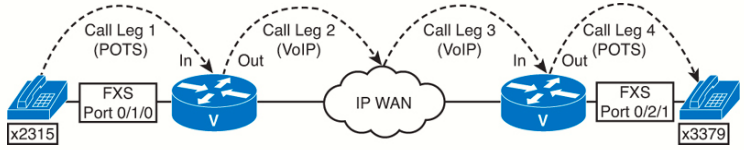
Note that with just these four call legs, 2315 can call 3379 and have a conversation, but 3379 cannot call 2315 without an additional four call legs going the other way! With data networks, if PC A can ping to PC B, we can assume that PC B can also ping PC A (unless there are access lists). This logic is not true in voice networks. Just because Caller A can reach Caller B and have a conversation, it does not automatically mean that Caller B can dial Caller A. In some cases, a dial peer can serve as both the inbound and outbound call legs.
Task 2: Introduction to Dial Peers
To make call legs work, we use dial peers. A dial peer is similar in function to a static route statement in data networking, as the dial peer
matches a dialed number or numbers and directs the call to its destination. The two types of dial peers used in these labs are POTS and VoIP. The following is an example of both types:
dial-peer voice 15 pots
destination-pattern 1234
port 0/1/0

dial-peer voice 6 voip
destination-pattern 5555678
session target ipv4:10.0.10.100
Both types of dial peers start with the dial-peer voice tag command. The tag is a number from 1 to 2147483647 (unique to a gateway) that identifies the individual dial peer. As you can see from the previous output, the tag used does not have any connection to the digits matched. However, in some cases, to organize the dial peers, a tag will be used that is the same as, or identifies, the matching digits. The tag is followed by the pots or voip keyword. The primary difference between the two will be whether the call is switched to a port or sent to an IP-based network.
The actual matching of dialed digits is done by the destination-pattern command. The destination pattern can be an exact match or, by using wildcards, a range of digits. In both previous outputs, the destination pattern will match a specific dialed number.
The final part of the dial peer is the target. POTS dial peers use the port command to identify the analog or digital interface to switch the call to. VoIP dial peers use the session target command to direct the call to a remote gateway. Unlike a static route statement, the session target command identifies the final destination IP address, not the next-hop IP address.
Call Flow with a Single-Router Dial Peer Exercise
Looking at the following figure:
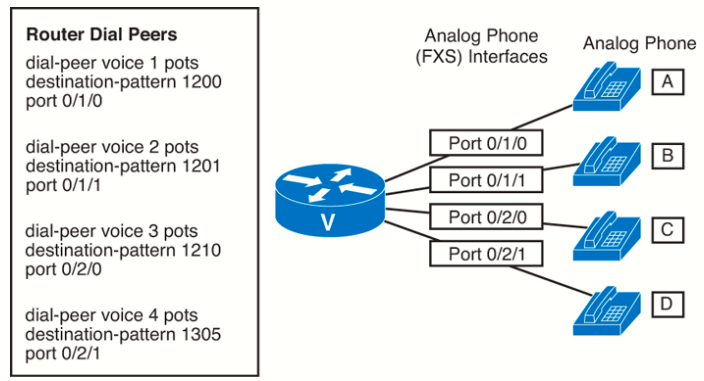
Complete the following table by determining the numbers dialed, the dial peers, and the ports used to complete the call.
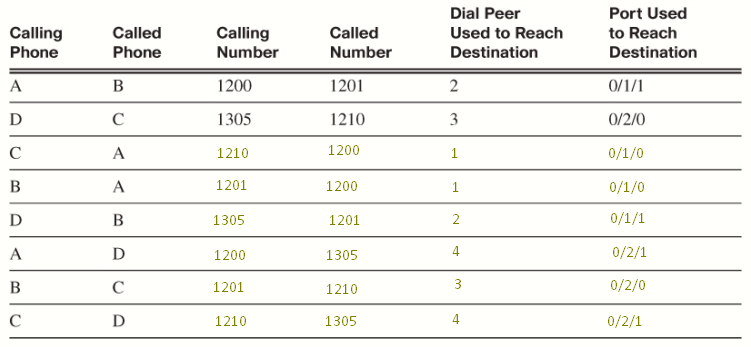
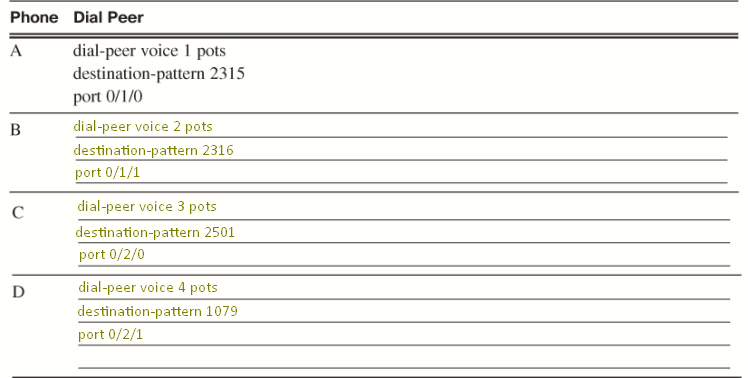
Create POTS Dial Peers
Looking at the following figure:
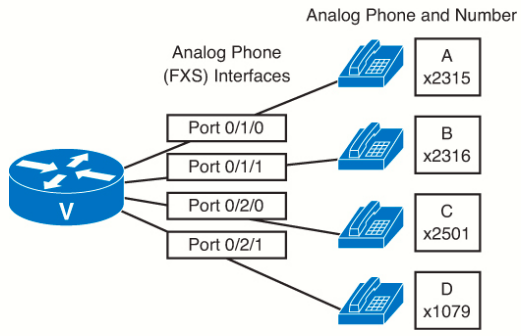
Complete the following table by determining the numbers dialed, the dial peers, and the ports used to complete the call.
Call Flow for Dual-Router Dial Peers Without Wildcards Exercices
Looking at the following figure:
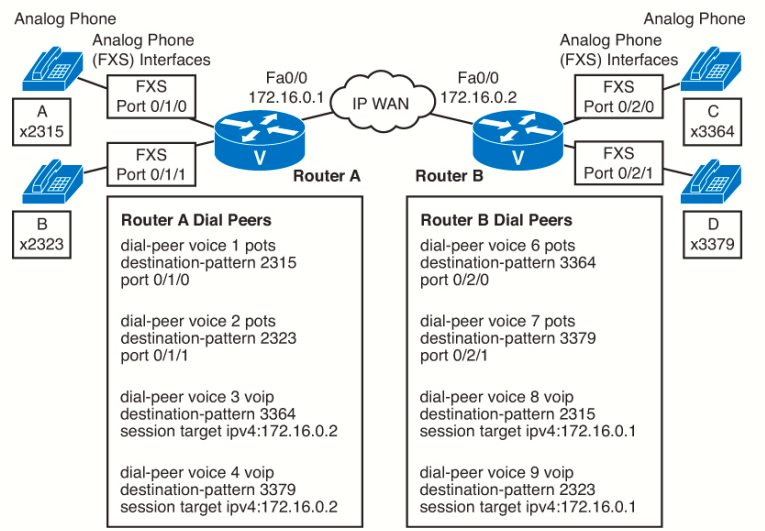
Complete the following table by determining the numbers dialed, the dial peers, and the ports used to complete the call:
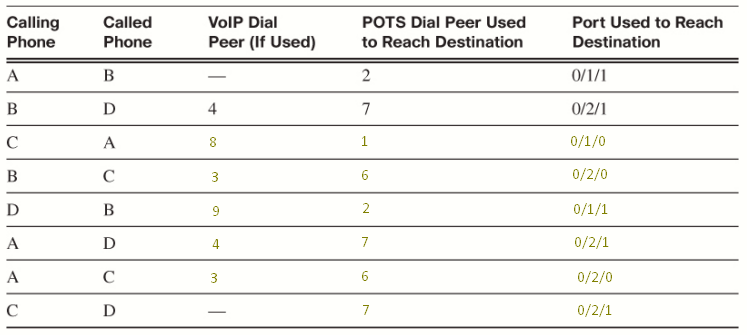
Normally, you would not create a separate VoIP dial peer for each remote phone; instead you would use wildcards.
Notice that unlike the POTS dial peers in the previous examples, the VoIP dial peers used here have the IP address of the remote router as the session target. Because the tag used for the dial peer is unique to the router, Router B could have used dial peers 1 to 4 too, but different numbers were used to make determining the answere here easier.
Task 3: Introduction to Wildcard in CUCME
Creating a dial peer for every remote phone would quickly become unworkable. Most phones are assigned directory number ranges based on their location. Using wildcards allows us to cover groups of numbers with one statement. There are special characters to help with covering a range (or ranges) of numbers. The most common ones used in CUCME destination patterns are listed here:
| Period ( . ) | Matches any single digit from 0 to 9 and the * key. A destination-pattern 30.. command would match digits from 3000 to 3099. A destination-pattern 30.0 command would only match 3000, 3010, 3020, 3030... or 30*0. |
| Brackets ( [ ] ) | Match a set or range of numbers for any single digit. Individual numbers can be listed or separated by commas. The hyphen (-) is used for a consecutive range. Thus, either [5-8], [5,6,7,8] or [5678] would select numbers from 5 to 8 for a single digit. A destination-pattern 300[0-3] command would match 3000 to 3003. |
| Caret ( ^ ) | The caret (sometimes also called a circumflex), when used inside brackets, designates a number to not match. A destination-pattern 300[^0-6] command would match 3007 to 3009, while a destination-pattern 300[^0^2] command would match 3001 and 3003 to 3009. Note that if not in front of a range, the caret should appear in front of every digit to be excluded. |
| T | Matches any digits up to the maximum length of a dialed string, which is 32 digits. This is very useful when constructing dial peers for international calls, as the number of digits that foreign PSTNs require can vary. However, because the number of digits collected is unknown, the Call Agent must either receive the pound sign (#) to signify the end of the dialed string or wait until the interdigit timeout (10 seconds by default) before the call is connected. |
| Comma ( , ) | Inserts a one-second delay between dialed digits. Except when used inside brackets, where it is used as a separator between digits, as noted in the description for the bracket wildcard. |
The brackets only match a single digit, so it is not possible to match a range of numbers that spans more than a single digit. Thus 5523 to 5546 cannot be matched as 55[23-46], as that pattern would only cover 552, 553, 554, and 556. Likewise, using two brackets to match 5523 to 5546 cannot be done as such: 55[2-4][3-6]. That pattern will only match 5523 to 5526, 5533 to 5536, and 5543 to 5546. Each bracket works independently. The only way to match a range such as 5523 to 5546 is to use three separate dial peers, each with a separate destination pattern such as (dial-peer 1) destination-pattern 552[3-9], (dial-peer 2) destination-pattern 553[0-9], and (dial-peer 3) destination-pattern 554[0-6].
The T is usually used with a period before the T, such as .T - without the period, a phone left off the hook will match no digits and try to dial nothing! By putting the period in front, the dial peer will require at least on digit to be dialed before matching.
The asterisk (*) and pound sign (#) are not wildcards; ; they are valid digits that can be dialed on a phone, just like the numbers 0 to 9. The pound sign (#) has special meaning in CUCME by signaling that digit collection is done, and the router should process the call without waiting for the interdigit timeout. (This is useful for unknown digit lengths in international calls.)
The wildcards used by CUCME are not entirely the same as the wildcards used in Cisco Unified Communications Manager.
Wildcards can be used together. For example, to match all numbers from 3300 to 3599 you could use this: destination-pattern 3[3-5]..
Call Flow for Dual-Router Dial Peers with Wildcards Exercise
Looking at the following figure:
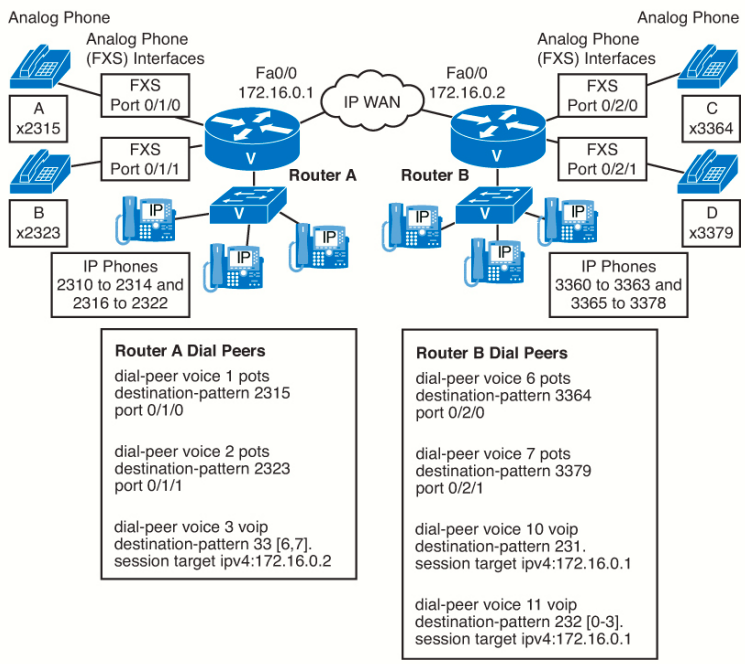
Determine the VoIP dial peer used to complete the call. Because the tag used for the dial peer is unique to the router
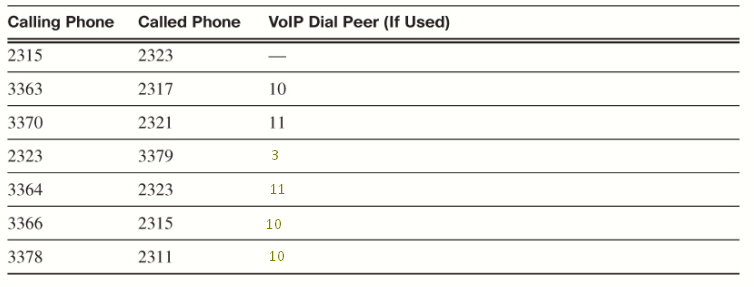
In the figure, Router A can use a single dial peer to reach all the numbers on Router B. However, Router B needs two dial peers. If
we used a single dial peer on Router B (for example, destination-pattern 23[1-2].), we would match numbers that are not used
on Router A, such as 2324 to 2329. As noted before, it is not possible for the brackets to match a range that is more than one digit, so it is necessary to create two dial peers in this case to match the valid numbers on Router A.
Create Destination Patterns Using Wildcards
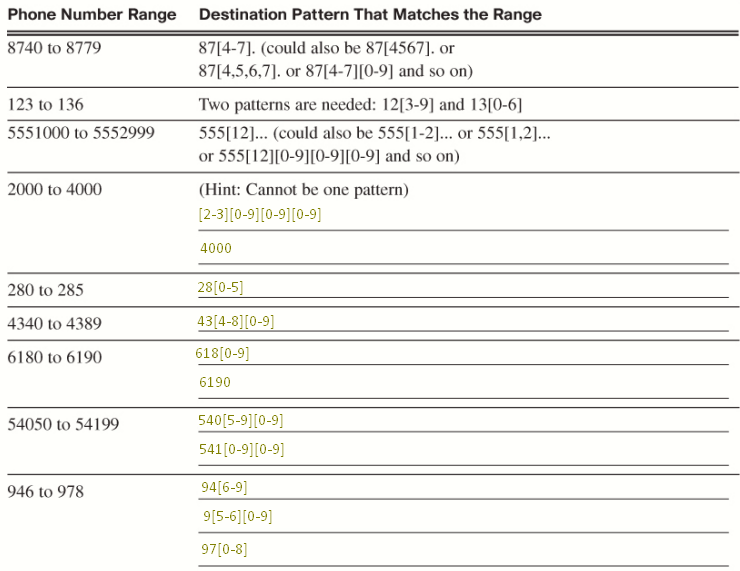
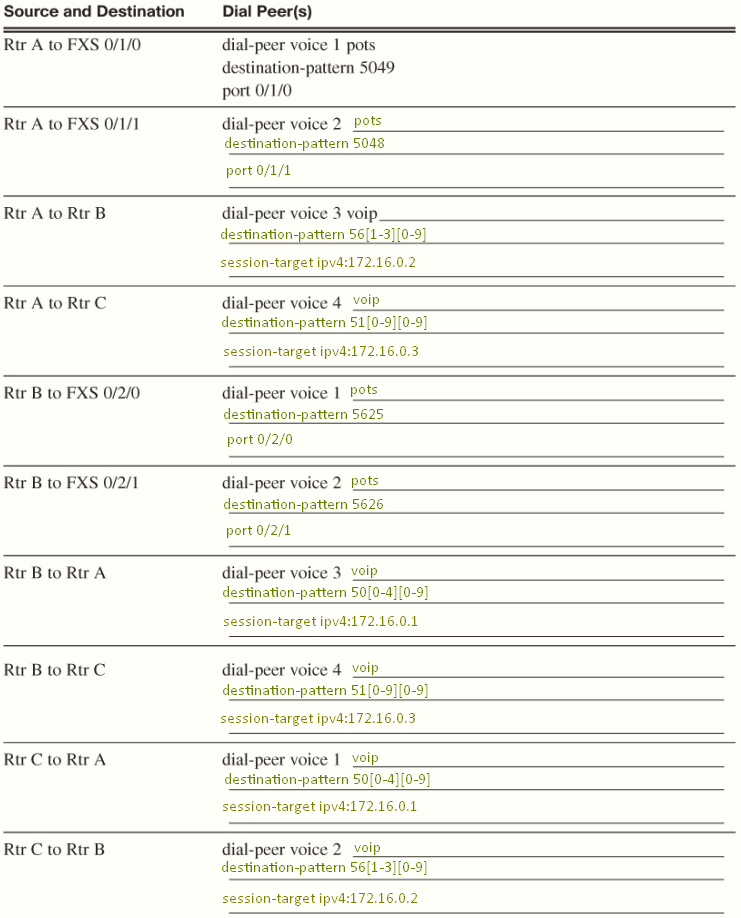
Task 4: Create POTS and VoIP Dial Peers
Looking at the figure:
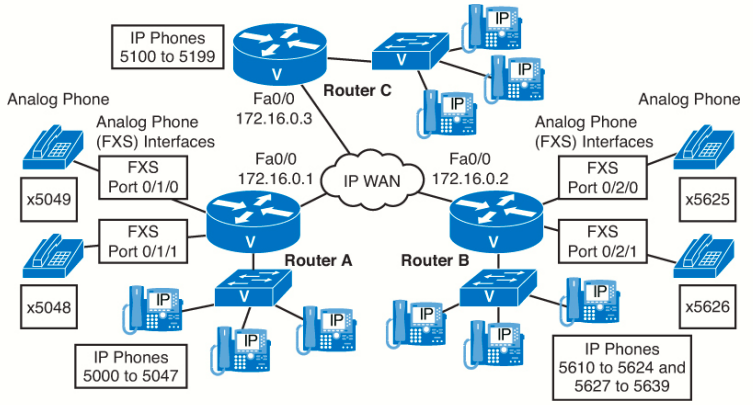
Determine the dial peers, destination patterns, and ports used to call among the three routers. Because the tag used for the dial peer is unique to the router, we are using the same dial-peer tag numbers on all the routers.