
Lab 6-4: Call Processing, Dial Plans, and Digit Manipulation
Equipment Required
No equipment is required for this lab.
Learning Objectives
Upon completion of this lab, you will be able to:
- Understand dial-peer selection.
- Understand POTS dial-peer digit-stripping behavior.
- Understand basic digit manipulation commands.
- Create a dial plan.
Scenario
This lab introduces the concepts of call processing, dial plans, and digit manipulation. Before the router can be configured with dial peers, it is necessary to understand some of the rules the router uses for call processing. Additionally, POTS dial peers have specific behaviors for digit stripping that need to be understood. This leads to a discussion of digit manipulation to impact the digit stripping of POTS peers and influence call processing. After understanding these basics, it is time to bring the concepts together into a dial plan that will direct calls to the desired destination.
Task 1: Outbound Call Processing
Examining Dial-Peer Selection
When a user takes a phone off-hook, the router tells the phone to play a dial tone and then the router starts collecting the digits the user dialed. How the router acts on those dialed digits is fundamental to building a dial plan.
The following rules impact the selection the router makes when collecting digits:
- By default, the router analyzes the outbound digits as they are dialed (digit-by-digit collection) to select the dial peers, rather than collecting all digits first and then selecting the dial peer (en block selection). One exception is that calls inbound from ISDN trunks use en block dial-peer selection.
- When a match is found, the router immediately processes the call.
- When more than one match of the same length is found, the most specific destination pattern is selected.
- When two or more destination patterns match on the same digit length (or the exact same number), one of the dial peers is chosen at random. The preference command can be used to force a preferred selection order.
To better understand these rules, consider the following dial peers:
dial-peer voice 1 pots
destination-pattern 911
port 0/1/0

dial-peer voice 2 voip
destination-pattern 91..
session target ipv4:10.1.0.1

dial-peer voice 3 voip
destination-pattern 916.
session target ipv4:10.1.10.1

dial-peer voice 4 voip
destination-pattern 9[1-7]..
session target ipv4:10.1.20.1

dial-peer voice 5 voip
destination-pattern 9[1-7]…
session target ipv4:10.1.30.1

dial-peer voice 6 voip
destination-pattern 9[^1-7]..
session target ipv4:10.1.40.1

dial-peer voice 7 pots
destination-pattern 978.
preference 1
port 0/1/1

dial-peer voice 8 voip
destination-pattern 978.
session target ipv4:10.1.50.1
The following paragraphs examine the output:
- If a user dials the number 911, rules 1 and 2 require that the digits match dial peer 1, even though it could potentially match dial peers 2 and 4. As a result of this, it is impossible to have longer numbers that start with 911 dialed, such as 9117, 91134, and so on, that match dial peers 2 or 4, because as soon as the three digits are dialed, 911 is matched and dial peer 1 is selected.
- Now consider a user dialing 9165. The router matches dial peers 2, 3, and 4. This is where rule 3 applies, because there are three dial peers that have the same length (four digits) that could match. The dial peer with the longest match is selected (the periods don't count for match length). In this case, dial peer 3 is the best match, because it has three digits match (the 916), while dial peers 2 and 4 both have two digits matching (both match 91). However, if the first choice is unavailable (down or in use), the router will pick the next best available choice. In this case, both dial peers 2 and 4 match with equal length, and using rule 4, dial peer 2 or 4 is randomly chosen as they both have the same default preference of 0 (which does not show in the configuration). Note that even if dial peers 2, 3, and 4 are unavailable, dial peer 5 will never be selected, as it requires five digits, and the other four-digit dial peers will always match first.
- If a user dials 9889, dial peer 6 is the only match, because the 9[^1-7] excludes any calls starting with 90 to 97, so only four-digit numbers starting with 9800 to 9999 will match.
- Finally, consider a user dialing 9785. The router would normally randomly select either dial peer 7 or 8 based on rule 4. But with the preference 1 command on dial peer 7, the router uses dial peer 8, because of the default preference 0 for every dial peer (which does not show in the config). You might ask, "Why even have dial peer 7 if the preference 1 command causes dial peer 8 to be used?" The preference command has the ability to allow orderly failover if dial peers are not available.
Understanding Dial-Peer Selection
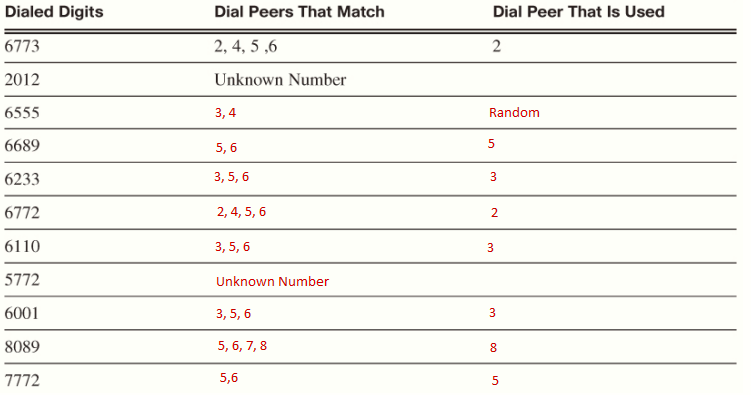
Test exercise. Given the following dial-peers:
dial-peer voice 1 pots
destination-pattern 6772
port 0/1/0

dial-peer voice 2 voip
destination-pattern 67[6-9].
session target ipv4:10.1.0.1

dial-peer voice 3 voip
destination-pattern 6[0-5]..
session target ipv4:10.1.10.1

dial-peer voice 4 voip
destination-pattern 6[5-9]..
session target ipv4:10.1.20.1

dial-peer voice 5 voip
destination-pattern [6-8]...
session target ipv4:10.1.30.1

dial-peer voice 6 voip
destination-pattern [6-8]...
preference 1
session target ipv4:10.1.40.1

dial-peer voice 7 voip
destination-pattern 80..
preference 1
session target ipv4:10.1.50.1

dial-peer voice 8 pots
destination-pattern 80..
port 0/1/0

dial-peer voice 9 pots
destination-pattern 611
port 0/1/0
Complete the following table:
Given the following output:
RtrPodx# show ip route
<output omitted>
Gateway of last resort is not set
10.0.0.0/8 is variably subnetted, 8 subnets, 2 masks
C 10.0.0.0/30 is directly connected, FastEthernet0/1
D 10.1.0.0/24 [90/156160] via 10.0.0.2, 00:36:55, FastEthernet0/1
D 10.1.20.0/24 [90/156160] via 10.0.0.2, 00:36:55, FastEthernet0/1
D 10.1.40.0/24 [90/156160] via 10.0.0.2, 00:36:55, FastEthernet0/1
D 10.1.50.0/24 [90/156160] via 10.0.0.2, 00:36:55, FastEthernet0/1

RtrPodx# show voice port summary
IN OUT
PORT CH SIG-TYPE ADMIN OPER STATUS STATUS EC
=============== == ============ ===== ==== ======== ======== ==
0/0/0 — fxo-ls up dorm idle on-hook y
0/0/1 — fxo-ls up dorm idle on-hook y
0/1/0 — fxs-ls down down on-hook idle y
0/1/1 — fxs-ls up dorm on-hook idle y
<output omitted>
Do any of the dial peers used change for any of the dialed numbers? If so, which dialed numbers are impacted and which dial peers are now used?
- For dialed number 6555 it chooses dial peer 4 due to no route to 10.1.10.0 network (dial peer 3)
- For dialed number 6689 it chooses dial peer 6 due to no route to 10.1.30.0 network (dial peer 5)
- For dialed number 6233 it chooses dial peer 6 due to no route to 10.1.10.0 and 10.1.30.0 networks (dial peers 3 and 5)
- For dialed number 6110 it chooses dial peer 6 due to no route to 10.1.10.0 and 10.1.30.0 networks (dial peers 3 and 5)
- For dialed number 6001 it chooses dial peer 6 due to no route to 10.1.10.0 and 10.1.30.0 networks (dial peers 3 and 5)
- For dialed number 8089 it chooses dial peer 7 due to port 0/1/0 being down (dial peer 8)
- For dialed number 7772 it chooses dial peer 6 due to no route to 10.1.30.0 network (dial peer 5)
Troubleshooting Dial-Peer Selection with the show dial-peer voice summary Command
There are several commands that can help you troubleshoot dial-peer selection. The show dial-peer voice summary command displays the existing dial peers. This can be a quick way to check the destination patterns in use, as a call will fail if it cannot match a destination pattern. Notice that the ephone-dns show up in the output. CUCME automatically creates a dial peer for each ephone-dn (they are created with the dollar sign ($) at the end, which is the wildcard to stop matching digits). This is why a VoIP phone can call another VoIP phone without manually creating dial peers.
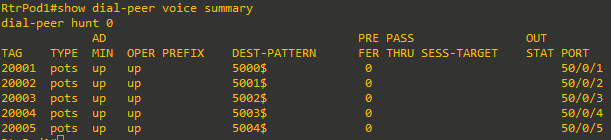
The best way to troubleshoot dial-peer problems is to use the show dialplan number command. This command shows all the details of each dial peer that matches, in the order that they are selected.
RtrPodx# show dialplan number 6773
Macro Exp.: 6773

VoiceOverIpPeer2
peer type = voice, system default peer = FALSE, information type = voice,
description = `’,
tag = 2, destination-pattern = `67[6-9].‘,
voice reg type = 0, corresponding tag = 0,
voice reg type = 0, corresponding tag = 0,
allow watch = FALSE
answer-address = `’, preference=0,
<output omitted>
Matched: 6773 Digits: 3
Target: ipv4:10.1.0.1

VoiceOverIpPeer4
peer type = voice, system default peer = FALSE, information type = voice,
description = `’,
tag = 4, destination-pattern = `6[5-9]..’,
voice reg type = 0, corresponding tag = 0,
allow watch = FALSE
answer-address = `’, preference=0,
<output omitted>
Matched: 6773 Digits: 2
Target: ipv4:10.1.20.1

VoiceOverIpPeer5
peer type = voice, system default peer = FALSE, information type = voice,
description = `’,
tag = 5, destination-pattern = `[6-8]…’,
voice reg type = 0, corresponding tag = 0,
allow watch = FALSE
answer-address = `’, preference=0,
<output omitted>
Matched: 6773 Digits: 1
Target: ipv4:10.1.30.1

VoiceOverIpPeer6
peer type = voice, system default peer = FALSE, information type = voice,
description = `’,
tag = 6, destination-pattern = `[6-8]…‘,
voice reg type = 0, corresponding tag = 0,
allow watch = FALSE
answer-address = `’, preference=1,
<output omitted>
Matched: 6773 Digits: 1
Target: ipv4:10.1.40.1
There is a lot of output from the show dialplan number command. One way to get just the dial-peer tag information is to use CLI output filtering with the pipe character ( | ). Example: show dialplan number number timeout | i tag = [0-9]+, des
Troubleshooting Dial-Peer Selection with Debug
To watch the process the router uses to select the correct dial peers, use the debug voip dialpeer command (and the debug voip dialpeer all command to get even more detailed output).
The debug voip dialpeer commands should be used only with great caution on a production system. The output generated can overwhelm the console buffer, causing you to lose control of the router.
In the output below, the router shows a user dialing 6773. You can see how the router examines each digit as it is dialed until it finds a match, in this case dial peers 2, 4, 5 and 6.
RtrPodx# debug voip dialpeer
voip dialpeer default debugging is on
RtrPodx#
*Feb 19 22:18:41.963: //-1/xxxxxxxxxxxx/DPM/dpAssociateIncomingPeerCore:
Calling Number=5330, Called Number=, Voice-Interface=0x4BF57024,
Timeout=TRUE, Peer Encap Type=ENCAP_VOICE, Peer Search Type=PEER_TYPE_VOICE,
Peer Info Type=DIALPEER_INFO_SPEECH
*Feb 19 22:18:41.963: //-1/xxxxxxxxxxxx/DPM/dpAssociateIncomingPeerCore:
Result=Success(0) after DP_MATCH_ORIGINATE; Incoming Dial-peer=20001
*Feb 19 22:18:41.979: //-1/83B14A988016/DPM/dpMatchPeersCore:
Calling Number=, Called Number=6, Peer Info Type=DIALPEER_INFO_SPEECH
*Feb 19 22:18:41.979: //-1/83B14A988016/DPM/dpMatchPeersCore:
Match Rule=DP_MATCH_DEST; Called Number=6
*Feb 19 22:18:41.979: //-1/83B14A988016/DPM/dpMatchPeersCore:
Result=Partial Matches(1) after DP_MATCH_DEST
*Feb 19 22:18:41.979: //-1/83B14A988016/DPM/dpMatchPeersMoreArg:
Result=MORE_DIGITS_NEEDED(1)
*Feb 19 22:18:42.175: //-1/83B14A988016/DPM/dpMatchPeersCore:
Calling Number=, Called Number=67, Peer Info Type=DIALPEER_INFO_SPEECH
*Feb 19 22:18:42.175: //-1/83B14A988016/DPM/dpMatchPeersCore:
Match Rule=DP_MATCH_DEST; Called Number=67
*Feb 19 22:18:42.175: //-1/83B14A988016/DPM/dpMatchPeersCore:
Result=Partial Matches(1) after DP_MATCH_DEST
*Feb 19 22:18:42.175: //-1/83B14A988016/DPM/dpMatchPeersMoreArg:
Result=MORE_DIGITS_NEEDED(1)
*Feb 19 22:18:42.375: //-1/83B14A988016/DPM/dpMatchPeersCore:
Calling Number=, Called Number=677, Peer Info Type=DIALPEER_INFO_SPEECH
*Feb 19 22:18:42.375: //-1/83B14A988016/DPM/dpMatchPeersCore:
Match Rule=DP_MATCH_DEST; Called Number=677
*Feb 19 22:18:42.375: //-1/83B14A988016/DPM/dpMatchPeersCore:
Result=Partial Matches(1) after DP_MATCH_DEST
*Feb 19 22:18:42.375: //-1/83B14A988016/DPM/dpMatchPeersMoreArg:
Result=MORE_DIGITS_NEEDED(1)
*Feb 19 22:18:42.575: //-1/83B14A988016/DPM/dpMatchPeersCore:
Calling Number=, Called Number=6773, Peer Info Type=DIALPEER_INFO_SPEECH
*Feb 19 22:18:42.575: //-1/83B14A988016/DPM/dpMatchPeersCore:
Match Rule=DP_MATCH_DEST; Called Number=6773
*Feb 19 22:18:42.575: //-1/83B14A988016/DPM/dpMatchPeersCore:
Result=Success(0) after DP_MATCH_DEST
*Feb 19 22:18:42.575: //-1/83B14A988016/DPM/dpMatchPeersMoreArg:
Result=SUCCESS(0)
List of Matched Outgoing Dial-peer(s):
1: Dial-peer Tag=2
2: Dial-peer Tag=4
3: Dial-peer Tag=5
4: Dial-peer Tag=6
*Feb 19 22:18:42.579: //-1/83B14A988016/DPM/dpMatchPeersCore:
Calling Number=, Called Number=6773, Peer Info Type=DIALPEER_INFO_SPEECH
<output omitted>
Task 2: POTS Dial-Peer Behavior and Digit Manipulation
Before building a dial plan that will involve any POTS dial peers, the default behavior of POTS dial peers needs to be examined, as well as the digit manipulation methods that are used to alter the results. VoIP dial peers do not strip digits.
Examining POTS Dial-Peer Digit Stripping
When a call matches a POTS dial peer, by default the router strips the explicitly matched (non-wildcard) digits on the left. Any remaining digits that match a wildcard or are to the right of a wildcard are not stripped. As an example, we have this dial peer:
dial-peer voice 1 pots
destination-pattern 555....
port 2/0/0
If a user dials 5555439, the result is that the 555 is explicitly matched and stripped, while the 5439 matches the wildcard digits and those digits are sent out the port.
There are two main reasons for this default digit-stripping behavior:
- When constructing a dial plan for a PBX-type environment, an outside access digit (such as dialing a 9 to get an outside line) is needed, or it would be very difficult to dial any number on the PSTN that had the same first digits as your internal extensions, as the calls will complete when the last digit of an extension is dialed. This is rule 2 of dial-peer selection. When using an outside line access digit, this number should not be sent to the PSTN and needs to be stripped.
- When the POTS dial peer points to an FXS port, the analog device has no need of the dialed digits because it is an endpoint. In contrast, for a digital trunk that connects to the PSTN, the dialed digits are needed to route the call through the PSTN.
However, in many cases, we don't want all the digits that are explicitly matched to be stripped. By using digit manipulation commands, you can change the default digit-stripping behavior of POTS dial peer.
| COMMAND / METHOD | DESCRIPTION | EXAMPLE |
| no digit-strip |
Turns off digit stripping for a POTS dial peer.
Advantage: No digits are stripped.
Disadvantage: Outside line access digit is not stripped. |
To send a specific seven-digit number range to the PSTN:
dial-peer voice 3 pots destination-pattern 9555.... no digit-strip port 2/0/0
If 95551234 is dialed, 95551234 is sent on. |
| forward-digits [all | x] |
The forward-digits all command acts just like the no digit-strip. The forward-digits x command on a POTS dial peer sends on just the x number of digits in the destination pattern from the right.
Advantage: The forward-digits x command controls the exact number of digits to be saved; thus the outside line access digit can be stripped while all other digits are sent on.
Disadvantage: This is one of the few commands that cannot be removed with the no option. To remove the command, use default forward-digits. |
To send a seven-digit number to the PSTN when a specific ten-digit number range is dialed and 9 is the outside access digit:
dial-peer voice 6 pots destination-pattern 91510555.... forward-digits 7 port 2/0/0
If 915105551234 is dialed, 5551234 is sent on. |
| prefix digits |
Adds the specified digits to the left, after digit stripping happens in the POTS dial peer. Because the digits to be stripped are known, it is easy to prefix them back while ignoring the outside line access digit. The prefix command can also add digits that were not dialed to the start of the dialed digits. Advantage: Can not only replace stripped digits, but also adds additional new digits to the left of the dialed digits. It can also ass a one-second delay for every comma ( , ) added to allow automated systems to answer.
Disadvantages: None |
To send a long-distance digit number (1+10 digits) to the PSTN when a specific seven-digit number range is dialed an 9 is the outside access digit:
dial-peer voice 4 pots destination-pattern 9556.... prefix 1510556 port 2/0/0
If 95561234 is dialed, 15105561234 is sent on. |
| Use a wildcard for the first digit (or all the digits) to be saved. |
By using a wildcard for the first digit to be saved in the POTS destination pattern, the other remaining digits are not stripped. The wildcard can be as simple as putting a single digit in brackets, for example, [5]55...
Advantage: No other method is required to save the digits.
Disadvantage: None |
To send the three-digit North American N11 codes and 9 is the outside access digit:
dial-peer voice 8 pots destination-pattern 9[2-9]11 port 2/0/0 If 9311 is dialed, 311 is sent on |
| num-exp match_digits expanded_digits |
Number expansion globally transforms any digits matching the match_digits pattern using the expanded_digits. There can be more replaced digits than the digits matched.
Advantage: Transforms digits globally so that they don't need to be applied to every dial peer or ephone-dn.
Disadvantage: Transforms digits globally, so you are unable to control which dial peers use the transform. |
When callers dial 0 for operator servcies, redirect the call to an internal support desk at extension 3344: num-exp 0 3344
If 0 is dialed, the digits are changed to 3344. |
| Voice translation profiles |
Voice translation profiles allow extremely complex digit manipulation. They can change both the dialed and calling numbers, and are for calls inbound, outbound, or in both directions. Regexp concepts can be used to save some digits while changing others.
Advantage: Extremely powerful and can be applied to individual dial peers or ephone-dns. Can also be used in VoIP dial peers to change digits.
Disadvantage: Can be tricky to understand and troubleshoot. |
When callers dial 911 for emergency services, redirect the call to an internal security service at extension 1234:
voice translation-rule 911 rule 0 /^911$/ /1234/ rule 1 /^9911$/ /1234/
voice translation-profile EMERGENCY translate called 911 dial-peer voice 17 voip
translation-profile outgoing EMERGENGY
If 911 or 9911 is dialed, the digits are changed to 1234. |
To compare the various digit manipulations, examine a dial peer for emergency services (the number is 911 in North America; elsewhere 112 is the most common). If nothing is done, a destination pattern 911 in a POTS dial peer would have all the digits matched; thus all digits are stripped and no digits are sent to the PSTN. The various methods that are commonly used to resolve this are as follows:
destination-pattern 911
no digit-strip

destination-pattern 911
forward digits all

destination-pattern 911
forward digits 3

destination-pattern 911
prefix 911
Typically, you use only one method per dial peer. If you mix more than one method on the same dial peer, it can cause unexpected results.
However, if an outside access digit (such as dialing a 9 to get an outside line) is used, some of the previous methods will not work, as they also send the access digit, which causes the PSTN to reject the call. The various methods that are commonly used to resolve this are as follows:
destination-pattern 9911
forward digits 3

destination-pattern 9911
prefix 911
From a legal and regulatory standpoint, access to emergency service numbers is one of the most critical functions of the phone
system. This can cause design issues with your dial plan. To avoid accidental calls (and people hanging up on emergency operators), the approach you take can vary.
Task 3: Inbound Dial-Peer Selection
After examining the outbound use of the destination-pattern command in dial peers, it is necessary to examine how inbound calls are routed. The router uses various methods for inbound calls to match extensions on phones, potentially requiring the incoming number to match the extension length.
Examine Digit Matching for Inbound Calls
When an incoming phone call is received from the PSTN, the call needs to be matched to an internal extension. One problem that might occur is the number of digits received from the PSTN for the called number being greater than the number of digits used for internal extensions. For example, the PSTN sends the full ten digits of the phone number, but the company is using four-digit extensions internally. This results in the call not matching a dial peer because of the difference in the number of digits. There are a few methods to make sure that an incoming call will match a dial peer:
- Ask the PSTN provider to only send in the digits that match your extensions. For example, if customers call 510-555-1234 to reach an inside user at extension 1234, the provider would forward just 1234 as the dialed digits. Not all providers will do this, and this might not be possible if your phone numbers are in more than one exchange or area code, or if the internal extensions do not match the outside numbers.
- When configuring the number command in ephone-dn configuration, the secondary number keyword allows an additional number to be matched. For example, if the PSTN is sending in ten digits, such as 5105551234. the following command would allow the digits to match internal extension 1234:
RtrPodx(config-ephone-dn)# number 1234 secondary 5105551234 - Adding the dialplan-pattern command in telephony-service configuration mode will automatically create a dial peer for each ephone-dn that matches the extension pattern. For example, if the PSTN is sending in ten digits in the range of 5105551000 to 5105551999, the following command would allow the digits to match all internal extensions that start with 1xxx:
The dialplan pattern must have at least one of the extension digits listed to work correctly. Thus, if your extension is four digits long, there needs to be three or fewer wildcard digits, and the command does not support the range command wildcard. One other important note: If you ever change the dialplan pattern, you must remove the previous one with the no command. Overwriting with a new version will not work!RtrPodx(config-telephony)# dialplan-pattern 1 5105551... extension-length 4 - Use a digit manipulation method to change the incoming digits to match the extensions. Options such as number expansion or voice translation profiles would allow the numbers to be changed to match internal extensions.
Task 4: Dial Plans for the PSTN
Understanding Dial Plans
Before calls can be placed to local analog phones, remote VoIP phones, and the PSTN, you need to understand dial plans. Dial plans route calls to the correct destination, primarily based on the number dialed by the caller, but this behavior can be modified with digit manipulation as discussed previously. Just like connecting a data network to the Internet requires a valid public IP address, connecting to the PSTN requires using valid phone numbers and following the dial plan of the country you are connecting to.
International Telecommunication Numbering Plan
The international numbering plan is defined by E.164 from the ITU. A full E.164 number is usually written with a + at the front of the number, and must be 15 digits or less. E.164 is comprised of 2 or 3 parts:
- Country code: One to three digits.
- National number: Maximum of 15 digits, minus the length of the country code. Optionally, the national number can be divided into:
- National destination code
- Subscriber number
North American Numbering Plan
In the US, the North American Numbering Plan (NANP) further defines the dialing plan used by the PSTN. The NANP is defined as follows:
- Country code = 1 (+1 to meet E.164 conventions).
- Area code = 3 digits: The first digit is in the range of 2-9, and the second and third digits are from 0 to 9. The area code defines a geographic region.
- Central office code = 3 digits: The first digit in the range of 2-9, and the second and third digits are from 0 to 9. The CO code also defines a geographic area.
- Subscriber number = 4 digits: A range of 0 to 9 is used for each. This is the unique number for the subscriber.
Creating a PSTN Dial Plan for the Spain
We can take a look at the following document (Presentation of E.164 National Numbering Plan - Country Code 34 - Spain). This document includes everything we need to know to make a dial plan for Spain.
We could simple create a single dial-peer like this, with 9 as the outside line access:
dial-peer voice 1 pots
destination-pattern 9T
port 0/1/0
This would work, as the 9 would be stripped off as the access digit and the T wildcard will collect any number of digits. However, the disadvantage of this method is that for each phone call, the system will wait for the interdigit timeout value (10 seconds by default) or the user will have to press the pound key (#) to signal the end of digit collection. Additionally, there is no way to provide any calling restrictions for numbers that might incur premium rates (803, 806, 807).
A better option is to break down the PSTN dial plan into categories of numbers and build a separate dial peer for each. Sample wildcard patterns for categories of numbers are shown:
| PATTERN | NUMBER TYPE |
| 112 | Emergency number |
| 6....... | Mobile services |
| 7[1-4]..... | Mobile telephone service |
| 80[367] | Premium rate services |
| 9[1-8]....... | Geographic (PATS) |
Creating the dial peers for the PSTN dial plan shown will be covered in the following labs using the CLI or GUI.
References
Cisco CME header manipulation
https://www.reddit.com/r/Cisco/comments/c5xgiy/cisco_cme_header_manipulation/
Determine Voice Translation Rules
https://www.cisco.com/c/en/us/support/docs/voice/call-routing-dial-plans/61083-voice-transla-rules.html