
Lab 15-2: Troubleshooting CUCME Configuration
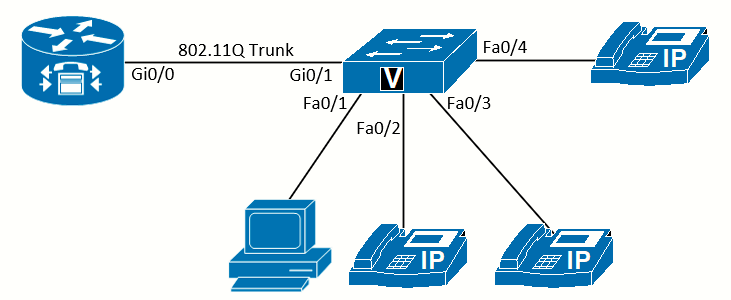 Topology diagram for this lab
Equipment Required
- Cisco 2821 router
- Cisco 3560 switch
- Three IP Phones
- PC with IP Communicator installed.
Objectives
Upon completion of this lab, you will be able to troubleshoot common VoIP setup and configuration problems.
Scenario
In this challenge, JimenezCo, a business with 15 employees, had another technician install a small-business phone system, but it doesn't work. You have been brought in to fix the system and get the first three phones working.
Task 1: Desired Configuration
The requirements for the system are:
- 10.225.0.1/24 for the voice VLAN.
- 10.220.0.1/24 for the data VLAN.
- 10.221.0.1/24 for the management VLAN.
- The VLAN numbers should match the second octet of the subnet IP address.
- The first ten addresses for both data and voice VLANs should be reserved for static devices.
- The first desk phone should have number 1000 assigned.
- The second desk phone should have number 1001 assigned.
- The third desk phone should have number 1002 assigned.
- The IP Communicator on a PC should have number 1003 assigned.
- All lines should-be dual-line.
- JimenezCo should be on the display of all phones.
- When any phone calls another, the name as well as the number should show.
- The Phone Directory button should show the names for all phones and be able to dial.
Task 2: Router Configuration
This is the wrong configuration on the router. Write all the corrections, additions, and deletions necessary to fix the configuration to match the requirements in Task 1. If possible, test your configuration on a router to verify.
hostname JimenezCo
!
ip dhcp excluded-address 10.220.0.1 10.221.1.10
!
ip dhcp pool Data
network 10.220.0.0 255.255.255.0
default-router 10.230.0.1
!
ip dhcp pool Voice
network 10.225.0.0 255.255.255.0
default-router 10.225.0.1
option 150 ip 11.226.0.1
!
interface GigabitEthernet0/0
no ip address
duplex auto
speed auto
!
interface GigabitEthernet0/0.220
encapsulation dot1Q 220
ip address 10.220.0.1 255.255.255.0
!
interface GigabitEthernet0/0.221
encapsulation dot1Q 121
ip address 10.222.0.1 255.255.255.0
!
interface GigabitEthernet0/0.225
encapsulation dot1Q 126
ip address 10.225.0.1 255.255.255.0
!
telephony-service
no auto-reg-ephone
max-ephones 2
max-dn 6
exit
!
ephone-dn 1 dual-line
number 1000
name Person 1
!
ephone-dn 2
number 1001
name Person 2
!
ephone-dn 3
number 1002
name Person 3
!
ephone 1
mac-address 00aa.bbbb.ccdd
button 1:1
!
ephone 2
mac-address 00bb.1234.abcd
button 1:1
!
ephone 3
The problems with this configuration, according to the requirements are:
- The range of excluded addresses for the data VLAN is wrong.
- Lack of exlcluded-address range for voice VLAN.
- The default-router IP on the data VLAN scope is wrong.
- The IP of the option 150 in voice VLAN scope is wrong.
- encapsulation dot1q in mgmt VLAN subintf. is wrong.
- IP address of the mgmt subintf. is wrong.
- encapsulation dot1q in voice VLAN subintf. is wrong.
- Lack of ip source-address 10.225.0.1 under telephony-service.
- max-ephone should at least 4.
- NTP/clock is not configured.
- ephone-dn 2 is not dual-line
- ephone-dn 3 is not dual-line
- Lack of ephone-dn 4 dual-line (for IP Communicator)
- Lack system message JimenezCo
- Lack of labels (for Caller ID info.)
- Lack of directory
- Button assignment is wrong.
Configuration amended:
hostname JimenezCo
!
ip dhcp excluded-address 10.220.0.1 10.220.0.10
ip dhcp excluded-address 10.225.0.1 10.225.0.10
!
ip dhcp pool Data
network 10.220.0.0 255.255.255.0
default-router 10.220.0.1
!
ip dhcp pool Voice
network 10.225.0.0 255.255.255.0
default-router 10.225.0.1
option 150 ip 10.225.0.1
!
interface GigabitEthernet0/0
no ip address
duplex auto
speed auto
!
interface GigabitEthernet0/0.220
encapsulation dot1Q 220
ip address 10.220.0.1 255.255.255.0
!
interface GigabitEthernet0/0.221
encapsulation dot1Q 221
ip address 10.222.0.1 255.255.255.0
!
interface GigabitEthernet0/0.225
encapsulation dot1Q 225
ip address 10.225.0.1 255.255.255.0
!
telephony-service
ip source-address 10.225.0.1
system message JimenezCo
no auto-reg-ephone
max-ephones 4
max-dn 6
exit
!
ephone-dn 1 dual-line
number 1000
label Person 1 (1000)
name Person 1
!
ephone-dn 2 dual-line
number 1001
label Person 2 (1001)
name Person 2
!
ephone-dn 3 dual-line
number 1002
label Person 3 (1002)
name Person 3
!
ephone-dn 4 dual-line
number 1003
label IP Communicator (1003)
name IP Communicator
!
ephone 1
mac-address 00aa.bbbb.ccdd
button 1:1
!
ephone 2
mac-address 00bb.1234.abcd
button 1:2
!
ephone 3
mac-address 00bb.1234.abcc
button 1:3
!
ephone 4
mac-address 00bb.1234.abdd
button 1:4
!
directory entry 1 1000 name Person 1
directory entry 2 1001 name Person 2
directory entry 3 1002 name Person 3
directory entry 4 1003 name IP Communicator
Task 3: Switch Configuration
This is the wrong configuration on the switch. Write all the corrections, additions, and deletions necessary to fix the configuration to match the requirements in Task 1. If possible, test your configuration on a router to verify.
vlan 220
name Data
!
vlan 221
name Management
!
vlan 255
name Voice
!
hostname StartCoSwitch
!
no ip domain-lookup
!
interface GigabitEthernet0/1
switchport trunk encapsulation dot1q
switchport mode trunk
!
interface FastEthernet0/1
switchport access vlan 220
switchport mode access
no cdp enable
shutdown
!
interface FastEthernet0/2
switchport access vlan 220
switchport mode access
no cdp enable
power inline never
!
interface FastEthernet0/3
switchport access vlan 220
switchport mode access
no cdp enable
power inline never
!
interface FastEthernet0/4
switchport access vlan 220
switchport mode access
no cdp enable
power inline never
!
!
<output omitted>
!
interface Vlan221
ip address 10.221.0.2 255.255.255.0
!
ip default-gateway 10.223.0.1
The problems with this configuration, according to the requirements are:
- Voice VLAN number is wrong.
- Lack of switchport voice vlan 225 in every access port.
- CDP is disabled in every access port.
- Port Fa0/1 is shutdown.
- Command power inline never must be removed from Fa0/3-4 so IP Phones can boot.
- IP address of VLAN 221 SVI is wrong (not on network).
- Default gateway is wrong, should be 10.221.0.1
- No STP Portfast configured.
Configuration amended:
vlan 220
name Data
!
vlan 221
name Management
!
vlan 225
name Voice
!
hostname JimenezCoSwitch
!
no ip domain-lookup
!
interface GigabitEthernet0/1
switchport trunk encapsulation dot1q
switchport mode trunk
!
interface FastEthernet0/1
switchport access vlan 220
switchport voice vlan 225
switchport mode access
spanning-tree portfast
!
interface FastEthernet0/2
switchport access vlan 220
switchport voice vlan 225
switchport mode access
spanning-tree portfast
!
interface FastEthernet0/3
switchport access vlan 220
switchport voice vlan 225
switchport mode access
spanning-tree portfast
!
interface FastEthernet0/4
switchport access vlan 220
switchport voice vlan 225
switchport mode access
spanning-tree portfast
!
!
<output omitted>
!
interface Vlan221
ip address 10.221.0.2 255.255.255.0
!
ip default-gateway 10.221.0.1