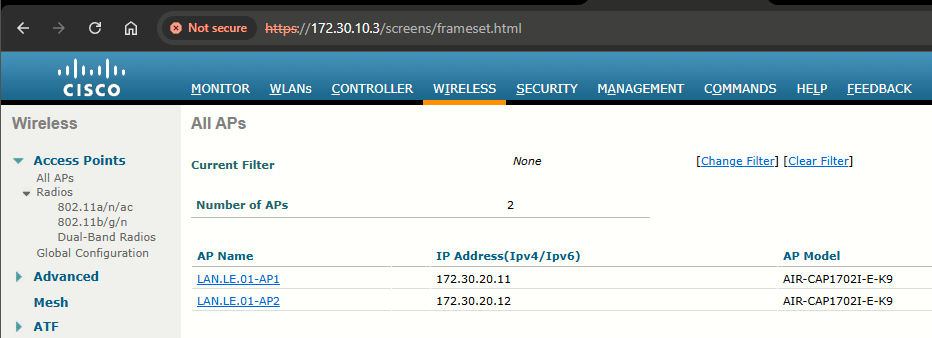
Lab 4-5: Configuring Backup Controllers and Redundacy (N+1 and N+N)
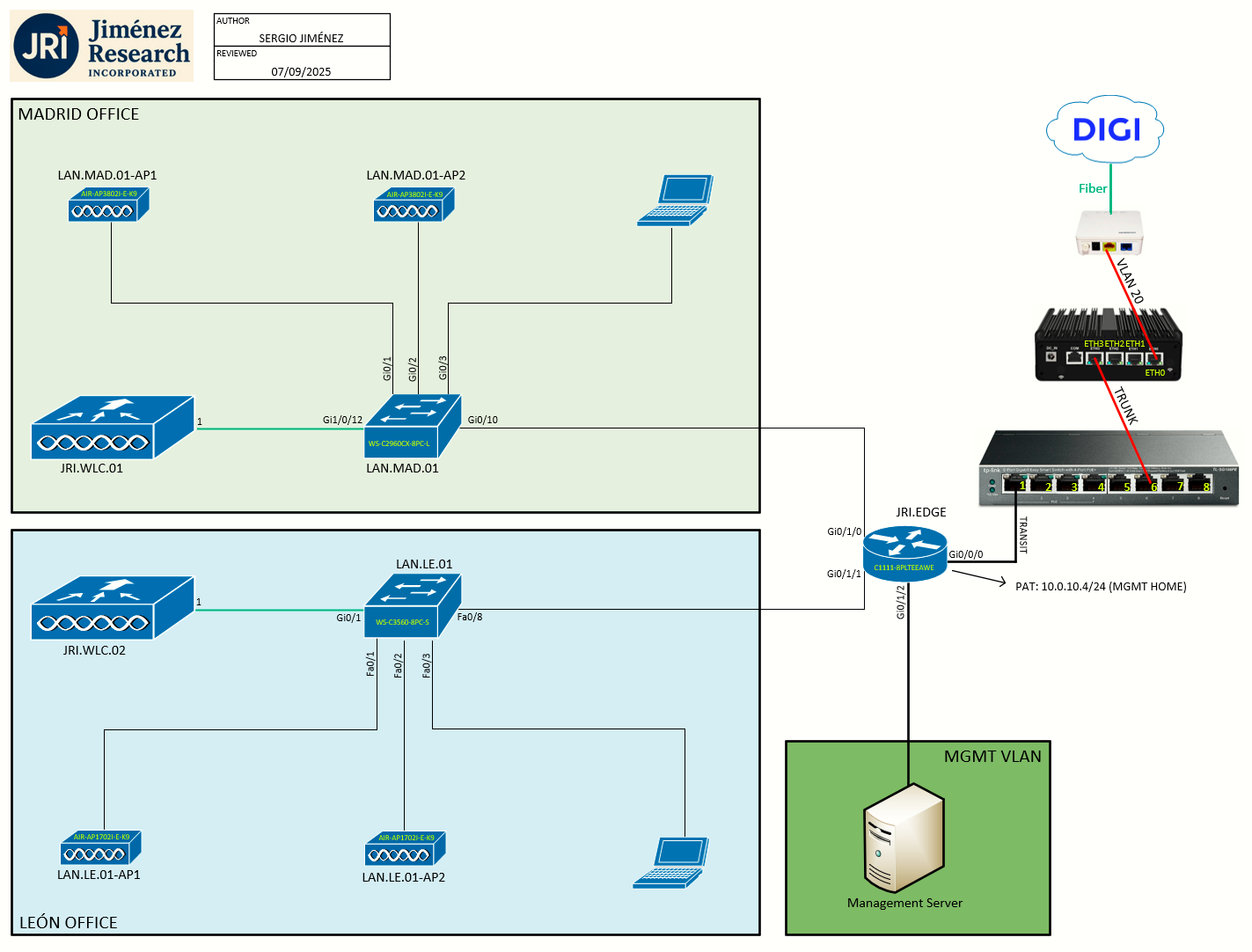
Topology
Task 1: APs WLC selection
Once an AP has finished the discovery process, it should have built a list of live candidate controllers. Now it must begin a separate process to select one WLC and attempt to join it. Joining a WLC involves sending it a CAPWAP Join Request and waiting for it to return a CAPWAP Join Response. From that point on, the AP and WLC build a DTLS tunnel to secure their CAPWAP control messages.
The WLC selection process consists of the following three steps:
- Try primed addresses: If the AP has previously joined a controller and has been configured or "primed" with a primary, secondary, and tertiary controller, it will try to join those controllers in succession.
- Try the master controller: If the AP does not know of any candidate controller, it can try to discover one by broadcasting on the local subnet. If a controller has been configured as a master controller, it can respond to the APs broadcast.
- Try the least-loaded controller: The AP will attempt to join the least-loaded WLC, in an effort to load balance APs across a set of controllers. During the discovery phase, each controller reports its load (the ratio of the number of currently joined APs to the total AP capacity). The least-loaded WLC is the on with the lowest ratio.
Task 2: Backup Controllers and N+1 Redundancy
Adding another controller or two could provide some redundancy, as long as the APs know how to move from one controller to another when the time comes. Redundant controllers should be configured similarly so that APs can move from one controller to another without having to undergo any major configuration changes.
N+1 Redundancy
The simplest way to introduce HA into a Cisco unified wireless network is to provide an extra backup controller. This is commonly called N+1 or N:1 redundancy, where N represents some number of active controllers and 1 denotes the one backup controller.
By having one backup controller, N+1 redundancy can withstand a failure of only one active controller. As long as the backup controller is sized appropriately, it can accept all of a failed controller's APs. However, once an active controller fails and all its APs rehome to the backup controller, there will be no space to accept any other APs if a second controller fails.
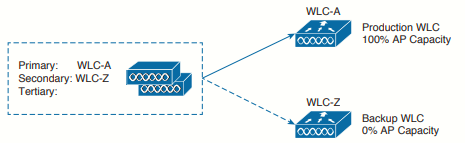 N+1 redundancy
A single controller at a centralized location can act as a backup for access points when they lose connectivity with the primary controller in the local region. Centralized and regional controllers do not need to be in the same mobility group. You can specify a primary, secondary, and tertiary controller for specific access points in your network. Using the controller GUI or CLI, you can specify the IP addresses of the backup controllers, which allows the access points to fail over to controllers outside of the mobility group.
The following are some guidelines for configuring backup controllers:
-
You can configure primary and secondary backup controllers (which are used if primary, secondary, or tertiary controllers are not specified or are not responsive) for all access points connected to the controller as well as various timers, including heartbeat timers and discovery request timers. To reduce the controller failure detection time, you can configure the fast heartbeat interval (between the controller and the access point) with a smaller timeout value. When the fast heartbeat timer expires (at every heartbeat interval), the access point determines if any data packets have been received from the controller within the last interval. If no packets have been received, the access point sends a fast echo request to the controller.
-
The access point maintains a list of backup controllers and periodically sends primary discovery requests to each entry on the list. When the access point receives a new discovery response from a controller, the backup controller list is updated. Any controller that fails to respond to two consecutive primary discovery requests is removed from the list. If the access point’s local controller fails, it chooses an available controller from the backup controller list in this order: primary, secondary, tertiary, primary backup, and secondary backup. The access point waits for a discovery response from the first available controller in the backup list and joins the controller if it receives a response within the time configured for the primary discovery request timer. If the time limit is reached, the access point assumes that the controller cannot be joined and waits for a discovery response from the next available controller in the list.
-
When an access point's primary controller comes back online, the access point disassociates from the backup controller and reconnects to its primary controller. The access point falls back only to its primary controller and not to any available secondary controller for which it is configured. For example, if an access point is configured with primary, secondary, and tertiary controllers, it fails over to the tertiary controller when the primary and secondary controllers become unresponsive. If the secondary controller comes back online while the primary controller is down, the access point does not fall back to the secondary controller and stays connected to the tertiary controller. The access point waits until the primary controller comes back online to fall back from the tertiary controller to the primary controller. If the tertiary controller fails and the primary controller is still down, the access point then falls back to the available secondary controller.
Task 3: Configuring N+1 Redundancy
We have two options here, either configure backup controllers globally, or configure primary and secondary controllers IPs on all APs (locally). First I will explain how to configure both, and then we'll see the differences:
Configuring a primary backup controller globally (from JRI.WLC.01 with all 4 APs joined):
Step 1: Choose Wireless > Access Points > Global Configuration to open the Global Configuration page.
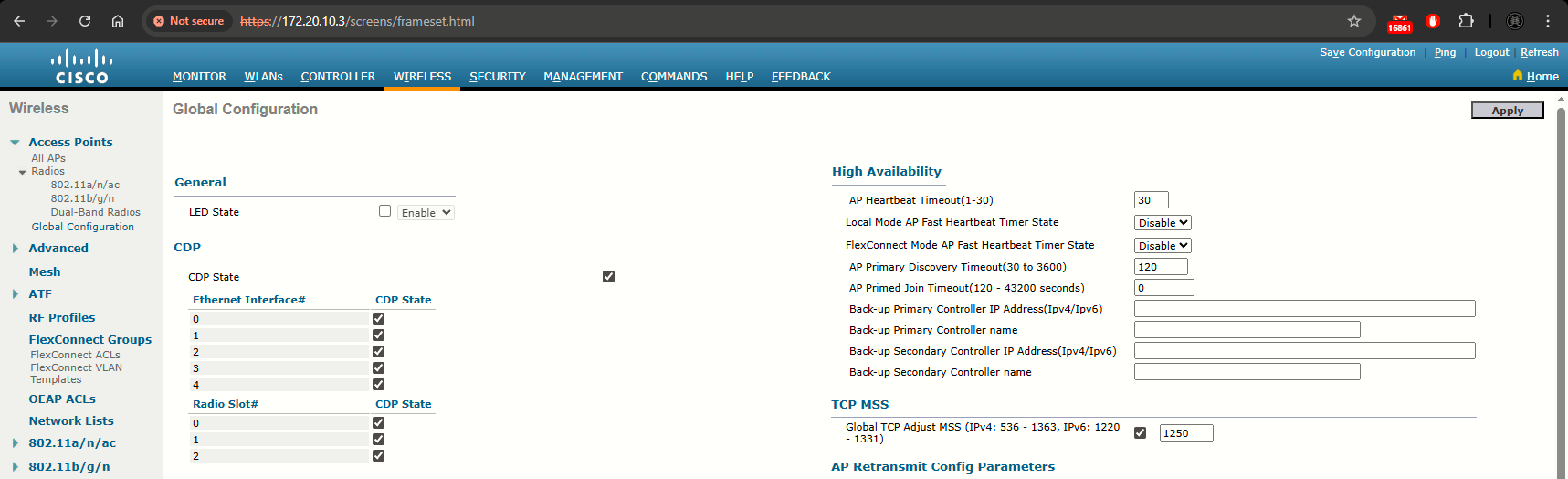
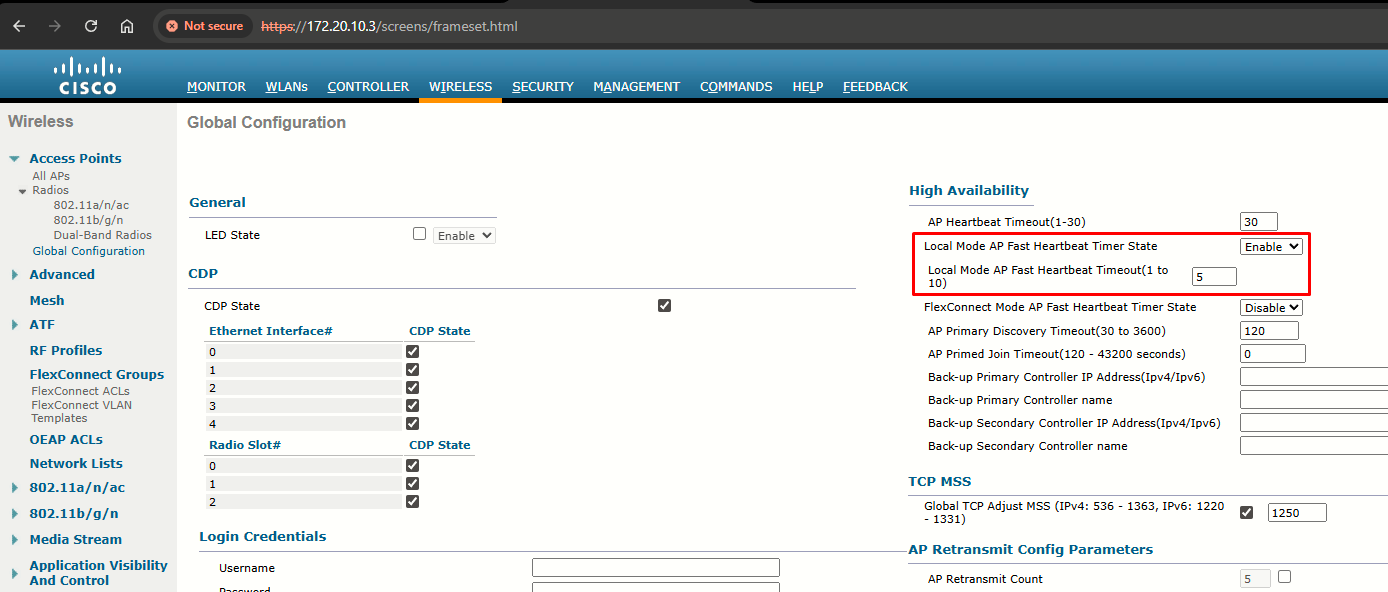
Step 2: From the Local Mode AP Fast Heartbeat Timer State drop-down list, choose Enable to enable the fast heartbeat timer for access points in local mode or choose Disable to disable this timer. The default value is Disable.
If you chose Enable, enter the Local Mode AP Fast Heartbeat Timeout text box to configure the fast heartbeat timer for access points in local mode. Specifying a small heartbeat interval reduces the amount of time it takes to detect a controller failure. The default value is 1 second. I have changed it to 5:
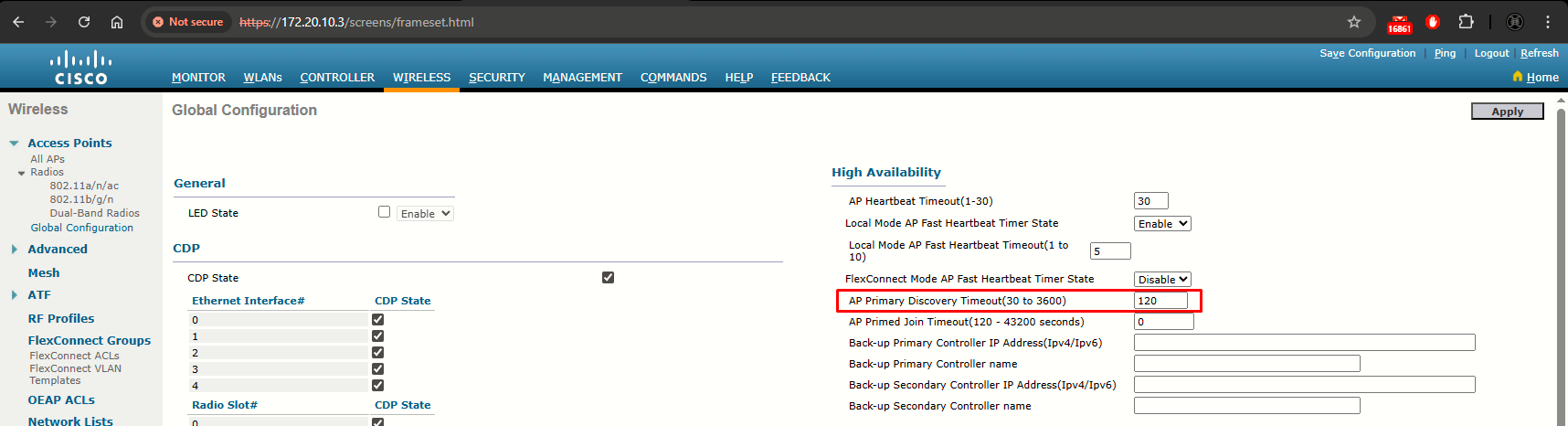
Step 3: In the AP Primary Discovery Timeout text box, a value between 30 and 3600 seconds (inclusive) to configure the access point primary discovery request timer. The default value is 120 seconds.
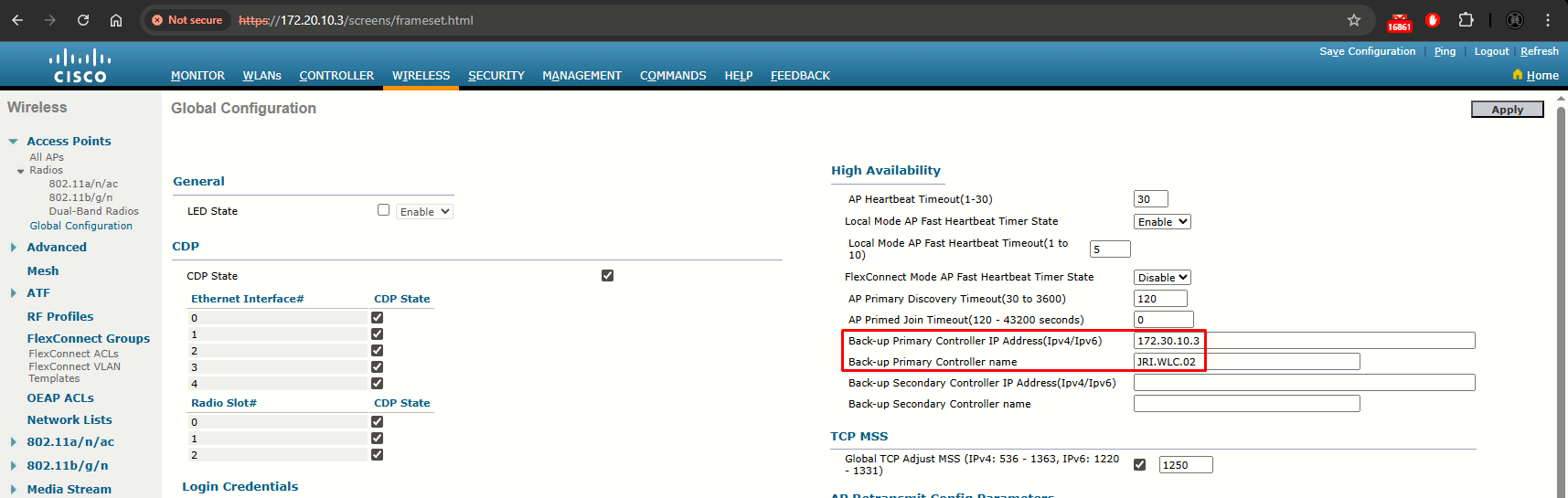
Step 4: If you want to specify a primary backup controller for all access points, enter the IPv4/IPv6 address of the primary backup controller (JRI.WLC.02) in the Back-up Primary Controller IP Address (IPv4/IPv6) text box and the name of the controller in the Back-up Primary Controller Name text box. Finally click Apply at the upper right corner.
Configuring local (per-AP) primary and secondary backup controllers (for all 4 APs):
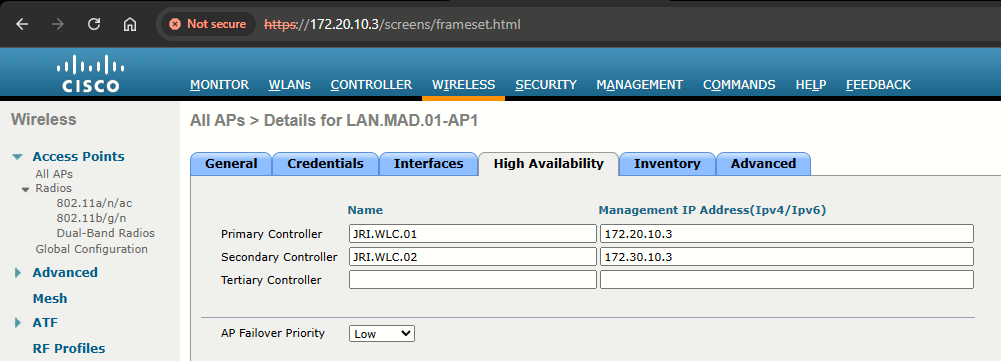
To configure N+1 redundancy, you configure the primary controller field on all APs with the name of an active controller (JRI.WLC.01). The secondary controller field is set to the name of the backup controller (JRI.WLC.02).
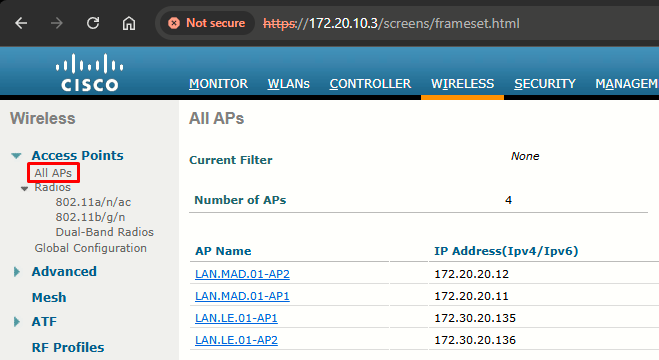
Step 1: Choose Access Points > All APs to open the All APs page
Step 2: Click the name of the access point for which you want to configure primary, secondary, (and tertiary if we had one) backup controllers. Choose the High Availability tab to open the All APs > Details for (High Availability) page. Enter the name and IP address of the primary controller for this access point in the Primary Controller text boxes.
Entering an IP address for the backup controller is optional. If the backup controller is outside the mobility group to which the access point is connected (the primary controller), then you need to provide the IP address of the primary, secondary, or tertiary controller, respectively. The controller name and IP address must belong to the same primary, secondary, or tertiary controller. Otherwise, the access point cannot join the backup controller.
Considerations
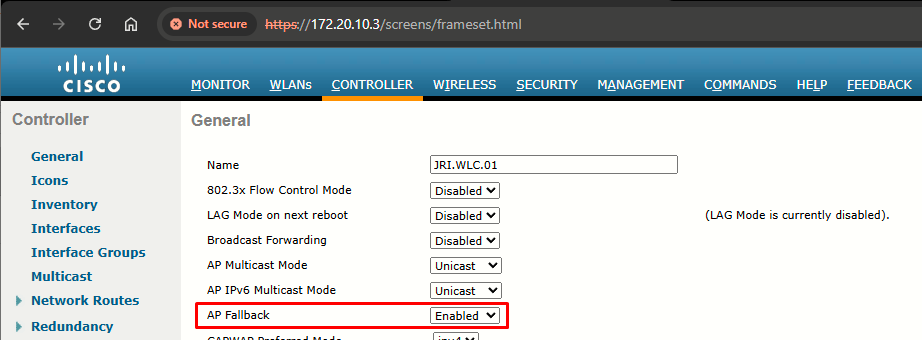
When using both the local (primary, secondary, tertiary) and global backup configurations, the locally configured settings take precedence in the event of a controller failure. If an AP is not able to join any of the locally configured controllers, it then tries to join the global backup controllers.
When an AP moves off the primary controller, it joins another controller and stays registered to that controller until the primary controller comes back online. The APs continue to send primary discovery request every 30s to the configured primary controller. AP primary discovery timeout value is set to 120s by default (it can be value from 30s to 3600s). As soon as the primary controller responds, the AP tries to re-join it.
This only happens if the backup controllers are configured locally, per APs If there are no per-AP (locally) configured backup controller addresses, but there is a global primary backup controller configured, the APs do NOT fallback to the primary WLC.
So, to conclude N+1 redundancy: in this scenario we have a two-controller deployment. Actually, the network could have any number of active controllers, but only one backup controller. JRI.WLC.01 is the active controller and carries 100% of the network's AP. JRI.WLC.02 is the backup controller, which normally carries no APs at all. The backup controller sits idle until JRI.WLC.01 fails. To configure N+1 we can configure the primary and secondary (backup) controllers global o locally.
Task 4: N+N Redundancy
N+1 design is simple, but is has a couple of shortcoming. First, the backup controller (JRI.WLC.02) must sit idle and empty of APs until JRI.WLC.01 fails. That might not sound like a problem, except that the backup unit must be purchased with the same AP capacity as the active controller it supports. Second, the backup controller must be configure identically to the active controller. The idea is to make a controller failure as seamless as possible so the APs should not have any noticeable configuration differences when they move from one controller to another.
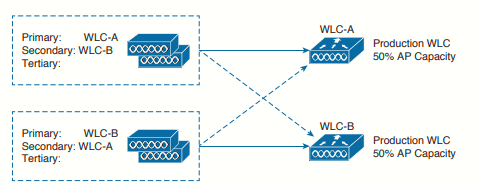
N+N redundancy strategy tries to make better use of the available controllers. N+N gets its name from grouping controller in pairs. If we have one active controller (JRI.WLC.01) we would pair it with one other controller (JRI.WLC.01). By grouping controllers in pairs, we can divide the active role across two separate devices. This makes better use of the AP capacity on each controller. As well, the APs including their client loads, will be distributed across separate hardware, while still supporting redundancy during a failure.
 N+N redundancy
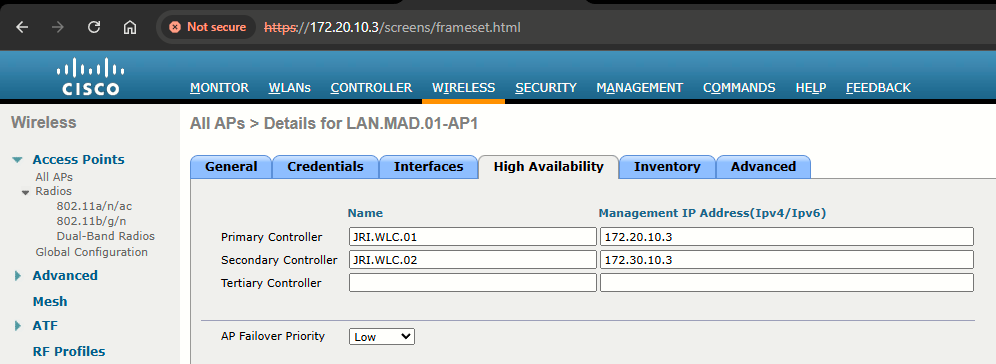
The APs will be divided into two groups - one that joins JRI.WLC.01 as primary controller (MADRID APs) and
another that joins JRI.WLC.02 as primary controller (LEON APs). The primary and secondary controllers will be reversed between the two groups of APs. To support the full set of APs during a failure, each controller must not be loaded with more than 50% of its capacity.
Rather than having an extra controller sitting idle waiting for another controller to die, N+N puts all of the controllers to use. However, it also requires more controllers and licenses than you actually need. N+N is an extremely reliable but extremely expensive solution.
Configuration for N+N - MADRID APs
Configuration for N+N - LEON APs
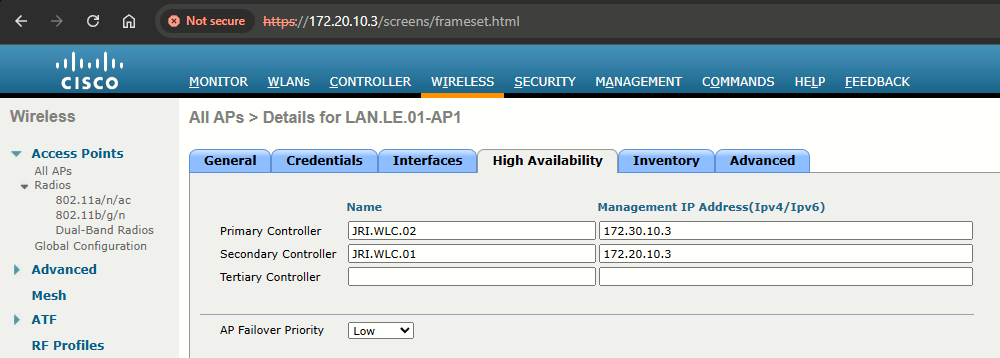
After the change is made, the LEON APs automatically fallback to JRI.WLC.02 after aprox. 120 seconds.
If JRI.WLC.02 loses connectivity LEON APs will connect to JRI.WLC.01:
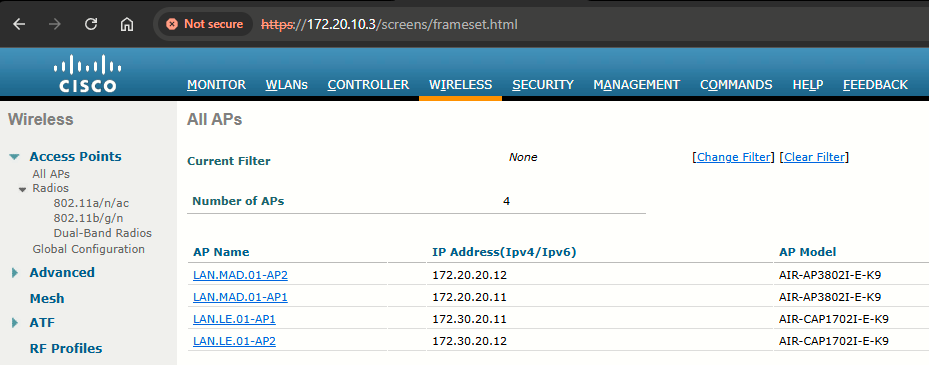
Once JRI.WLC.02 is back online, LEON APs will automatically join it: