
Lab 3-1: Join Process - Configure and Register Lightweight APs
Topology
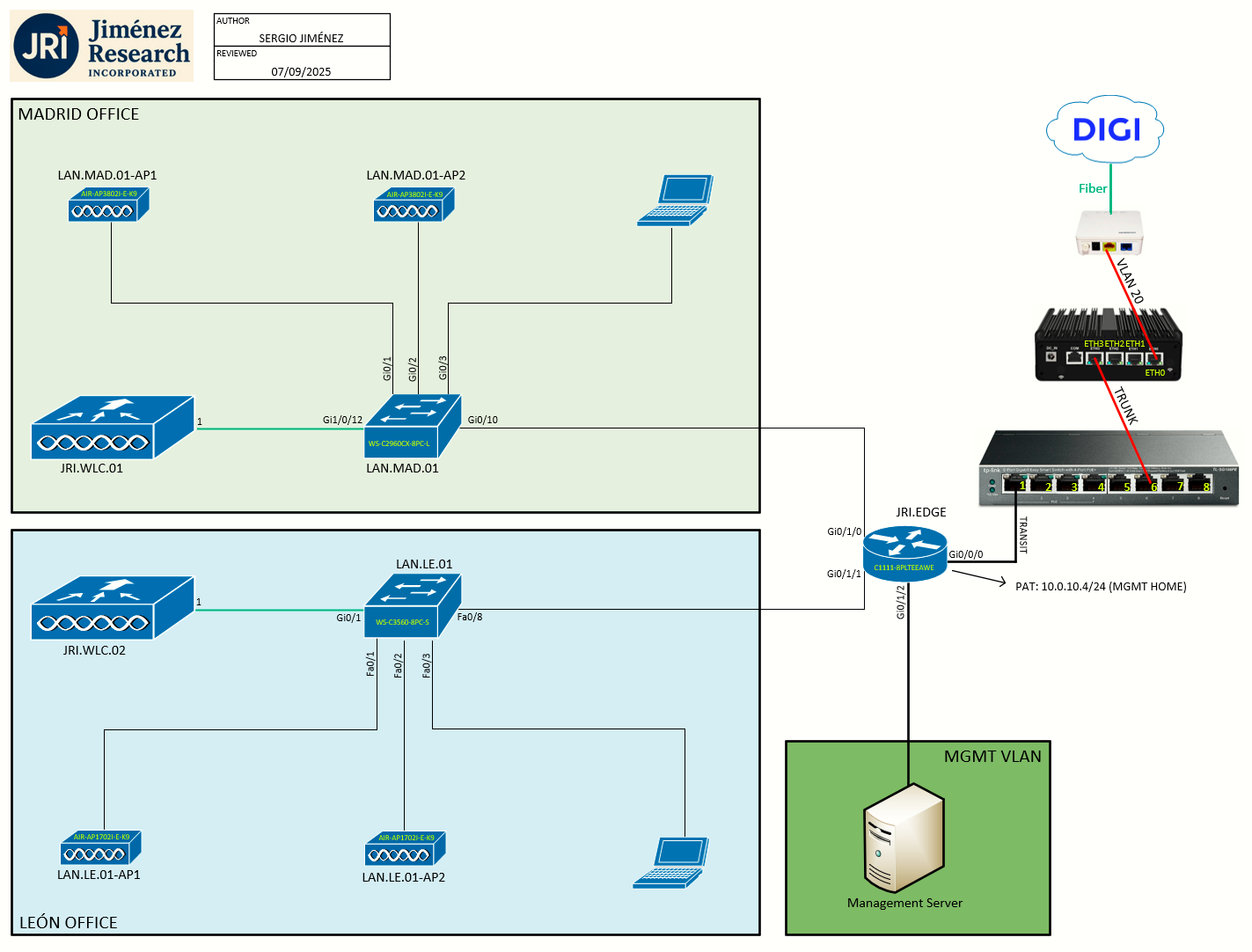
Task 1: CAPWAP Exploration
Cisco lightweight access points use the IETF standard Control and Provisioning of Wireless Access Points Protocol (CAPWAP) to communicate with the controller and other lightweight access points on the network.
CAPWAP, which is based on LWAPP, is a standard, interoperable protocol that enables a controller to manage a collection of wireless access points.
The following are some guidelines that you must follow for access point communication protocols:
- Ensure that the CAPWAP UDP ports 5246 and 5247 are enabled and are not blocked by an intermediate device that could prevent an access point from joining the controller.
-
If access control lists (ACLs) are in the control path between the controller and its access points, you need to open new protocol ports to prevent access points from being stranded.
Restrictions for AP Communication Protocols
-
Ensure that the controllers are configured with the correct date and time. If the date and time configured on the controller precedes the creation and installation date of certificates on the APs, the AP fails to join the controller. If the controller is set to a time that has already occurred, the access point might not join the controller because its certificate may not be valid for that time.
-
Do not use the following IP addresses with Cisco Wave 2 APs in the network to avoid the AP from dropping packets:
-
10.128.128.126
-
10.128.128.127
-
10.128.128.128
-
6.0.0.7
-
Task 2: Discovering and Joining Controllers
In a CAPWAP environment, a lightweight access point (LAP) discovers a controller by using CAPWAP discovery mechanisms and then sends the controller a CAPWAP join request. The controller sends the access point a CAPWAP join response allowing the access point to join the controller. When the access point joins the controller, the controller manages its configuration, firmware, control transactions, and data transactions.
The following are some guidelines for the controller discovery process:
-
If an access point is in the UP state and its IP address changes, the access point tears down the existing CAPWAP tunnel and rejoins the controller.
- APs must be discovered by a controller before they can become an active part of the network. The LAPs support the following controller discovery processes:
- L3 CAPWAP: This feature can be enabled on different subnets from the AP and uses either IPv4 or IPv6 addresses and UDP packets rather than MAC addresses used by L2 discovery.
- CAPWAP Multicast Discovery: Broadcast does not exist in IPv6 address. AP sends CAPWAP discovery message to all the controllers multicast address FF01::18C. The controller receives the IPv6 discovery request from the AP only if it is in the same L2 segment and sends back the IPv6 discovery response.
- Locally stored controller IPv4 or IPv6 address discovery: If the AP was previously associated to a controller, the IPv4 or IPv6 addresses of the primary, secondary, and tertiary controllers are stored in the APs NVRAM. This process of storing controller IPv4 or IPv6 addresses on an access point for later deployment is called priming the access point.
-
DHCP server discovery using option 43: This feature uses DHCP option 43 to provide controller IPv4 addresses to the access points. Cisco switches support a DHCP server option that is typically used for this capability. You can configure up to three addresses in the hexadecimal string.
- DHCP server discovery using option 52: This feature uses DHCP option 52 to allow the AP to discover the IPv6 address of the controller to which it connects. As part of the DHCPv6 messages, the DHCP server provides the controllers management with an IPv6 address.
- DNS discovery: The access point can discover controllers through your domain name server (DNS). You must configure your DNS to return controller IPv4 and IPv6 addresses in response to CISCO-CAPWAP-CONTROLLER.localdomain, where localdomain is the AP domain name. When an access point receives an IPv4/IPv6 address and DNSv4/DNSv6 information from a DHCPv4/DHCPv6 server, it contacts the DNS to resolve CISCO-LWAPP-CONTROLLER.localdomain or CISCO-CAPWAP-CONTROLLER.localdomain . When the DNS sends a list of controller IP addresses, which may include either IPv4 addresses or IPv6 addresses or both the addresses, the access point sends discovery requests to the controllers.
- L3 CAPWAP: This feature can be enabled on different subnets from the AP and uses either IPv4 or IPv6 addresses and UDP packets rather than MAC addresses used by L2 discovery.
Task 3: Authorizing APs
When an AP joins a controller, that connection is mutually authenticated via X.509 certificates, that is, the controller authenticates the AP’s certificate and the AP authenticates the controller's certificate.
All Cisco wireless controllers and all Cisco APs manufactured after July 18 2005, have manufacturing installed certificates (MICs).
By default, the controllers and APs authenticate each other via MICs. MICs generated before mid-2017 expire after 10 years, at which point, by default, the APs will no longer be able to join the controller. To allow the APs with expired MICs to join the controller, and/or APs to join a controller with an expired MIC, use the following command:
config ap cert-expiry-ignore {mic|ssc} enable
We will see this in practice in the following step.
Task 4: Joining the first AP to the WLC (LAN.MAD.01-AP1)
The moment has come to join the first AP (LAN.MAD.01-AP1) to the WLC (JRI.WLC.01). This AP is a Cisco Aironet 3802I. The port on the switch (LAN.MAD.01 - Gi0/1) is already configured:
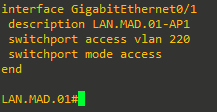
A simple DHCP server has been set up on JRI.EDGE for the MADRID_MGMT_APs VLAN:
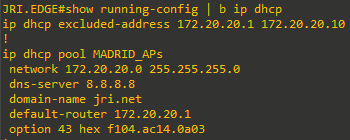
I have connected a temporal USB-to-Ethernet adapter on the Management Server, connected to port Gi0/4 on LAN.MAD.01. We will configure a local SPAN session to see the exchange of packets between the AP and the DHCP router and WLC.
PROBLEM
We are hitting bug CSCvb93909 (Field Notice: FN63942 - Cisco Wireless Lightweight Access Points and WLAN Controllers Fail to Create CAPWAP Connections Due to Certificate Expiration)

As you can see the WLCs certificate is not passing the AP check (AP throws Controller certificate verification error).
If we issue show certificate all at the WLC CLI, we can see that the Cisco SHA1 device cert expired on Jun 8 2021.
(JRI.WLC.01) >show certificate all

<output ommitted>

--------------  Identification Certificates --------------

<output ommitted>

----------------------------

Certificate Name: Cisco SHA1 device cert

     Subject Name :
         C=US, ST=California, L=San Jose, O=Cisco Systems, CN=AIR-CT5508-K9-e8b748a17380, emailAddress=support@cisco.com
     Issuer Name :
         O=Cisco Systems, CN=Cisco Manufacturing CA
     Serial Number (Hex):
         3981209D00000032C8A2
     Validity :
         Start : Jun  8 19:40:57 2011 GMT
         End   : Jun  8 19:50:57 2021 GMT
     Signature Algorithm :
         sha1WithRSAEncryption
     Hash key :
         SHA1 Fingerprint  : 9c:fd:68:1b:ff:18:7b:98:b4:aa:e4:91:80:0e:aa:4d:4b:74:1d:4d
         SHA256 Fingerprint  : 4d:19:07:ad:30:74:4f:a1:78:ef:aa:46:74:3b:1d:6c:e5:b5:1e:cc:50:5f:88:5e:72:6d:0a:04:da:4b:2f:a9

<output ommitted>

(JRI.WLC.01) >
Workaround for Cisco APs That Fail to Join a Cisco WLC Due to an Expired Certificate
If the Cisco AP or Cisco WLC certificates have expired, complete the following steps:
- Disable NTP
- Enter the
config ap cert-expiry-ignore {mic|ssc} enablecommand. - Change the Cisco WLC clock time to a recent earlier time when the certificates were still valid
- Have all Cisco APs join the Cisco WLC, download new software, and rejoin.
- Set the clock to the correct time and re-enable NTP.
For now then, we will just disable NTP, change the clock to date earlier than Jun 8 2021, and issue the following commands at the WLC to allow the APs to join and download the software release matching the WLC:
(JRI.WLC.01) >config ap cert-expiry-ignore mic enable
(JRI.WLC.01) >config ap cert-expiry-ignore ssc enable
(JRI.WLC.01) >config time ntp delete 1
(JRI.WLC.01) >config time manual 06/01/21 12:00:00
I will keep this configuration until all necessary APs for the lab have succesfully joined the WLC. Then I will revert to the NTP and current date & time.
Complete 3802 AP Console Output (from startup to WLC join)
Board configuration:
|  port  | Interface  | PHY address  |
|--------|------------|--------------|
| egiga1 |   SGMII    |     0x01     |
| egiga2 |   SGMII    |     In-Band  |
Net:   , egiga1, egiga2 [PRIME]
Hit ESC key to stop autoboot:  0
Creating 1 MTD partitions on "nand0":
0x000000200000-0x000010000000 : "mtd=2"
UBI: attaching mtd1 to ubi0
UBIFS: mounted UBI device 0, volume 0, name "part1"
Loading file 'part1/part.bin' to addr 0x02000000 with size 39801089 (0x025f5101)...
Done
SF: Detected S25FL032P with page size 64 KiB, total 4 MiB

Checking image signing.
Image signing verification success, continue to run...
Loading Marvel PHY firmware...
Ethernet transceiver PHY firmware download started:
Downloading to PHY's RAM.............
BootROM - 1.78
Booting from SPI flash, Secure mode
BootROM: RSA Public key verification PASSED
BootROM: CSK block signature verification PASSED
BootROM: Boot header signature verification PASSED
BootROM: Box ID verification PASSED
BootROM: JTAG is disabled


General initialization - Version: 1.0.0
Detected Device ID 6920
Master bootloder version 1.24
High speed PHY - Version: 2.0
BoardId = 0x25board SerDes lanes topology details:
 | Lane # | Speed|    Type     |
 ------------------------------|
 |   1    |  0   |  SGMII1     |
 |   2    |  5   |  PCIe1      |
 |   4    |  5   |  PCIe2      |
 |   5    |  0   |  SGMII2     |
 -------------------------------
:** Link is Gen1, check the EP capability
PCIe, Idx 1: Link upgraded to Gen2 based on client cpabilities
:** Link is Gen1, check the EP capability
PCIe, Idx 2: Link upgraded to Gen2 based on client cpabilities
High speed PHY - Ended Successfully
DDR4 Training Sequence - Ver TIP-0.23.(Sublib 0.8)0
DDR4 Training Sequence - Switching XBAR Window to FastPath Window
DDR4 Training Sequence - Ended Successfully
BootROM: Image checksum verification PASSED
BootROM: Boot image signature verification PASSED

  ____  _
 / ___|(_) ___   ___  ___
| |    | |/ __| / __|/ _ \
| |___ | |\__ \| (__| (_) |
 \____||_||___/ \___|\___/
         _   _     ____              _
        | | | |   | __ )  ___   ___ | |_
        | | | |___|  _ \ / _ \ / _ \| __|
        | |_| |___| |_) | (_) | (_) | |_
         \___/    |____/ \___/ \___/ \__|
 ** LOADER **


U-Boot 2013.01-gf899470 (Aug 16 2018 - 15:50:45) SDK version: 2015_T2.0p10

Board: Barbados-3KVE
SoC:   MV88F6920 Rev A1
       running 2 CPUs
CPU:   ARM Cortex A9 MPCore (Rev 1) LE
       CPU 0
       CPU    @ 1800 [MHz]
       L2     @ 900 [MHz]
       TClock @ 250 [MHz]
       DDR4    @ 900 [MHz]
       DDR4 32 Bit Width,FastPath Memory Access, DLB Enabled, ECC Disabled
DRAM:  1 GiB

RST I2C0
NAND:  256 MiB
SF: Detected S25FL032P with page size 64 KiB, total 4 MiB
PCI-e 1 (IF 0 - bus 0) Root Complex Interface, Detected Link X1, GEN 2.0
PCI-e 2 (IF 1 - bus 1) Root Complex Interface, Detected Link X1, GEN 2.0

Map:   Code:                    0x3fed9000:0x3ffad5c4
       BSS:                     0x3ffef080
       Stack:                   0x3f9c8f20
       Heap:                    0x3f9c9000:0x3fed9000
       U-Boot Environment:      0x00100000:0x00110000 (SPI)

Board configuration:
|  port  | Interface  | PHY address  |
|--------|------------|--------------|
| egiga1 |   SGMII    |     0x01     |
| egiga2 |   SGMII    |     In-Band  |


Button is pressed. Configuration reset activated..
Keep the button pressed for > 20 seconds for full reset

Wait for the button to be released ....
Button pressed for  23 seconds

Setting env for full reset..
SF: Detected S25FL032P with page size 64 KiB, total 4 MiB
Erasing SPI flash....Writing to SPI flash.....done
Net:   , egiga1, egiga2 [PRIME]
Hit ESC key to stop autoboot:  0
Creating 1 MTD partitions on "nand0":
0x000000200000-0x000010000000 : "mtd=2"
UBI: attaching mtd1 to ubi0
UBIFS: mounted UBI device 0, volume 0, name "part1"
Loading file 'part1/part.bin' to addr 0x02000000 with size 39801089 (0x025f5101)...
Done
SF: Detected S25FL032P with page size 64 KiB, total 4 MiB

Checking image signing.
Image signing verification success, continue to run...
Loading Marvel PHY firmware...
Ethernet transceiver PHY firmware download started:
Downloading to PHY's RAM...................... 180192 of 180192 Bytes transferred. [Done]
Ethernet transceiver PHY firmware download succeeded.
Automatic Voltage setting value: 05
## Booting kernel from Legacy Image at 02000000 ...
   Image Name:   Barbados Firmware Image
   Created:      2023-11-17  23:37:31 UTC
   Image Type:   ARM Linux Multi-File Image (uncompressed)
   Data Size:    39800081 Bytes = 38 MiB
   Load Address: 00008000
   Entry Point:  00008000
   Contents:
      Image 0: 3976224 Bytes = 3.8 MiB
      Image 1: 35808076 Bytes = 34.1 MiB
      Image 2: 15765 Bytes = 15.4 KiB
   Verifying Checksum ... OK
## Loading init Ramdisk from multi component Legacy Image at 02000000 ...
## Flattened Device Tree from multi component Image at 02000000
   Booting using the fdt at 0x045f0fbc
   Loading Multi-File Image ... OK
OK
   reserving fdt memory region: addr=0 size=4000
   Loading Device Tree to 01ff9000, end 01fffd94 ... OK

   Starting Device Tree update ('fdt_skip_update' = no)

Limit DDR size at 3GB due to power of 2 requirement of Address decoding
Updating device tree successful

Starting kernel ...

[01/01/1970 00:00:00.0000] Built 1 zonelists in Zone order, mobility grouping on.  Total pages: 260096
[01/01/1970 00:00:00.0000] Memory: 993404K/1048576K available (5392K kernel code, 395K rwdata, 2392K rodata, 347K init, 465K bss, 55172K reserved)
[01/01/1970 00:00:00.1200] CPU1: Booted secondary processor
[01/01/1970 00:00:08.9900] buginf tty flushing thread started, ttyport=bf0f3000
[01/01/1970 00:00:09.0800] m25p80 spi1.0: found s25sl032p, expected n25q032
[*01/01/1970 00:00:10.2160] buginf() enabled.
[*01/01/1970 00:00:10.2246] Made it into bootsh: Nov 17 2023 23:32:01
[*01/01/1970 00:00:10.2247] bootsh build T-453ee1fc5dd4f147d34c457034f924da4b6d507d-g453ee1fc-aut
[*01/01/1970 00:00:10.2248] bootsh mini ramfs booted
[*01/01/1970 00:00:17.4530] 241749 blocks

Welcome to Cisco.

Usage of this device is governed by Cisco's End User License Agreement,
available at:
http://www.cisco.com/c/en/us/td/docs/general/warranty/English/EU1KEN_.html.


             Restricted Rights Legend

Use, duplication, or disclosure by the Government is subject to
restrictions as set forth in subparagraph (c) of the Commercial
Computer Software - Restricted Rights clause at FAR sec. 52.227-19 and
subparagraph (c) (1) (ii) of the Rights in Technical Data and Computer
Software clause at DFARS sec. 252.227-7013.

            Cisco Systems, Inc.
            170 West Tasman Drive
            San Jose, California 95134-1706

This product contains cryptographic features and is subject to United
States and local country laws governing import, export, transfer and
use. Delivery of Cisco cryptographic products does not imply
third-party authority to import, export, distribute or use encryption.
Importers, exporters, distributors and users are responsible for
compliance with U.S. and local country laws. By using this product you
agree to comply with applicable laws and regulations. If you are unable
to comply with U.S. and local laws, return this product immediately.

A summary of U.S. laws governing Cisco cryptographic products may be found at:
http://www.cisco.com/wwl/export/crypto/tool/stqrg.html

If you require further assistance please contact us by sending email to
export@cisco.com.


This product contains some software licensed under the
"GNU General Public License, version 2" provided with
ABSOLUTELY NO WARRANTY under the terms of
"GNU General Public License, version 2", available here:
http://www.gnu.org/licenses/old-licenses/gpl-2.0.html


This product contains some software licensed under the
"GNU Library General Public License, version 2" provided
with ABSOLUTELY NO WARRANTY under the terms of "GNU Library
General Public License, version 2", available here:
http://www.gnu.org/licenses/old-licenses/lgpl-2.0.html


This product contains some software licensed under the
"GNU Lesser General Public License, version 2.1" provided
with ABSOLUTELY NO WARRANTY under the terms of "GNU Lesser
General Public License, version 2.1", available here:
http://www.gnu.org/licenses/old-licenses/lgpl-2.1.html


This product contains some software licensed under the
"GNU General Public License, version 3" provided with
ABSOLUTELY NO WARRANTY under the terms of
"GNU General Public License, Version 3", available here:
http://www.gnu.org/licenses/gpl.html.


This product contains some software licensed under the
"GNU Affero General Public License, version 3" provided
with ABSOLUTELY NO WARRANTY under the terms of
"GNU Affero General Public License, version 3", available here:
http://www.gnu.org/licenses/agpl-3.0.html.

Factory full reset detected...
Full Factory Reset triggered: clear all files from storage..
init started: BusyBox v1.23.2 (2023-11-17 23:10:05 GMT)
Jan  1 00:00:21 FIPS[1271]: *** shell: FIPS Mode = disabled ***


User Access Verification
Username: [*01/01/1970 00:00:22.8103]
[*01/01/1970 00:00:22.8103]
[*01/01/1970 00:00:22.8103]
[*01/01/1970 00:00:22.8103]
[*01/01/1970 00:00:22.8103] Authenticating ACT2 ID:AP3800
[*01/01/1970 00:00:22.8103] Authenticating SN:FOC231564GK
[*01/01/1970 00:00:22.8107]
[*01/01/1970 00:00:22.8108] (ACT2Boot) Hardware is Cisco (c) authentic :-)
[*01/01/1970 00:00:22.8108]
[*01/01/1970 00:00:22.8139] Seeding /dev/urandom from ACT2
[*01/01/1970 00:00:23.4533] Reading ACT2 SUDI certificates
[*04/26/2019 23:59:59.0059] Last reload time: Jun 1 10:27:46 2021
[*11/17/2023 23:32:37.0001] Setting system time Fri Nov 17 23:32:37 UTC 2023
[*11/17/2023 23:32:38.5990] Loading kernel crypto modules
[*11/17/2023 23:32:38.7215] GCM-128 POST passed
[*11/17/2023 23:32:38.7215] GCM-256 POST passed
[*11/17/2023 23:32:39.3422] MGIG Bundeled version 201, Tarball version 201
[*11/17/2023 23:32:39.3641] Identified Ethernet mGig PHY: mv2010
[*11/17/2023 23:32:45.5570] Active version: 8.5.182.12
[*11/17/2023 23:32:45.5582] Backup version: 8.3.143.0
[*11/17/2023 23:[11/17/2023 23:32:45.7100] PCI: enabling device 0000:00:02.0 (0140 -> 0143)
32:45.7031] devi[11/17/2023 23:32:45.8000] PCI: enabling device 0000:02:00.0 (0140 -> 0142)
ce wired0 entered promiscuous mode
[*11/17/2023 23:32:47.1473] 0;0;0;0;0;0;0;0;0;0;0;0;0;0;0;
[*11/17/2023 23:32:50.7872] Firmware download complete
[*11/17/2023 23:32:50.9819] FIPS enc aes-ccmp Verified
[*11/17/2023 23:32:50.9820] FIPS dec aes-ccmp Verified
[*11/17/2023 23:32:50.9822] FIPS[11/17/2023 23:32:51.1200] PCI: enabling device 0000:00:03.0 (0140 -> 0143)
 enc aes-ccmp-25[11/17/2023 23:32:51.2100] PCI: enabling device 0000:03:00.0 (0140 -> 0142)
6 Verified
[*11/17/2023 23:32:50.9823] FIPS dec aes-ccmp-256 Verified
[*11/17/2023 23:32:50.9824] FIPS enc aes-gcmp Verified
[*11/17/2023 23:32:50.9825] FIPS dec aes-gcmp Verified
[*11/17/2023 23:32:50.9826] FIPS enc aes-gcmp-256 Verified
[*11/17/2023 23:32:50.9827] FIPS dec aes-gcmp-256 Verified
[*11/17/2023 23:32:52.5615] 0;0;0;0;0;0;0;0;0;0;0;0;0;
[*11/17/2023 23:32:55.6239] Firmware download complete
[*11/17/2023 23:32:55.8219] FIPS enc aes-ccmp Verified
[*11/17/2023 23:32:55.8220] FIPS dec aes-ccmp Verified
[*11/17/2023 23:32:55.8221] FIPS enc aes-ccmp-256 Verified
[*11/17/2023 23:32:55.8222] FIPS dec aes-ccmp-256 Verified
[*11/17/2023 23:32:55.8223] FIPS enc aes-gcmp Verified
[*11/17/2023 23:32:55.8224] FIPS dec aes-gcmp Verified
[*11/17/2023 23:32:55.8225] FIPS enc aes-gcmp-256 Verified
[*11/17/2023 23:32:55.8227] FIPS dec aes-gcmp-256 Verified
[*11/17/2023 23:32:56.2974] ifconfig: SIOCGIFFLAGS: No such device
[*11/17/2023 23:32:56.3612] Creating default base capwap config.
[*11/17/2023 23:32:56.4283] Initializing NSS Firmware
[11/17/2023 23:32:59.5700] Disabling lock debugging due to kernel taint
[*11/17/2023 23:32:59.6700] stile module dp init successfully
[*11/17/2023 23:32:59.6701] NBAR Label:BLD_V155_3_S_XE316_THROTTLE_LATEST_20180404_162221 NBAR VERSION:module build date: Nov 17 2023 at 23:29:04
[*11/17/2023 23:33:01.1838] Loading nf_conntrack...
[*11/17/2023 23:33:01.2024] Loading nf_conntrack_ftp...
[*11/17/2023 23:33:01.2137] Loading nf_defrag_ipv4...
[*11/17/2023 23:33:01.2249] Loading nf_defrag_ipv6...
[*11/17/2023 23:33:01.2361] Loading nf_conntrack_ipv4...
[*11/17/2023 23:33:01.2475] Loading nf_conntrack_ipv6...
[*11/17/2023 23:33:01.2586] Loading nf_conntrack_irc...
[*11/17/2023 23:33:01.2699] Loading nfnetlink...
[*11/17/2023 23:33:01.2812] Loading nf_conntrack_netlink...
[*11/17/2023 23:33:01.2927] Loading nf_conntrack_sip...
[*11/17/2023 23:33:01.3042] Loading nf_nat...
[*11/17/2023 23:33:01.3160] Loading nf_nat_ftp...
[*11/17/2023 23:33:01.3272] Loading nf_nat_ipv4...
[*11/17/2023 23:33:01.3383] Loading nf_nat_irc...
[*11/17/2023 23:33:01.3494] Loading nf_nat_sip...
[*11/17/2023 23:33:01.3607] Loading x_tables...
[*11/17/2023 23:33:01.3724] Loading xt_conntrack...
[*11/17/2023 23:33:01.3836] Loading xt_state...
[*11/17/2023 23:33:01.3949] Loading xt_nat...
[*11/17/2023 23:33:01.4062] Loading xt_tcpudp...
[*11/17/2023 23:33:01.4175] Loading ip_tables...
[*11/17/2023 23:33:01.4337] Loading iptable_filter...
[*11/17/2023 23:33:01.4449] Loading iptable_mangle...
[*11/17/2023 23:33:01.4564] Loading iptable_nat...
[*11/17/2023 23:33:01.4677] Loading ip6_tables...
[*11/17/2023 23:33:01.4793] Loading ip6t_REJECT...
[*11/17/2023 23:33:01.4906] Loading ip6t_ipv6header...
[*11/17/2023 23:33:01.5098] Loading ip6table_filter...
[*11/17/2023 23:33:01.5212] Loading ip6table_mangle...
[*11/17/2023 23:33:01.5326] Loading ipt_MASQUERADE...
[*11/17/2023 23:33:01.5440] Loading ipt_REJECT...
[*11/17/2023 23:33:01.5556] Loading iptable_raw...
[*11/17/2023 23:33:01.5669] Loading ip6table_raw...
[*11/17/2023 23:33:01.5782] Loading bridge...
[*11/17/2023 23:33:01.5934] Loading nfnetlink_log...
[*11/17/2023 23:33:01.6049] Loading xt_mark...
[*11/17/2023 23:33:01.6165] Loading xt_policy...
[*11/17/2023 23:33:01.6279] xt_tcpudp is already loaded
[*11/17/2023 23:33:01.6279] Loading ebtables...
[*11/17/2023 23:33:01.6395] Loading ebt_ip...
[*11/17/2023 23:33:01.6510] Loading ebt_ip6...
[*11/17/2023 23:33:01.6626] Loading ipt_ULOG...
[*11/17/2023 23:33:01.8125]
[*11/17/2023 23:33:01.8163] boot 1 build T-453ee1fc5dd4f147d34c457034f924da4b6d507d-g453ee1fc-aut board barbados mac 78:BC:1A:49:40:74
[*11/17/2023 23:33:01.8193] Module: act2_driver  .text=0x7f000000        data=0x7f000770        bss=0x7f000a04
[*11/17/2023 23:33:01.8193] Module: aes_generic  .text=0x7f004000        data=0x7f00a460        bss=
[*11/17/2023 23:33:01.8194] Module: sha256_generic  .text=0x7f00e000        data=0x7f00fbdc        bss=
[*11/17/2023 23:33:01.8194] Module: sha512_generic  .text=0x7f014000        data=0x7f0158c8        bss=
[*11/17/2023 23:33:01.8194] Module: hmac  .text=0x7f019000        data=0x7f0195e8        bss=
[*11/17/2023 23:33:01.8194] Module: sha1_generic  .text=0x7f01d000        data=0x7f01d2cc        bss=
[*11/17/2023 23:33:01.8194] Module: sha1_arm  .text=0x7f021000        data=0x7f021850        bss=
[*11/17/2023 23:33:01.8194] Module: gf128mul  .text=0x7f025000        data=        bss=
[*11/17/2023 23:33:01.8194] Module: cbc  .text=0x7f02a000        data=0x7f02a4f4        bss=
[*11/1[11/17/2023 23:33:04.5900] wired0 emac 0: link up
7/2023 23:33:01.[11/17/2023 23:33:04.6600] wired0: link up
8194] Module: ctr  .text=0x7f02e000        data=0x7f02e7c8        bss=
[*11/17/2023 23:33:01.8194] Module: ghash_generic  .text=0x7f032000        data=0x7f032268        bss=
[*11/17/2023 23:33:01.8194] Module: seqiv  .text=0x7f036000        data=0x7f036654        bss=
[*11/17/2023 23:33:01.8194] Module: mbedtls  .text=0x7f03a000        data=0x7f0415e0        bss=0x7f041850
[*11/17/2023 23:33:01.8194] Module: a390_mii_xsmi  .text=0x7f046000        data=0x7f046b8c        bss=0x7f046d50
[*11/17/2023 23:33:01.8194] Module: a390_port_switch  .text=0x7f04b000        data=0x7f0ae0d0        bss=0x7f0b18f0
[*11/17/2023 23:33:01.8194] Module: aptrace  .text=0x7f0c9000        data=0x7f0d4f84        bss=0x7f0d5470
[*11/17/2023 23:33:01.8194] Module: ap8x  .text=0x7f0dd000        data=0x7f194ae8        bss=0x7f19c540
[*11/17/2023 23:33:01.8194] Module: mv_nss_api  .text=0x7f38d000        data=0x7f3df66c        bss=0x7f3e0af4
[*11/17/2023 23:33:01.8194] Module: proclikefs  .text=0x7f3f2000        data=        bss=0x7f3f2b80
[*11/17/2023 23:33:01.8194] Module: stile_lm_ft  .text=        data=        bss=
[*11/17/2023 23:33:01.8194] Module: stile_lm_dp  .text=        data=        bss=
[*11/17/2023 23:33:01.8195] Module: mtdoops  .text=0x7ff0a000        data=0x7ff0ae34        bss=0x7ff0afa8
[*11/17/2023 23:33:01.8195] Module: ipv6  .text=0x7ff0f000        data=0x7ff44980        bss=0x7ff46540
[*11/17/2023 23:33:01.8195] Module: llc  .text=0x7ff6d000        data=0x7ff6d848        bss=0x7ff6d9e4
[*11/17/2023 23:33:01.8195] Module: stp  .text=0x7ff72000        data=0x7ff72280        bss=0x7ff7243c
[*11/17/2023 23:33:01.8195] Module: nf_conntrack  .text=0x7ff76000        data=0x7ff7fb34        bss=0x7ff80840
[*11/17/2023 23:33:01.8195] Module: nf_conntrack_ftp  .text=0x7ff90000        data=        bss=0x7ff91380
[*11/17/2023 23:33:01.8195] Module: nf_defrag_ipv4  .text=0x7ff95000        data=0x7ff95188        bss=
[*11/17/2023 23:33:01.8195] Module: nf_defrag_ipv6  .text=0x7ff99000        data=0x7ff9a050        bss=0x7ff9a2c0
[*11/17/2023 23:33:01.8195] Module: nf_conntrack_ipv4  .text=0x7ffa0000        data=0x7ffa1d88        bss=0x7ffa2218
[*11/17/2023 23:33:01.8195] Module: nf_conntrack_ipv6  .text=0x7ffa8000        data=0x7ffa91bc        bss=
[*11/17/2023 23:33:01.8195] Module: nf_conntrack_irc  .text=0x7ffae000        data=0x7ffae57c        bss=0x7ffaea24
[*11/17/2023 23:33:01.8195] Module: nfnetlink  .text=0x7ffb2000        data=0x7ffb2a34        bss=0x7ffb2bac
[*11/17/2023 23:33:01.8195] Module: nf_conntrack_netlink  .text=0x7ffb7000        data=0x7ffbaa5c        bss=
[*11/17/2023 23:33:01.8195] Module: nf_conntrack_sip  .text=0x7ffc0000        data=        bss=0x7ffc3f44
[*11/17/2023 23:33:01.8195] Module: nf_nat  .text=0x7ffc9000        data=0x7ffcaf54        bss=0x7ffcb174
[*11/17/2023 23:33:01.8195] Module: nf_nat_ftp  .text=0x7ffd1000        data=0x7ffd1320        bss=
[*11/17/2023 23:33:01.8195] Module: nf_nat_ipv4  .text=0x7ffd5000        data=        bss=0x7ffd591c
[*11/17/2023 23:33:01.8195] Module: nf_nat_irc  .text=0x7ffd9000        data=0x7ffd9254        bss=
[*11/17/2023 23:33:01.8195] Module: nf_nat_sip  .text=0x7ffdd000        data=0x7ffde7d8        bss=
[*11/17/2023 23:33:01.8196] Module: x_tables  .text=0x7ffe2000        data=0x7ffe4184        bss=0x7ffe42fc
[*11/17/2023 23:33:01.8196] Module: xt_conntrack  .text=0x7ffeb000        data=        bss=
[*11/17/2023 23:33:01.8196] Module: xt_state  .text=0x7ffef000        data=        bss=
[*11/17/2023 23:33:01.8196] Module: xt_nat  .text=0x7fff3000        data=        bss=
[*11/17/2023 23:33:01.8196] Module: xt_tcpudp  .text=0x7fff7000        data=        bss=
[*11/17/2023 23:33:01.8196] Module: ip_tables  .text=0x7fffb000        data=0x7fffceb4        bss=0x7fffd12c
[*11/17/2023 23:33:01.8196] Module: iptable_filter  .text=0x7f00c000        data=0x7f00c1b0        bss=
[*11/17/2023 23:33:01.8196] Module: iptable_mangle  .text=0x7f017000        data=0x7f017210        bss=
[*11/17/2023 23:33:01.8196] Module: iptable_nat  .text=0x7f01f000        data=0x7f01f5bc        bss=
[*11/17/2023 23:33:01.8196] Module: ip6_tables  .text=0x7f0bd000        data=0x7f0bef50        bss=0x7f0bf1c8
[*11/17/2023 23:33:01.8196] Module: ip6t_REJECT  .text=0x7f028000        data=        bss=
[*11/17/2023 23:33:01.8196] Module: ip6t_ipv6header  .text=0x7f030000        data=        bss=
[*11/17/2023 23:33:01.8196] Module: ip6table_filter  .text=0x7f038000        data=0x7f038174        bss=
[*11/17/2023 23:33:01.8196] Module: ip6table_mangle  .text=0x7f049000        data=0x7f049284        bss=
[*11/17/2023 23:33:01.8196] Module: ipt_MASQUERADE  .text=0x7f0c5000        data=0x7f0c52a8        bss=
[*11/17/2023 23:33:01.8196] Module: ipt_REJECT  .text=0x7f0d9000        data=        bss=
[*11/17/2023 23:33:01.8197] Module: iptable_raw  .text=0x7f36f000        data=0x7f36f17c        bss=
[*11/17/2023 23:33:01.8197] Module: ip6table_raw  .text=0x7f373000        data=0x7f373140        bss=
[*11/17/2023 23:33:01.8197] Module: bridge  .text=0x7f377000        data=0x7f384028        bss=0x7f38457c
[*11/17/2023 23:33:01.8197] Module: nfnetlink_log  .text=0x7f5cb000        data=0x7f5cc5e0        bss=0x7f5cc7ec
[*11/17/2023 23:33:01.8197] Module: xt_mark  .text=0x7f38b000        data=        bss=
[*11/17/2023 23:33:01.8198] Module: xt_policy  .text=0x7f5d2000        data=        bss=
[*11/17/2023 23:33:01.8198] Module: ebtables  .text=0x7f5d6000        data=0x7f5d95ec        bss=
[*11/17/2023 23:33:01.8198] Module: ebt_ip  .text=0x7f5dd000        data=        bss=
[*11/17/2023 23:33:01.8198] Module: ebt_ip6  .text=0x7f5e1000        data=        bss=
[*11/17/2023 23:33:01.8198] Module: ipt_ULOG  .text=0x7f5e5000        data=0x7f5e58a0        bss=
[*11/17/2023 23:33:01.8198] Module: crc_itu_t  .text=0x7f5e9000        data=        bss=
[*11/17/2023 23:33:01.8198] Module: lowmemorykiller  .text=0x7f5ed000        data=0x7f5ed2f4        bss=0x7f5ed4a0
[*11/17/2023 23:33:01.8198] Module: p8022  .text=0x7f5f1000        data=        bss=
[*11/17/2023 23:33:01.8198] Module: psnap  .text=0x7f5f5000        data=0x7f5f5344        bss=0x7f5f54c4
[*11/17/2023 23:33:01.8198] Module: rng_core  .text=0x7f5f9000        data=0x7f5f9818        bss=0x7f5f99d8
[*11/17/2023 23:33:01.8198] Module: udf  .text=0x7f5fd000        data=0x7f60d004        bss=0x7f60d180
[*11/17/2023 23:33:01.8428] barbados /tmp/SC4_1dbm.txt
[*11/17/2023 23:33:01.9632] Last reload reason : 0: unknown
[*11/17/2023 23:33:09.5711]
[*11/17/2023 23:33:09.5711] Click sched monitor: schedulers = 1
[*11/17/2023 23:33:13.8383] click-config/io-real.click:131: While configuring 'todev_wired0 :: ToDevice':
[*11/17/2023 23:33:13.8383]   warning: device 'wired0' is down
[*11/17/2023 23:33:13.8582] click-config/io-real.click:131: While configuring 'fromdev_wired0 :: FromDevice':
[*11/17/2023 23:33:13.8582]   warning: device 'wired0' is down
[*11/17/2023 23:33:14.3211] click-config/io-real[11/17/2023 23:33:14.3600] wired0 emac 0: link up
.click:131: Whil[11/17/2023 23:33:14.4200] wired0: link up
e initializing 'tohost_wired0 :: ToHost':
[*11/17/2023 23:33:14.3212]   warning: device 'wired0' is down
[*11/17/2023 23:33:14.4873] aptrace_register_sysproc_fn: duplicate registeration for 'wired'
[*11/17/2023 23:33:15.2948] chatter: tohost_srcr6 :: ToHost: device 'srcr6' went down
[*11/17/2023 23:33:15.3039] chatter: tohost_srcr6 :: ToHost: device 'srcr6' came up
[*11/17/2023 23:33:15.3044] ip6_port srcr6, ip6local fe80::7abc:1aff:fe49:4074, ip6 ::, plen 0, gw6 ::, gw6_mac 00:00:00:00:00:00, mtu 1500, vid 0, mode6 3(slaac)
[*11/17/2023 23:33:23.4863]  Create symlink /dev/mic_cert result 0
[*11/17/2023 23:33:23.4863] Loading certificates from storage...
[*11/17/2023 23:33:23.5001] SKU to radio FW
[*11/17/2023 23:33:23.7983] Starting monit
[*11/17/2023 23:33:24.0636]  New Monit id: 92a56052b32040a6b1de32ffeaf6c67e
[*11/17/2023 23:33:24.0636]  Stored in '/var/.monit.id'
[*11/17/2023 23:33:24.0638] Starting Monit 5.18 daemon with http interface at [localhost]:2812
[*11/17/2023 23:33:27.6316] starting tam services using ACT2...
[*11/17/2023 23:33:28.5831] Password for user changed
[*11/17/2023 23:33:28.9003] gzip -dc /etc/wcp.usermodule.template.gz | sed -e 's/__TX_POWER_XOR_5G_FILE__/\/radio_fw\/X5.csv/g' -e 's/__EVM_POWER_XOR_5G_FILE__/\/radio_fw\/EVM_X5.csv/g' -e 's/__TX_POWER_2G_FILE__/\/radio_fw\/R2.csv/g' -e '                               s/__TX_POWER_5G_FILE__/\/radio_fw\/R5.csv/g' -e 's/__EVM_POWER_2G_FILE__/\/radio_fw\/EVM_2.csv/g' -e 's/__EVM_POWER_5G_FILE__/\/radio_fw\/EVM_5.csv/g' -e 's/__DOMAIN_2G__/1/g' -e 's/__DOMAIN_5G__/12/g' -e 's/__PWR_TABLE_49G__/0/g' -e 's/__                               PRODUCT_ID__/AIR-AP3802I-E-K9/g' -e 's/__AP_TYPE__/52/g' -e 's/__WIRELESS_MAC__/78:BC:1A:B0:5B:40/g' -e 's/__WIRED_MAC__/78:BC:1A:49:40:74/g' -e 's/__WIRED1_MAC__/78:BC:1A:49:40:74/g' | DMALLOC_OPTIONS=debug=0x400003,inter=1000,log=/tmp/wc                               p.dmalloc.log,limit=40000000 wcpd &
[*11/17/2023 23:33:30.2931] Stopped Radio 1
[*11/17/2023 23:33:30.3057] DOT11_DRV[1]: set_channel Channel set to 36
[*11/17/2023 23:33:30.8623] Stopped Radio 0
[*11/17/2023 23:33:30.8748] DOT11_DRV[0]: set_channel Channel set to 6
[*11/17/2023 23:33:31.1174] CRIT-MeshControl:
[*11/17/2023 23:33:31.1174] Mesh Control: skipped adding wired1 backhaul
[*11/17/2023 23:33:31.1205] DOT11_CFG[0] Radio Mode is changed from Local to Local
[*11/17/2023 23:33:31.1210] DOT11_CFG[1] Radio Mode is changed from Local to Local
[*11/17/2023 23:33:31.3773] DOT11_DRV[0]: set_channel Channel set to 1
[*11/17/2023 23:33:31.6701] DOT11_DRV[0]: set_channel Channel set to 1
[*11/17/2023 23:33:31.6816] DOT11_DRV[0]: set_channel Channel set to 1
[*11/17/2023 23:33:31.9214] Generating key, this may take a while...
[*11/17/2023 23:33:32.1162] bftype is 6
[*11/17/2023 23:33:32.1290] DOT11_DRV[0]: set_channel Channel set to 1
[*11/17/2023 23:33:32.4693] DOT11_DRV[0]: set_channel Channel set to 1
[*11/17/2023 23:33:32.7801] DOT11_DRV[1]: set_channel Channel set to 36
[*11/17/2023 23:33:33.0789] DOT11_DRV[1]: set_channel Channel set to 36
[*11/17/2023 23:33:33.3737] DOT11_DRV[1]: set_channel Channel set to 36
[*11/17/2023 23:33:33.3834] DOT11_DRV[1]: set_channel Channel set to 36
[*11/17/2023 23:33:33.8288] bftype is 6
[*11/17/2023 23:33:33.8416] DOT11_DRV[1]: set_channel Channel set to 36
[*11/17/2023 23:33:34.1999] DOT11_DRV[1]: set_channel Channel set to 36
[*11/17/2023 23:33:34.5543] DOT11_DRV[1]: set_channel Channel set to 36
[*11/17/2023 23:33:34.6782] ethernet_port wired0, ip 172.20.20.11, netmask 255.255.255.0, gw 172.20.20.1, mtu 1500, bcast 172.20.20.255, dns1 8.8.8.8, domain jri.net, vid 0, static_ip_failover false, dhcp_vlan_failover false
[*11/17/2023 23:33:35.9354] Public key portion is:
[*11/17/2023 23:33:35.9354] ssh-rsa AAAAB3NzaC1yc2EAAAADAQABAAABAQCh5ZzWeukedcoC4i2eGtRZyR0x7s3a5nF252EqDnXBnUELGBWCbvv6os4mriHBQq8ATagpmjNhTVWzlT54l+tpeMvCDrgJ22fPSQsW6NoOEQrRvbsiOmFVMjC3PlkaQHAEKfrSZbmZrwrpeUIntDJWYG7X2roWeNcynlZJ3n4hgu5                               VhpdrvxxJu3R0ZU4jTYkHpLRqrRemqJ34sVV6UI3M5ygg+EnrY8MN2hIq9QqOrIzJgqNao8SqnhlnA7PZE4dx+vMilQDKxW2YwqC+nXucoimGe6tGdJmH7xn7kHlmbn2+8/NGodw7ImqTxchg5Czw71hF6lw+yxJy4+Ahzf0l root@AP78BC.1A49.4074
[*11/17/2023 23:33:35.9354] Fingerprint: sha1!! 35:af:ed:8a:ae:d0:74:df:88:56:26:69:b6:28:df:9c:e8:f0:63:bd
[*11/17/2023 23:33:38.6630] Waiting for POE negotiation to complete
[*11/17/2023 23:33:38.6630]
[*11/17/2023 23:33:43.6636] Waiting for POE negotiation to complete
[*11/17/2023 23:33:43.6636]
[*11/17/2023 23:33:48.6642] Waiting for POE negotiation to complete
[*11/17/2023 23:33:48.6642]
[*11/17/2023 23:33:49.8646] AP IPv4 Address updated from 0.0.0.0 to 172.20.20.11
[*11/17/2023 23:33:53.6648] Waiting for POE negotiation to complete
[*11/17/2023 23:33:53.6648]
[*11/17/2023 23:33:53.8722] Waiting for POE negotiation to complete
[*11/17/2023 23:33:53.8722]
[*11/17/2023 23:33:54.8903] SYS-COND: AP is in fair condition
[*11/17/2023 23:33:55.7701] DOT11_CFG[0] Radio Mode is changed from Local to Local
[*11/17/2023 23:33:55.7709] DOT11_CFG[1] Radio Mode is changed from Local to Local
[*11/17/2023 23:33:55.7722] PoE negotiation complete, starts radio
[*11/17/2023 23:33:55.8650] Started Radio 0
[*11/17/2023 23:33:55.8655] PoE negotiation complete, starts radio
[*11/17/2023 23:33:55.9605] Started Radio 1
[*11/17/2023 23:33:56.6899] dtls_init: Use SUDI certificate
[*11/17/2023 23:33:56.6902]
[*11/17/2023 23:33:56.6902] CAPWAP State: Init
[*11/17/2023 23:33:56.6907]
[*11/17/2023 23:33:56.6907] Config not found, PNP is required, Starting PNP
[*11/17/2023 23:33:56.6907]
[*11/17/2023 23:34:16.0849] PNP:Server not reachable, Start CAPWAP Discovery
[*11/17/2023 23:34:16.0851]
[*11/17/2023 23:34:16.0851] CAPWAP State: Discovery
[*11/17/2023 23:34:16.0858] Got WLC address 172.20.10.3 from DHCP.
[*11/17/2023 23:34:16.0858] IP DNS query for CISCO-CAPWAP-CONTROLLER.jri.net
[*11/17/2023 23:34:16.1325] DNS resolved CISCO-CAPWAP-CONTROLLER.jri.net
[*11/17/2023 23:34:16.1326] DNS discover IP addr: 91.195.241.232
[*11/17/2023 23:34:16.1371] Discovery Request sent to 172.20.10.3, discovery type DHCP(2)
[*11/17/2023 23:34:16.1382] Discovery Request sent to 91.195.241.232, discovery type DNS(3)
[*11/17/2023 23:34:16.1385] Discovery Response from 172.20.10.3
[*11/17/2023 23:34:16.1404] Discovery Request sent to 255.255.255.255, discovery type UNKNOWN(0)
[*11/17/2023 23:34:16.1404]
[*11/17/2023 23:34:16.1404] CAPWAP State: Discovery
[*06/01/2021 10:34:39.0000]
[*06/01/2021 10:34:39.0000] CAPWAP State: DTLS Setup
[*06/01/2021 10:34:39.3769]
[*06/01/2021 10:34:39.3769] CAPWAP State: Join
[*06/01/2021 10:34:39.3785] Sending Join request to 172.20.10.3 through port 5248
[*06/01/2021 10:34:39.3809] Join Response from 172.20.10.3
[*06/01/2021 10:34:39.4606] HW CAPWAP tunnel is ADDED
[*06/01/2021 10:34:39.4775]
[*06/01/2021 10:34:39.4775] CAPWAP State: Image Data
[*06/01/2021 10:34:39.5158] do NO_UPGRADE, part1 is active part
[*06/01/2021 10:34:39.5227]
[*06/01/2021 10:34:39.5227] CAPWAP State: Configure
[*06/01/2021 10:34:39.5249] DOT11_CFG[0] Radio Mode is changed from Local to Local
[*06/01/2021 10:34:39.5255] DOT11_CFG[1] Radio Mode is changed from Local to Local
[*06/01/2021 10:34:39.5715] Stopped Radio 0
[*06/01/2021 10:34:39.5817] Stopped Radio 1
[*06/01/2021 10:34:40.1607] Started Radio 0
[*06/01/2021 10:34:40.1790] Stopped Radio 0
[*06/01/2021 10:34:40.1918] DOT11_DRV[0]: set_channel Channel set to 1
[*06/01/2021 10:34:40.3306] Started Radio 0
[*06/01/2021 10:34:40.9485] Stopped Radio 0
[*06/01/2021 10:34:40.9611] DOT11_DRV[0]: set_channel Channel set to 1
[*06/01/2021 10:34:41.1003] Started Radio 0
[*06/01/2021 10:34:42.0364] Started Radio 1
[*06/01/2021 10:34:42.0565] Stopped Radio 1
[*06/01/2021 10:34:42.0687] DOT11_DRV[1]: set_channel Channel set to 36
[*06/01/2021 10:34:42.2298] Started Radio 1
[*06/01/2021 10:34:42.8492] Stopped Radio 1
[*06/01/2021 10:34:42.8645] DOT11_DRV[1]: set_channel Channel set to 36
[*06/01/2021 10:34:43.0258] Started Radio 1
[*06/01/2021 10:34:43.6830] CAPWAP HW tunnel params changed, DELETING the existing
[*06/01/2021 10:34:44.7363] HW CAPWAP tunnel is ADDED
[*06/01/2021 10:34:45.0217] Discarding msg CAPWAP_WTP_EVENT_REQUEST(type 9) in CAPWAP state: Configure(8).
[*06/01/2021 10:34:45.0218] Discarding msg CAPWAP_WTP_EVENT_REQUEST(type 9) in CAPWAP state: Configure(8).
[*06/01/2021 10:34:45.0220] Discarding msg CAPWAP_WTP_EVENT_REQUEST(type 9) in CAPWAP state: Configure(8).
[*06/01/2021 10:34:45.0220] Discarding msg CAPWAP_WTP_EVENT_REQUEST(type 9) in CAPWAP state: Configure(8).
[*06/01/2021 10:34:45.0221] Discarding msg CAPWAP_WTP_EVENT_REQUEST(type 9) in CAPWAP state: Configure(8).
[*06/01/2021 10:34:45.0520] Stopped Radio 0
[*06/01/2021 10:34:45.0644] DOT11_DRV[0]: set_channel Channel set to 1
[*06/01/2021 10:34:45.2055] Started Radio 0
[*06/01/2021 10:34:45.9452] Stopped Radio 1
[*06/01/2021 10:34:45.9578] DOT11_DRV[1]: set_channel Channel set to 36
[*06/01/2021 10:34:46.1188] Started Radio 1
[*06/01/2021 10:34:46.7433] Stopped Radio 1
[*06/01/2021 10:34:46.7558] DOT11_DRV[1]: set_channel Channel set to 36
[*06/01/2021 10:34:46.9183] Started Radio 1
[*06/01/2021 10:34:47.7104]
[*06/01/2021 10:34:47.7105] CAPWAP State: Run
[*06/01/2021 10:34:47.7435] CAPWAP HW tunnel params changed, UPDATING the existing
[*06/01/2021 10:34:47.8099] AP has joined controller JRI.WLC.01
[*06/01/2021 10:34:47.8592] Re-Tx Count=1, Max Re-Tx Value=5, SendSeqNum=29, NumofPendingMsgs=26
[*06/01/2021 10:34:47.8592]
[*06/01/2021 10:34:48.0818] save_on_failure is set to 1
[*06/01/2021 10:34:48.0821] save_on_failure is set to 1
[*06/01/2021 10:35:16.1225] set cleanair [slot0][band0] enabled
[*06/01/2021 10:35:16.1239] set cleanair [slot0][band1] enabled
[*06/01/2021 10:35:16.1253] set cleanair [slot1][band1] enabled
On the controller, at Wireless > Access Points (All APs) we can see that the AP successfully joined the WLC:

Adding for reference, partial output of a Wireshark capture of the SPAN session that shows initial CAPWAP exchange between AP and WLC:
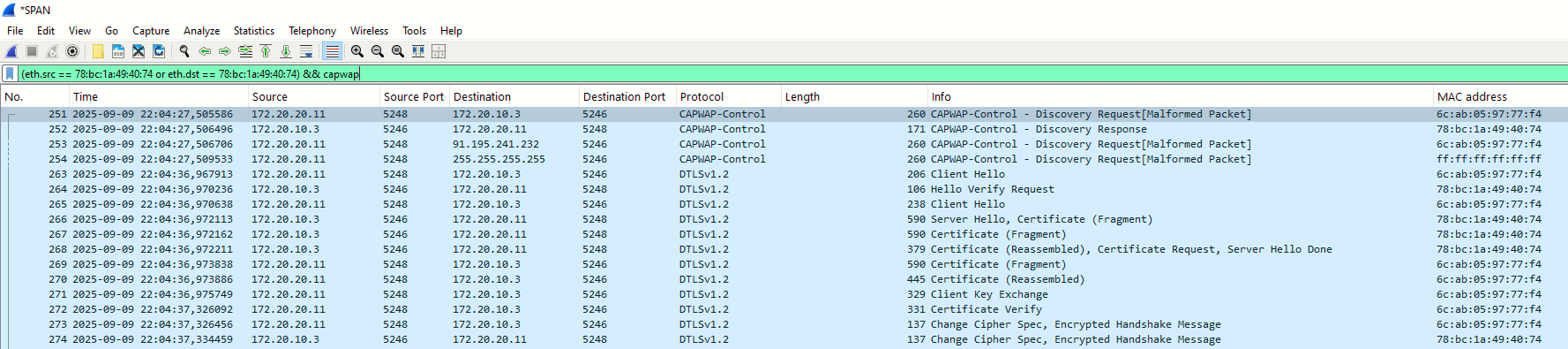
Task 5: Modifying Basic Parameters of a LAP at the WLC GUI (LAN.MAD.01-AP1)
If we click on the AP name we access the Details page of the AP. On the General tab I will modify AP name and location:
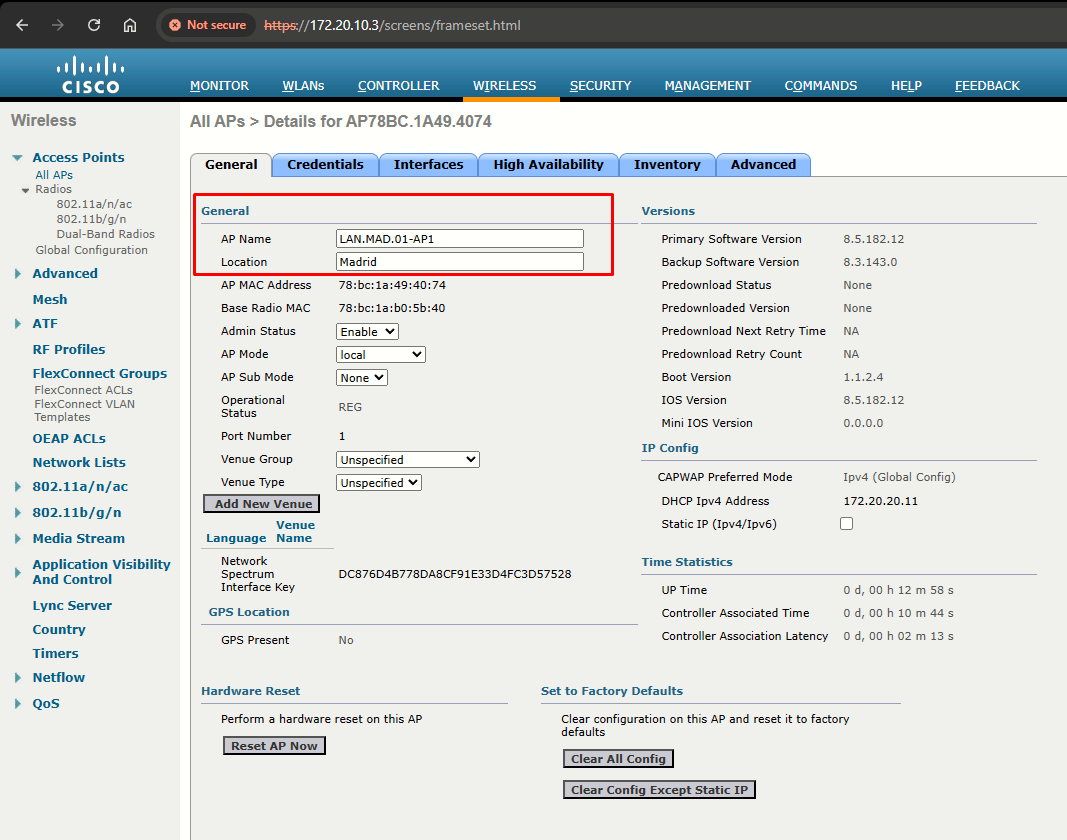
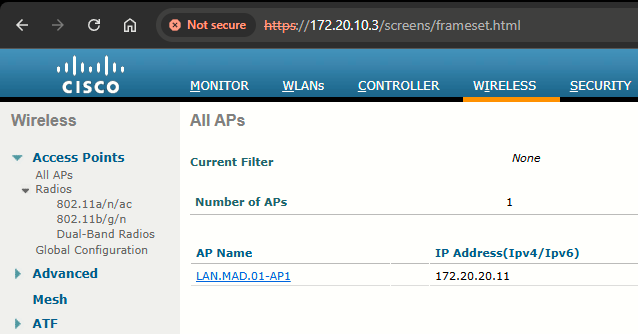
To apply the changes, I'll hit Apply at the upper right of the screen (not shown in the image above). I can confirm the name was correctly changed:
Task 6: Autonomous to Lightweight AP Conversion
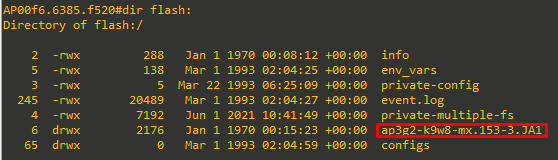
One of the APs (LAN.LE.01-AP2) was previously configured as an autonomous AP, hence it has the incorrect image and won't be able to join the WLC (no CAPWAP discovery will be issued!). To fix this, the autonomous image needs to be removed. and the lightweight one copied in flash.:
The AP had originally an ap3g2-k9w7 file in flash. This needs to be deleted, and the ap3g2-k9w8 installed instead.
Understanding Cisco Access Point IOS Images
What I'll do is just enter rommon, init_flash, delete the k9w7, ether_init, spin up a TFTP server on a laptop connected to the AP and set the IP address and netmask to match on the same network as I had configured the laptop's wired network adapter.
Then I'll tftp_init and enter the following command to download and extract the k9w8 image:
tar -xtract tftp://<TFTP_server_address>/<k9w8_tar_filename> flash:If the file was extracted successfully, I'll reboot the AP (it may actually need two reboots). At the end, I'll end up with a flash similar like this. Only the k9w8 image folder.
Task 7: Joining the Rest of the APs
To complete this lab, I will connect the remaining APs to the LAN.MAD.01 and LAN.LE.01 switches per the topology.
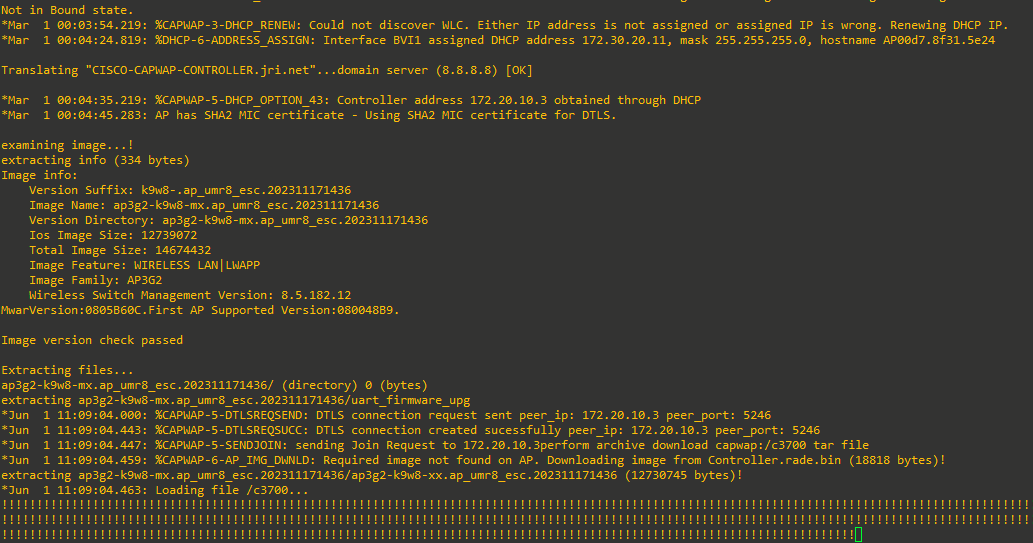
As reference, console output for the 1700I APs cold startup:
References
Field Notice: FN72524 - During Software Upgrade/Downgrade, Cisco IOS APs Might Remain in Downloading State After December 4, 2022 Due to Certificate Expiration - Software Upgrade Recommended
https://www.cisco.com/c/en/us/support/docs/field-notices/725/fn72524.html
Field Notice: FN63942 - Cisco Wireless Lightweight Access Points and WLAN Controllers Fail to Create CAPWAP Connections Due to Certificate Expiration - Software Upgrade Recommended
https://www.cisco.com/c/en/us/support/docs/field-notices/639/fn63942.html