
Lab 4-2: Configuring Link Aggregation (LAG) on the WLC
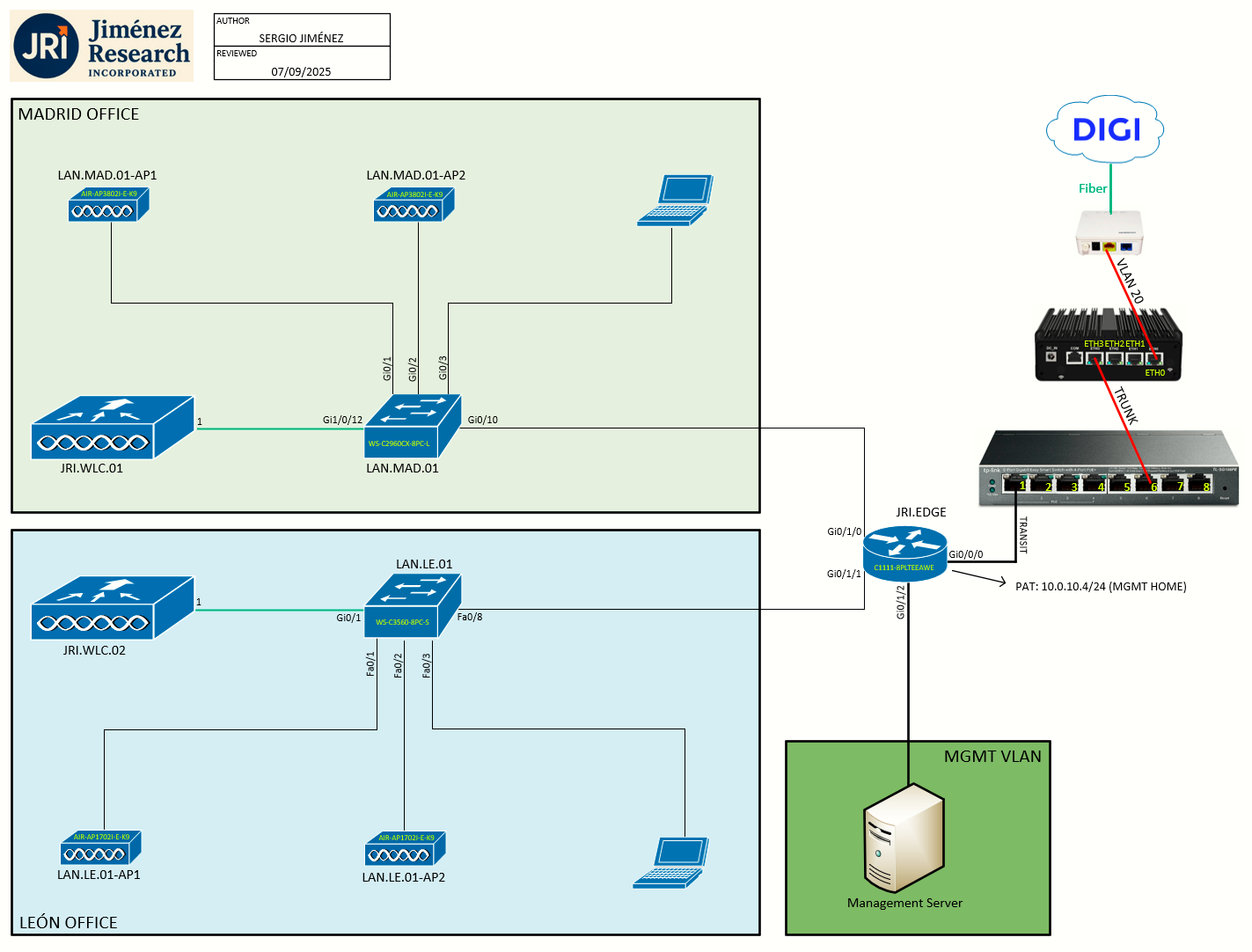
Topology
Task 1: Explain Link Aggregation
Link aggregation (LAG) is a partial implementation of the 802.3ad port aggregation standard. It bundles all of the controller’s distribution system ports into a single 802.3ad port channel. This reduces the number of IP addresses required to configure the ports on your controller. When LAG is enabled, the system dynamically manages port redundancy and load balances access points transparently to the user.
LAG simplifies controller configuration because you no longer require to configure primary and secondary ports for each interface. If any of the controller ports fail, traffic is automatically migrated to one of the other ports. As long as at least one controller port is functioning, the system continues to operate, access points remain connected to the network, and wireless clients continue to send and receive data.
You can use fast restart for any LAG changes.
Controller does not send CDP advertisements on a LAG interface.
LAG is supported across switches.
Restrictions on Link Aggregation
-
The controller relies on the switch for the load balancing decisions on traffic that come from the network, with “source-destination IP” as the typically recommended option. It is important to select a correct balancing configuration on the switch side, as some variations might have an impact on controller performance or cause packet drops on some scenarios, where traffic from different ports is split across different data planes internally.
-
When using Link aggregation (LAG) make sure all ports of the controller have the same Layer 2 configuration on the switch side. For example, avoid filtering some VLANs in one port, and not the others.
-
LAG requires the EtherChannel to be configured for 'mode on' on both the controller and the Catalyst switch.
-
Once the EtherChannel is configured as on at both ends of the link, the Catalyst switch should not be configured for either Link Aggregation Control Protocol (LACP) or Cisco proprietary Port Aggregation Protocol (PAgP) but be set unconditionally to LAG. Because no channel negotiation is done between the controller and the switch, the controller does not answer to negotiation frames and the LAG is not formed if a dynamic form of LAG is set on the switch. Additionally, LACP and PAgP are not supported on the controller.
- If the recommended load-balancing method cannot be configured on the Catalyst switch, then configure the LAG connection as a single member link or disable LAG on the controller.
-
You cannot configure the controller’s ports into separate LAG groups. Only one LAG group is supported per controller.
-
When you enable LAG or make any changes to the LAG configuration, you must immediately reboot the controller.
-
When you enable LAG, all ports participate in LAG by default. You must configure LAG for all of the connected ports in the neighbor switch.
-
When you enable LAG, if any single link goes down, traffic migrates to the other links.
-
When you enable LAG, only one functional physical port is needed for the controller to pass client traffic.
-
When you enable LAG, you eliminate the need to configure primary and secondary ports for each interface.
-
When you enable LAG, the controller sends packets out on the same port on which it received them. If a CAPWAP packet from an access point enters the controller on physical port 1, the controller removes the CAPWAP wrapper, processes the packet, and forwards it to the network on physical port 1. This may not be the case if you disable LAG.
Task 2: Configuring Neighbor Devices to Support LAG
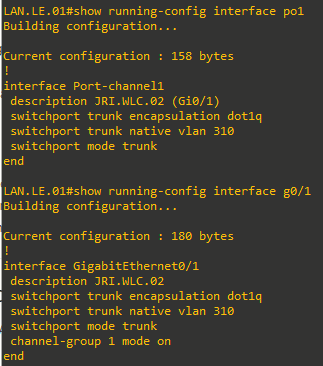
The controller’s neighbor device (the switch, LAN.LE.01 in this case) must also be properly configured to support LAG.
Task 3: Verifying Access to JRI.WLC.02
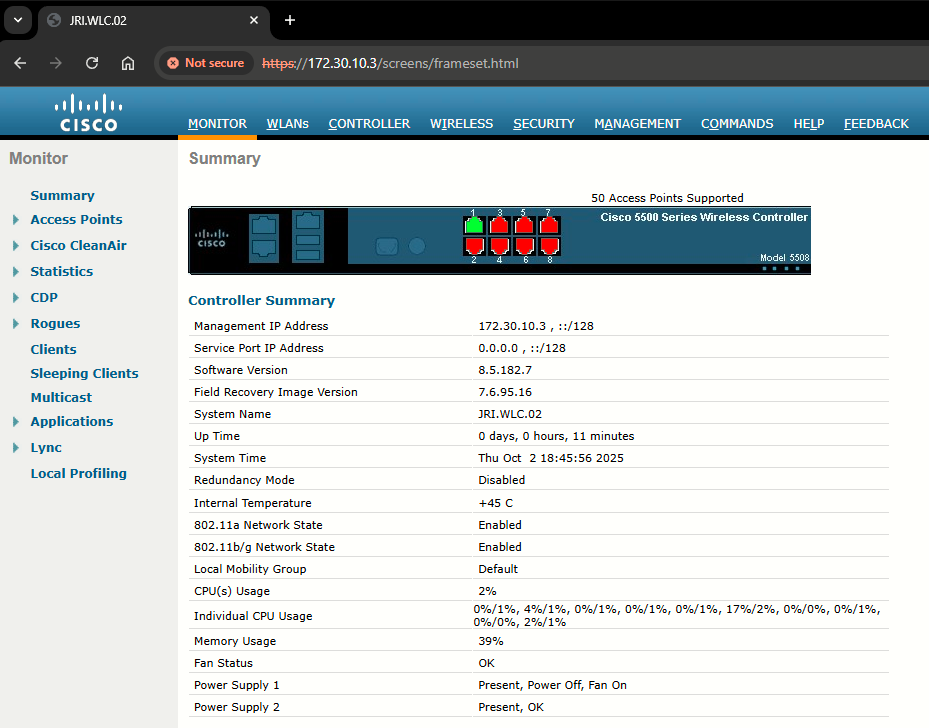
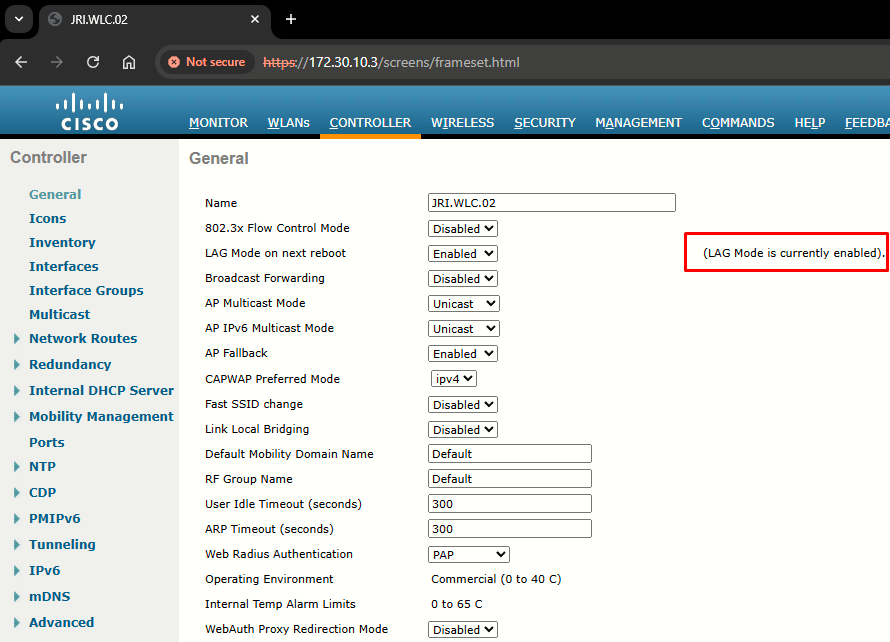
If everything was configured correctly (the switch in the previous step, and the LAG at the CLI setup on the previous lab) the GUI should be accessible at https://172.30.10.3 which it is:
|
|
|
References
Ports and Interfaces
https://www.cisco.com/c/en/us/td/docs/wireless/controller/8-5/config-guide/b_cg85/ports_and_interfaces.html#ID594