
v1.0 - Initial Homelab Topology
|
|
|
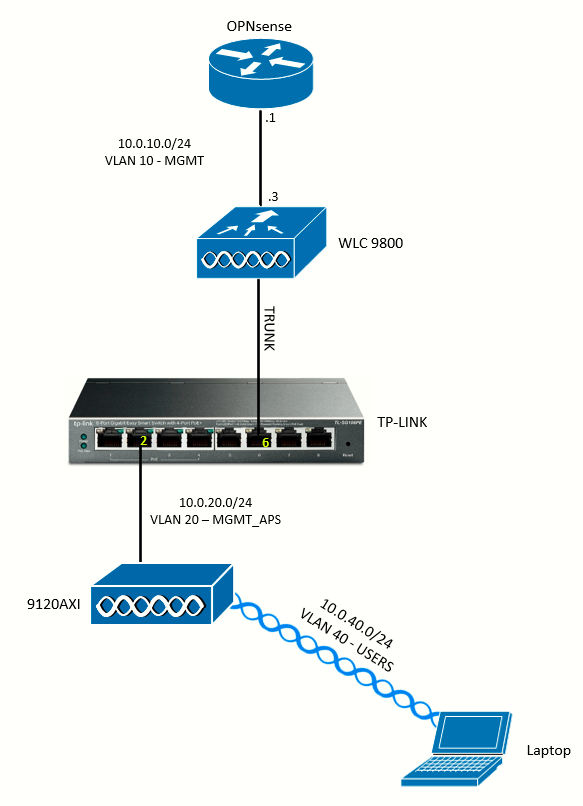
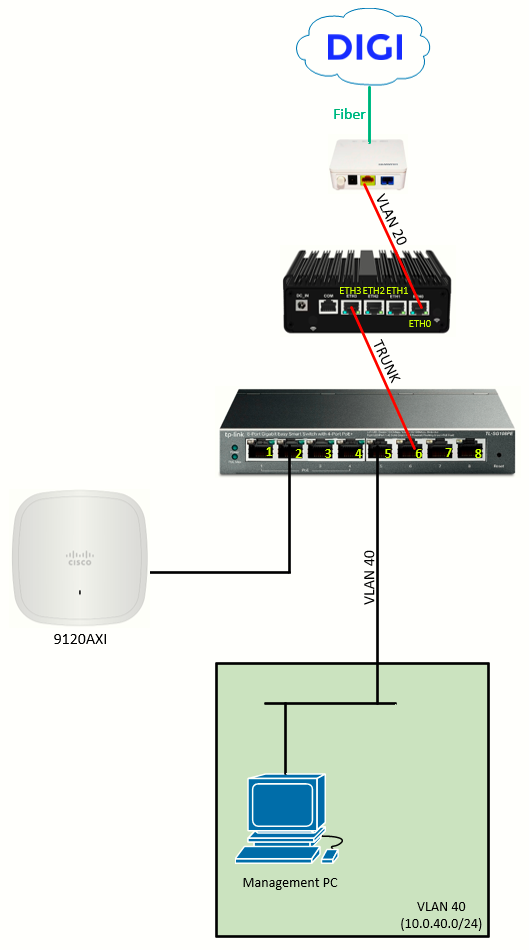
This is the first ever drawing of my homelab topology. The topology depicts mainly two separate concepts: the edge of the network (connection to ISP DIGI) and how the wireless network actually work.
The following addressing plan will be used:
| NETWORK | ADDRESS |
| VLAN 10 (MANAGEMENT) | 10.0.10.0/24 |
| VLAN 20 (WAN) | - (details on the note below) |
| VLAN 20 (MANAGEMENT_APs) | 10.0.20.0/24 |
| VLAN 30 (SERVERS) | 10.0.30.0/24 |
| VLAN 40 (USERS) | 10.0.40.0/24 |
This addressing plan will be reused across topologies and labs.
In DIGI Fibra SMART with Conexión Plus (Spain), Internet access is delivered via VLAN ID 20. The customer’s neutral router must tag its WAN interface with VLAN 20 and establish a PPPoE session, which is negotiated directly with DIGI’s network (BNG/BRAS). The ONT acts solely as a bridge device and is transparent at both the VLAN and PPPoE levels.