
Proxmox VE 9.0 - Introduction

Introduction
Proxmox Virtual Environment (VE) is a platform to run virtual machines and containers. It is based on Debian Linux, and completely open source. For maximum flexibility, it uses two virtualization technologies - Kernel-based Virtual Machine (KVM) and container-based virtualization (LXC).
You can use Proxmox VE on a single node, or assemble a cluster of many nodes. All management tasks can be done using our web-based management interface, and even a novice user can setup and install Proxmox VE within minutes.
I will use a single node.
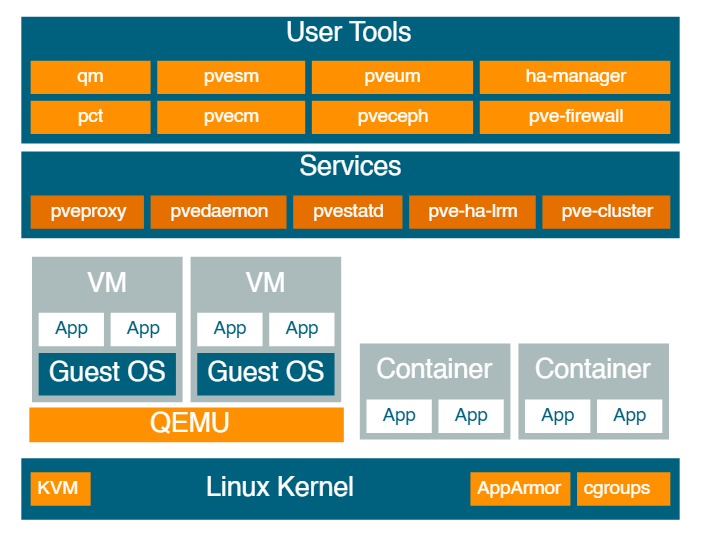
Central Management
Unique Multi-Master Design
The integrated web-based management interface gives you a clean overview of all your KVM guests and Linux containers. You can easily manage your VMs and containers or storage from the GUI. There is no need to install a separate, complex, and pricey management server.
Web-based Management Interface
Proxmox VE is simple to use. Management tasks can be done via the included web based management interface. The central web-based management - based on the JavaScript Framework (ExtJS) - empowers you to control all functionalities from the GUI and overview history and syslogs of the node. This includes running backup or restore jobs, live-migration or HA triggered activities.
Command Line
For advanced users who are used to the comfort of the Unix shell or Windows Powershell, Proxmox VE provides a command-line interface to manage all the components of your virtual environment. This command-line interface has intelligent tab completion and full documentation in the form of UNIX man pages.
REST API
Proxmox VE uses a RESTful API. We choose JSON as primary data format, and the whole API is formally defined using JSON Schema. This enables fast and easy integration for third party management tools like custom hosting environments.
Role-based Administration
You can define granular access for all objects (like VMs, storages, nodes, etc.) by using the role based user- and permission management. This allows you to define privileges and helps you to control access to objects. This concept is also known as access control lists: Each permission specifies a subject (a user or group) and a role (set of privileges) on a specific path.
Authentication Realms
Proxmox VE supports multiple authentication sources like Microsoft Active Directory, LDAP, Linux PAM standard authentication or the built-in Proxmox VE authentication server.
Storage
Although it supports network storage, I will be using local storage only, for which it supports:
- LVM Group (local backing devices like block devices, FC devices, DRBD, etc.)
- Directory (storage on existing filesystem)
- ZFS
Flexible Networking
Proxmox VE uses a bridged networking model. All VMs can share one bridge as if virtual network cables from each guest were all plugged into the same switch. For connecting VMs to the outside world, bridges are attached to physical network cards and assigned a TCP/IP configuration.
For further flexibility, VLANs (IEEE 802.1q) and network bonding/aggregation are possible. In this way it is possible to build complex, flexible virtual networks for the Proxmox VE hosts, leveraging the full power of the Linux network stack.
Integrated Firewall
The integrated firewall allows you to filter network packets on any VM or Container interface. Common sets of firewall rules can be grouped into “security groups”.