
Proxmox VE 9.0 - Configuring Management Interface with Routing at OPNsense
Introduction
The goal here is to configure Proxmox to have a management interface in the VLAN 10 - MGMT network (10.0.10.0/24). The routing for this VLAN is handled by OPNsense (10.0.10.1).
Proxmox Configuration
I will assign the Proxmox host the 10.0.10.10/24 IP in the VLAN 10 - MGMT network.
I have to create a Linux VLAN above the trunk bridge I previously created, as follows:
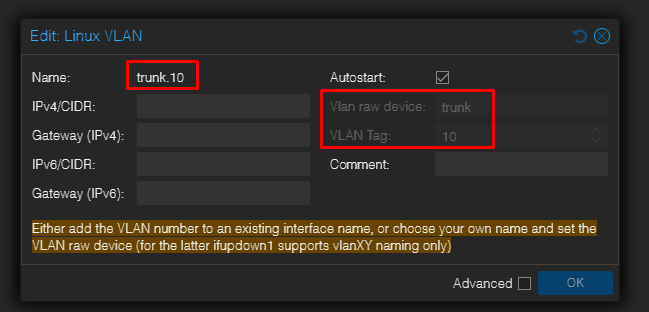
- Name: trunk.10
- Vlan raw device: trunk
- VLAN Tag: 10
This makes a logical device trunk.10 which will receive only VLAN 10-tagged frames from the trunk that the trunk bridge already carries.
Now, I have to add another bridge (which I will simply call proxmox) bonded to the trunk.10. This is where I will add the IP address configuration:
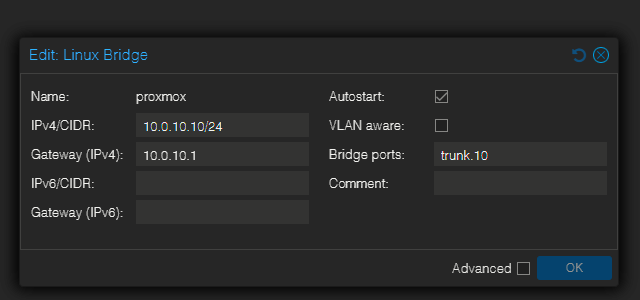
Proxmox attaches host IPs to bridges. By creating the proxmox bridge that uses the VLAN device trunk.10 as its port, the host now lives on VLAN 10 and uses OPNsense as gateway, without un-bridging any existing VM trunk.
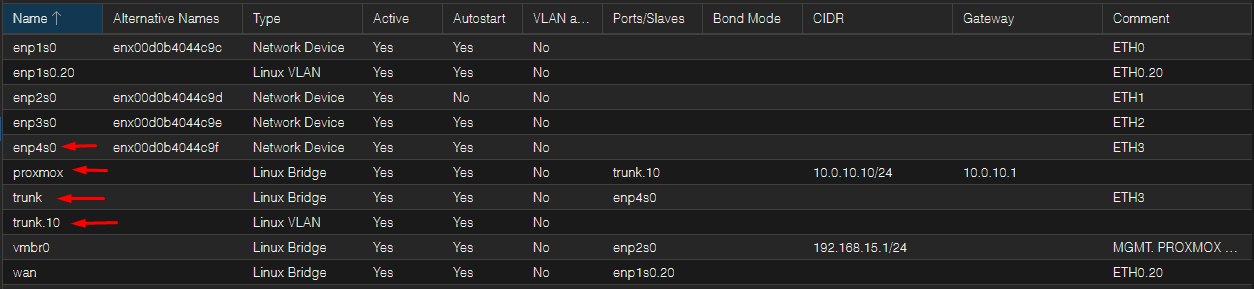
Explanation
- enp4so: The physical NIC (ETH3) connected to the TP-LINK
- trunk (Linux Bridge): This bridge is the "raw trunk" switch inside Proxmox: it forwards all Ethernet frames (including 802.1Q tags) that arrive on enp4s0.
- trunk.10 (Linux VLAN): A VLAN logical device created on the bridge trunk (parent=trunk), representing VLAN 10 on that trunk.
- proxmox (Linux Bridge): A bridge whose port is trunk.10, with 10.0.10.10/24 IP assigned to it. Essentially, this is the host's management interface on VLAN 10.
Packet Flow Example from PC on VLAN 40
-
PC (VLAN 40) sends IP packet to 10.0.10.10
-
PC is on access port (untagged) in VLAN 40, source MAC A, source IP 10.0.40.X, dst IP 10.0.10.10.
-
Because destination is in another subnet, PC forwards to its default gateway: 10.0.40.1 (OPNsense VLAN40).
-
-
Switch behavior on ingress
-
The TP-LINK receives the untagged frame on an access port (PVID=40) and internally associates it with VLAN 40.
-
When forwarding toward the uplink port (port6/trunk to Proxmox), the switch tags the frame with 802.1Q tag = 40 (because port6 is a Tagged member of VLAN 40).
-
-
Frame arrives at Proxmox (enp4s0 → trunk bridge)
-
enp4s0receives the 802.1Q-tagged VLAN40 frame. -
The
trunkLinux bridge forwards it unchanged to guests and to the host VLAN devices.
-
-
OPNsense VM (attached to
trunk) sees VLAN40 tagged frame-
OPNsense has a VLAN40 interface (parent = its vtnet on
trunk) with IP 10.0.40.1. -
OPNsense decapsulates the VLAN40 tag, processes the IP packet (src 10.0.40.X dst 10.0.10.10).
-
-
OPNsense routes the packet to VLAN10
-
OPNsense checks its routing table: destination 10.0.10.10 is on its VLAN10 interface (10.0.10.1).
-
To forward, OPNsense must deliver an Ethernet frame on VLAN10. It will ARP for 10.0.10.10 on VLAN10 if it doesn’t have the MAC cached.
-
-
ARP and VLAN10 forwarding
-
OPNsense sends an ARP request for 10.0.10.10 on VLAN10 (this ARP request is tagged with VLAN ID 10 and goes onto
trunk). -
The switch receives the tagged VLAN10 ARP and forwards it out any ports that are members of VLAN10:
-
It tags toward
enp4s0(so Proxmox side gets VLAN10-tagged ARP). -
It also sends untagged to access ports that are untagged members of VLAN10 (not shown in your example, but that’s the rule).
-
-
-
Proxmox host (
proxmoxbridge attached totrunk.10) receives ARP-
The kernel demultiplexes VLAN10 to
trunk.10, thenproxmoxbridge sees the ARP request and the host responds (source MAC B, IP 10.0.10.10). -
That ARP reply is sent back: OPNsense receives it on VLAN10, learning MAC B for 10.0.10.10.
-
-
OPNsense forwards the original IP packet
-
OPNsense now encapsulates the IP packet into an Ethernet frame destined to MAC B, tags it with VLAN10, and sends it out onto the
trunk. -
The switch receives the VLAN10-tagged frame and forwards it to the trunk port toward
enp4s0(tagged), and to any untagged access ports for VLAN10 (if any).
-
-
Proxmox host receives VLAN10-tagged frame and delivers to process
-
enp4s0→trunk→ kernel routes VLAN10-tagged frames totrunk.10→proxmoxbridge → host IP 10.0.10.10 receives the packet and replies (reply packet now has src 10.0.10.10, dst 10.0.40.X).
-
-
Reply path (Proxmox → PC)
-
Proxmox sends reply out via
trunk.10(tagged VLAN10). -
OPNsense receives it on VLAN10, routes to VLAN40, encapsulates into a VLAN40-tagged frame, sends onto
trunk. -
Switch forwards VLAN40-tagged frame to the TL access port for the PC as untagged (because that access port is untagged member of VLAN40). PC receives reply.
-