DNS Forwarder: Explanation and Configuration
By using a forwarder, you can manage name resolution for names that are outside your network, such as names on the Internet or names in other forests or domains.
Understanding Forwarders
A forwarder is a DNS server on a network that forwards DNS queries for external DNS names to DNS servers outside that network.
You can also forward queries according to specific domain names using conditional forwarders.
You designate a DNS server on a network as a forwarder by configuring the other DNS servers in the network to forward the queries that they cannot resolve locally to that DNS server. By using a forwarder, you can manage name resolution for names outside your network, such as names on the Internet, and improve the efficiency of name resolution for the computers in your network.
The following figure illustrates how external name queries are directed with forwarders.
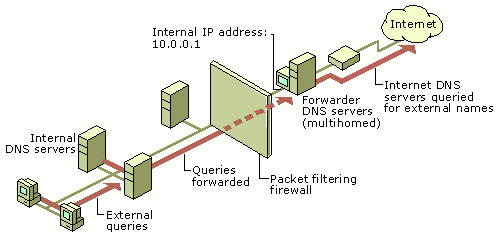
When you designate a DNS server as a forwarder, you make that forwarder responsible for handling external traffic, which limits DNS server exposure to the Internet. A forwarder builds up a large cache of external DNS information because all the external DNS queries in the network are resolved through it. In a small amount of time, a forwarder resolves a large number of external DNS queries using this cached data. This decreases the Internet traffic over the network and the response time for DNS clients.
When a DNS server forwards a query to a forwarder, it sends a recursive query to the forwarder. This is different than the iterative query that a DNS server sends to another DNS server during standard name resolution (name resolution that does not involve a forwarder).
Configuring a Forwarder on Windows Server
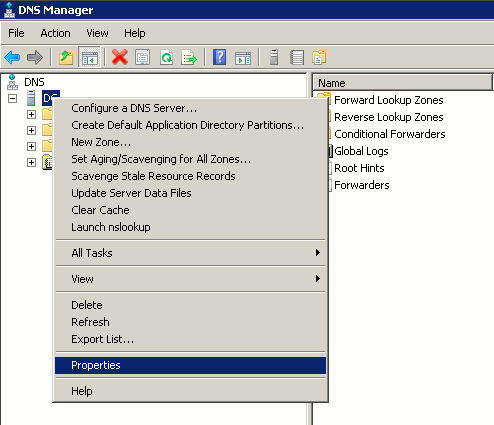
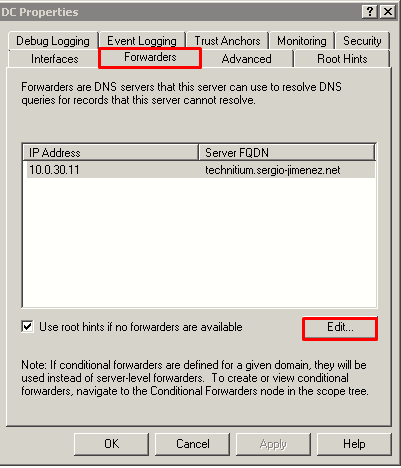
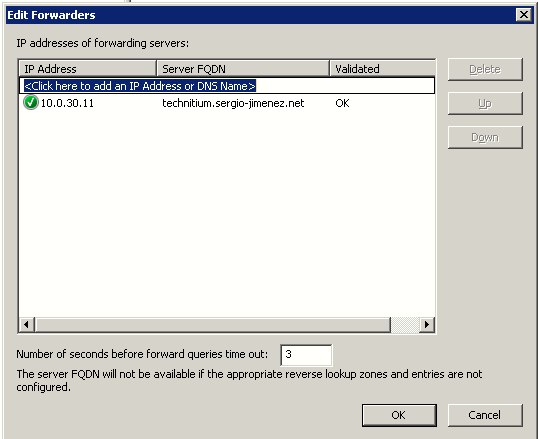
On Windows Server 2008, open the DNS console and right-click on the server, then click Properties. Then on the Forwarders tab, click the Edit... button, and add the Technitium IP server address. Once it's validated click OK, Apply and exit this window.
|
|
|
|
|