
Lab - Manipulate Route Redistribution
Topology
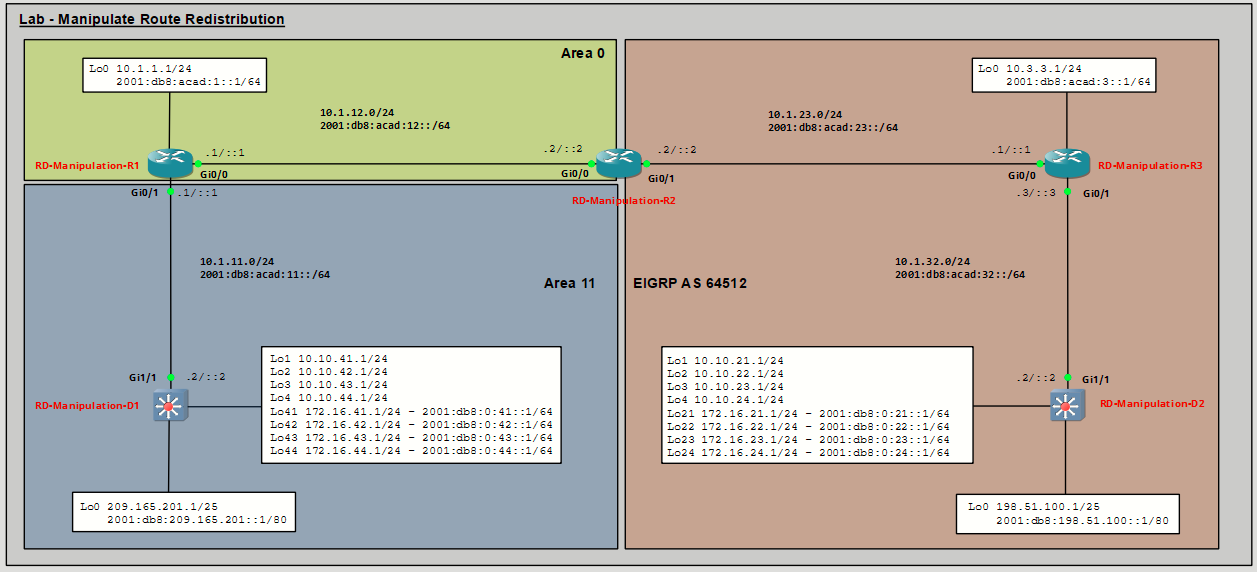
Addressing Table
|
Device |
Interface |
IPv4 Address/Mask |
IPv6 Address/Prefix |
IPv6 Link Local |
|---|---|---|---|---|
|
RD-Manipulation-R1 |
Gi0/0 |
10.1.12.1/24 |
2001:db8:acad:12::1/64 |
fe80::12:1 |
|
Gi0/1 |
10.1.11.1/24 |
2001:db8:acad:11::1/64 |
fe80::11:1 |
|
|
Lo0 |
10.1.1.1/24 |
2001:db8:acad:1::1/64 |
fe80::1:1 |
|
|
RD-Manipulation-R2 |
Gi0/0 |
10.1.12.2/24 |
2001:db8:acad:12::2/64 |
fe80::12:2 |
|
Gi0/1 |
10.1.23.2/24 |
2001:db8:acad:23::2/64 |
fe80::23:2 |
|
|
RD-Manipulation-R3 |
Gi0/0 |
10.1.23.3/24 |
2001:db8:acad:23::3/64 |
fe80::23:3 |
|
Gi0/1 |
10.1.32.3/24 |
2001:db8:acad:32::3/64 |
fe80::32:3 |
|
|
Lo0 |
10.3.3.3/24 |
2001:db8:acad:3::3/64 |
fe80::3:3 |
|
|
RD-Manipulation-D1 |
Gi1/1 |
10.1.11.2/24 |
2001:db8:acad:11::2/64 |
fe80::11:2 |
|
Lo0 |
209.165.201.1/25 |
2001:db8:209:165:201::1/80 |
fe80::209:1 |
|
|
Lo1 |
10.10.41.1/24 |
— |
Automática |
|
|
Lo2 |
10.10.42.1/24 |
— |
Automática |
|
|
Lo3 |
10.10.43.1/24 |
— |
Automática |
|
|
Lo4 |
10.10.44.1/24 |
— |
Automática |
|
|
Lo41 |
172.16.41.1/24 |
2001:db8:0:41::1/64 |
fe80:41::1 |
|
|
Lo42 |
172.16.42.1/24 |
2001:db8:0:42::1/64 |
fe80:42::1 |
|
|
Lo43 |
172.16.43.1/24 |
2001:db8:0:43::1/64 |
fe80:43::1 |
|
|
Lo44 |
172.16.44.1/24 |
2001:db8:0:44::1/64 |
fe80:44::1 |
|
|
RD-Manipulation-D2 |
Gi1/1 |
10.1.32.2/24 |
2001:db8:acad:32::2/64 |
fe80::32:2 |
|
Lo0 |
198.51.100.1/25 |
2001:db8:198:51:100::1/80 |
fe80::198:2 |
|
|
Lo1 |
10.10.21.1/24 |
— |
— |
|
|
Lo2 |
10.10.22.1/24 |
— |
— |
|
|
Lo3 |
10.10.23.1/24 |
— |
— |
|
|
Lo4 |
10.10.24.1/24 |
— |
— |
|
|
Lo21 |
172.16.21.1/24 |
2001:db8:0:21::1/64 |
fe80:21::1 |
|
|
Lo22 |
172.16.22.1/24 |
2001:db8:0:22::1/64 |
fe80:22::1 |
|
|
Lo23 |
172.16.23.1/24 |
2001:db8:0:23::1/64 |
fe80:23::1 |
|
|
Lo24 |
172.16.24.1/24 |
2001:db8:0:24::1/64 |
fe80:24::1 |
Objectives
- Part 1: Build the Network and Configure Basic Device Settings
- Part 2: Verify OSPFv3 AF Neighborships and Routing for IPv4 and IPv6
- Part 3: Verify EIGRP Neighborships and Routing for IPv4 and IPv6
- Part 4: Configure Redistribution from OSPFv3 to EIGRP
- Part 5: Configure Redistribution from EIGRP to OSPFv3
- Part 6: Configure Policies to Manipulate Route Redistribution
Background / Scenario
In the first part of this lab, you will review the configuration of redistribution from OSPF into EIGRP for IPv4 and IPv6, and redistribution of EIGRP into OSPF for IPv4 and IPv6. Much of this lab reviews what you did in the lab Configure Route Redistribution Between EIGRP and OSPF. Refer to that lab if you need a reference for how to configure redistribution in Part 4 and Part 5.
In Part 6, you will manipulate route redistribution using a variety of methods including ACLs, prefix lists, and route maps.
D1, R1 and R2 are configured with OSPFv3 for IPv4 and IPv6 address families, while R2, R3 and D2 are configured with EIGRP using named mode for IPv4 and IPv6 address families.
Note: D1 is configured to originate and advertise a default route into the OSPFv3 domain for both IPv4 and IPv6 address families.
Note: This lab is an exercise in configuring and verifying two-way route redistribution on R2. Route redistribution in this lab does not reflect networking best practices.
Required Resources - Sergio Jiménez's Version
For this lab I am using GNS3, where I have deployed:
- 3 Routers (Cisco IOSv)
- 2 Switches (Cisco IOSvL2)
Instructions
Part 1: Configure Basic Device Settings and Verify Connectivity and DMVPN
RD-Manipulation-R1
configure terminal
hostname RD-Manipulation-R1
no ip domain lookup
ipv6 unicast-routing
banner motd # RD-Manipulation-R1, Manipulate Redistribution #
line con 0
 exec-timeout 0 0
 logging synchronous
exit
router ospfv3 1
 router-id 1.1.1.1
exit
interface GigabitEthernet0/0
 ip address 10.1.12.1 255.255.255.0
 ipv6 address FE80::12:1 link-local
 ipv6 address 2001:DB8:ACAD:12::1/64
 ospfv3 1 ipv6 area 0
 ospfv3 1 ipv4 area 0
 no shutdown
exit
interface GigabitEthernet0/1
 ip address 10.1.11.1 255.255.255.0
 ipv6 address fe80::11:1 link-local
 ipv6 address 2001:db8:acad:11::1/64
 ospfv3 1 ipv6 area 11
 ospfv3 1 ipv4 area 11
 no shutdown
exit
interface Loopback0
 ip address 10.1.1.1 255.255.255.0
 ipv6 address FE80::1:1 link-local
 ipv6 address 2001:DB8:ACAD:1::1/64
 ospfv3 network point-to-point
 ospfv3 1 ipv4 area 0
 ospfv3 1 ipv6 area 0
 no shutdown
exit
router ospfv3 1
 address-family ipv4 unicast
  passive-interface Loopback0
 exit-address-family
 address-family ipv6 unicast
  passive-interface Loopback0
 exit-address-family
end
wr mem
!
RD-Manipulation-R2
configure terminal
hostname RD-Manipulation-R2
no ip domain lookup
ipv6 unicast-routing
banner motd # RD-Manipulation-R2, Manipulate Redistribution #
line con 0
 exec-timeout 0 0
 logging synchronous
exit
router ospfv3 1
 router-id 2.2.2.2
 address-family ipv4 unicast
 exit-address-family
 address-family ipv6 unicast
 exit-address-family
interface GigabitEthernet0/0
 ip address 10.1.12.2 255.255.255.0
 ipv6 address FE80::12:2 link-local
 ipv6 address 2001:DB8:ACAD:12::2/64
 ospfv3 1 ipv6 area 0
 ospfv3 1 ipv4 area 0
 no shutdown
exit
interface GigabitEthernet0/1
 ip address 10.1.23.2 255.255.255.0
 ipv6 address fe80::23:2 link-local
 ipv6 address 2001:db8:acad:23::2/64
 no shutdown
exit
router eigrp CISCO
 address-family ipv4 unicast autonomous-system 64512
  af-interface default
   shutdown
  exit-af-interface
  af-interface GigabitEthernet0/1
   no shutdown
  exit-af-interface
  topology base
  exit-af-topology
  network 10.1.23.0 0.0.0.255
  eigrp router-id 2.2.2.2
 exit-address-family
 address-family ipv6 unicast autonomous-system 64512
  af-interface default
   shutdown
  exit-af-interface
  af-interface GigabitEthernet0/1
   no shutdown
  exit-af-interface
  topology base
  exit-af-topology
 exit-address-family
end
wr mem
!
RD-Manipulation-R3
configure terminal
hostname RD-Manipulation-R3
no ip domain lookup
ipv6 unicast-routing
banner motd # RD-Manipulation-R3, Manipulate Redistribution #
line con 0
 exec-timeout 0 0
 logging synchronous
exit
interface GigabitEthernet0/0
 ip address 10.1.23.3 255.255.255.0
 ipv6 address fe80::23:3 link-local
 ipv6 address 2001:db8:acad:23::3/64
 no shutdown
exit
interface GigabitEthernet0/1
 ip address 10.1.32.3 255.255.255.0
 ipv6 address fe80::32:3 link-local
 ipv6 address 2001:db8:acad:32::3/64
 no shutdown
exit
interface Loopback0
 ip address 10.3.3.3 255.255.255.0
 ipv6 address fe80::3:3 link-local
 ipv6 address 2001:db8:acad:3::3/64
 no shutdown
exit
router eigrp CISCO
 address-family ipv4 unicast autonomous-system 64512
  af-interface default
   shutdown
  exit-af-interface
  af-interface GigabitEthernet0/0
   no shutdown
  exit-af-interface
  af-interface GigabitEthernet0/1
   no shutdown
  exit-af-interface
  af-interface Loopback0
   no shutdown
  exit-af-interface
  topology base
  exit-af-topology
  network 10.1.23.0 0.0.0.255
  network 10.1.32.0 0.0.0.255
  network 10.3.3.0 0.0.0.255
  eigrp router-id 3.3.3.3
 exit-address-family
 address-family ipv6 unicast autonomous-system 64512
  af-interface default
   shutdown
  exit-af-interface
  af-interface GigabitEthernet0/0
   no shutdown
  exit-af-interface
  af-interface GigabitEthernet0/1
   no shutdown
  exit-af-interface
  af-interface Loopback0
   no shutdown
  exit-af-interface
  topology base
  exit-af-topology
  eigrp router-id 3.3.3.3
 exit-address-family
end
wr mem
!
RD-Manipulation-D1
configure terminal
hostname RD-Manipulation-D1
no ip domain lookup
ip routing
ipv6 unicast-routing
banner motd # RD-Manipulation-D1, Manipulate Redistribution #
line con 0
 exec-timeout 0 0
 logging synchronous
exit
router ospfv3 1
 router-id 11.11.11.11
exit
interface GigabitEthernet1/1
 shutdown
exit
interface GigabitEthernet1/1
 no switchport
 ip address 10.1.11.2 255.255.255.0
 ipv6 address fe80::11:2 link-local
 ipv6 address 2001:db8:acad:11::2/64
 ospfv3 1 ipv6 area 11
 ospfv3 1 ipv4 area 11
 no shutdown
exit
interface Loopback0
 ip address 209.165.201.1 255.255.255.128
 ipv6 address fe80::209:1 link-local
 ipv6 address 2001:db8:209:165:201::1/80
 ospfv3 network point-to-point
 ospfv3 1 ipv4 area 11
 ospfv3 1 ipv6 area 11
 no shutdown
exit
interface Loopback1
 ip address 10.10.41.1 255.255.255.0
 ipv6 enable
 ospfv3 network point-to-point
 ospfv3 1 ipv4 area 11
 no shutdown
exit
interface Loopback2
 ip address 10.10.42.1 255.255.255.0
 ipv6 enable
 ospfv3 network point-to-point
 ospfv3 1 ipv4 area 11
 no shutdown
exit
interface Loopback3
 ip address 10.10.43.1 255.255.255.0
 ipv6 enable
 ospfv3 network point-to-point
 ospfv3 1 ipv4 area 11
 no shutdown
exit
interface Loopback4
 ip address 10.10.44.1 255.255.255.0
 ipv6 enable
 ospfv3 network point-to-point
 ospfv3 1 ipv4 area 11
 no shutdown
exit
interface Loopback41
 ip address 172.16.41.1 255.255.255.0
 ipv6 address fe80:41::1 link-local
 ipv6 address 2001:db8:0:41::1/64
 ospfv3 network point-to-point
 ospfv3 1 ipv4 area 11
 ospfv3 1 ipv6 area 11
 no shutdown
exit
interface Loopback42
 ip address 172.16.42.1 255.255.255.0
 ipv6 address fe80:42::1 link-local
 ipv6 address 2001:db8:0:42::1/64
 ospfv3 network point-to-point
 ospfv3 1 ipv4 area 11
 ospfv3 1 ipv6 area 11
 no shutdown
exit
interface Loopback43
 ip address 172.16.43.1 255.255.255.0
 ipv6 address fe80:43::1 link-local
 ipv6 address 2001:db8:0:43::1/64
 ospfv3 network point-to-point
 ospfv3 1 ipv4 area 11
 ospfv3 1 ipv6 area 11
 no shutdown
exit
interface Loopback44
 ip address 172.16.44.1 255.255.255.0
 ipv6 address fe80:44::1 link-local
 ipv6 address 2001:db8:0:44::1/64
 ospfv3 network point-to-point
 ospfv3 1 ipv4 area 11
 ospfv3 1 ipv6 area 11
 no shutdown
exit
router ospfv3 1
 address-family ipv4 unicast
  passive-interface Loopback0
  default-information originate
 exit-address-family
 address-family ipv6 unicast
  passive-interface Loopback0
  default-information originate
 exit-address-family
exit
ip route 0.0.0.0 0.0.0.0 Loopback0
ipv6 route ::/0 Loopback0
end
wr mem
!
RD-Manipulation-D2
configure terminal
hostname RD-Manipulation-D2
no ip domain lookup
ip routing
ipv6 unicast-routing
banner motd # RD-Manipulation-D2, Manipulate Redistribution #
line con 0
 exec-timeout 0 0
 logging synchronous
exit
interface GigabitEthernet1/1
 shutdown
exit
interface GigabitEthernet1/1
 no switchport
 ip address 10.1.32.2 255.255.255.0
 ipv6 address fe80::32:2 link-local
 ipv6 address 2001:db8:acad:32::2/64
 no shutdown
exit
interface Loopback0
 ip address 198.51.100.1 255.255.255.128
 ipv6 address fe80::198:2 link-local
 ipv6 address 2001:db8:198:51:100::1/80
 ospfv3 network point-to-point
 ospfv3 1 ipv4 area 11
 no shutdown
exit
interface Loopback1
 ip address 10.10.21.1 255.255.255.0
 ospfv3 network point-to-point
 ospfv3 1 ipv4 area 11
 no shutdown
exit
interface Loopback2
 ip address 10.10.22.1 255.255.255.0
 ospfv3 network point-to-point
 ospfv3 1 ipv4 area 11
 no shutdown
exit
interface Loopback3
 ip address 10.10.23.1 255.255.255.0
 ospfv3 network point-to-point
 ospfv3 1 ipv4 area 11
 no shutdown
exit
interface Loopback4
 ip address 10.10.24.1 255.255.255.0
 ospfv3 network point-to-point
 ospfv3 1 ipv4 area 11
 no shutdown
exit
interface Loopback21
 ip address 172.16.21.1 255.255.255.0
 ipv6 address fe80:21::1 link-local
 ipv6 address 2001:db8:0:21::1/64
 ospfv3 network point-to-point
 ospfv3 1 ipv4 area 11
 ospfv3 1 ipv6 area 11
 no shutdown
exit
interface Loopback22
 ip address 172.16.22.1 255.255.255.0
 ipv6 address fe80:22::1 link-local
 ipv6 address 2001:db8:0:22::1/64
 ospfv3 network point-to-point
 ospfv3 1 ipv4 area 11
 ospfv3 1 ipv6 area 11
 no shutdown
exit
interface Loopback23
 ip address 172.16.23.1 255.255.255.0
 ipv6 address fe80:23::1 link-local
 ipv6 address 2001:db8:0:23::1/64
 ospfv3 network point-to-point
 ospfv3 1 ipv4 area 11
 ospfv3 1 ipv6 area 11
 no shutdown
exit
interface Loopback24
 ip address 172.16.24.1 255.255.255.0
 ipv6 address fe80:24::1 link-local
 ipv6 address 2001:db8:0:24::1/64
 ospfv3 network point-to-point
 ospfv3 1 ipv4 area 11
 ospfv3 1 ipv6 area 11
 no shutdown
exit
router eigrp CISCO
 address-family ipv4 unicast autonomous-system 64512
  af-interface default
   shutdown
  exit-af-interface
  af-interface Loopback0
   no shutdown
   passive-interface
  exit-af-interface
  af-interface Loopback1
   no shutdown
  exit-af-interface
  af-interface Loopback2
   no shutdown
  exit-af-interface
  af-interface Loopback3
   no shutdown
  exit-af-interface
  af-interface Loopback4
   no shutdown
  exit-af-interface
  af-interface Loopback21
   no shutdown
  exit-af-interface
  af-interface Loopback22
   no shutdown
  exit-af-interface
  af-interface Loopback23
   no shutdown
  exit-af-interface
  af-interface Loopback24
   no shutdown
  exit-af-interface
  af-interface GigabitEthernet1/1
   no shutdown
  exit-af-interface
  topology base
  exit-af-topology
  network 10.1.32.0 0.0.0.255
  network 198.51.100.0 0.0.0.127
  network 10.10.21.0 255.255.255.0
  network 10.10.22.0 255.255.255.0
  network 10.10.23.0 255.255.255.0
  network 10.10.24.0 255.255.255.0
  network 172.16.21.0 255.255.255.0
  network 172.16.22.0 255.255.255.192
  network 172.16.22.64 255.255.255.192
  network 172.16.22.128 255.255.255.192
  eigrp router-id 22.22.22.22
 exit-address-family
 address-family ipv6 unicast autonomous-system 64512
  af-interface default
   shutdown
  exit-af-interface
  af-interface Loopback0
   no shutdown
   passive-interface
  exit-af-interface
  af-interface Loopback1
   no shutdown
  exit-af-interface
  af-interface Loopback2
   no shutdown
  exit-af-interface
  af-interface Loopback3
   no shutdown
  exit-af-interface
  af-interface Loopback4
   no shutdown
  exit-af-interface
  af-interface Loopback21
   no shutdown
  exit-af-interface
  af-interface Loopback22
   no shutdown
  exit-af-interface
  af-interface Loopback23
   no shutdown
  exit-af-interface
  af-interface Loopback24
   no shutdown
  exit-af-interface
  af-interface GigabitEthernet1/1
   no shutdown
  exit-af-interface
  topology base
  exit-af-topology
  eigrp router-id 22.22.22.22
 exit-address-family
end
wr mem
!
Part 2: Verify OSPFv3 AF Neighborships and Routing for IPv4 and IPv6
In this part, you will verify that OSPF has established neighbor relationships and routing for IPv4 and IPv6. The verification commands are identical to what you did in the previous lab. Refer to that lab if you need a refresher.
Step 1: Verify OSPFv3 AF neighborships on R1.
Verify R1 has OSPFv3 neighbors: two neighbors from IPv4 address family and two from IPv6 address family. Neighbor State should be FULL/DR or FULL/BDR.
Step 2: Verify the IPv4 OSPFv3 routing table on R2.
- Verify the OSPFv3 IPv4 routing table on R2. You should see the default route from D1 as well as all the intra-area and inter-area OSPF routes are received and installed from 10.1.12.1, which is R1.
- From R2, ping the Loopback 0 address on D1. The ping should be successful.
Step 3: Verify IPv6 OSPFv3 routing table on R2.
- Verify the OSPFv3 IPv6 routing table on R2. You should see the default route from D1 as well as all the intra-area and inter-area OSPF routes are received and installed from fe80::12:1, which is R1.
- From R2, ping the IPv6 Loopback 0 address on D1. The ping should be successful.
Part 3: Verify EIGRP Neighborships and Routing for IPv4 and IPv6
In this part, you will verify that EIGRP has established neighbor relationships and routing for IPv4 and IPv6. The verification commands are identical to what you did in the previous lab. Refer to that lab if you need a refresher.
Step 1: Verify EIGRP for IPv4 neighborships on R3.
Issue the command to verify EIGRP has two IPv4 neighbors.
Step 2: Verify the EIGRP for IPv6 neighborships on R3.
Issue the command to verify EIGRP has two IPv6 neighbors .
Step 3: Verify EIGRP for IPv4 routing table on R2.
Issue the command to display the EIGRP IPv4 routing table on R2, as shown.
Step 4: Verify EIGRP for IPv6 routing table on R2.
Issue the command to display the IPv6 EIGRP routing table on R2, as shown.
Part 4: Configure Redistribution from OSPFv3 to EIGRP
In this part, you will redistribute OSPFv3 routes into EIGRP for IPv4. The configuration is identical to what you did in the previous lab. Refer to that lab if you need a refresher.
Step 1: Redistribute OSPFv3 into EIGRP for IPv4.
The name of the EIGRP process is CISCO. The AS is 64512. You are redistributing OSPFv3 process 1 routes. Use metric values of 1000000, 10, 255, 1, and 1500.
Step 2: On D2, verify redistribution of OSPFv3.
Issue the show ip route eigrp on D2. You should see that the gateway of last resort is now set and D2 has learned all the external EIGRP for IPv4 routes which originated from OSPFv3.
Step 3: Redistribute OSPFv3 into EIGRP for IPv6.
The name of the EIGRP process is CISCO. The AS is 64512. You are redistributing OSPFv3 process 1 routes. Use metric values of 1000000, 10, 255, 1, and 1500. Be sure to add include-connected to the redistribute command.
Note: When redistributing OSPFv3 routes into EIGRP, IPv6 requires the include-connected keyword to ensure connected IPv6 interfaces participating in OSPFv3 are redistributed. IPv4 connected routes are included by default.
Step 4: On D2 Verify OSPFv3 redistribution for IPv6.
Issue the command to view the IPv6 routing table for EIGRP. You should see that the gateway of last resort is now set and D2 has learned all the external EIGRP for IPv6 routes, including 2001:db8:acad:12::/64, which originated from OSPFv3.
Part 5: Configure Redistribution from EIGRP for IPv4 into OSPFv3
In this part, you will perform EIGRP for IPv4 redistribution into OSPFv3. The configuration is identical to what you did in the previous lab. Refer to that lab if you need a refresher.
Step 1: On R2, redistribute EIGRP into OSPFv3.
The OSPFv3 process is 1. The EIGRP autonomous system is 64512. Set the metric-type to 1.
Note: Using metric-type 1 causes redistributed EIGRP routes to be advertised as OSPF external type 1 (E1) routes. With E1 routes, the OSPF metric includes both the external cost assigned at the ASBR and the internal OSPF cost to reach that ASBR, allowing routers to prefer the closest exit point when multiple ASBRs exist.
Step 2: Verify redistribution on D1.
- Issue the show ip route ospfv3 on D1 to see the external OSPF routes.
- From D2 ping the Loopback 0 interface on D1 using Loopback 0 interface of D2 as the source. The ping should be successful. This verifies successful two-way redistribution on R2 and end-to-end connectivity for IPv4.
Step 3: Configure redistribution of EIGRP for IPv6 routes into OSPFv3 using a route map.
Next, you will redistribute EIGRP for IPv6 routes into OSPFv3 using a route map to set the external LSA to a metric type 1.
- Create a route map with the name E20, and then set the metric type to 1 for E1.
- Next, you access the OSPFv3 IPv6 address family. Then you issue the redistribute command and specify the route map name. Ensure to add the include-connected after the route map name.
Step 4: On D1 verify that routes from EIGRP for IPv6 are imported into OSPFv3 with the external metric type 1.
- Issue the show ipv6 route ospf on D1 to see the external EIGRP routes. Notice the highlighted external E1 OSPF routes.
- From D2, ping the Loopback address on D1 using Loopback address of D2. The ping should be successful. This verifies full successful two-way redistribution on R2 and end-to-end connectivity for IPv6.
Part 6: Configure Policies to Manipulate Route Redistribution
In this part, you will apply policies to manipulate route redistribution using ACLs, prefix lists, and route maps.
Step 1: Use distribute-list with an access list to filter IPv4 routes that are redistributed from OSPF into EIGRP.
- Assume the policy is to not advertise the 10.10.x.x networks into EIGRP. You can do this with a standard ACL using a statement to deny each of the 10.10.x.x networks. Then you apply the ACL to a distribute-list inside the EIGRP for IPv4 address family.
After configuring access list 5 to deny the specified networks, configure the distribute-list under the EIGRP IPv4 address family topology configuration mode on R2. To prevent networks from being advertised, use deny statements in the access list. The out keyword in the distribute-list command specifies that subnets matching access list 5 will be filtered as routing updates leave the GigabitEthernet0/1 interface towards R3. The in keyword would allow control of routes entering the routing table.
Note: The EIGRP neighbor relationship between R2 and D1 will reset after applying the distribute-list, as indicated by the DUAL-5-NBRCHANGE message. - Verify that the 10.10.x.x networks are no longer in the routing table of D2.
Step 2: Use prefix-list to filter IPv4 routes that are redistributed from EIGRP into OSPF.
Prefix-list commands filter traffic by matching exact prefix lengths or ranges using these operators:
- ge (greater than or equal) - Matches prefix lengths from the specified value up to /32
- le (less than or equal) - Matches prefix lengths up to the specified value
- ge and le combined - Matches prefix lengths within the specified range
Routes must match both the base prefix/length and any ge/le range parameters specified.
Configuration Examples
ip prefix-list ANY_ROUTE permit 0.0.0.0/0 le 32 # Matches any route
ip prefix-list ONLY_DEFAULT permit 0.0.0.0/0 # Matches only default route
ip prefix-list List1 permit 192.168.0.0/16 le 20 # Matches /16 to /20 inclusive
ip prefix-list List2 permit 192.168.0.0/16 ge 18 # No match between /16 and /18
Key Points
- Without ge/le keywords, prefix lists require exact matches.
- With ge/le keywords, prefix lists match any prefix within the specified address space if the subnet mask length falls within the defined range.
- This provides more flexible filtering than using network/length arguments alone.
- Assume the policy is to only allow subnets belonging to 172.16.0.0/16 with prefix lengths up to /24 into OSPF. You can do this with a prefix list using a permit statement for 172.16.0.0/16 with the le 24 parameter, which matches any subnet within the 172.16.0.0/16 range that has a mask between /16 and /24. Then you apply the prefix list to a distribute-list inside the OSPFv3 process for IPv4 address family, filtering IPv4 routes redistributed from EIGRP 64512.
- Use the show ip prefix-list detail command to verify hits on the prefix list. The 2 hits correspond to the 172.16.13.0/24 and 172.16.21.0/24 prefixes that were redistributed from EIGRP into OSPF.
- Verify that D1 is no longer receiving routes for 172.16.0.0/16 subnets with a mask greater than /24. These routes are assigned a cost of 22, which is the default 20 for redistributed OSPF routes plus a cost of 2 to reach the ASBR, which is R2. Also, notice that D1 is also no longer receiving routes for any of the other IPv4 networks in the EIGRP for IPv4 routing process.
Step 3: Use route-map to filter IPv4 routes that are redistributed from EIGRP into OSPF.
- Assume that the policy is to use route maps for packet and route manipulation. We can quickly change the above configuration to apply the prefix list in a route map. Then refer to the route map in the redistribute command. In the following configuration, we also use set commands to change the default OSPF metric for redistributed routes from 20 to 25.
Note: The ip prefix-list is already configured. It is shown here again for completeness. - Verify that the routing table on D1 has the same routes as before when we used the distribute-list method of route manipulation. Notice that the metric is now 27 instead of 22 for the two redistributed EIGRP networks