
Basic BGP Configuration
BGP configuration consists of three main components:
-
BGP session parameters: Configure neighbor IP, remote ASN, authentication, source IP/interface, and Keepalive/Hold timers.
-
Address family initialization: Configure the AFI/SAFI (IPv4, IPv6, unicast, multicast, etc.). Route advertisement and summarization are configured within the address family.
-
Neighbor address family activation: Enable an address family for a specific peer to exchange routes. Neighbor configuration establishes the peer relationship, while address-family activation determines which routing information can be exchanged.
1. Basic BGP Configuration Steps
The following example uses two directly connected eBGP routers:
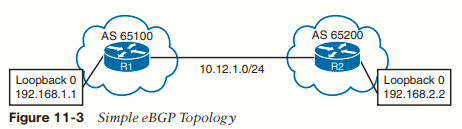
| Configuration Example | Explanation |
|---|---|
Step 1 R1(config)# router bgp 65100 |
Initialize the BGP process: Starts BGP with the router's local ASN. |
Step 2 (Optional) R1(config-router)# bgp router-id 192.168.1.1 |
Configure the BGP Router ID (RID): A unique 32-bit identifier. If not manually configured, BGP selects the highest IP of an up loopback interface; otherwise, the highest IP of an active physical interface. The RID can be any valid IPv4-formatted address, even if not configured on the router. Changing the RID resets all BGP sessions. Static RIDs are recommended for stability. |
Step 3 R1(config-router)# neighbor 10.12.1.2 remote-as 65200 |
Configure the BGP neighbor: Specifies the peer's IP and ASN. The neighbor's ASN determines whether the peering is iBGP (same AS) or eBGP (different AS). |
Step 4 (Optional) R1(config-router)# neighbor 192.168.2.2 update-source Loopback0 |
Specify the BGP source interface: By default, BGP uses the outgoing interface's IP as the TCP source. update-source overrides this behavior, commonly for loopback peering (this example is an alternative to the direct-interface topology). The TCP source IP must match the neighbor IP configured on the remote router, or the connection is not associated with that peer and is discarded. Loopback eBGP additionally requires appropriate multihop configuration and bidirectional reachability. |
Step 5 (Optional) R1(config-router)# neighbor 10.12.1.2 password CISCOBGP |
Configure authentication: Enables TCP MD5 authentication to protect BGP sessions against unauthorized or forged BGP packets. Both peers must use matching authentication settings. Without authentication, forged updates could potentially be injected into a session. |
Step 6 (Optional) R1(config-router)# neighbor 10.12.1.2 timers 10 40 |
Configure BGP timers: Syntax: neighbor ip-address timers keepalive holdtime [minimum-holdtime]. Cisco defaults: Keepalive 60s / Hold 180s. The Hold Time is negotiated using the lower advertised value. Timers can be configured globally or per neighbor. |
Step 7 R2(config-router)# no bgp default ipv4-unicast then R2(config-router)# address-family ipv4 |
Initialize the address family: Syntax: address-family afi [safi]. AFI identifies the protocol (IPv4/IPv6); SAFI identifies the routing type (unicast/multicast). IOS XE enables IPv4 unicast by default. no bgp default ipv4-unicast disables its automatic neighbor activation, requiring explicit configuration. |
Step 8 R2(config-router-af)# neighbor 10.12.1.1 activate |
Activate the AF for the neighbor: Allows the peer to exchange routes for that address family. Required when automatic IPv4 unicast activation is disabled, or when configuring address families that are not enabled by default. |
Important Configuration Notes
-
IPv4 unicast is enabled by default on IOS XE, making Steps 7–8 optional for ordinary IPv4 BGP peering.
-
no bgp default ipv4-unicastdisables automatic IPv4 neighbor activation, not IPv4 BGP itself. Explicitaddress-family ipv4andneighbor ... activateare then required. -
Unicast is the default SAFI for IPv4 and IPv6 in IOS XE, so specifying
unicastis optional. -
Explicit address-family configuration is recommended when working with multiple AFIs such as IPv4, IPv6, VPNv4, and VPNv6.
-
BGP uses KEEPALIVE messages, not Hello packets. The OCG example refers to a "BGP hello timer," but the correct term is Keepalive timer.
-
BGP authentication in this example uses MD5. It authenticates the TCP session but does not encrypt the routing information.
2. Complete eBGP Configuration Example
R1 — Default IPv4 Address Family Enabled
router bgp 65100
 neighbor 10.12.1.2 remote-as 65200
 neighbor 10.12.1.2 password CISCOBGP
 neighbor 10.12.1.2 timers 10 40
R2 — Default IPv4 Address Family Disabled
router bgp 65200
 no bgp default ipv4-unicast
 neighbor 10.12.1.1 remote-as 65100
 neighbor 10.12.1.1 password CISCOBGP
 neighbor 10.12.1.1 timers 15 50
 !
 address-family ipv4
  neighbor 10.12.1.1 activate
 exit-address-family
Key observations:
-
R1 automatically enables IPv4 unicast; R2 manually activates it using
neighbor ... activate. -
Both routers use the authentication password
CISCOBGP. -
R1 advertises a Hold Time of 40 seconds, while R2 advertises 50 seconds. The negotiated Hold Time is 40 seconds (the lower value).
-
R1 configures a 10-second Keepalive interval; R2 configures 15 seconds. The OCG's R2 verification output shows an effective Keepalive interval of 13 seconds with Hold Time 40. Keepalive intervals are not directly negotiated in the OPEN message.
-
Neither router manually configures a RID, so R1 selects
192.168.1.1and R2 selects192.168.2.2from their Loopback0 interfaces, assuming those interfaces are up and eligible. -
The neighbors use their directly connected interface addresses, so
update-sourceandebgp-multihopare unnecessary.
3. Verification of BGP Sessions
3.1 BGP Summary
Use:
show bgp ipv4 unicast summaryExample (R1):
BGP router identifier 192.168.1.1, local AS number 65100
BGP table version is 1, main routing table version 1

Neighbor       V    AS    MsgRcvd MsgSent TblVer InQ OutQ Up/Down  State/PfxRcd
10.12.1.2 4 65200 8 9 1 0 0 00:05:23 0| Field | Meaning |
|---|---|
| Neighbor | IP address of the BGP peer |
| V | BGP version used by the peer |
| AS | Neighbor's ASN |
| MsgRcvd | Number of BGP messages received |
| MsgSent | Number of BGP messages sent |
| TblVer | Last version of the BGP database sent to the peer |
| InQ | Received messages awaiting processing |
| OutQ | Messages queued for transmission |
| Up/Down | Session uptime if Established; otherwise, time in current non-established state |
| State/PfxRcd | Current FSM state if not Established; otherwise, number of prefixes received |
Important: State/PfxRcd = 0 means the BGP session is Established but has received zero prefixes. It does NOT indicate that the session is down.
In this example, the neighbor has been Established for 5 minutes and 23 seconds.
3.2 Detailed Neighbor Verification
Use:
show bgp ipv4 unicast neighbors 10.12.1.1This command provides detailed BGP neighbor information, organized into several sections.
Section 1 — Neighbor Identification, State and Timers
BGP neighbor is 10.12.1.1, remote AS 65100, external link
  BGP version 4, remote router ID 192.168.1.1
  BGP state = Established, up for 00:01:04
  Last read 00:00:10, last write 00:00:09, hold is 40, keepalive is 13 seconds
  Neighbor sessions:
    1 active, is not multisession capable (disabled)
Shows the neighbor IP, ASN, BGP version, Router ID, eBGP/iBGP relationship, FSM state, session uptime, last activity, negotiated Hold Time, effective Keepalive interval, and session count/multisession status.
Section 2 — Neighbor Capabilities
Neighbor capabilities:
 Route refresh: advertised and received(new)
 Four-octets ASN Capability: advertised and received
 Address family IPv4 Unicast: advertised and received
 Enhanced Refresh Capability: advertised
 Multisession Capability:
 Stateful switchover support enabled: NO for session 1
Shows the capabilities supported and negotiated between neighbors.
-
Route Refresh: Allows BGP to request route re-advertisement without resetting the session.
-
Four-octet ASN: Supports 32-bit AS numbers.
-
Address Family: Indicates supported/negotiated AFI/SAFI combinations (IPv4 Unicast in this example).
-
Enhanced Refresh: Extended route-refresh capability; shown as advertised in this output.
-
Multisession / Stateful Switchover: Indicates whether these capabilities are supported or enabled.
Section 3 — Message Statistics
Displays the number of BGP messages sent and received, including:
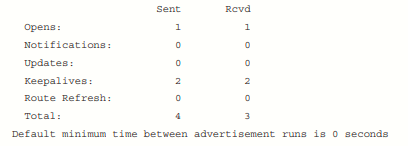
Example values from the OCG. ROUTE REFRESH is an additional BGP message type beyond the four original types discussed earlier.
The output also shows queue depths and the minimum interval between advertisement runs (0 seconds in this example).
Section 4 — Address Family and Prefix Information
Displays information for each address family, including:
-
BGP Table Version / Neighbor Version: Routing database version information. A version change does not always correspond to a single route change.
-
Output Queue: Number of pending outbound messages.
-
Session / Index / Advertise Bit: Internal neighbor and advertisement-tracking information.
-
Prefix Activity: Prefixes currently exchanged, total prefix activity, and implicit/explicit withdrawals.
-
Bestpath / Multipath: Information about accepted routes selected as best or multipath.
-
Local Policy Denied Prefixes: Routes rejected by local routing policies, separated by inbound/outbound direction.
-
NLRI Count: Number of reachability entries carried in UPDATE messages.
In the OCG example, zero prefixes have been exchanged, although the session is Established.
Section 5 — TCP Connectivity and Session History
     Address tracking is enabled, the RIB does have a route to 10.12.1.1
     Connections established 2; dropped 1
     Last reset 00:01:40, due to Peer closed the session
     Transport(tcp) path-mtu-discovery is enabled
Connection state is ESTAB, I/O status: 1, unread input bytes: 0
Minimum incoming TTL 0, Outgoing TTL 255
Local host: 10.12.1.2, Local port: 179
Foreign host: 10.12.1.1, Foreign port: 56824
Key checks:
-
RIB Reachability: Confirms a valid route exists to the neighbor IP.
-
Connections established/dropped: Tracks successful connections and disconnections.
-
Last Reset: Indicates when and why the session last reset.
-
Path MTU Discovery: Shows whether TCP Path MTU Discovery is enabled.
-
TCP State:
ESTABconfirms the underlying TCP connection is established. -
TTL: Displays incoming minimum and outgoing TTL values; relevant to eBGP multihop and TTL security troubleshooting.
-
TCP Ports: The passive peer uses local port 179, while the initiating peer typically uses an ephemeral source port (56824 in this example).
-
Connection Statistics: Includes TCP I/O status and unread input bytes.
4. ENARSI Exam Essentials
| Topic | What to remember |
|---|---|
| BGP initialization | router bgp <local-as> |
| Neighbor configuration | neighbor <ip> remote-as <remote-as> |
| Router ID selection | Manual RID → Highest up Loopback IP → Highest active interface IP |
| RID change | Resets BGP sessions |
| Source IP | Must match the peer's configured neighbor IP |
| Authentication | neighbor <ip> password <password> (TCP MD5 in this example) |
| Default timers | Keepalive 60s / Hold 180s |
| Hold Time negotiation | Lowest Hold Time advertised by the peers |
| IPv4 unicast | Enabled automatically by default on IOS XE |
| Disable automatic IPv4 activation | no bgp default ipv4-unicast |
| Address family | address-family ipv4 [unicast] |
| Activate a neighbor | neighbor <ip> activate inside the address family |
| BGP summary | show bgp ipv4 unicast summary |
| Detailed neighbor information | show bgp ipv4 unicast neighbors <ip> |
| Established with no prefixes | Numeric State/PfxRcd = 0 |
| Troubleshooting | Check IP reachability, ASN, source IP, authentication, address-family activation, FSM state, timers, and TCP connectivity |
CLI note: The older show ip bgp summary command predates MP-BGP's address-family-oriented command structure. Prefer show bgp <afi> <safi> summary for consistent verification across IPv4, IPv6, VPNv4, VPNv6, and other supported address families.
Route Advertisement
BGP uses three tables for maintaining the network paths and path attributes (PAs) for a prefix. The following list briefly explains the BGP tables:
- Adj-RIB-in: Contains the routes in original form (that is, from before inbound route policies were processed). The table is purged after all route policies are processed to save memory.
- Loc-RIB: Contains all the routes that originated locally or that were received from other BGP peers. After NLRI routes pass the validity and next-hop reachability check, the BGP best-path algorithm selects the best NLRI for a specific prefix. The Loc-RIB table is the table used for presenting routes to the IP routing table.
- Adj-RIB-out: Contains the routes after outbound route policies have been processed.
You install network prefixes in the BGP Loc-RIB with the command network network mask subnet-mask [route-map route-map-name] under the appropriate BGP address family configuration. The optional route-map provides a method to set specific BGP PAs when the prefix installs into the Loc-RIB.
The BGP network statements do not enable BGP for a specific interface. Instead, they identify a specific network prefix to be installed into the Loc-RIB table.
After you enter a BGP network statement, the BGP process searches the global RIB for an exact network match. The network can be a connected network, a secondary connected network, or any route from a routing protocol. After verifying that the network statement matches a route in the RIB, the prefix is installed into the Loc-RIB table. As the BGP prefix is installed into the Loc-RIB, the following BGP PAs are set, depending on the RIB prefix type:
- Connected network: The next-hop BGP attribute is set to 0.0.0.0, the BGP Origin attribute is set to i (for IGP), and the BGP weight is set to 32,768.
- Static route or routing protocol: The next-hop BGP attribute is set to the next-hop IP address in the RIB, the BGP Origin attribute is set to i (for IGP), the BGP weight is set to 32,768, and the multi-exit discriminator (MED) is set to the IGP metric.
Not every route in the Loc-RIB table is advertised to a BGP peer. All routes in the Loc-RIB table follow this process for advertisement to BGP peers:
- Verify that the route is valid and that the next-hop address can be resolved in the RIB. If the next-hop check fails, the route remains but does not process further.
- Process any specific outbound neighbor policies. After processing, if the route was not denied by the outbound policies, the route is maintained in the Adj-RIB-Out for later reference.
- Advertise the route to BGP peers. If the route’s next-hop BGP PA is 0.0.0.0, the next-hop address is changed to the IP address of the BGP session.
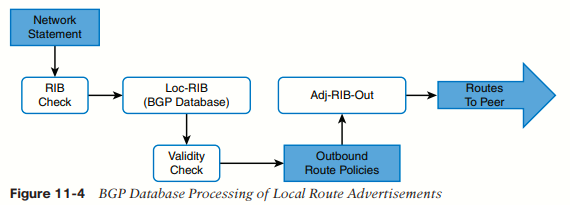
By default, BGP only advertises the best path to other BGP peers, regardless of the number of routes (that is, NLRI routes) in the BGP Loc-RIB table.
The following example expands on the previous topology, where R1 already has an eBGP session established with R2. R1 has multiple routes learned from static routes, EIGRP, and OSPF. Notice that R3’s loopback was learned through EIGRP, R4’s loopback is reached using a static route, and R5’s loopback is learned from OSPF.
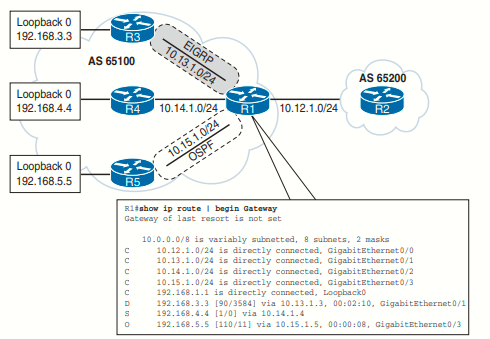
All the routes in R1’s routing table can be advertised into BGP, regardless of the source routing protocol. The following example demonstrates the configuration for advertising the loopback interface of R1, R3, and R4 using network statements on R1. Specifying every prefix that should be advertised might seem tedious, so R5’s loopback interface is injected into BGP through redistribution of OSPF into BGP. R2’s configuration resides under address-family ipv4 unicast because the default IPv4 unicast address family has been disabled.
R1
router bgp 65100
 neighbor 10.12.1.2 remote-as 65200
 network 10.12.1.0 mask 255.255.255.0
 network 192.168.1.1 mask 255.255.255.255
 network 192.168.3.3 mask 255.255.255.255
 network 192.168.4.4 mask 255.255.255.255
 redistribute ospf 1

 --------------------------------------------------------------------------------------------------------------

R2
router bgp 65200
 neighbor 10.12.1.1 remote-as 65100
 address-family ipv4 unicast
 neighbor 10.12.1.1 activate
 network 10.12.1.0 mask 255.255.255.0
 network 192.168.2.2 mask 255.255.255.255
Redistributing routes learned from an IGP into BGP is completely safe; however, redistributing routes learned from BGP into an IGP should be done with caution. BGP is designed for large scale and can handle a routing table the size of the Internet (940,000+ prefixes), whereas IGPs could have stability problems with fewer than 20,000 routes.
Receiving and Viewing Routes
Not every prefix in the Loc-RIB table is advertised to a BGP peer or installed into the global RIB when received from a BGP peer. BGP performs the following route processing steps:
- Store the route in the Adj-RIB-In in the original state and apply the inbound route policy, based on the neighbor on which the route was received.
- Update the Loc-RIB with the latest entry. The Adj-RIB-In is cleared to save memory.
- Pass a validity check to verify that the route is valid and that the next-hop address is resolvable in the RIB. If the route fails, the route remains in the Loc-RIB but is not processed further.
- Identify the BGP best path and pass only the best path and its path attributes to step 5.
- Install the best-path route into the RIB, process the outbound route policy, store the non-discarded routes in the Adj-RIB-Out table, and advertise to BGP peers.
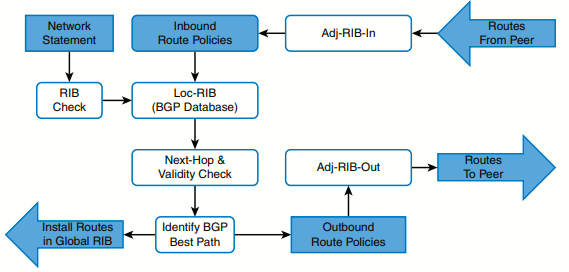
The previous image shows the complete BGP route processing logic. It includes the receipt of a route from a BGP peer and the BGP best-path algorithm. The command show bgp afi safi displays the contents of the BGP database (Loc-RIB table) on the router. Every entry in the BGP Loc-RIB table contains at least one path but could contain multiple paths for the same network prefix.
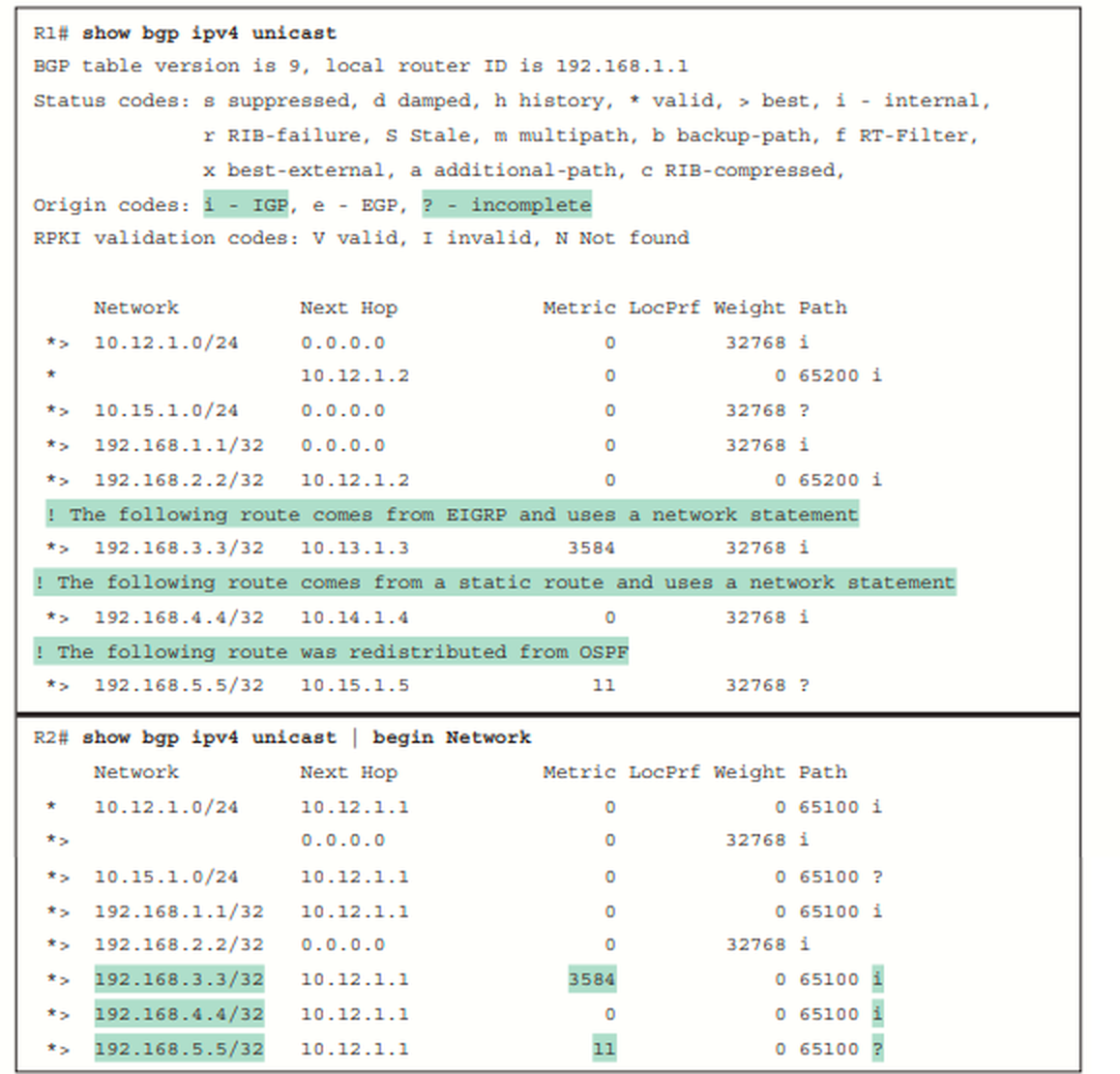
Notice that on R1, the next hop matches the next hop learned from the RIB, AS_Path is blank, and the Origin code is IGP (for routes learned from the network statement) or incomplete (redistributed). The metric is carried over from R3’s and R5’s IGP routing protocols and is indicated as MED. R2 learns the routes strictly from eBGP and sees only MED and the Origin codes.
|
Field |
Description |
|---|---|
|
Network |
A list of the prefixes installed in BGP. If multiple paths exist for the same prefix, only the first prefix is listed, and other paths leave an empty space in the output.
Valid paths are indicated by the *
The paths selected as the best path is indicated by an angle bracket (>). |
|
Next Hop |
A well-known mandatory BGP path attribute that defines the IP address for the next hop for that specific path. |
|
Metric |
Multi-exit discriminator (MED), an optional non-transitive BGP path attribute used in the BGP best-path algorithm for that specific path. |
|
LocPrf |
Local preference, a well-known discretionary BGP path attribute used in the BGP best-path algorithm for that specific path. |
|
Weight |
A locally significant Cisco-defined attribute used in the BGP best-path algorithm for that specific path. |
|
Path and Origin |
AS_Path, a well-known mandatory BGP path attribute used for loop prevention and in the BGP best-path algorithm for that specific path. |
The command show bgp afi safi network displays all the paths for a specific prefix and the BGP path attributes for that prefix. The following example displays the paths for the 10.12.1.0/24 prefix. The output includes the number of paths and which path is the best path.
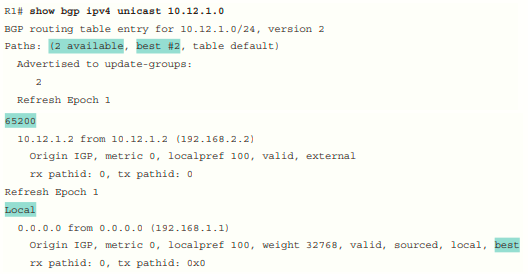
The following table explains the output provided in the example above and the correlation of each part of
the output to BGP attributes. Some of the BGP path attributes may change, depending on the BGP features used.
|
Output |
Description |
|---|---|
|
Paths: (2 available, best #2) |
Provides a count of BGP paths in the BGP Loc-RIB table and identifies the path selected as the BGP best path. |
|
Advertised to update-groups |
Identifies whether the path was advertised to a BGP peer. BGP neighbors are consolidated into BGP update groups. If a path is not advertised, Not advertised to any peer is displayed. |
|
65200 (1st path) |
This is the AS_Path for the path as it was received or whether the prefix was locally advertised. |
|
10.12.1.2 from 10.12.1.2 (192.168.2.2) |
The first entry lists the IP address of the next hop for the prefix. The from field lists the IP address of the advertising router. (The field could change when an external path is learned from an iBGP peer.) The number in parentheses is the BGP identifier (RID) for the node. |
|
Origin IGP |
Origin is the BGP well-known mandatory attribute that states the mechanism for advertising this path. In this instance, it is an internal path. |
|
metric 0 |
Displays the optional non-transitive BGP attribute MED, also known as the BGP metric. |
|
localpref 100 |
Displays the well-known discretionary BGP attribute Local Preference. |
|
valid |
Displays the validity of this path. |
|
External (1st path) |
Displays how the path was learned: internal, external, or local. |
The command show bgp afi safi detail displays the entire BGP table with all the path attributes
The Adj-RIB-Out table is a unique table maintained for each BGP peer. It enables a network engineer to view routes advertised to a specific router.
The command show bgp afi safi neighbors ip-address advertised-routes displays the contents of the Adj-RIB-Out table for a specific neighbor.
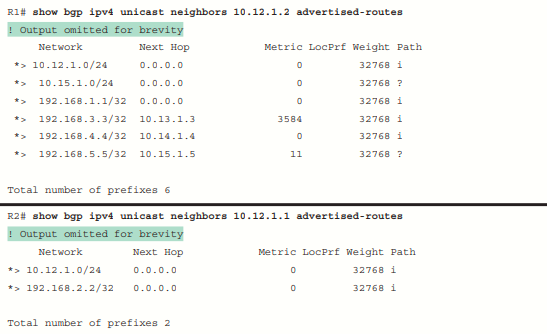
The next-hop address reflects the local router’s BGP table and is changed as the route advertises to the peer.
The show bgp ipv4 unicast summary command is also used to verify the exchange of routes between nodes:

You display the BGP routes in the global IP routing table (RIB) by using the command show ip route bgp. It shows the BGP routes that have been installed into the routing table. The routes are from an eBGP session and have an AD of 20, and no metric is present.
