
OpenWRT - Huawei E3372s NCM + relayd on OpenWrt 25.12.5 [Updated]
Raspberry Pi 3 Model B · Movistar LTE · transparent public IPv4 passthrough with relayd
This guide documents the configuration that was actually proven working during the troubleshooting process I made on the initial version. The objective is not to make the Raspberry Pi act as the Internet router for the downstream device. Instead, the Pi brings up the Huawei E3372s LTE/NCM session and transparently passes the mobile operator's DHCP/public IPv4 service through a TP-Link UE300 Ethernet adapter to a downstream device such as the Cisco UC540. The downstream device therefore receives the Movistar public IPv4 address itself.
The guide deliberately does not include any OpenWrt upgrade procedure. It assumes the Raspberry Pi is already running OpenWrt 25.12.5 on the correct Raspberry Pi 3 target (bcm27xx/bcm2710). It also preserves the Pi's Wi-Fi client connection as a completely separate backup management and package-upgrade path.
1. Final architecture, hardware and packages
The working physical design is intentionally simple. The Raspberry Pi has three distinct network roles. Its normal LAN can remain on the built-in Ethernet interface if desired; its built-in Wi-Fi is configured as a station called wwan and is used only for management and Internet access by the Pi itself; and the LTE passthrough path consists of the Huawei modem on wwan0 plus the UE300 on eth1.
The naming matters because wwan and wwan0 are not the same thing. In this installation, wwan is the OpenWrt logical interface for the backup Wi-Fi connection. wwan0 is the Linux network device created by the Huawei E3372s NCM driver. The two must remain separate. The backup Wi-Fi belongs to the normal WAN firewall zone and can use DHCP/NAT normally. The LTE relay path must not use NAT on the Pi.
The proven hardware layout is:
Movistar LTE network
        │
Huawei E3372s USB / NCM
        │
      wwan0
        │
Raspberry Pi 3 - OpenWrt
        │
       eth1
        │
TP-Link UE300
        │
downstream device WAN port
        │
  downstream LAN
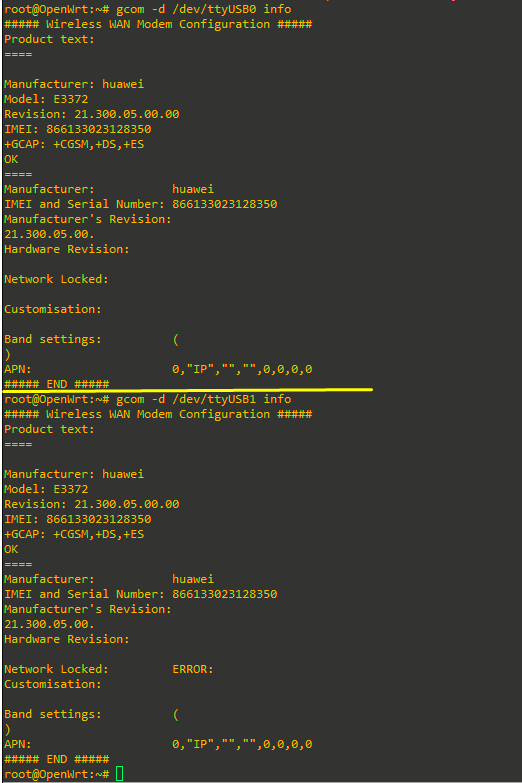
The TP-Link UE300 used here is the RTL8153 model. Once the correct kernel module is installed it appears as eth1; the USB identifier observed in the working setup is 0bda:8153. The Huawei E3372s initially may expose its mass-storage mode as 12d1:14fe. After USB mode switching it must appear as 12d1:1506. In that switched state the useful interfaces are /dev/ttyUSB0, /dev/ttyUSB1, cdc-wdm0 and wwan0. During testing, /dev/ttyUSB0 was proven to be the correct AT/NCM control port for this modem:
Install the packages required for the complete setup. The following set corresponds to the working configuration and also includes the diagnostic tools that were useful during troubleshooting:
apk update
apk add \
    usb-modeswitch \
    kmod-usb-net-rtl8152 \
    kmod-usb-net-huawei-cdc-ncm \
    kmod-usb-net-cdc-ncm \
    kmod-usb-serial-option \
    comgt comgt-ncm luci-proto-ncm \
    relayd luci-proto-relay \
    usbutils tcpdump picocom ip-full
Do not run a general apk upgrade as part of this procedure. The requirement here is only to install the packages needed by the modem, UE300, relayd and diagnostics.
One important cleanup is to remove ModemManager. It was installed during troubleshooting and was observed running simultaneously with comgt-ncm, which created a real possibility of both processes issuing commands to the same modem. After ModemManager was stopped, the Huawei could be controlled consistently by OpenWrt's NCM stack. In the final design, only comgt-ncm should own the modem:
/etc/init.d/modemmanager stop 2>/dev/null || true
/etc/init.d/modemmanager disable 2>/dev/null || true
apk del luci-proto-modemmanager modemmanager 2>/dev/null || true
After installing the drivers, load them or simply reboot. If the Huawei is still in 12d1:14fe storage mode, request USB mode switching:
usbmode -s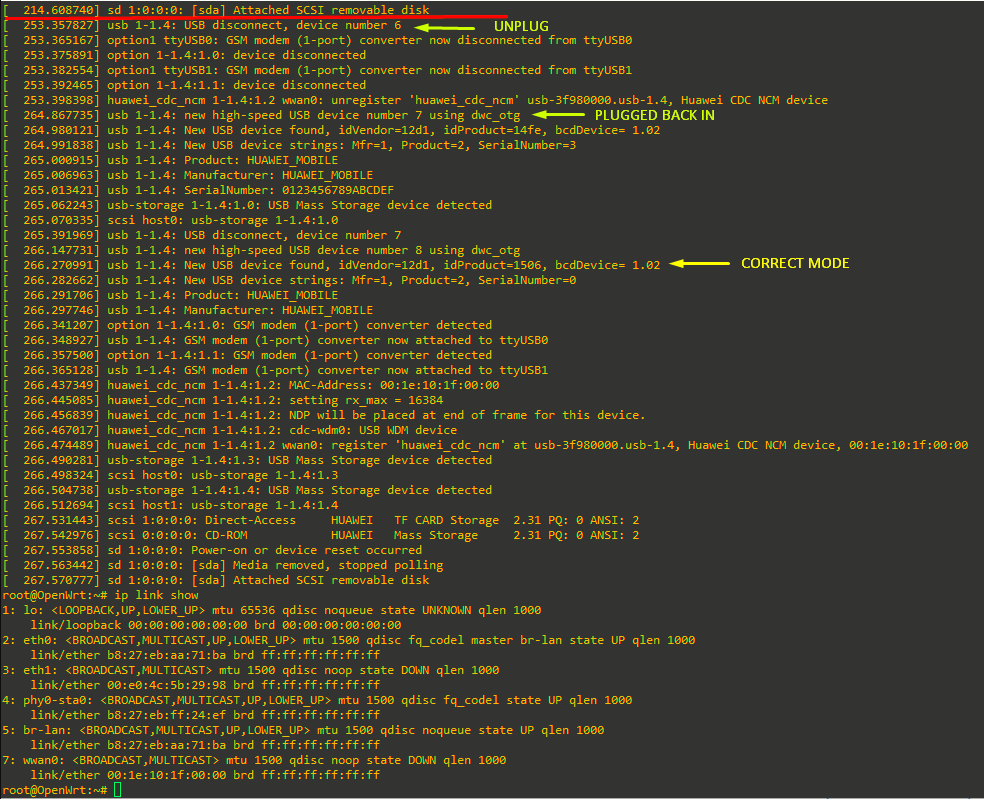
Then verify the devices:
lsusb
ls -l /dev/ttyUSB*
ip link show eth1
ip link show wwan0

The desired end state is the UE300 on eth1, the Huawei on wwan0, /dev/ttyUSB0 present, and the Huawei USB ID switched to 12d1:1506.
The backup Wi-Fi should remain configured as an ordinary DHCP client. In the tested installation it is the logical interface wwan. Its purpose is particularly valuable here: restarting the LTE side does not have to remove your management path, and the Pi can still reach the OpenWrt repositories even while the mobile relay path is being rebuilt.
2. Bring up the Huawei E3372s correctly with NCM
The Huawei must be controlled by OpenWrt's NCM protocol, but the Pi must not become the DHCP client for the LTE public IPv4 address. That distinction is the central part of the design.
The working modem interface is wan_lte. It uses /dev/ttyUSB0 as its control device, movistar.es as the APN, IPv4 as the PDP type, and no username, password or authentication settings at all. During troubleshooting, adding the traditional Movistar username/password caused comgt-ncm to generate an authenticated AT^NDISDUP command which this modem rejected. The successful command was simply AT^NDISDUP=1,1,"movistar.es".
The final NCM interface is therefore:
config interface 'wan_lte'
        option proto 'ncm'
        option device '/dev/ttyUSB0'
        option apn 'movistar.es'
        option pdptype 'IP'
        option mode 'lte'
The mode 'lte' line forces LTE-only operation. In the working OpenWrt NCM implementation this resulted in the modem receiving:
AT^SYSCFGEX="03",3fffffff,2,4,7fffffffffffffff,,The logs then showed the normal session establishment command:
AT^NDISDUP=1,1,"movistar.es"This was verified after an ifdown wan_lte / ifup wan_lte cycle. LTE-only is appropriate for this installation because the objective is a stable LTE data link and there is no requirement to fall back to older radio technologies. The trade-off is that if LTE is completely unavailable, the modem will not fall back to 3G or 2G.
The unusual but essential second interface is wan_lte_4:
config interface 'wan_lte_4'
        option proto 'none'
        option device 'wwan0'
This interface exists to reserve wwan0 without running a DHCP client on it. In a normal OpenWrt NCM configuration, netifd may create a dynamic IPv4 child interface and run DHCP on the modem data interface. That is precisely what must not happen here, because if OpenWrt's own DHCP client obtains the mobile public address, the downstream device cannot obtain it.
The successful architecture therefore separates modem control from address acquisition: wan_lte starts and controls the Huawei NCM session, while wan_lte_4 keeps wwan0 present as a proto none interface so the public DHCP exchange can traverse the Pi instead of terminating on it.
Apply the configuration with UCI if configuring manually:
uci -q delete network.wan_lte
uci -q delete network.wan_lte_4

uci set network.wan_lte='interface'
uci set network.wan_lte.proto='ncm'
uci set network.wan_lte.device='/dev/ttyUSB0'
uci set network.wan_lte.apn='movistar.es'
uci set network.wan_lte.pdptype='IP'
uci set network.wan_lte.mode='lte'

uci set network.wan_lte_4='interface'
uci set network.wan_lte_4.proto='none'
uci set network.wan_lte_4.device='wwan0'

uci commit network
Then bring up the modem:
ifdown wan_lte 2>/dev/null || true
sleep 3
ifup wan_lte
Inspect the logs:
logread | grep -Ei 'wan_lte|SYSCFGEX|NDIS|wwan0' | tail -n 60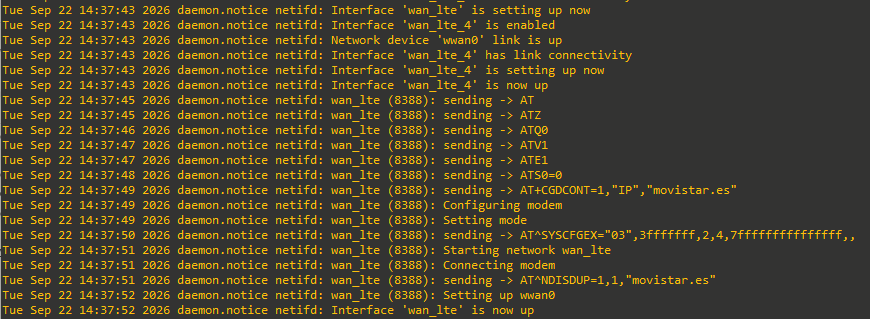
A healthy startup should show the AT initialization, the AT+CGDCONT=1,"IP","movistar.es" context configuration, the LTE-only SYSCFGEX command, the successful NDISDUP connection command, and finally wan_lte reporting up.
An apparent oddity that was seen in the working configuration is a later message such as Interface 'wan_lte_4' is now down. In this particular relay design that message by itself is not evidence of failure. What actually matters is the real data device. The final working runtime showed:
wwan0: <BROADCAST,MULTICAST,UP,LOWER_UP>and relayd remained bound to wwan0, with end-to-end ping continuing to work. Therefore always check the actual Linux device and the relay process before assuming the wan_lte_4 status message is fatal.
For deep diagnostics only, the modem can be queried manually with picocom, but do not leave a serial terminal open while comgt-ncm is supposed to own the modem. If necessary, first stop the interface, then open /dev/ttyUSB0 and use commands such as:
AT^NDISSTATQRY?
AT+CSQ
AT+COPS?
AT+CGATT?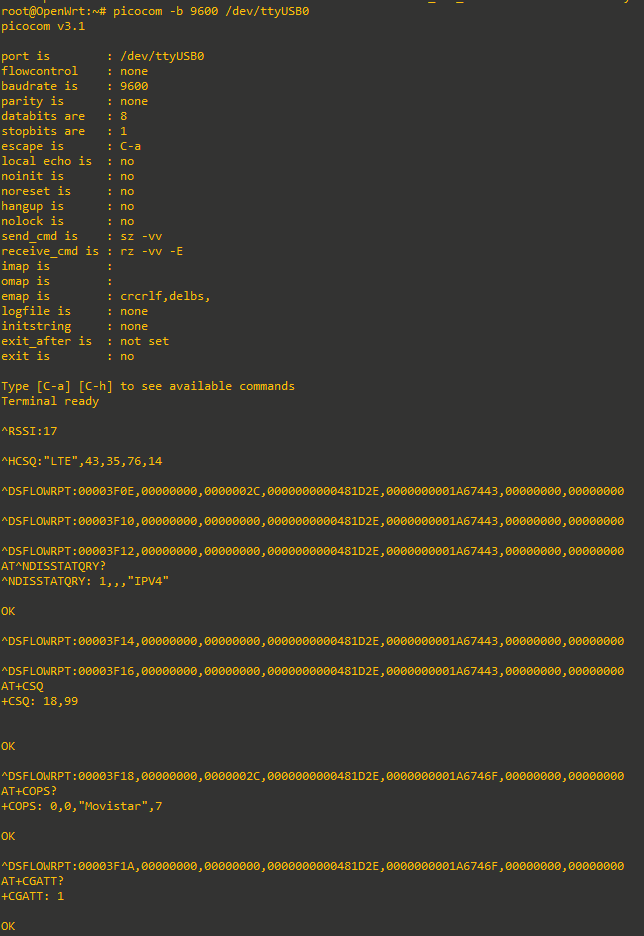
During troubleshooting, manually sending AT^NDISDUP=1,1,"movistar.es" on /dev/ttyUSB0 returned OK and an NDIS-up indication, which confirmed both the correct control port and the correct APN syntax.
3. Build the transparent relay and the firewall correctly
The TP-Link UE300 is the downstream handoff interface. OpenWrt must not assign it an IPv4 address and must not run DHCP on it. Define it as a simple proto none interface:
config interface 'downstream'
        option proto 'none'
        option device 'eth1'
        option force_link '1'
The relay itself joins the downstream logical interface and the reserved modem logical interface. This is the exact network-based form retained in the final script because it mirrors the configuration that was proven working:
config interface 'cellular_relay'
        option proto 'relay'
        list network 'downstream'
        list network 'wan_lte_4'
        option expiry '30'
        option retry '5'
        option multipath 'off'
        option forward_bcast '1'
        option forward_dhcp '1'
When operating correctly, relayd resolves those two logical networks to the real devices and the process looks like this:
/usr/sbin/relayd -I eth1 -I wwan0 -t 30 -p 5 -B -DThe expiry 30 value is safe. Earlier in troubleshooting it looked as if connectivity was dying because of the relayd host-expiry timer, and much larger values such as 120 or 3600 seconds appeared to postpone the symptom. That turned out not to be the real root cause. Once the firewall was fixed so that traffic could actually leave through wwan0, the connection remained stable with the normal 30-second expiry. There is therefore no reason to increase the timer merely to hide a forwarding problem.
The firewall is the most important part of the final working configuration. Create a dedicated zone for the relay. It should allow forwarding through the relay but should not NAT the traffic, because the entire purpose is for the downstream device to receive and use the Movistar public address itself.
A clean final relay zone is:
config zone
        option name 'relay'
        option input 'REJECT'
        option output 'ACCEPT'
        option forward 'ACCEPT'
        option masq '0'
        option masq6 '0'
        option mtu_fix '0'
        list network 'downstream'
        list device 'eth1'
        list device 'wwan0'
The explicit wwan0 device membership is not cosmetic. It was the decisive fix in the real troubleshooting session. Before that fix, nft list chain inet fw4 accept_to_relay showed only:
oifname "eth1" ... acceptAt the same time the routing tables were correct, IPv4 forwarding was enabled, packets from the downstream device (an UC540 in this case) were visible arriving on eth1, but a focused capture on wwan0 showed that the ICMP requests never left the Pi. The firewall's default forward policy was dropping them because the relay zone did not recognize wwan0 as an allowed output device.
After adding wwan0 explicitly to the relay zone, the generated rule became equivalent to:
oifname { "eth1", "wwan0" } ... acceptand Windows behind the UC540 immediately regained a stable ping through the mobile connection. This is the key detail that must not be omitted from a rebuild.
With UCI, the essential zone can be built as follows. The automated script performs additional safety checks around these commands, but the final intent is the same:
uci -q delete firewall.e3372s_relay
uci set firewall.e3372s_relay='zone'
uci set firewall.e3372s_relay.name='relay'
uci set firewall.e3372s_relay.input='REJECT'
uci set firewall.e3372s_relay.output='ACCEPT'
uci set firewall.e3372s_relay.forward='ACCEPT'
uci set firewall.e3372s_relay.masq='0'
uci set firewall.e3372s_relay.masq6='0'
uci set firewall.e3372s_relay.mtu_fix='0'
uci add_list firewall.e3372s_relay.network='downstream'
uci add_list firewall.e3372s_relay.device='eth1'
uci add_list firewall.e3372s_relay.device='wwan0'
uci commit firewall
/etc/init.d/firewall restart
The Pi should not run a DHCP server or router advertisements on either side of the relay. Its normal LAN DHCP service can remain untouched, but any DHCP/RA sections explicitly attached to downstream, wan_lte, wan_lte_4 or cellular_relay should be disabled.
Once the relay and firewall are up, connect the downstream device to the UE300 and configure that device's WAN interface as DHCP. For the Cisco UC540 used in the test, FastEthernet0/0 was left as a DHCP client. The UC540 successfully received a public Movistar IPv4 address, public subnet mask, default gateway and DHCP server directly across the relay. A Windows client behind the UC540 then reached the Internet through the UC540's own NAT.
If the LTE session has been restarted, renew the downstream DHCP lease. A client may otherwise retain an address from the previous mobile session even though the operator has assigned a new subnet/gateway to the newly established NCM session.
4. Verification, failure modes and lessons from troubleshooting
The quickest final validation is to check the physical devices, the relay process, the generated policy-routing state and the firewall rule. The Pi itself should have no IPv4 address on either eth1 or wwan0. The public IPv4 belongs downstream.
Use:
ip link show eth1
ip link show wwan0
ip -4 addr show dev eth1
ip -4 addr show dev wwan0
ps w | grep '[r]elayd'
sysctl net.ipv4.ip_forward
ip rule show
ip route show table 16800
ip route show table 16801
nft list chain inet fw4 forward_relay
nft list chain inet fw4 accept_to_relay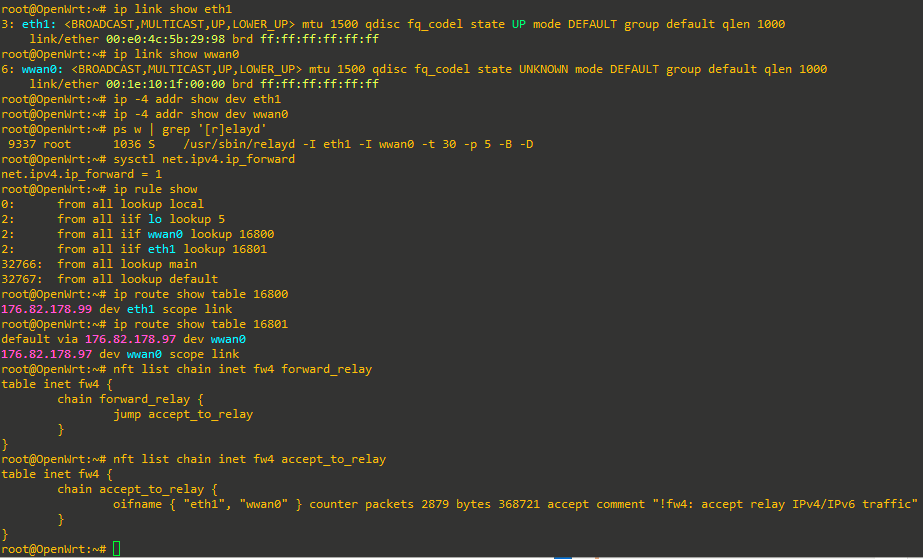
The expected characteristics are that wwan0 is UP,LOWER_UP, IPv4 forwarding is 1, relayd is bound to both eth1 and wwan0, and the firewall's relay output chain contains both devices. relays typically create policy-routing tables dynamically; in the successful runtime one table represented the downstream public host via eth1 and another represented the mobile gateway via wwan0.
Also ensure no DHCP client is running on the modem data interface:
ps w | grep '[u]dhcpc'There should be no udhcpc attached to wwan0. If there is, the Pi may steal the public lease that should go to the UC540 or other downstream device.
For packet-level troubleshooting, run captures on both sides at the same time. For example, while a Windows machine behind the UC540 continuously pings 8.8.8.8:
tcpdump -eni eth1 'arp or icmp or (udp port 67 or 68)'and in another shell:
tcpdump -eni wwan0 'arp or icmp or (udp port 67 or 68)'A particularly useful symptom discovered during troubleshooting was: packets were clearly arriving on eth1, ip route get selected the correct wwan0 route, yet nothing appeared on a focused wwan0 ICMP capture. That combination pointed away from DHCP, relayd discovery and routing, and directly toward firewall forwarding. Inspecting accept_to_relay then revealed that only eth1 was accepted. Explicitly adding wwan0 to the zone fixed the issue.
Several experiments were useful diagnostically but are not part of the final configuration. Temporary 169.254.255.1/32 and 169.254.255.2/32 maintenance addresses were tested on the relay interfaces to see whether they would improve relayd's ARP host probes. They did not solve the problem and were removed. The final setup should contain no such addresses. If ip addr show eth1 and ip addr show wwan0 do not display them, the system is clean.
Another misleading symptom was the apparent 30-second host-expiry failure. Packet captures showed relayd sending some dummy/proxy ARP traffic, which initially made the expiry timer look suspicious. However, after the actual firewall problem was fixed, the connection remained stable with expiry 30. Do not add keepalive scripts, fake link-local addresses or huge expiry values unless a new, independently proven issue requires them.
ModemManager was a separate real problem. At one point the Huawei remained registered to Movistar and attached to the packet network, yet AT^NDISSTATQRY? reported that the NDIS data session was down. ModemManager processes were simultaneously present. Removing ModemManager eliminated that extra owner of the modem and leaves comgt-ncm as the single control stack. This is why the final script explicitly stops, disables and removes it.
The final sanity checks after a modem restart are:
logread | grep -Ei 'SYSCFGEX|wan_lte|NDIS' | tail -n 30
ps w | grep '[r]elayd'
ip link show wwan0
nft list chain inet fw4 accept_to_relay
You should see the LTE-only SYSCFGEX command, the successful NCM connection, relayd running on eth1 and wwan0, wwan0 up with carrier, and both relay devices in the firewall accept chain. The definitive end-to-end test is still performed from behind the downstream device, not from the Pi: renew DHCP on the UC540 or other downstream router, confirm it receives a public Movistar lease, and verify continuous Internet traffic from a client behind it.
5. Fully automated installer: latest working script
The following is the latest corrected installer produced from the working configuration above. It is intentionally more defensive than the manual procedure. It verifies the exact OpenWrt release/target, preserves and uses the backup Wi-Fi path, synchronizes time before package installation, backs up the current configuration, installs the required packages, removes ModemManager, verifies the expected Huawei and UE300 USB IDs, builds the NCM/relayd/firewall configuration, validates the saved state, and asks for explicit confirmation before the final network restart.
The script does not hard-code the Wi-Fi SSID or password. By default it asks for both interactively. For unattended use, the SSID can be supplied with E3372S_WIFI_SSID and the password with E3372S_WIFI_KEY.
Copy the script to the Pi, for example as /tmp/setup-e3372s-relay.sh, then run:
sh /tmp/setup-e3372s-relay.shFor unattended credentials:
E3372S_WIFI_SSID='your-ssid' \
E3372S_WIFI_KEY='your-password' \
sh /tmp/setup-e3372s-relay.sh
After reconnecting following the final activation, use:
sh /tmp/setup-e3372s-relay.sh --checkThe complete script follows exactly as validated with sh -n:
#!/bin/sh
# Huawei E3372s / UE300 / Raspberry Pi 3 / OpenWrt 25.12.5
# Run on the Pi as root: sh /tmp/setup-e3372s-relay.sh
# This launcher detaches its worker so a network restart cannot kill the install.
# Progress streams to the terminal automatically while the connection remains up.
# Results: /tmp/e3372s-setup.log and /tmp/e3372s-setup.exit
# Downstream: any Ethernet device using DHCP; the cable may be unplugged at setup.
# Exit 0 = configuration saved; restart either confirmed and completed, or deferred.
# Use --check after reconnecting for runtime readiness (no downstream cable required).
# Exit 1 = installation/configuration failed. Exit 2 = --check found runtime issues.
# This script has been syntax checked and tested with mocks, not on hardware.
# Wi-Fi SSID and passphrase are requested at launch (or may be supplied in E3372S_WIFI_SSID / E3372S_WIFI_KEY).

set -eu
umask 077
PATH=/usr/sbin:/usr/bin:/sbin:/bin
export PATH
LOG=/tmp/e3372s-setup.log
RESULT=/tmp/e3372s-setup.exit
LOCK=/tmp/e3372s-setup.lock
BACKUP=
ROLLBACK=0
NTP_PAUSED=0
WIFI_SSID=${E3372S_WIFI_SSID:-}
WIFI_KEY=${E3372S_WIFI_KEY:-}

say() { printf '\n%s\n' "$*"; }
die() { say "ERROR: $*" >&2; exit 1; }
get() { uci -q get "$1" 2>/dev/null || :; }
sections() { uci -q show "$1" | sed -n "s/^$1\.\([^.=]*\)=$2$/\1/p"; }

follow_worker() {
    # Keep the worker's output in a regular file, independent of this SSH session.
    # Start at line one so even fast startup checks are visible.
    tail -n +1 -f "$LOG" &
    VIEWER_PID=$!
    trap 'kill "$VIEWER_PID" 2>/dev/null || :; wait "$VIEWER_PID" 2>/dev/null || :' EXIT
    trap 'printf "\nStopped watching; the installer continues. Log: %s\n" "$LOG"; exit 130' INT
    trap 'exit 129' HUP
    trap 'exit 143' TERM
    while kill -0 "$WORKER_PID" 2>/dev/null; do
        if [ -f "$LOCK/restart.request" ] && [ ! -f "$LOCK/restart.answer" ]; then
            # The foreground launcher owns stdin; the detached worker cannot read it.
            sleep 2
            RESTART_ANSWER=n
            while :; do
                printf '\nActivate services and restart networking now? [Y/n] '
                if ! IFS= read -r RESTART_INPUT; then
                    printf '\nNo response available; restart deferred.\n'
                    break
                fi
                case "$RESTART_INPUT" in
                    Y|y) RESTART_ANSWER=y; break ;;
                    N|n) break ;;
                    *) printf 'Please enter Y or n.\n' ;;
                esac
            done
            printf '%s\n' "$RESTART_ANSWER" >"$LOCK/restart.answer.tmp"
            mv "$LOCK/restart.answer.tmp" "$LOCK/restart.answer"
        fi
        sleep 1
    done
    if wait "$WORKER_PID"; then WORKER_RC=0; else WORKER_RC=$?; fi
    # Allow tail to emit the final buffered output before stopping it.
    sleep 2
    printf '\nInstaller exit status: %s. Full log: %s\n' "$WORKER_RC" "$LOG"
    exit "$WORKER_RC"
}

if [ "${1:-}" = '--check' ]; then
say 'Checking runtime state after activation'
say 'A missing Ethernet cable or downstream DHCP lease is normal during installation.'
for net in wwan wan_lte wan_lte_4 downstream; do
    say "Interface: $net"; ifstatus "$net" || :
done
ip link show eth1
ip link show wwan0
ip -4 addr show dev eth1
ip -4 addr show dev wwan0
ps w | grep -E '[r]elayd|[M]odemManager|[u]dhcpc' || :
sysctl net.ipv4.ip_forward
ip rule show
ip route show table 16800 || :
ip route show table 16801 || :
ip neigh show dev eth1
ip neigh show dev wwan0
nft list chain inet fw4 forward_relay || :
nft list chain inet fw4 accept_to_relay || :
logread | grep -Ei 'wan_lte|SYSCFGEX|NDIS|relayd|wwan0' | tail -n 60 || :

BAD=0
check() {
    label=$1; shift
    if "$@"; then printf 'PASS: %s\n' "$label"; else printf 'CHECK: %s\n' "$label"; BAD=1; fi
}
check 'NCM session reports up' test "$(ifstatus wan_lte 2>/dev/null | jsonfilter -e '@.up')" = true
check 'Backup Wi-Fi remains up' test "$(ifstatus wwan 2>/dev/null | jsonfilter -e '@.up')" = true
check 'The reserved modem interface does not request DHCP' test "$(get network.wan_lte_4.proto)" = none
for d in eth1 wwan0; do
    check "The Pi has no IPv4 address on $d" test -z "$(ip -4 -o addr show dev "$d")"
done
check 'The modem data link has carrier' test "$(cat /sys/class/net/wwan0/carrier 2>/dev/null || :)" = 1
if [ "$(cat /sys/class/net/eth1/carrier 2>/dev/null || :)" = 1 ]; then
    say 'READY: eth1 has a physical Ethernet connection; a downstream DHCP client can request a lease.'
else
    say 'READY: eth1 is configured and waiting for a cable. This is normal and is not an installation failure.'
fi
check 'IPv4 forwarding is enabled' test "$(sysctl -n net.ipv4.ip_forward)" = 1
check 'relayd is enabled for future boots' /etc/init.d/relayd enabled
RELAY_PS=$(ps w | grep '[/]usr/sbin/relayd' || :)
case "$RELAY_PS" in *'-I eth1'*'-I wwan0'*) :;; *) say 'CHECK: relayd must bind eth1 and wwan0'; BAD=1;; esac
CHAIN=$(nft list chain inet fw4 accept_to_relay 2>/dev/null || :)
for d in eth1 wwan0; do
    if ! printf '%s\n' "$CHAIN" | grep -q "\"$d\""; then say "CHECK: firewall relay output lacks $d"; BAD=1; fi
done
if ps w | grep '[u]dhcpc' | grep -q 'wwan0'; then say 'CHECK: unexpected DHCP client on wwan0'; BAD=1; fi
if ps w | grep -qi '[M]odemManager'; then say 'CHECK: ModemManager still running'; BAD=1; fi
say 'Next: connect any Ethernet device to eth1 and set its connected interface to obtain IPv4 automatically (DHCP).'
say 'No downstream brand, model, MAC address or existing lease is required. No installer rerun is needed when connecting the cable.'
say 'The downstream device should learn its address, gateway and DNS through DHCP; renew its lease if it retains an old one.'
[ "$BAD" -eq 0 ] || exit 2
say 'SUCCESS: local configuration and readiness checks passed. The relay is ready for a downstream DHCP client.'
say 'End-to-end Internet access can be verified once a downstream device is connected; it is not required to complete installation.'
    exit 0
fi

if [ "${1:-}" != '--worker' ]; then
    [ "$#" -eq 0 ] || die 'No arguments are supported.'
    [ "$(id -u)" -eq 0 ] || die 'Run as root on the OpenWrt Pi.'
    [ -r /etc/openwrt_release ] || die 'This installer only runs on OpenWrt.'
    if [ -z "$WIFI_SSID" ]; then
        printf 'Backup Wi-Fi SSID: '
        IFS= read -r WIFI_SSID || die 'Unable to read the Wi-Fi SSID.'
        [ -n "$WIFI_SSID" ] || die 'Wi-Fi SSID cannot be empty.'
    fi
    E3372S_WIFI_SSID=$WIFI_SSID
    export E3372S_WIFI_SSID
    if [ -z "$WIFI_KEY" ]; then
        printf 'Backup Wi-Fi password for %s: ' "$WIFI_SSID"
        if command -v stty >/dev/null 2>&1; then stty -echo 2>/dev/null || :; fi
        IFS= read -r WIFI_KEY || die 'Unable to read the Wi-Fi password.'
        if command -v stty >/dev/null 2>&1; then stty echo 2>/dev/null || :; fi
        printf '\n'
        [ -n "$WIFI_KEY" ] || die 'Wi-Fi password cannot be empty.'
    fi
    E3372S_WIFI_KEY=$WIFI_KEY
    export E3372S_WIFI_KEY
    mkdir "$LOCK" 2>/dev/null || die "Another run or stale lock exists: $LOCK. Check the log/processes before removing it."
    # Keep a private copy if the original was uploaded to a transient location.
    if ! cp "$0" "$LOCK/worker.sh"; then rmdir "$LOCK"; exit 1; fi
    rm -f "$RESULT"
    : >"$LOG"
    # Ignored HUP is inherited across exec; no package is needed to launch.
    E3372S_LAUNCHER_PID=$$
    export E3372S_LAUNCHER_PID
    (trap '' HUP; exec /bin/sh "$LOCK/worker.sh" --worker) >"$LOG" 2>&1 </dev/null &
    WORKER_PID=$!
    printf '%s\n' "$WORKER_PID" >"$LOCK/pid" 2>/dev/null || :
    printf 'Installer started as PID %s. Network access may pause.\n' "$WORKER_PID"
    printf 'Live progress follows. Ctrl+C stops watching; installation continues.\n'
    printf 'After reconnecting: tail -f %s\nCompletion status: cat %s\n\n' "$LOG" "$RESULT"
    follow_worker
fi

finish() {
    rc=$?
    trap - EXIT
    if [ "$NTP_PAUSED" -eq 1 ]; then /etc/init.d/sysntpd restart || :; fi
    if [ "$ROLLBACK" -eq 1 ]; then
        say "Restoring network, firewall and DHCP configuration from $BACKUP"
        set +e
        for cfg in network firewall dhcp; do
            uci -q revert "$cfg"
            cp -p "$BACKUP/$cfg" "/etc/config/$cfg"
        done
        say 'Saved configuration restored. No automatic network restart was performed during error recovery.'
        say 'Package changes and service enable/disable changes are not rolled back.'
    fi
    printf '%s\n' "$rc" >"$RESULT"
    rm -f "$LOCK/worker.sh" "$LOCK/pid" "$LOCK/ntp.log" "$LOCK/restart.request" "$LOCK/restart.answer" "$LOCK/restart.answer.tmp"
    rmdir "$LOCK" 2>/dev/null || :
    say "Installer finished with status $rc. Backup: ${BACKUP:-${BOOT_BACKUP:-not created}}"
    exit "$rc"
}
trap finish EXIT
trap 'exit 1' INT TERM

say 'Preflight: checking the target platform and built-in bootstrap tools'
[ "$(id -u)" -eq 0 ] || die 'Root is required.'
for cmd in uci ubus jsonfilter apk ip fw4 nft wifi busybox; do
    command -v "$cmd" >/dev/null || die "Missing OpenWrt tool: $cmd"
done
BOARD=$(ubus call system board)
[ "$(printf '%s' "$BOARD" | jsonfilter -e '@.release.version')" = '25.12.5' ] || die 'Expected OpenWrt 25.12.5.'
[ "$(printf '%s' "$BOARD" | jsonfilter -e '@.release.target')" = 'bcm27xx/bcm2710' ] || die 'Expected bcm27xx/bcm2710.'
[ "$(printf '%s' "$BOARD" | jsonfilter -e '@.board_name')" = 'raspberrypi,3-model-b' ] || die 'Expected Raspberry Pi 3 Model B.'
for cfg in network firewall dhcp wireless system; do
    [ -z "$(uci changes "$cfg")" ] || die "Commit or revert pending UCI changes in $cfg first."
done

say '[0/10] Connecting backup Wi-Fi and synchronizing time before any package operation'
BOOT_BACKUP="/root/e3372s-before-wifi-$(date +%Y%m%d-%H%M%S)-$$"
mkdir -p "$BOOT_BACKUP"
for cfg in network wireless firewall system; do
    [ ! -f "/etc/config/$cfg" ] || cp -p "/etc/config/$cfg" "$BOOT_BACKUP/$cfg"
done
say "Original Wi-Fi/network settings saved privately in $BOOT_BACKUP"
RADIO=radio0
STA=
for candidate in $(sections wireless wifi-iface); do
    [ "$(get "wireless.$candidate.mode")" = sta ] || continue
    for net in $(get "wireless.$candidate.network"); do
        if [ "$net" = wwan ]; then
            [ -z "$STA" ] || die 'More than one Wi-Fi station is assigned to wwan.'
            STA=$candidate
            RADIO=$(get "wireless.$candidate.device")
        fi
    done
done
[ "$(get "wireless.$RADIO")" = wifi-device ] || die 'Built-in Wi-Fi radio configuration is missing; the base image must include Pi Wi-Fi support.'
if [ -z "$STA" ]; then
    for candidate in $(sections wireless wifi-iface); do
        if [ "$(get "wireless.$candidate.device")" = "$RADIO" ] && [ "$(get "wireless.$candidate.mode")" = sta ]; then
            die 'Another station already uses the radio; assign the intended station to wwan before retrying.'
        fi
    done
    STA=e3372s_backup
    [ -z "$(get "wireless.$STA")" ] || die 'wireless.e3372s_backup is already used.'
    uci set "wireless.$STA=wifi-iface"
fi
WIFI_CHANGED=0
set_wifi() {
    if [ "$(get "$1")" != "$2" ]; then
        uci set "$1=$2"
        WIFI_CHANGED=1
    fi
}
# Omitted disabled/auto options already mean enabled; avoid needless reloads.
[ "$(get "wireless.$RADIO.disabled")" != 1 ] || set_wifi "wireless.$RADIO.disabled" 0
[ "$(get "wireless.$STA.disabled")" != 1 ] || set_wifi "wireless.$STA.disabled" 0
set_wifi "wireless.$STA.device" "$RADIO"
set_wifi "wireless.$STA.mode" sta
set_wifi "wireless.$STA.network" wwan
set_wifi "wireless.$STA.ssid" "$WIFI_SSID"
set_wifi "wireless.$STA.encryption" psk2
set_wifi "wireless.$STA.key" "$WIFI_KEY"
set_wifi network.wwan interface
set_wifi network.wwan.proto dhcp
[ "$(get network.wwan.auto)" != 0 ] || set_wifi network.wwan.auto 1
[ "$(get network.wwan.defaultroute)" != 0 ] || set_wifi network.wwan.defaultroute 1
[ "$(get network.wwan.peerdns)" != 0 ] || set_wifi network.wwan.peerdns 1
unset WIFI_KEY
WWAN_ZONE=
for z in $(sections firewall zone); do
    for net in $(get "firewall.$z.network"); do
        [ "$net" != wwan ] || WWAN_ZONE=$z
    done
done
if [ -z "$WWAN_ZONE" ]; then
    for z in $(sections firewall zone); do
        [ "$(get "firewall.$z.name")" != wan ] || WWAN_ZONE=$z
    done
    if [ -z "$WWAN_ZONE" ]; then
        WWAN_ZONE=e3372s_wifi_wan
        [ -z "$(get "firewall.$WWAN_ZONE")" ] || die 'Wi-Fi firewall section name is already used.'
        uci set "firewall.$WWAN_ZONE=zone"
        uci set "firewall.$WWAN_ZONE.name=wan"
        uci set "firewall.$WWAN_ZONE.input=REJECT"
        uci set "firewall.$WWAN_ZONE.output=ACCEPT"
        uci set "firewall.$WWAN_ZONE.forward=REJECT"
        uci set "firewall.$WWAN_ZONE.masq=1"
    fi
    uci add_list "firewall.$WWAN_ZONE.network=wwan"
fi
[ "$(get "firewall.$WWAN_ZONE.name")" != relay ] || die 'Backup wwan must not belong to the LTE relay zone.'
uci set firewall.e3372s_wifi_dhcp=rule
uci set firewall.e3372s_wifi_dhcp.name='Allow backup Wi-Fi DHCP replies'
uci set "firewall.e3372s_wifi_dhcp.src=$(get "firewall.$WWAN_ZONE.name")"
uci set firewall.e3372s_wifi_dhcp.proto=udp
uci set firewall.e3372s_wifi_dhcp.dest_port=68
uci set firewall.e3372s_wifi_dhcp.family=ipv4
uci set firewall.e3372s_wifi_dhcp.target=ACCEPT
for cfg in network wireless firewall; do uci commit "$cfg"; done
fw4 check || die 'Bootstrap firewall configuration is invalid.'
/etc/init.d/firewall reload
if [ "$WIFI_CHANGED" -eq 1 ] || [ "$(ifstatus wwan 2>/dev/null | jsonfilter -e '@.up')" != true ]; then
    say "Enabling $RADIO as a Wi-Fi client for $WIFI_SSID; the passphrase is not printed."
    say 'Applying the Wi-Fi changes without restarting the network service. Wi-Fi SSH may briefly pause.'
    ubus call network reload
    wifi up "$RADIO"
    ifup wwan
    sleep 5
else
    say "Already connected to the configured $WIFI_SSID station; reusing the existing Wi-Fi connection."
fi
wifi_ready() {
    state=$(ifstatus wwan 2>/dev/null) || return 1
    [ "$(printf '%s' "$state" | jsonfilter -e '@.up')" = true ] || return 1
    if command -v iw >/dev/null 2>&1; then
        dev=$(printf '%s' "$state" | jsonfilter -e '@.l3_device')
        connected_ssid=$(iw dev "$dev" link 2>/dev/null | sed -n 's/^[[:space:]]*SSID: //p')
        [ "$connected_ssid" = "$WIFI_SSID" ] || return 1
    fi
    return 0
}
n=0
while [ "$n" -lt 60 ]; do
    if wifi_ready; then break; fi
    [ $((n % 5)) -ne 0 ] || say "Waiting for Wi-Fi association and DHCP ($((n * 2)) of 120 seconds)..."
    n=$((n + 1)); sleep 2
done
wifi_ready || die 'Wi-Fi did not connect and obtain a lease; check signal, SSID/passphrase and access-point availability.'
say 'Wi-Fi DHCP is up. Synchronizing the clock with NTP before accessing package repositories.'
/etc/init.d/sysntpd stop
NTP_PAUSED=1
# Minimal BusyBox builds may omit --list; run the actual NTP client instead.
if command -v ntpd >/dev/null 2>&1; then
    ntpd -n -q -p 0.openwrt.pool.ntp.org -p 1.openwrt.pool.ntp.org >"$LOCK/ntp.log" 2>&1 &
else
    busybox ntpd -n -q -p 0.openwrt.pool.ntp.org -p 1.openwrt.pool.ntp.org >"$LOCK/ntp.log" 2>&1 &
fi
NTP_PID=$!
n=0
while kill -0 "$NTP_PID" 2>/dev/null && [ "$n" -lt 60 ]; do
    [ $((n % 5)) -ne 0 ] || say "Waiting for NTP synchronization ($((n * 2)) of 120 seconds)..."
    n=$((n + 1)); sleep 2
done
if kill -0 "$NTP_PID" 2>/dev/null; then
    kill "$NTP_PID" 2>/dev/null || :
    wait "$NTP_PID" 2>/dev/null || :
    die 'NTP synchronization timed out. No packages have been installed; check DNS and outbound UDP 123.'
fi
if ! wait "$NTP_PID"; then
    cat "$LOCK/ntp.log"
    die 'NTP synchronization failed; package installation has not started.'
fi
[ "$(date +%Y)" -ge 2026 ] || die 'The clock is still implausibly old; refusing HTTPS package operations.'
uci set system.ntp=timeserver
uci set system.ntp.enabled=1
uci set system.ntp.enable_server=0
if [ -z "$(get system.ntp.server)" ]; then
    uci add_list system.ntp.server=0.openwrt.pool.ntp.org
    uci add_list system.ntp.server=1.openwrt.pool.ntp.org
fi
uci commit system
/etc/init.d/sysntpd enable
/etc/init.d/sysntpd restart
NTP_PAUSED=0
say "PASS: clock synchronized: $(date). Package operations may now begin."
say '[1/10] Backup Wi-Fi and time bootstrap complete; checking the installation scope'

say '[2/10] Checking that the modem and Ethernet adapter are not assigned to conflicting networks'
# Refuse ambiguous interface ownership rather than dismantling another network.
for s in $(sections network interface); do
    case "$s" in wan_lte|wan_lte_4|downstream|cellular_relay) continue;; esac
    for d in $(get "network.$s.device") $(get "network.$s.ifname"); do
        case "$d" in eth1|wwan0|/dev/ttyUSB0|@wan_lte|@wan_lte_4|@downstream)
            die "network.$s already uses $d. Resolve this ownership conflict first.";;
        esac
    done
    [ "$(get "network.$s.proto")" != modemmanager ] || die "Other ModemManager interface $s exists; inspect it first."
    [ "$(get "network.$s.proto")" != relay ] || die "Another relay interface $s exists; inspect it first."
done
for s in $(sections network device); do
    for d in $(get "network.$s.ports"); do
        case "$d" in eth1|wwan0) die "$d is a bridge member in network.$s. Detach it before proceeding.";; esac
    done
done
RELAY_ZONE=
for z in $(sections firewall zone); do
    if [ "$(get "firewall.$z.name")" = relay ]; then
        [ -z "$RELAY_ZONE" ] || die 'Multiple zones named relay exist.'
        RELAY_ZONE=$z
        for net in $(get "firewall.$z.network"); do
            case "$net" in downstream|wan_lte|wan_lte_4|cellular_relay) :;; *) die "Relay zone includes unrelated network $net.";; esac
        done
        for d in $(get "firewall.$z.device"); do
            case "$d" in eth1|wwan0) :;; *) die "Relay zone includes unrelated device $d.";; esac
        done
    fi
done
[ -n "$RELAY_ZONE" ] || {
    [ -z "$(get firewall.e3372s_relay)" ] || die 'firewall.e3372s_relay is already used.'
    RELAY_ZONE=e3372s_relay
}
if [ "$RELAY_ZONE" != e3372s_relay ] && [ -n "$(get firewall.e3372s_relay)" ]; then
    die 'firewall.e3372s_relay is already used by another section.'
fi
for s in $(sections firewall forwarding); do
    if [ "$(get "firewall.$s.src")" = relay ] || [ "$(get "firewall.$s.dest")" = relay ]; then
        die 'Existing inter-zone forwarding involving relay needs review; the final design does not use it.'
    fi
done

say '[3/10] Saving network, firewall, DHCP and wireless configuration for recovery'
BACKUP="/root/e3372s-backup-$(date +%Y%m%d-%H%M%S)-$$"
mkdir -p "$BACKUP"
for cfg in network firewall dhcp wireless; do cp -p "/etc/config/$cfg" "$BACKUP/$cfg"; done
uci export network >"$BACKUP/network.export"
uci export wireless >"$BACKUP/wireless.export"
uci export network | sed -n "/^config interface 'wwan'$/,/^$/p" >"$BACKUP/wwan.before"
apk list --installed >"$BACKUP/packages.txt"
printf '%s\n' "$BOARD" >"$BACKUP/board.json"
say "Configuration backup: $BACKUP (contains Wi-Fi credentials; keep private)"

say '[4/10] Installing USB drivers, Huawei NCM control, relayd and diagnostic tools'
say 'Refreshing package indexes over the existing management connection; package progress follows.'
date
apk update || die 'Package index failed. Check Wi-Fi, DNS, system time, certificates and release feeds; do not bypass TLS.'
apk add usb-modeswitch kmod-usb-net-rtl8152 \
    kmod-usb-net-huawei-cdc-ncm kmod-usb-net-cdc-ncm \
    kmod-usb-serial-option comgt comgt-ncm luci-proto-ncm \
    relayd luci-proto-relay usbutils tcpdump picocom ip-full

say '[5/10] Removing competing modem control so comgt-ncm can own the Huawei'
if [ -x /etc/init.d/modemmanager ]; then
    /etc/init.d/modemmanager stop
    /etc/init.d/modemmanager disable
fi
MM_PACKAGES=
for p in luci-proto-modemmanager modemmanager; do
    if apk info -e "$p" >/dev/null 2>&1; then MM_PACKAGES="$MM_PACKAGES $p"; fi
done
if [ -n "$MM_PACKAGES" ]; then apk del $MM_PACKAGES; else say 'ModemManager packages are already absent.'; fi
ps w | grep -i '[M]odemManager' && die 'ModemManager is still running.'
if ps w | grep -q '[p]icocom'; then die 'Close picocom before allowing NCM to own the serial port.'; fi

say '[6/10] Loading USB drivers and checking the Huawei and UE300 hardware'
say 'Loading r8152 for the UE300, option for the AT ports, and huawei_cdc_ncm for modem data.'
modprobe r8152
modprobe option
modprobe huawei_cdc_ncm
if [ ! -c /dev/ttyUSB0 ] || [ ! -d /sys/class/net/wwan0 ]; then
    say 'The modem interfaces are not ready; requesting USB mode switching.'
    usbmode -s || die 'USB mode switching failed.'
fi
n=0
while [ "$n" -lt 45 ]; do
    if [ -c /dev/ttyUSB0 ] && [ -d /sys/class/net/wwan0 ] && [ -d /sys/class/net/eth1 ]; then break; fi
    [ $((n % 5)) -ne 0 ] || say "Waiting for ttyUSB0, wwan0 and eth1 ($n of 45 seconds elapsed)..."
    n=$((n + 1)); sleep 1
done
lsusb
[ -c /dev/ttyUSB0 ] || die 'No ttyUSB0 after mode switching. Check USB/power and replug the Huawei, then rerun.'
[ -d /sys/class/net/eth1 ] || die 'UE300 did not appear as eth1. Check USB/power, driver and naming.'
[ -d /sys/class/net/wwan0 ] || die 'No Huawei wwan0. Check mode switching and driver.'
[ "$(basename "$(readlink -f /sys/class/net/eth1/device/driver)")" = r8152 ] || die 'eth1 is not driven by r8152.'
[ "$(basename "$(readlink -f /sys/class/net/wwan0/device/driver)")" = huawei_cdc_ncm ] || die 'wwan0 is not driven by huawei_cdc_ncm.'
usb_parent() {
    p=$(readlink -f "$1")
    while [ "$p" != / ] && [ -n "$p" ]; do
        if [ -r "$p/idVendor" ]; then printf '%s\n' "$p"; return 0; fi
        p=${p%/*}; [ -n "$p" ] || p=/
    done
    return 1
}
MODEM_USB=$(usb_parent /sys/class/net/wwan0/device)
SERIAL_USB=$(usb_parent /sys/class/tty/ttyUSB0/device)
UE_USB=$(usb_parent /sys/class/net/eth1/device)
[ "$MODEM_USB" = "$SERIAL_USB" ] || die 'ttyUSB0 and wwan0 belong to different USB devices.'
[ "$(cat "$MODEM_USB/idVendor"):$(cat "$MODEM_USB/idProduct")" = 12d1:1506 ] || die 'Expected switched Huawei USB ID 12d1:1506.'
[ "$(cat "$UE_USB/idVendor"):$(cat "$UE_USB/idProduct")" = 0bda:8153 ] || die 'Expected UE300 USB ID 0bda:8153.'
[ ! -e /sys/class/net/eth1/master ] || die 'eth1 is enslaved to another device.'
[ ! -e /sys/class/net/wwan0/master ] || die 'wwan0 is enslaved to another device.'
[ -r /lib/netifd/proto/ncm.sh ] || die 'NCM protocol handler was not installed.'
say 'OK: Huawei control/data ports and UE300 eth1 verified. No downstream Ethernet cable is required.'

say '[7/10] Configuring LTE and the generic downstream Ethernet relay'
say 'Preparing the dedicated LTE and relay configuration without stopping running interfaces.'
ROLLBACK=1
for s in wan_lte wan_lte_4 downstream cellular_relay; do uci -q delete "network.$s" || :; done
say 'Setting wan_lte: NCM on ttyUSB0, APN movistar.es, IPv4, LTE-only and no authentication.'
say 'Reserving wan_lte_4 as proto none: the Pi must not request the public DHCP lease.'
say 'Setting downstream: eth1, no IPv4 address, no DHCP client, usable with the cable unplugged.'
say 'Binding relayd through downstream and wan_lte_4, which resolve to eth1 and wwan0, with DHCP/broadcast forwarding and expiry 30 / retry 5.'
uci batch <<'UCI'
set network.wan_lte=interface
set network.wan_lte.proto='ncm'
set network.wan_lte.device='/dev/ttyUSB0'
set network.wan_lte.apn='movistar.es'
set network.wan_lte.pdptype='IP'
set network.wan_lte.mode='lte'
set network.wan_lte_4=interface
set network.wan_lte_4.proto='none'
set network.wan_lte_4.device='wwan0'
set network.downstream=interface
set network.downstream.proto='none'
set network.downstream.device='eth1'
set network.downstream.force_link='1'
set network.cellular_relay=interface
set network.cellular_relay.proto='relay'
add_list network.cellular_relay.network='downstream'
add_list network.cellular_relay.network='wan_lte_4'
set network.cellular_relay.expiry='30'
set network.cellular_relay.retry='5'
set network.cellular_relay.multipath='off'
set network.cellular_relay.forward_bcast='1'
set network.cellular_relay.forward_dhcp='1'
UCI

say '[8/10] Configuring firewall forwarding and preventing local DHCP service on the relay'
say 'Explicitly covering eth1 and wwan0, allowing relay forwarding, disabling NAT and rejecting access to Pi services.'
# Remove only LTE/relay membership from other zones. Preserve wwan and LAN.
for z in $(sections firewall zone); do
    [ "$z" != "$RELAY_ZONE" ] || continue
    for net in downstream wan_lte wan_lte_4 cellular_relay; do
        uci -q del_list "firewall.$z.network=$net" || :
    done
    for d in eth1 wwan0; do uci -q del_list "firewall.$z.device=$d" || :; done
done
uci -q delete "firewall.$RELAY_ZONE" || :
# Use a stable named section after deleting an old anonymous zone.
RELAY_ZONE=e3372s_relay
uci set "firewall.$RELAY_ZONE=zone"
uci set "firewall.$RELAY_ZONE.name=relay"
uci set "firewall.$RELAY_ZONE.input=REJECT"
uci set "firewall.$RELAY_ZONE.output=ACCEPT"
uci set "firewall.$RELAY_ZONE.forward=ACCEPT"
uci set "firewall.$RELAY_ZONE.masq=0"
uci set "firewall.$RELAY_ZONE.masq6=0"
uci set "firewall.$RELAY_ZONE.mtu_fix=0"
uci add_list "firewall.$RELAY_ZONE.network=downstream"
uci add_list "firewall.$RELAY_ZONE.device=eth1"
uci add_list "firewall.$RELAY_ZONE.device=wwan0"

# Disable any existing local DHCP/RA service on the relay sides, not on LAN.
for s in $(sections dhcp dhcp); do
    case "$(get "dhcp.$s.interface")" in downstream|wan_lte|wan_lte_4|cellular_relay)
        uci set "dhcp.$s.ignore=1"
        uci set "dhcp.$s.dhcpv4=disabled"
        uci set "dhcp.$s.dhcpv6=disabled"
        uci set "dhcp.$s.ra=disabled"
        uci set "dhcp.$s.ndp=disabled";;
    esac
done
say 'Saving the dedicated configuration; existing management LAN and Wi-Fi remain in place.'
for cfg in network firewall dhcp; do uci commit "$cfg"; done
DHCP_CHANGED=0
cmp -s /etc/config/dhcp "$BACKUP/dhcp" || DHCP_CHANGED=1
# Byte comparison for wireless, semantic comparison for the wwan UCI section.
cmp -s /etc/config/wireless "$BACKUP/wireless" || die 'Unexpected wireless configuration change.'
uci export network | sed -n "/^config interface 'wwan'$/,/^$/p" >"$BACKUP/wwan.after"
cmp -s "$BACKUP/wwan.before" "$BACKUP/wwan.after" || die 'Unexpected wwan configuration change.'
fw4 check || die 'Firewall validation failed.'
say 'OK: firewall syntax is valid and backup Wi-Fi configuration is unchanged.'

say '[9/10] Checking the saved configuration before activation'
[ "$(get network.wan_lte.proto)" = ncm ] || die 'NCM configuration is missing.'
[ "$(get network.wan_lte.mode)" = lte ] || die 'LTE-only configuration is missing.'
[ "$(get network.wan_lte_4.proto)" = none ] || die 'The modem lease reservation is incorrect.'
[ "$(get network.downstream.proto)" = none ] || die 'eth1 must not request an IPv4 lease.'
[ "$(get network.cellular_relay.network)" = 'downstream wan_lte_4' ] || die 'Relay network bindings are incorrect.'
[ "$(get "firewall.$RELAY_ZONE.device")" = 'eth1 wwan0' ] || die 'Both physical relay devices must be in the firewall zone.'
say 'PASS: NCM, LTE-only, lease reservation, generic eth1 relay and explicit firewall devices are saved.'
say 'Enabling relayd for boot. All saved-configuration checks are complete; no services are restarted in this step.'
/etc/init.d/relayd enable
ROLLBACK=0
say '[10/10] FINAL ACTIVATION -- all installation and configuration work is complete'
say 'All configuration is saved. Final service activation requires your Y confirmation; n defers it.'
say 'Confirming activation may disconnect SSH during this final stage.'
say 'The installation worker continues independently. There are no more configuration steps after this warning.'
say 'After reconnecting, read /tmp/e3372s-setup.log and /tmp/e3372s-setup.exit.'
say 'Optional runtime checks: sh /tmp/setup-e3372s-relay.sh --check'
say 'eth1 may remain unplugged. Later connect any Ethernet DHCP client; no installer rerun is needed.'
say 'A successful restart exit code confirms activation was requested, not end-to-end mobile connectivity.'
# Ask through the foreground launcher; never infer consent from a lost SSH session.
say 'Waiting for your response in the terminal: Y to activate, n to leave configuration saved.'
: >"$LOCK/restart.request"
while [ ! -f "$LOCK/restart.answer" ]; do
    if [ -z "${E3372S_LAUNCHER_PID:-}" ] || ! kill -0 "$E3372S_LAUNCHER_PID" 2>/dev/null; then
        say 'Terminal watcher disconnected. Configuration saved; final activation deferred.'
        exit 0
    fi
    sleep 1
done
if [ "$(cat "$LOCK/restart.answer")" != y ]; then
    say 'Configuration saved. You declined final activation; no final service reloads or restart were performed.'
    say 'Run this installer again when ready to activate, or reboot at a convenient time.'
    exit 0
fi
say 'Y confirmed. Applying final service changes; the network restart is the last command.'
# Allow the live viewer to display confirmation before connectivity changes.
sleep 2
if [ "$DHCP_CHANGED" -eq 1 ]; then
    say 'Applying changed DHCP settings. A DHCP-server detection probe may report no lease; that alone is not an installer failure.'
    /etc/init.d/dnsmasq restart
    if [ -x /etc/init.d/odhcpd ]; then /etc/init.d/odhcpd restart; fi
else
    say 'DHCP configuration is unchanged; leaving dnsmasq and odhcpd running.'
fi
say 'Applying firewall rules and registering relayd interface-event handling.'
/etc/init.d/firewall reload
/etc/init.d/relayd restart
say 'Final command: restarting the network service. Reconnect after the interfaces recover.'
/etc/init.d/network restart