
Slow sorting on an SSD folder with a lot mixed media
Problem
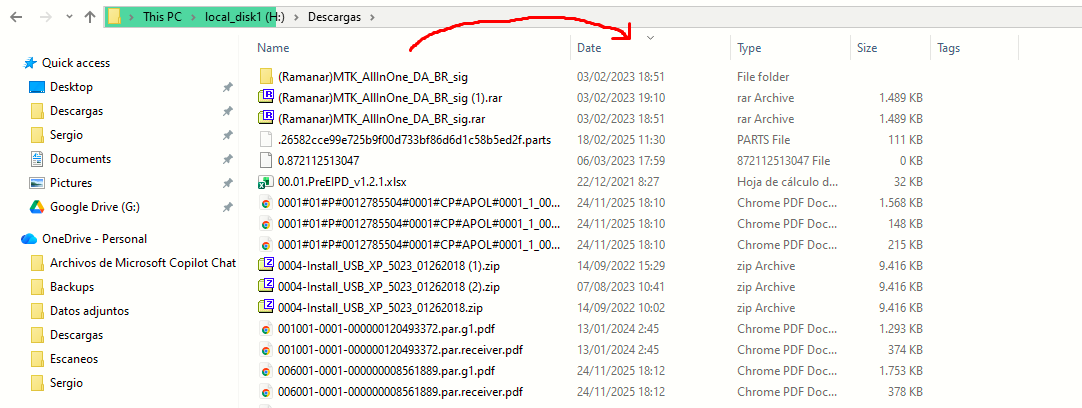
You want to make the sorting process faster (as it somehow was before) on a folder that contains a huge amount of folder and files.
Solution
We have to fix the folder optimization to treat this H:\Descargas folder in the example as a standard folder rather than a media gallery.
|
|
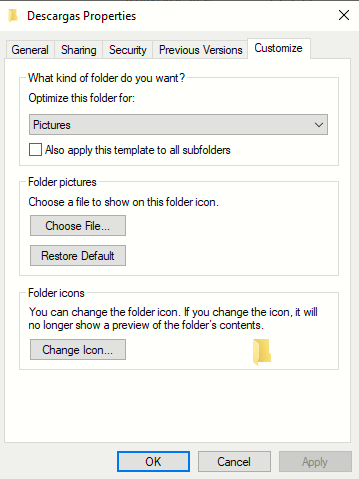
Right-click the folder, Properties > Customize
Here's the problem. The folder is optimized for Pictures as seen on the dropdown.
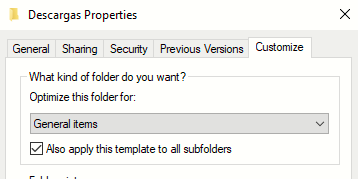
Change that to General items, and the crucial step is to check the box Also apply this template to all subfolders
When this is completed, the folder sorting will work normally again.
|
Discussion
The culprit in this case is a Windows feature called Automatic Folder Type Discovery (sometimes called Folder Sniffing), combined with how Windows handles file metadata. By default, when creating a new folder or adding files to an unassigned folder, Windows looks at the contents to try and "help". If it notices a large percentage of images, it automatically applies the "Pictures" template. If it sees video files, it applies the "Videos" template.
When a folder is optimized for "General items," File Explorer only looks up basic information stored in the drive's Master File Table (MFT). The MFT is basically a hyper-fast index. Reading the File Name, File Size, and Date Modified from the MFT is nearly instantaneous, even for thousands of files.
However, when Windows optimizes a folder for "Pictures" or "Videos", it tries to provide media-specific details like date taken, dimensions/resolution, video length/framerate, camera model used... this information is not stored in the fast MFT. To get this data, Windows Explorer has to physically open the header of every single file in that folder, read the metadata, and close it again.
By forcing the folder back to General items, we are essentially telling Windows to stop looking inside the files, just reading the basic index.