
Lab 1.1.2 - Implement Inter-VLAN Routing
Topology
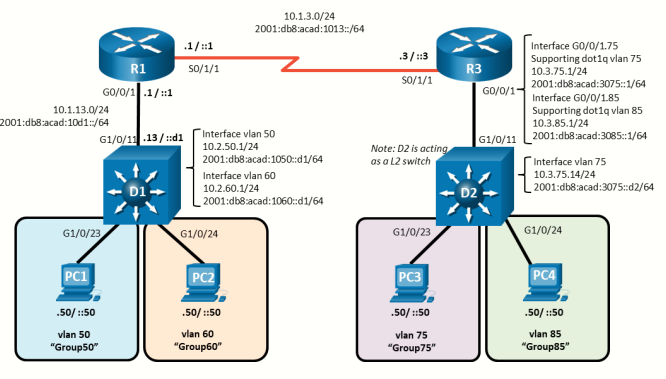
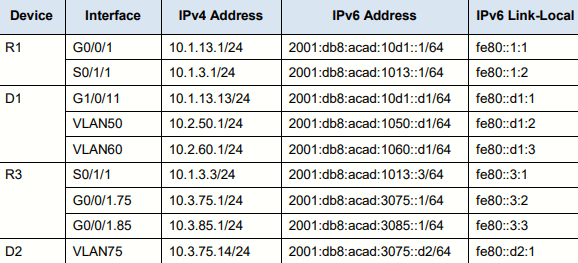
Addressing Table
Objectives
Part 1: Build the Network and Configure Basic Device Settings
Part 2: Configure and Verify Inter-VLAN Routing on a Layer 3 Switch
Part 3: Configure and Verify Router-based Inter-VLAN Routing
Part 4: Examine CAM and CEF Details
Background / Scenario
The methods used to move packets and frames from one interface to the next has changed over the years. In
this lab you will configure Inter-VLAN Routing in its various forms and then examine the different tables used
in making forwarding decisions.
Note: This lab is an exercise in configuring and verifying various methods of Inter-VLAN routing and does not
reflect networking best practices.
Note: The routers and switches used with CCNP hands-on labs are Cisco 4221 and Cisco 3650, both with
Cisco IOS XE Release 16.9.4 (universalk9 image). Other routers and Cisco IOS versions can be used.
Depending on the model and Cisco IOS version, the commands available and the output produced might vary
from what is shown in the labs.
Note: Ensure that the routers and switches have been erased and have no startup configurations.
Required Resources - Sergio Jiménez's Version
- 2 Routers (Cisco 2600 and Cisco 2821)
- 2 Switches (Cisco 3560)
- 2 PCs
- Console cables
- Ethernet and serial cables as shown in the topology
Instructions
Part 1: Build the Network and Configure Basic Device Settings
In Part 1, I will set up the network topology and configure basic settings.
Step 1: Cable the network as shown in the topology.
Attach the devices as shown in the topology diagram, and cable as necessary.
Step 2: Configure basic settings for each device.
Note: The default Switch Database Manager (SDM) template on a Catalyst 3560 does not support dual-stacked operations and requires additional configuration with the sdm prefer dual-ipv4-and-ipv6 routing command to support IPv6 routes.
- Console into each device, enter global config mode, and apply the basic settings using the following startup configurations:
Router R1 (Cisco 2600)
Router R3 (Cisco 2821)Router(config)#no ip domain lookup Router(config)#hostname R1 R1(config)#line con 0 R1(config-line)#exec-timeout 0 0 R1(config-line)#logging synchronous R1(config-line)#exit R1(config)#banner motd # This is R1, Inter-VLAN Routing Lab #
Switch D1Router(config)#no ip domain lookup Router(config)#hostname R3 R3(config)#line con 0 R3(config-line)#exec-timeout 0 0 R3(config-line)#logging synchronous R3(config-line)#exit R3(config)#banner motd # This is R3, Inter-VLAN Routing Lab #
Switch(config)#no ip domain lookup
Switch(config)#hostname D1
D1(config)#line con 0
D1(config-line)#exec-timeout 0 0
D1(config-line)#logging synchronous
D1(config-line)#exit
D1(config)#banner motd # This is D1, Inter-VLAN Routing Lab #
D1(config)#int range f0/1-8,g0/1
D1(config-if-range)#sh
D1(config)#sdm prefer dual-ipv4-and-ipv6 routing
D1(config)#reload
Switch D2
Switch(config)#no ip domain lookup Switch(config)#hostname D2 D2(config)#line con 0 D2(config-line)#exec-timeout 0 0 D2(config-line)#logging synchronous D2(config-line)#exit D2(config)#banner motd # This is D2, Inter-VLAN Routing Lab # D2(config)#int range f0/1-8,g0/1 D2(config-if-range)#sh D2(config)#sdm prefer dual-ipv4-and-ipv6 routing D2(config)#reload - Set the clock on each device to CEST time (Madrid)
clock summer-time CEST recurring last Sunday March 02:00 last Sunday October 02:00 clock set 01:06:00 7 June 2026 - Save the config
Part 2: Configure and Verify Inter-VLAN Routing on a Layer 3 Switch
In Part 2, you will configure and verify inter-VLAN Routing on a Layer 3 switch. For this part, you will focus on
the configuration of switch D1 and router R1.
Step 1: On D1, configure Inter-VLAN Routing
- Configure D1 to support IP routing and IPv6 unicast routing.
D1(config)#ipv6 unicast-routing D1(config)#vlan 50 - Create the VLANs and name them as specified in the topology.
D1(config)# vlan 50 D1(config-vlan)# name Group50 D1(config-vlan)# exit D1(config)# vlan 60 D1(config-vlan)# name Group60 D1(config-vlan)# exit - Assign the F0/7 to VLAN 50 and F0/8 to VLAN 60.
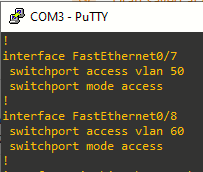
- Create the Switched Virtual Interfaces (SVI) that will support VLAN 50 and VLAN 60
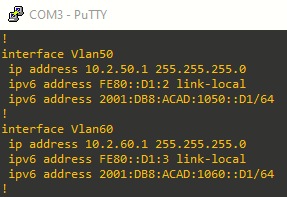
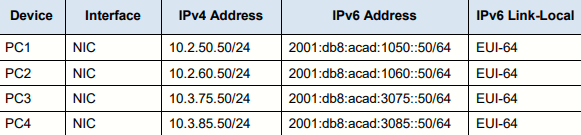
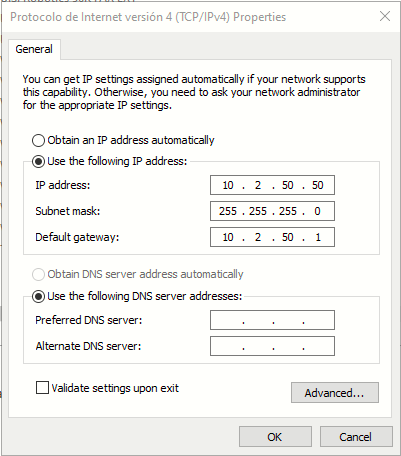
- Configure PC1 with the addresses specified in the Addressing Table. Further assign default gateways of 10.2.50.1 and 2001:db8:acad:1050::d1.
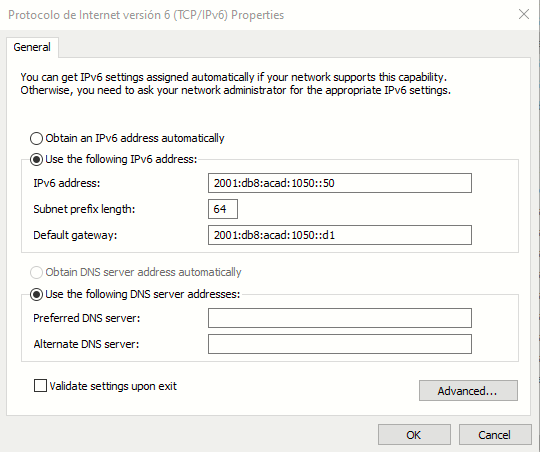
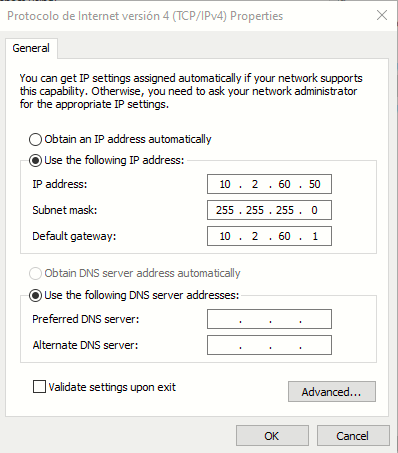
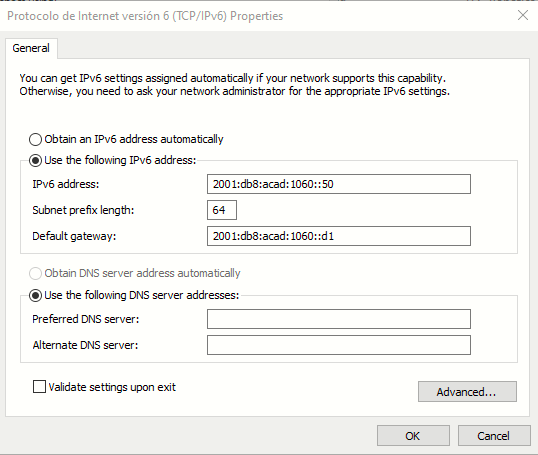
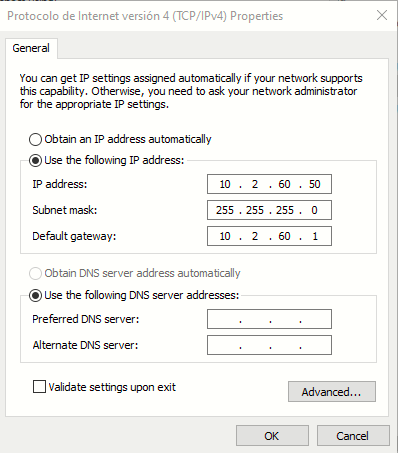
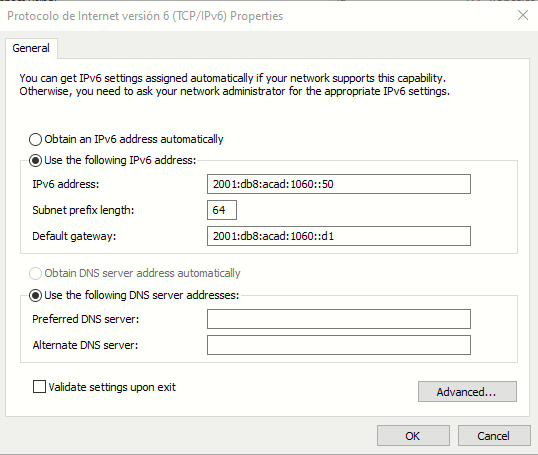
- Configure PC2 with the addresses specified in the Addressing Table. Further assign default gateways of 10.2.60.1 and 2001:db8:acad:1060::d1.
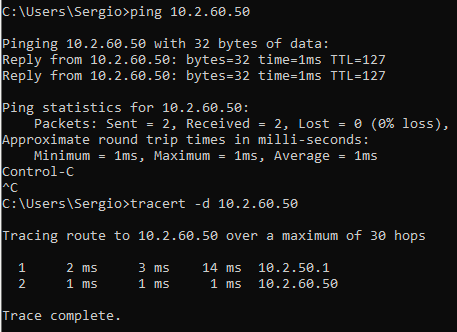
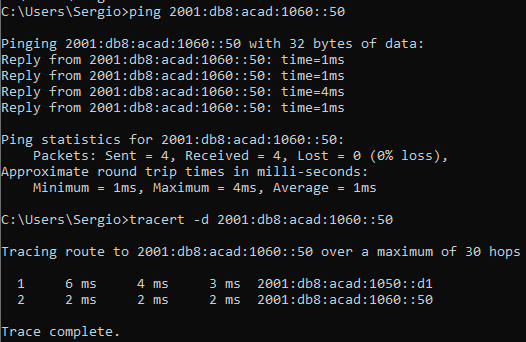
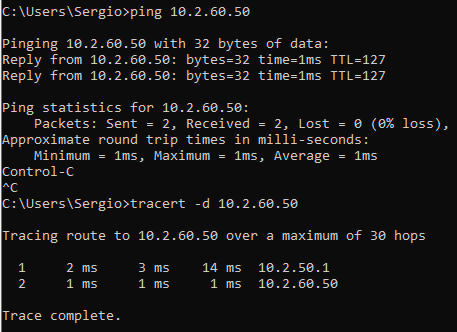
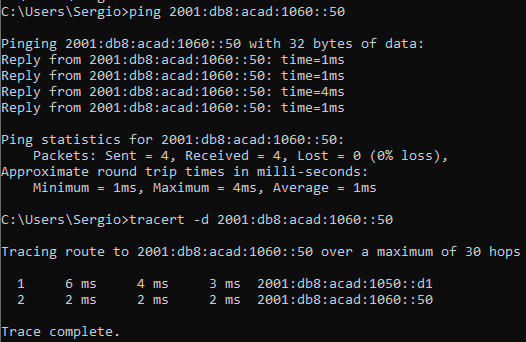
- From PC1, ping PC2’s IPv4 and IPv6 address. Success indicates that D1 is performing Inter-VLAN Routing.
New-NetFirewallRule -DisplayName "Allow Inter-VLAN ICMPv6" -Protocol ICMPv6 -Action AllowNote: This firewall rule must be added on both PC1 and PC2, otherwise ICMPv6 will not work
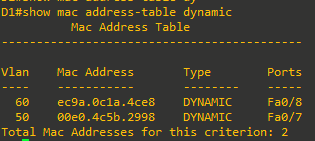
- Examine the MAC address table on D1 with the command show mac address-table dynamic. You should see PC1 and PC2’s mac addresses listed with the ports they are connected to
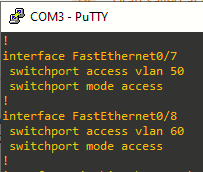
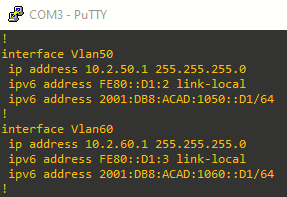
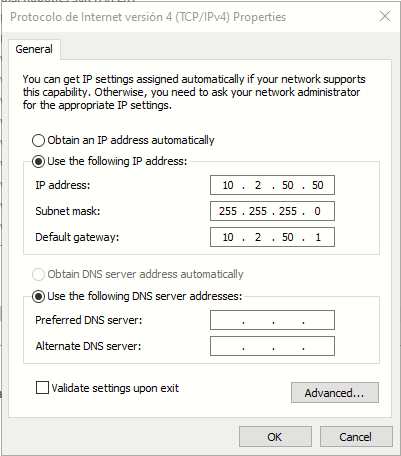
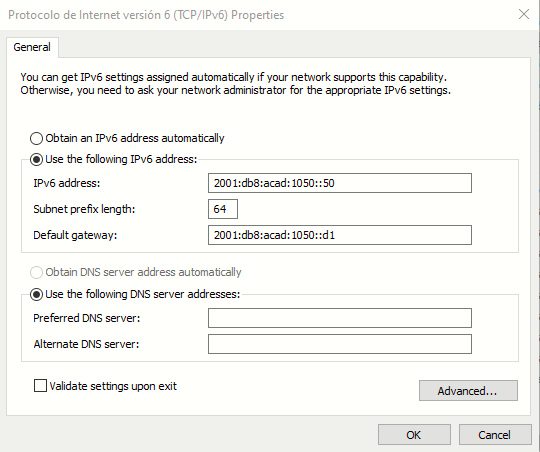
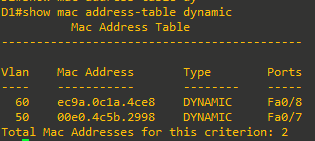
Step 2: On D1, configure a routed port and default routes towards R1
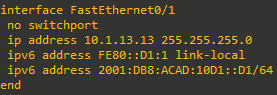
- Configure interface F0/1 as a routed port with addressing as specified in the topology diagram.
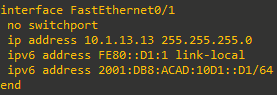
- Verify that interface G1/0/11 is no longer associated with the VLAN database by issuing the command
show vlan brief | i Fa0/1. There should be no output.

- Configure static default routes for IPv4 and IPv6 that point towards the interface address at R1



Step 3: On R1, configure interface addressing and static routing.
- Configure R1 to support IPv6 unicast routing

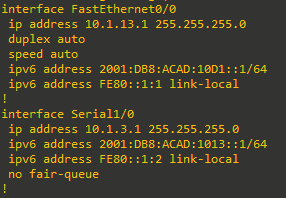
- Configure the interfaces on R1 with the addresses specified in the Addressing Table.
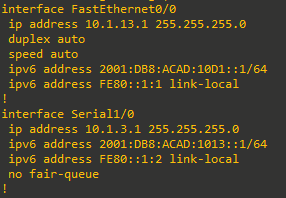
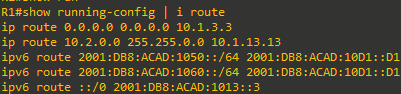
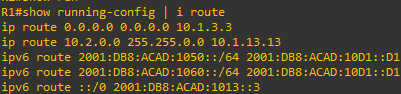
- Configure routing on R1. Configure static routes to the networks supported by D1 and a default route for everything else point at R3
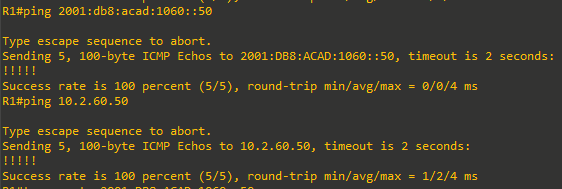
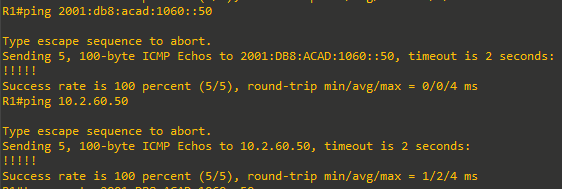
- From R1, ping PC2 with IPv4 and IPv6. All pings should be successful.

Part 3: Configure and Verify Router-based Inter-VLAN Routing
Step 1: Configure D2 to support the required VLANs
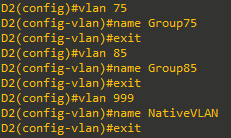
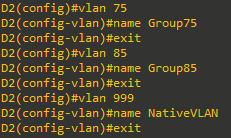
- Create the VLANs and name them as specified in the topology. In addition, create vlan 999 and name it NativeVLAN.
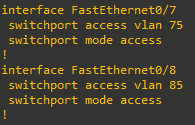
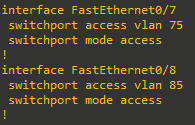
- Assign the F0/7 to VLAN 75 and F0/8 to VLAN 85
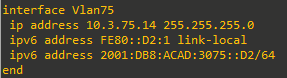
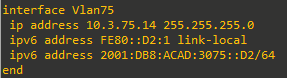
- Create a Switched Virtual Interface that will operate within VLAN 75.
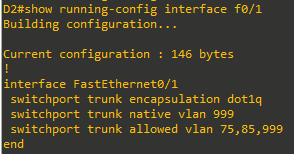
- Create an IEEE 802.1Q-based trunk to R3. As a part of the configuration of the trunk, set the native VLAN
to VLAN 999 and filter the VLANs allowed on the trunk down to only those that are configured.
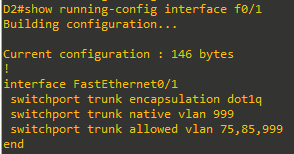
Step 2: Configure R3 to support Inter-VLAN Routing
- Configure R3 to support IPv6 unicast routing.
R3(config)#ipv6 unicast-routing - Configure the subinterfaces needed on R3 interface G0/0 to support the configured VLANs. Ensure an interface is created for the native VLAN 999.
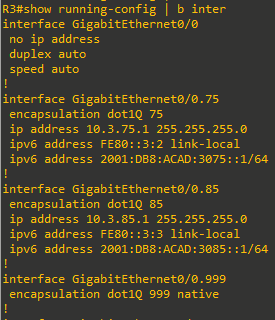
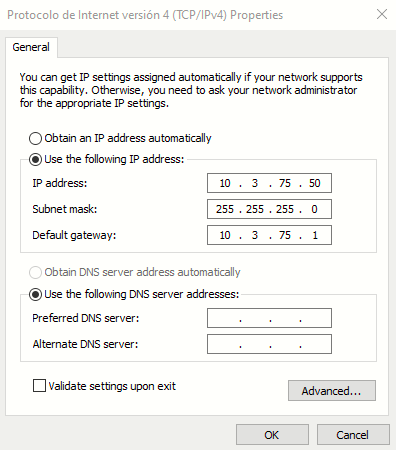
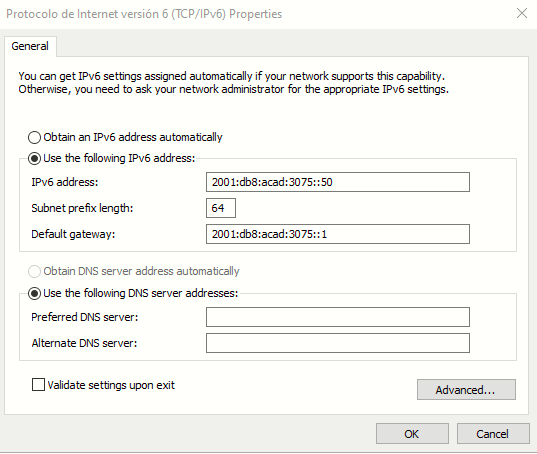
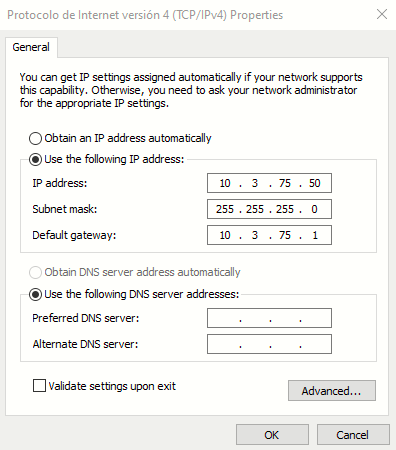
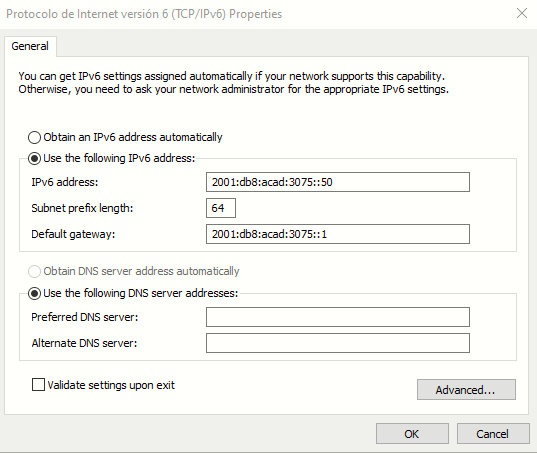
- Configure PC3 with the addresses specified in the Addressing Table. Further assign default gateways of 10.3.75.1 and 2001:db8:acad:3075::1.
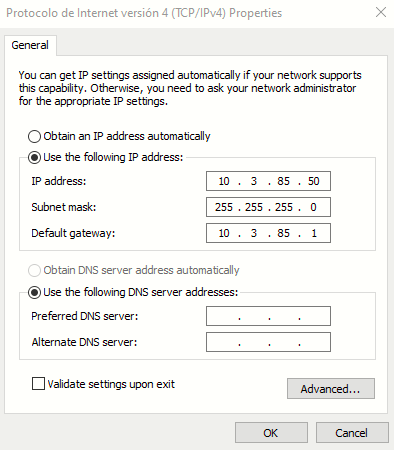
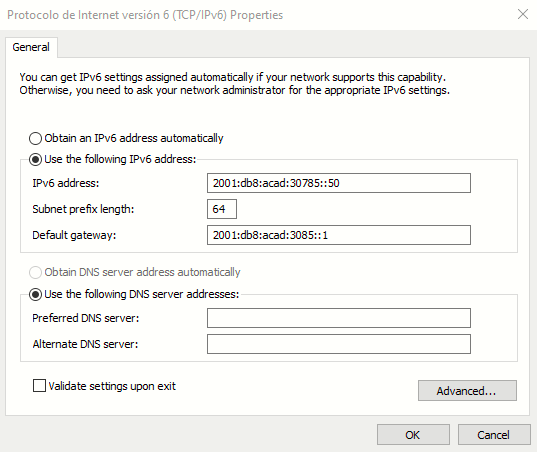
- Configure PC4 with the addresses specified in the Addressing Table. Further assign default gateways of 10.3.85.1 and 2001:db8:acad:3085::1.
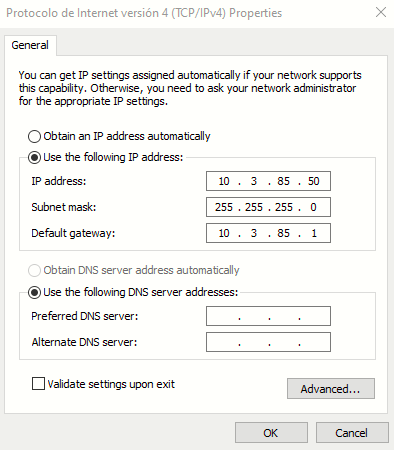
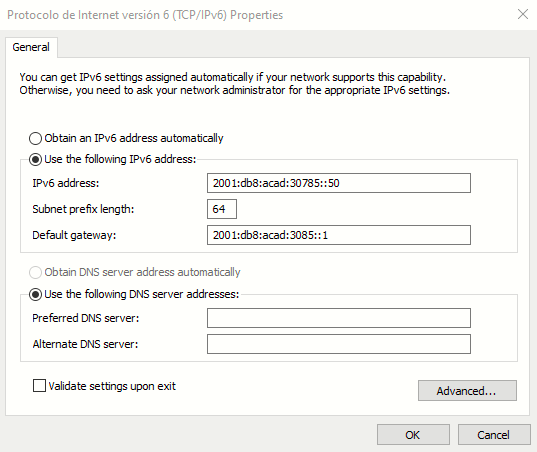
- From PC3, ping PC4’s IPv4 and IPv6 address. Success indicates that R3 is performing Inter-VLAN Routing
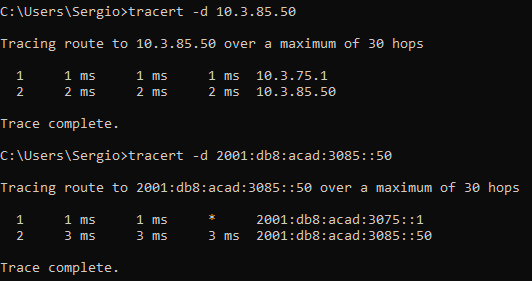
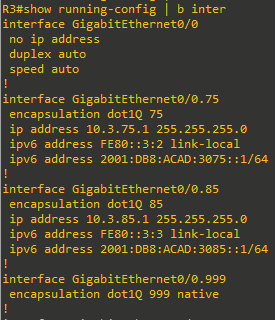
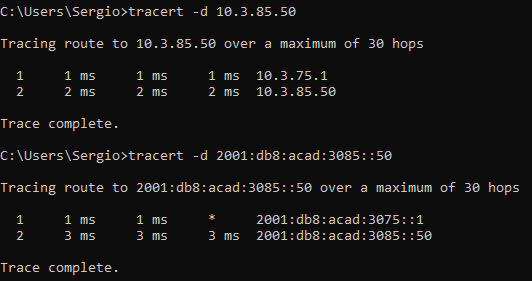
Step 3: Configure static routing to enable end-to-end reachability.
- On R3, configure interface S0/1/0 with the addresses specified in the Addressing Table.
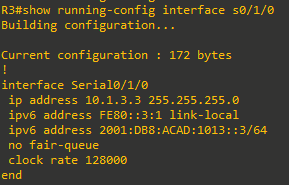
NOTE: Set clock rate to 128000, maximum supported by C2621 NM-4A/4 on the other end. - On R3, configure a static default route for IPv4 and IPv6 that points to R1’s S0/1/1 interface addresses.

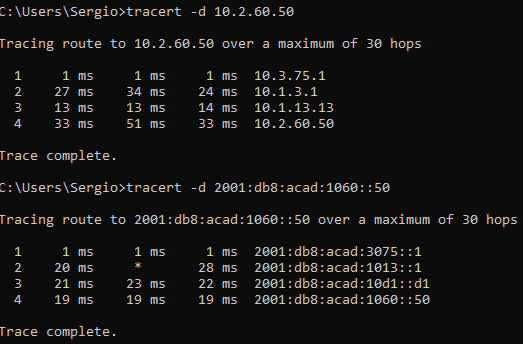
- On PC3, issue a ping to PC2. The ping should be successful. This indicates the routing solution is working in both directions.
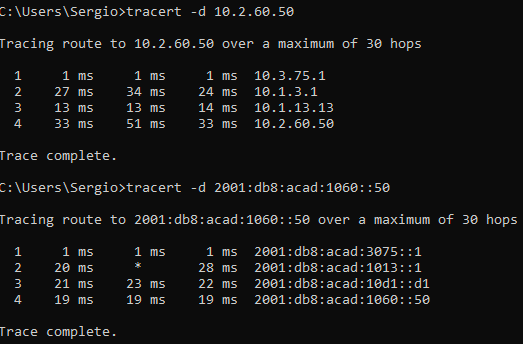

Part 4: Configure and Verify Router-based Inter-VLAN Routing
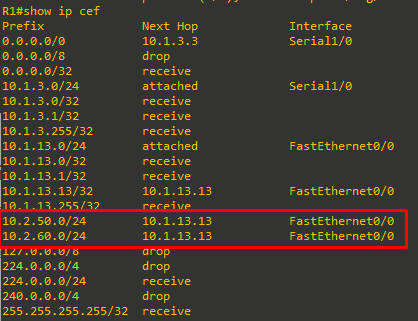
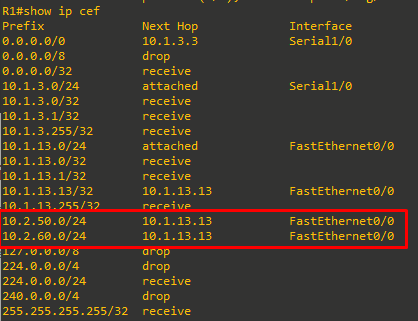
In Part 4, you will examine CEF details on the devices you have configured. The objective of Cisco Express Forwarding is to speed up the process of moving data from one interface to another. To do this, as much data as possible is precompiled into two tables, the Forwarding Information Base (FIB) and the Adjacency Table. These are basically shortcuts that identify what interface a packet should be sent out of and how it should be framed.
- Issue the command show ip cef to see the compiled CEF table, which tells the device what to do with a frame or packet based on its destination address. This table gives the device a quick answer and keeps the CPU from getting directly involved. For example, packets destined to the 10.2.50.0/24 and 10.2.60.0/24 networks are quickly resolved to the next-hop address of 10.1.13.13 exiting interface F0/0.
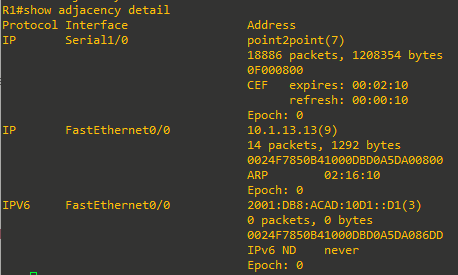
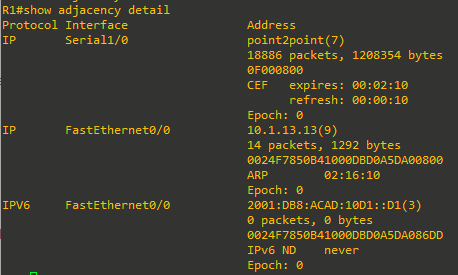
- Issue the command show adjacency, which shows you the address neighbors on each interface.

- Expand this a bit and issue the command show adjacency detail, and you will see that the router has precompiled the Layer 2 headers and other details to allow it to package information quickly.

Device Configs - Final
Router R1 - Cisco 2621
R1#show run
Building configuration...

Current configuration : 1518 bytes
!
version 12.4
service timestamps debug datetime msec
service timestamps log datetime localtime
no service password-encryption
!
hostname R1
!
boot-start-marker
boot-end-marker
!
logging buffered 4096 debugging
!
no aaa new-model
clock summer-time CEST recurring last Sun Mar 2:00 last Sun Oct 2:00
no network-clock-participate slot 1
no network-clock-participate wic 0
ip cef
!
!
!
!
no ip domain lookup
ip auth-proxy max-nodata-conns 3
ip admission max-nodata-conns 3
!
ipv6 unicast-routing
!
!
!
!
!
!
!
!
!
!
!
!
!
!
!
!
!
!
!
!
!
!
!
interface FastEthernet0/0
 ip address 10.1.13.1 255.255.255.0
 duplex auto
 speed auto
 ipv6 address 2001:DB8:ACAD:10D1::1/64
 ipv6 address FE80::1:1 link-local
!
interface Serial1/0
 ip address 10.1.3.1 255.255.255.0
 ipv6 address 2001:DB8:ACAD:1013::1/64
 ipv6 address FE80::1:2 link-local
 no fair-queue
!
interface Serial1/1
 no ip address
 shutdown
!
interface Serial1/2
 no ip address
 shutdown
!
interface Serial1/3
 no ip address
 shutdown
!
ip forward-protocol nd
ip route 0.0.0.0 0.0.0.0 10.1.3.3
ip route 10.2.50.0 255.255.255.0 10.1.13.13
ip route 10.2.60.0 255.255.255.0 10.1.13.13
!
!
ip http server
no ip http secure-server
!
ipv6 route 2001:DB8:ACAD:1050::/64 2001:DB8:ACAD:10D1::D1
ipv6 route 2001:DB8:ACAD:1060::/64 2001:DB8:ACAD:10D1::D1
ipv6 route ::/0 2001:DB8:ACAD:1013::3
!
!
!
control-plane
!
!
!
!
!
!
!
!
!
banner motd ^C This is R1, Inter-VLAN Routing Lab ^C
!
line con 0
 exec-timeout 0 0
 logging synchronous
line aux 0
line vty 0 4
 login
!
!
end

R1#
Router R3 - Cisco 2821
R3#sh run
Building configuration...


Current configuration : 1783 bytes
!
version 12.4
service timestamps debug datetime msec
service timestamps log datetime localtime
no service password-encryption
!
hostname R3
!
boot-start-marker
boot-end-marker
!
! card type command needed for slot/vwic-slot 0/0
logging message-counter syslog
!
no aaa new-model
clock summer-time CEST recurring last Sun Mar 2:00 last Sun Oct 2:00
!
dot11 syslog
ip source-route
!
!
ip cef
!
!
no ip domain lookup
ipv6 unicast-routing
ipv6 cef
!
multilink bundle-name authenticated
!
!
!
!
!
!
!
!
!
!
!
!
!
!
!
!
!
!
!
!
!
!
!
voice-card 0
!
!
!
!
!
archive
 log config
  hidekeys
!
!
!
!
!
!
!
!
!
interface GigabitEthernet0/0
 no ip address
 duplex auto
 speed auto
!
interface GigabitEthernet0/0.75
 encapsulation dot1Q 75
 ip address 10.3.75.1 255.255.255.0
 ipv6 address FE80::3:2 link-local
 ipv6 address 2001:DB8:ACAD:3075::1/64
!
interface GigabitEthernet0/0.85
 encapsulation dot1Q 85
 ip address 10.3.85.1 255.255.255.0
 ipv6 address FE80::3:3 link-local
 ipv6 address 2001:DB8:ACAD:3085::1/64
!
interface GigabitEthernet0/0.999
 encapsulation dot1Q 999 native
!
interface GigabitEthernet0/1
 no ip address
 shutdown
 duplex auto
 speed auto
!
interface Serial0/1/0
 ip address 10.1.3.3 255.255.255.0
 ipv6 address FE80::3:1 link-local
 ipv6 address 2001:DB8:ACAD:1013::3/64
 no fair-queue
 clock rate 128000
!
ip forward-protocol nd
ip route 0.0.0.0 0.0.0.0 10.1.3.1
no ip http server
no ip http secure-server
!
!
!
ipv6 route ::/0 2001:DB8:ACAD:1013::1
!
!
!
!
!
!
control-plane
!
!
!
voice-port 0/2/0
!
voice-port 0/2/1
!
voice-port 0/3/0
!
voice-port 0/3/1
!
!
!
!
!
!
!
!
gatekeeper
 shutdown
!
banner motd ^C This is R1, Inter-VLAN Routing Lab ^C
!
line con 0
 exec-timeout 0 0
 logging synchronous
line aux 0
line vty 0 4
 login
!
scheduler allocate 20000 1000
end

R3#
Switch D1 - Cisco 3650
D1#sh run
Building configuration...

Current configuration : 3224 bytes
!
version 15.0
no service pad
service timestamps debug datetime msec
service timestamps log datetime localtime
no service password-encryption
!
hostname D1
!
boot-start-marker
boot-end-marker
!
!
!
no aaa new-model
clock summer-time CEST recurring last Sun Mar 2:00 last Sun Oct 2:00
system mtu routing 1500
ip routing
no ip domain-lookup
!
!
!
ipv6 unicast-routing
!
!
crypto pki trustpoint TP-self-signed-4152691456
 enrollment selfsigned
 subject-name cn=IOS-Self-Signed-Certificate-4152691456
 revocation-check none
 rsakeypair TP-self-signed-4152691456
!
!
crypto pki certificate chain TP-self-signed-4152691456
 certificate self-signed 01
  3082022B 30820194 A0030201 02020101 300D0609 2A864886 F70D0101 05050030
  31312F30 2D060355 04031326 494F532D 53656C66 2D536967 6E65642D 43657274
  69666963 6174652D 34313532 36393134 3536301E 170D3933 30333031 30303031
  30385A17 0D323030 31303130 30303030 305A3031 312F302D 06035504 03132649
  4F532D53 656C662D 5369676E 65642D43 65727469 66696361 74652D34 31353236
  39313435 3630819F 300D0609 2A864886 F70D0101 01050003 818D0030 81890281
  8100AA7A 4DECFB54 F465AFAE 75973D13 1EAAC30E A11CCF57 155287C7 9D64D7A9
  2CA0B73B 74F61C5F 33F4C38C 809D595E CEFA2356 483C8805 2E1AFBB7 E8B7DBED
  6A20417C 51884A34 5B52A3ED 7BFC3EE2 10C59DA9 152DBC1C 814FFE1A 7F4DE2F9
  C364E12D 87DAE6EB EF274E9E 3B831BB8 3AF13459 FCEF2B75 D3B844E4 FD266FC7
  59110203 010001A3 53305130 0F060355 1D130101 FF040530 030101FF 301F0603
  551D2304 18301680 14D1EC9A 27186A82 372C4162 09B0BA51 DF7B64D1 7F301D06
  03551D0E 04160414 D1EC9A27 186A8237 2C416209 B0BA51DF 7B64D17F 300D0609
  2A864886 F70D0101 05050003 8181009D E7F00485 82A2B820 D89A871F 43CBE0E6
  94790C34 917EBA8F 47FF3146 4BB3F399 278C90B1 E805D381 295A1E97 8DED0E16
  86829D16 2D6D83EA 152567AD 10FB83AA 7885D2F2 9622F233 D1F415D9 BBDFFEE1
  23AA7A17 1E977960 1B65516C BCA4EF7A 802D761E 693B3A05 7B1DD3F4 243A99F7
  665EBBA5 28075711 6C4C0C2D 880537
        quit
!
!
!
!
!
spanning-tree mode pvst
spanning-tree extend system-id
!
vlan internal allocation policy ascending
!
!
!
!
!
!
!
!
!
!
!
!
!
!
!
interface FastEthernet0/1
 no switchport
 ip address 10.1.13.13 255.255.255.0
 ipv6 address FE80::D1:1 link-local
 ipv6 address 2001:DB8:ACAD:10D1::D1/64
!
interface FastEthernet0/2
 shutdown
!
interface FastEthernet0/3
 shutdown
!
interface FastEthernet0/4
 shutdown
!
interface FastEthernet0/5
 shutdown
!
interface FastEthernet0/6
 shutdown
!
interface FastEthernet0/7
 switchport access vlan 50
 switchport mode access
!
interface FastEthernet0/8
 switchport access vlan 60
 switchport mode access
!
interface GigabitEthernet0/1
 shutdown
!
interface Vlan1
 no ip address
!
interface Vlan50
 ip address 10.2.50.1 255.255.255.0
 ipv6 address FE80::D1:2 link-local
 ipv6 address 2001:DB8:ACAD:1050::D1/64
!
interface Vlan60
 ip address 10.2.60.1 255.255.255.0
 ipv6 address FE80::D1:3 link-local
 ipv6 address 2001:DB8:ACAD:1060::D1/64
!
ip http server
ip http secure-server
!
!
ip route 0.0.0.0 0.0.0.0 10.1.13.1
!
ipv6 route ::/0 2001:DB8:ACAD:10D1::1
!
!
!
vstack
banner motd ^C This is D1, Inter-VLAN Routing Lab ^C
!
line con 0
 exec-timeout 0 0
 logging synchronous
line vty 0 4
 login
line vty 5 15
 login
!
end

D1#
Switch D2 - Cisco 3560
D2#show run
Building configuration...

Current configuration : 3132 bytes
!
! Last configuration change at 02:25:34 CET Mon Mar 1 1993
!
version 15.0
no service pad
service timestamps debug datetime msec
service timestamps log datetime localtime
no service password-encryption
!
hostname D2
!
boot-start-marker
boot-end-marker
!
!
!
no aaa new-model
clock timezone CET 1 0
clock summer-time CEST recurring last Sun Mar 2:00 last Sun Oct 2:00
system mtu routing 1500
no ip domain-lookup
!
!
!
!
!
crypto pki trustpoint TP-self-signed-1832650624
 enrollment selfsigned
 subject-name cn=IOS-Self-Signed-Certificate-1832650624
 revocation-check none
 rsakeypair TP-self-signed-1832650624
!
!
crypto pki certificate chain TP-self-signed-1832650624
 certificate self-signed 01
  3082022B 30820194 A0030201 02020101 300D0609 2A864886 F70D0101 05050030
  31312F30 2D060355 04031326 494F532D 53656C66 2D536967 6E65642D 43657274
  69666963 6174652D 31383332 36353036 3234301E 170D3933 30333031 30303031
  30385A17 0D323030 31303130 30303030 305A3031 312F302D 06035504 03132649
  4F532D53 656C662D 5369676E 65642D43 65727469 66696361 74652D31 38333236
  35303632 3430819F 300D0609 2A864886 F70D0101 01050003 818D0030 81890281
  8100C590 FFBCFDF7 3D2F5E99 20CDD94E F0A7F09E 35DDAB4B F1B33003 643DBB7A
  013156A5 53526690 4FB35A96 E9966435 A59DC5A5 F26E3E64 6723DC8D 4A3F31CD
  9419465A E9508195 AA2C1FDA 43E89399 6063C5D0 F7F06ECD E693BF3D 4E2CE9C7
  BB1B86D9 2BD4B287 FD4883BE FB88AC7F FB06AAE3 B93ED049 C22DD221 95B76272
  B0670203 010001A3 53305130 0F060355 1D130101 FF040530 030101FF 301F0603
  551D2304 18301680 140D39AA CB49531D 08B2D817 588455F3 1FF79169 4A301D06
  03551D0E 04160414 0D39AACB 49531D08 B2D81758 8455F31F F791694A 300D0609
  2A864886 F70D0101 05050003 8181001A 3EF7BA06 B7275485 4420DD04 08C31B01
  A4919F12 BF215519 1EFA4C5F 3DFA0B6C B035B3BE 5BBA5F41 8B5B47C3 64329BDD
  B9063C4F D87F44C4 F11E4621 BB9B3CF6 80DAE63F 7A44F688 87E9273E FC195E21
  B5549F85 26175DB7 5D4CF32E 84454459 0B6A8DAA D5D3E6E2 4EE7F57E 183A7E82
  595BD6BE AA9CA294 DA9833FE 1C7145
        quit
!
!
!
!
!
spanning-tree mode pvst
spanning-tree extend system-id
!
vlan internal allocation policy ascending
!
!
!
!
!
!
!
!
!
!
!
!
!
!
!
interface FastEthernet0/1
 switchport trunk encapsulation dot1q
 switchport trunk native vlan 999
 switchport trunk allowed vlan 75,85,999
 switchport mode trunk
!
interface FastEthernet0/2
 shutdown
!
interface FastEthernet0/3
 shutdown
!
interface FastEthernet0/4
 shutdown
!
interface FastEthernet0/5
 shutdown
!
interface FastEthernet0/6
 shutdown
!
interface FastEthernet0/7
 switchport access vlan 75
 switchport mode access
!
interface FastEthernet0/8
 switchport access vlan 85
 switchport mode access
!
interface GigabitEthernet0/1
 shutdown
!
interface Vlan1
 no ip address
 no ip route-cache
 shutdown
!
interface Vlan75
 ip address 10.3.75.14 255.255.255.0
 no ip route-cache
 ipv6 address FE80::D2:1 link-local
 ipv6 address 2001:DB8:ACAD:3075::D2/64
!
ip http server
ip http secure-server
!
!
!
!
!
!
no vstack
banner motd ^C This is D2, Inter-VLAN Routing Lab ^C
!
line con 0
 exec-timeout 0 0
 logging synchronous
line vty 0 4
 login
line vty 5 15
 login
!
end