
UC500: CUE Reinstall
Step 1: Verify Internal Addressing
What we’re doing: the CUE bootloader must know its own IP, the UC540 internal gateway, and where our PC/TFTP server lives. Cisco’s recovery procedure uses exactly these parameters before boot helper.
On IOS, run:
UC540#show run interface Loopback0
Building configuration...

Current configuration : 155 bytes
!
interface Loopback0
 description $FW_INSIDE$
 ip address 10.1.10.2 255.255.255.252
 ip access-group 101 in
 ip nat inside
 ip virtual-reassembly in
end

UC540#show run interface Integrated-Service-Engine0/0
Building configuration...

Current configuration : 210 bytes
!
interface Integrated-Service-Engine0/0
 ip unnumbered Loopback0
 ip nat inside
 ip virtual-reassembly in
 service-module ip address 10.1.10.1 255.255.255.252
 service-module ip default-gateway 10.1.10.2
end

UC540#
Step 2: Configure the Bootloader
Cisco BootMon Version: 1.0.3
 (Jul 27 2007 - 10:41:10) MPC83XX

Bootmon starts
Bootmon: cold reset.
System now booting.
Bootmon: reading primary bootloader image
Bootmon: calling bootloader


Cisco ServiceEngine Bootloader Version: 1.0.3
 (Jul  6 2007 - 10:15:37) MPC83XX

Resetting devices ....Done.
mac address for internal ethernet a4:93:4c:6e:81:de

Please enter '***' to change boot configuration: ***

 ServicesEngine Bootloader Version : 1.0.3

ServicesEngine boot-loader> config
  IP Address [10.1.10.1] >
  Subnet Mask [255.255.255.252] >
  TFTP Server [192.168.10.10] > 192.168.10.11
  Gateway [10.1.10.2] >
  Default Helper-file [cue-installer.uc500.8.6.5] >
  Ethernet Interface [internal] [internal] >
  Default Boot [none|helper|disk] [disk] >
  Default Bootloader [primary|secondary] [primary] >
Erasing Flash...
. done
Erased 1 sectors
Writing to Flash...
64 KBdone
ServicesEngine boot-loader> show config

IP Address:             10.1.10.1
Subnet Mask:            255.255.255.252
TFTP Server:            192.168.10.11
Gateway:                10.1.10.2
Default Helper-file:    cue-installer.uc500.8.6.5
Ethernet Interface:     internal
Default Boot:           disk
Default Bootloader:     primary
Bootloader Version:     1.0.3
ServicesEngine boot-loader>
Step 3: Verify Network Reachability
May need to create an ICMP rule on Windows firewall for the following test to work:
ServicesEngine boot-loader> ping 192.168.10.11

Sending 5, 42 byte ICMP Echos to 192.168.10.11:
!!!!!
Success rate is 100% (5/5)
ServicesEngine boot-loader>
Step 4: Boot the Installer
What we’re doing now: CUE will download the small recovery installer from our PC by TFTP. This does not manually copy files to the CF; it loads Cisco’s helper environment, which will then perform the real reinstall. Cisco’s UC500 recovery procedure uses boot helper exactly for this.
ServicesEngine boot-loader> boot helper
bl_boot_helper_cmd tftpboot 0x4000000 cue-installer.uc500.8.6.5
Using internal device
TFTP from server 192.168.10.11; our IP address is 10.1.10.1; sending through gateway 10.1.10.2
Filename 'cue-installer.uc500.8.6.5'.
Load address: 0x4000000
Loading: #################################################################
         #################################################################
         #################################################################
         #################################################################
         #################################################################
         #################################################################
         #################################################################
         #################################################################
         #################################################################
         #################################################################
         #################################################################
         #################################################################
         #################################################################
         #################################################################
         #################################################################
         #################################################################
         #################################################################
         #################################################################
         #################################################################
         #################################################################
         #################################################################
         #################################################################
         #################################################################
         #################################################################
         #################################################################
         #################################################################
         #################################################################
         #################################################################
         #################################################################
         #################################################################
         #################################################################
         #################################################################
         #############
done
Bytes transferred = 10715771 (a3827b hex)
bl_boot_helper_cmd root=/dev/ram rw ramdisk_size=64000 ip=10.1.10.1:192.168.10.11:10.1.10.2:255.255.255.252::eth0:off console=ttyS0,9600 initrd=04000000,4000000 install_r                        oot=ide plat=freddo
## Booting image at 04000000 ...
   Image Name:   Linux-2.6.22-cisco-freddo
   Image Type:   PowerPC Linux Multi-File Image (gzip compressed)
   Data Size:    10715707 Bytes = 10.2 MB
   Load Address: 00000000
   Entry Point:  00000000
   Contents:
   Image 0:  1135397 Bytes =  1.1 MB
   Image 1:  9580295 Bytes =  9.1 MB
   Verifying Checksum ... OK
   Uncompressing Multi-File Image ... OK
   Loading Ramdisk to 036dd000, end 03ffff07 ... OK
Linux version 2.6.22.10-vs2.2.0.5-cisco-freddo (drodrig@fndn-bld-system10) (gcc version 4.2.2) #1 Thu Oct 4 10:16:40 PDT 2012
Zone PFN ranges:
  DMA             0 ->   131072
  Normal     131072 ->   131072
early_node_map[1] active PFN ranges
    0:        0 ->   131072
Built 1 zonelists.  Total pages: 130048
Kernel command line: root=/dev/ram rw ramdisk_size=64000 ip=10.1.10.1:192.168.10.11:10.1.10.2:255.255.255.252::eth0:off console=ttyS0,9600 initrd=04000000,4000000 install                        _root=ide plat=freddo
Platform: ise
IPIC (128 IRQ sources, 8 External IRQs) at fe000700
PID hash table entries: 2048 (order: 11, 8192 bytes)
Dentry cache hash table entries: 65536 (order: 6, 262144 bytes)
Inode-cache hash table entries: 32768 (order: 5, 131072 bytes)
Memory: 506368k available (1756k kernel code, 516k data, 108k init, 0k highmem)
in atrace_init
log_head: h: 0, t: 0, l: 0, w: 0, s: 1047488
Using existing trace log
log_head: h: 0, t: 0, l: 0, w: 0, s: 1047488
Mount-cache hash table entries: 512
NET: Registered protocol family 16
Generic PHY: Registered new driver
SCSI subsystem initialized
NET: Registered protocol family 2
IP route cache hash table entries: 16384 (order: 4, 65536 bytes)
TCP established hash table entries: 65536 (order: 7, 524288 bytes)
TCP bind hash table entries: 65536 (order: 6, 262144 bytes)
TCP: Hash tables configured (established 65536 bind 65536)
TCP reno registered
checking if image is initramfs... it is
Freeing initrd memory: 9355k freed
io scheduler noop registered
io scheduler anticipatory registered
io scheduler deadline registered
io scheduler cfq registered (default)
Cisco ContentEngine Flash Driver Version 0.03
Serial: 8250/16550 driver $Revision: 1.90 $ 4 ports, IRQ sharing disabled
serial8250.0: ttyS0 at MMIO 0xe0004500 (irq = 9) is a 16550A
serial8250.0: ttyS1 at MMIO 0xe0004600 (irq = 10) is a 16550A
RAMDISK driver initialized: 16 RAM disks of 64000K size 1024 blocksize
Gianfar MII Bus: probed
eth0: Gianfar Ethernet Controller Version 1.2, a4:93:4c:6e:81:de
eth0: Running with NAPI enabled
eth0: 256/256 RX/TX BD ring size
eth1: Gianfar Ethernet Controller Version 1.2, a4:93:4c:6e:81:df
eth1: Running with NAPI enabled
eth1: 256/256 RX/TX BD ring size
Uniform Multi-Platform E-IDE driver Revision: 7.00alpha2
ide: Assuming 50MHz system bus speed for PIO modes; override with idebus=xx
hda: probing with STATUS(0x50) instead of ALTSTATUS(0x0a)
hda: UNIGEN FLASH, ATA DISK drive
ide0 at 0xe1000000-0xe1000007,0xe100280d on irq 17
hda: max request size: 128KiB
hda: 4096512 sectors (2097 MB) w/1KiB Cache, CHS=4064/16/63
hda: set_multmode: status=0x51 { DriveReady SeekComplete Error }
hda: set_multmode: error=0x04 { DriveStatusError }
ide: failed opcode was: 0xef
hda: cache flushes supported
 hda: hda1
i2c /dev entries driver
NET: Registered protocol family 26
TCP cubic registered
NET: Registered protocol family 1
NET: Registered protocol family 17
Freeing unused kernel memory: 108k init
INIT: version 2.86 booting
mounting proc fs ...
mounting sys fs ...
mounting /dev/shm tmpfs ...
kernel.sem = 1900 4000 32 100
vm.overcommit_memory = 1
vm.min_free_kbytes = 8192


                Welcome to Cisco Service Engine

Sun Jan  1 00:00:00 UTC 2006

********** rc.aesop ****************
Populating resource values from /etc/freddo_rsrc_file
Populating resource values from /etc/default_rsrc_file
Populating resource values from /etc/products/cue/default_rsrc_file
Populating resource values from /etc/products/cue/freddo_rsrc_file
==> Management interface is eth0
==> Management interface is eth0
IOS IP Address Registration complete.

Kernel IP routing table
Destination     Gateway         Genmask         Flags   MSS Window  irtt Iface
10.1.10.0       *               255.255.255.252 U         0 0          0 eth0
default         10.1.10.2       0.0.0.0         UG        0 0          0 eth0
RDBL: Module 9 Type 3 Loc 0 Offset 8
Size of buff is: 65536
65536 bytes written
Valid License file not found: Using default values
INIT: Entering runlevel: 2
********** rc.post_install ****************

Changing owners and file permissions.
INIT: Switching to runlevel: 4
INIT: Sending processes the TERM signal
STARTED: dwnldr_startup.sh
        Welcome to Cisco Systems Service Engine Helper Software
Please select from the following
1       Install software
2       Reload module
3       Disk cleanup
(Type '?' at any time for help)
Step 5 - Install CUE 8.6.5 from the FTP server
For this step we need FTP instead of TFTP. With Filezilla Server working on the same PC, we serve the correct path (same as TFTP), user cue with no password set:
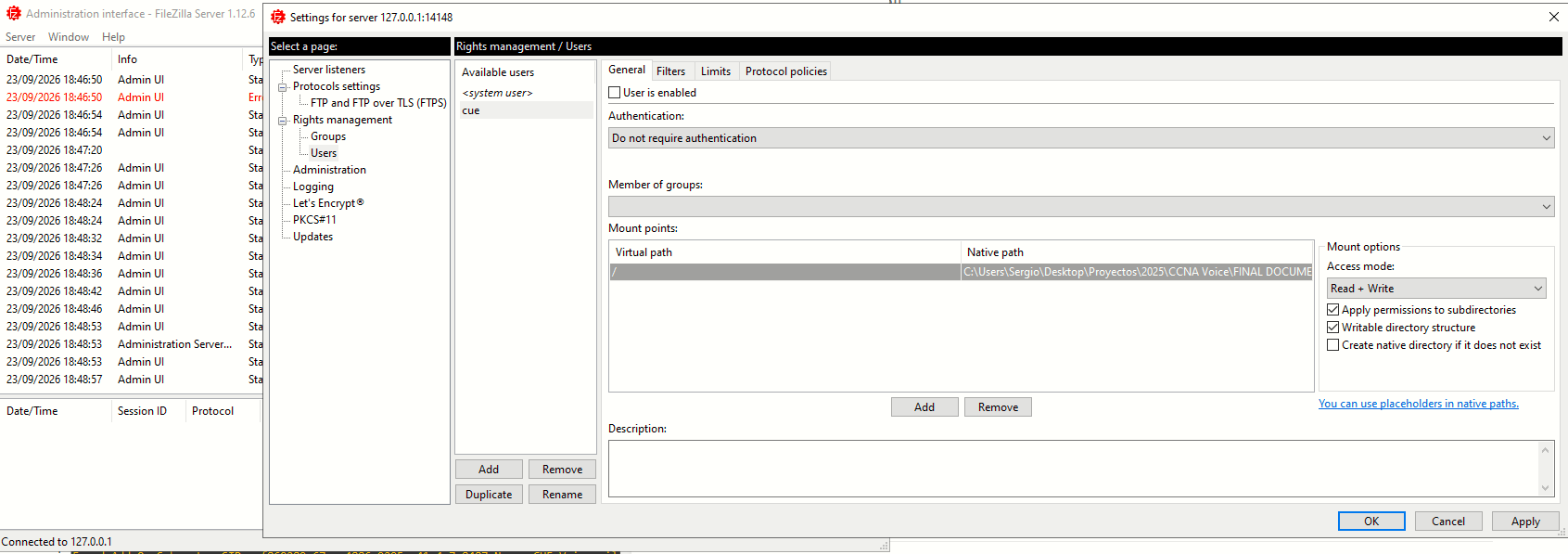
Back on the UC500, at the previous prompt, we enter 1. The installer will ask for the package name and then for the FTP server URL, ans username/password. The helper will first download the small main manifest and then automatically retrieves the required packages, including:
cue-apps.uc500.8.6.5.pkg
cue-vm-k9.uc500.8.6.5.pkg
cue-vm-langpack.uc500.8.6.5.pkg
Choice: 1
Package name: cue-main.uc500.8.6.5.pkg
Server url: ftp://192.168.10.11
Username: cue
Password:
Downloading ftp cue-main.uc500.8.6.5.pkg
Bytes downloaded : 3470
Validating package signature ... done
- Parsing package manifest files... complete.
No installed manifests found.
- Checking Package dependencies... complete.
Downloading ftp cue-apps.uc500.8.6.5.pkg
Bytes downloaded : 21733
Validating package signature ... done
Found Add-On Subsystem SID: 8191416e-d347-4ba7-8eb2-747138fd87de Name: PhoneConnect Version: 7.0.0
Found Add-On Subsystem SID: 1493990e-ec6f-4281-bfb7-1dc859153d37 Name: Monitor Agent Version: 7.0.0
Found Add-On Subsystem SID: 12161eb0-e646-4d3e-b174-d2fcac54d3b0 Name: Madrox refer install scripts Version: 8.6.5
Found Add-On Subsystem SID: 49bc5843-5c46-4bfe-83fa-e3634565b03d Name: Madrox Multi-app Support Version: 8.6.5
Found Add-On Subsystem SID: e2497725-368d-48b5-a7d5-7f87d889a608 Name: TimeCardView Version: 8.6.5
- Parsing package manifest files... complete.
- Checking Package dependencies... complete.
Downloading ftp cue-vm-k9.uc500.8.6.5.pkg
Bytes downloaded : 262120
Validating package signature ... done
- Parsing package manifest files... complete.
- Checking Package dependencies... complete.
Downloading ftp cue-vm-langpack.uc500.8.6.5.pkg
Bytes downloaded : 1386976
Validating package signature ... done
Found Add-On Subsystem SID: e2e81cc6-39b5-47e1-9f83-b83c897fc50c Name: CUE Voicemail Language Support Version: 8.6.5
Found Add-On Subsystem SID: c28339fa-f7ae-4732-85ab-fa6c68b5de0c Name: CUE Voicemail Italian Version: 8.6.5
Found Add-On Subsystem SID: 49f09114-e0b0-4721-8b85-04be2064920c Name: CUE Voicemail European Spanish Version: 8.6.5
Found Add-On Subsystem SID: 27e5e2ab-1622-4c02-8a0a-cfad0d932148 Name: CUE Voicemail US English Version: 8.6.5
Found Add-On Subsystem SID: cf860289-67ac-4886-9295-a41e4c7a8487 Name: CUE Voicemail European French Version: 8.6.5
Found Add-On Subsystem SID: f0a41398-3917-4d49-b5ab-c2b39a80c121 Name: CUE Voicemail Latin American Spanish Version: 8.6.5
Found Add-On Subsystem SID: c4ca62e2-daff-40dc-b94e-bf20094bd700 Name: CUE Voicemail Mexican Spanish Version: 8.6.5
Found Add-On Subsystem SID: 88a84158-c090-4203-bde8-0d62eda200c7 Name: CUE Voicemail Arabic Version: 8.6.5
Found Add-On Subsystem SID: ab049397-cfad-4952-852a-8dfa69780cb8 Name: CUE Voicemail Dutch Version: 8.6.5
Found Add-On Subsystem SID: d60c3add-0c6b-4a99-8e5c-31019fe7939e Name: CUE Voicemail Swedish Version: 8.6.5
Found Add-On Subsystem SID: e1ed9919-31da-4c38-b029-9bbd8231d523 Name: CUE Voicemail Norwegian Version: 8.6.5
Found Add-On Subsystem SID: 683674a5-e6ef-4c97-8e05-efbba1e6fe47 Name: CUE Voicemail Canadian French Version: 8.6.5
Found Add-On Subsystem SID: c3d2409a-ae9a-47d3-baf0-3c1a3ff85d82 Name: CUE Voicemail Portuguese Version: 8.6.5
Found Add-On Subsystem SID: b18bcd35-5a37-46af-b230-0d9c27713dec Name: CUE Voicemail Turkish Version: 8.6.5
Found Add-On Subsystem SID: 3e72a8ae-45d2-4790-b0b5-9301600e886e Name: CUE Voicemail Hungarian Version: 8.6.5
Found Add-On Subsystem SID: fa803d25-9c89-4171-a14c-ec12d6ed6b8c Name: CUE Voicemail UK English Version: 8.6.5
Found Add-On Subsystem SID: 09aa3e26-6efc-4bc4-a821-60d0fb238c74 Name: CUE Voicemail Hebrew Version: 8.6.5
Found Add-On Subsystem SID: 88f73a6c-884d-4838-b162-1b544dd6583f Name: CUE Voicemail Danish Version: 8.6.5
Found Add-On Subsystem SID: a2ba4f96-3452-40c3-83ad-c442cb6bf42f Name: CUE Voicemail Brazilian Portuguese Version: 8.6.5
Found Add-On Subsystem SID: 3f968fd0-6598-48e2-be1c-4af6c2e02e02 Name: CUE Voicemail German Version: 8.6.5
Found Add-On Subsystem SID: e67d778d-53bd-4a2e-8dec-2c640f00bec0 Name: CUE Voicemail Traditional Chinese (Taiwan) Version: 8.6.5
Found Add-On Subsystem SID: ea206a88-e44f-488b-a660-114a3b179065 Name: CUE Voicemail Korean Version: 8.6.5
Found Add-On Subsystem SID: 372fa3fd-1efb-4353-9005-45876646a351 Name: CUE Voicemail Simplified Chinese (PRC) Version: 8.6.5
Found Add-On Subsystem SID: 6cdfed34-6d45-48fd-afe0-717e589c9aa9 Name: CUE Voicemail Japanese Version: 8.6.5
Found Add-On Subsystem SID: fa2e95d4-6be5-422d-a934-89a8e6d33e95 Name: CUE Voicemail Hong Kong Chinese Version: 8.6.5
Found Add-On Subsystem SID: 24cb0b00-ed1c-4463-bf6f-261b15dfb3e7 Name: CUE Voicemail Russian Version: 8.6.5
- Parsing package manifest files... complete.
- Checking Package dependencies... complete.
Validating package signature ... done
- Parsing package manifest files... complete.
- Checking Package dependencies... complete.
- Checking Manifest dependencies for subsystems in the install candidate list...
complete
WARNING:: Software installation will clear disk contents
Continue [n]? y
cleaning fs
prepfs.sh: freddo reiser /mnt clean
umount: /dev/hda1: not mounted
check_partition_count: 1
deleting prev partitions
umount: /dev/hda1: not mounted
The number of cylinders for this disk is set to 2586.
There is nothing wrong with that, but this is larger than 1024,
and could in certain setups cause problems with:
1) software that runs at boot time (e.g., old versions of LILO)
2) booting and partitioning software from other OSs
(e.g., DOS FDISK, OS/2 FDISK)
Command (m for help): Selected partition 1
Command (m for help): 1: unknown command
Command action
a toggle a bootable flag
b edit bsd disklabel
c toggle the dos compatibility flag
d delete a partition
l list known partition types
m print this menu
n add a new partition
o create a new empty DOS partition table
p print the partition table
q quit without saving changes
s create a new empty Sun disklabel
t change a partition's system id
u change display/entry units
v verify the partition table
w write table to disk and exit
x extra functionality (experts only)
Command (m for help): Command action
e extended
p primary partition (1-4)
Partition number (1-4): First cylinder (1-2586, default 1): Using default value 1
Last cylinder or +size or +sizeM or +sizeK (1-2586, default 2586):
Command (m for help): Command action
e extended
p primary partition (1-4)
Partition number (1-4): First cylinder (7-2586, default 7): Using default value 7
Last cylinder or +size or +sizeM or +sizeK (7-2586, default 2586): Using default value 2586
Command (m for help): The partition table has been altered!
Calling ioctl() to re-read partition table.
Syncing disks.
mkreiserfs 3.6.19 (2003 www.namesys.com)
Starting payload download
File : cue-vm-full-k9.uc500.8.6.5.prt1 Bytes : 142002656
File : multiapp.uc500.8.6.5.prt1 Bytes : 1897280224
Validating payloads match registered checksums...
- cue-vm-full-k9.uc500.8.6.5.prt1 ....................................................................................................................................... .verified
- timecardview.uc500.8.6.5.prt1 ...verified
- multiapp.uc500.8.6.5.prt1 .verified
Extracting install scripts ...
/bin/sutar: usr/bin/products/cue/lang_ui_script.py: time stamp 2012-10-04 18:49:11 is 213302595 s in the future
/bin/sutar: usr/bin/products/attendanceview/aview_preinstall.py: time stamp 2012-10-04 18:56:03 is 213303007 s in the future
/bin/sutar: usr/bin/products/cue/rm_cue_allapps_manifest.py: time stamp 2012-10-04 18:49:12 is 213302592 s in the future
/bin/sutar: usr/bin/products/madrox/multiapp_ui_script.py: time stamp 2012-10-04 18:49:02 is 213302579 s in the future
/bin/sutar: usr/bin/products/madrox/multiapp_preinstall_script.py: time stamp 2012-10-04 18:49:02 is 213302578 s in the future
Scripts extraction complete.
Remove scripts work order /mnt/dwnld/.script_work_order
Running Script Processor for pre_install
pre_install scripts executed successfully.
Running Script Processor for ui_install
Step 6 - Select CUE voicemail language and optional applications
After the CompactFlash has been prepared, the installer downloads and validates the CUE payloads. It then asks which voicemail language packs you want to install. I entered ES for European Spanish. The installer then presents the optional CUE applications. In our installation these included:
PhoneConnect
Monitor Agent
TimeCardView
By default they are selected. Unless there is a specific reason to remove them, leave them selected and finish with: x. The installer will then download the selected language pack and application payloads and continue automatically.
Maximum 2 language add-ons allowed for this platform.
Please select language(s) to install from the following list:

Language Installation Menu:

 #  Selected   SKU     Language Name (version)
----------------------------------------------------------------------
 1            ITA     CUE Voicemail Italian (8.6.5)
 2            ESP     CUE Voicemail European Spanish (8.6.5)
 3            ENU     CUE Voicemail US English (8.6.5)
 4            FRA     CUE Voicemail European French (8.6.5)
 5            ESO     CUE Voicemail Latin American Spanish (8.6.5)
 6            ESM     CUE Voicemail Mexican Spanish (8.6.5)
 7            ARA     CUE Voicemail Arabic (8.6.5)
 8            NLD     CUE Voicemail Dutch (8.6.5)
 9            SVE     CUE Voicemail Swedish (8.6.5)
10            NOR     CUE Voicemail Norwegian (8.6.5)
11            FRC     CUE Voicemail Canadian French (8.6.5)
12            PTG     CUE Voicemail Portuguese (8.6.5)
13            TUR     CUE Voicemail Turkish (8.6.5)
14            HUN     CUE Voicemail Hungarian (8.6.5)
15            ENG     CUE Voicemail UK English (8.6.5)
16            HBR     CUE Voicemail Hebrew (8.6.5)
17            DAN     CUE Voicemail Danish (8.6.5)
18            PTB     CUE Voicemail Brazilian Portuguese (8.6.5)
19            DEU     CUE Voicemail German (8.6.5)
20            CHT     CUE Voicemail Traditional Chinese (Taiwan) (8.6.5)
21            KOR     CUE Voicemail Korean (8.6.5)
22            CHS     CUE Voicemail Simplified Chinese (PRC) (8.6.5)
23            JPN     CUE Voicemail Japanese (8.6.5)
24            ZHH     CUE Voicemail Hong Kong Chinese (8.6.5)
25            RUS     CUE Voicemail Russian (8.6.5)
----------------------------------------------------------------------

Available commands are:
# - enter the number for the language to select one
r # - remove the language for given #
i # - more information about the language for given #
x - Done with language selection

Enter Command:2

Language Installation Menu:

 #  Selected   SKU     Language Name (version)
----------------------------------------------------------------------
 1            ITA     CUE Voicemail Italian (8.6.5)
 2      *     ESP     CUE Voicemail European Spanish (8.6.5)
 3            ENU     CUE Voicemail US English (8.6.5)
 4            FRA     CUE Voicemail European French (8.6.5)
 5            ESO     CUE Voicemail Latin American Spanish (8.6.5)
 6            ESM     CUE Voicemail Mexican Spanish (8.6.5)
 7            ARA     CUE Voicemail Arabic (8.6.5)
 8            NLD     CUE Voicemail Dutch (8.6.5)
 9            SVE     CUE Voicemail Swedish (8.6.5)
10            NOR     CUE Voicemail Norwegian (8.6.5)
11            FRC     CUE Voicemail Canadian French (8.6.5)
12            PTG     CUE Voicemail Portuguese (8.6.5)
13            TUR     CUE Voicemail Turkish (8.6.5)
14            HUN     CUE Voicemail Hungarian (8.6.5)
15            ENG     CUE Voicemail UK English (8.6.5)
16            HBR     CUE Voicemail Hebrew (8.6.5)
17            DAN     CUE Voicemail Danish (8.6.5)
18            PTB     CUE Voicemail Brazilian Portuguese (8.6.5)
19            DEU     CUE Voicemail German (8.6.5)
20            CHT     CUE Voicemail Traditional Chinese (Taiwan) (8.6.5)
21            KOR     CUE Voicemail Korean (8.6.5)
22            CHS     CUE Voicemail Simplified Chinese (PRC) (8.6.5)
23            JPN     CUE Voicemail Japanese (8.6.5)
24            ZHH     CUE Voicemail Hong Kong Chinese (8.6.5)
25            RUS     CUE Voicemail Russian (8.6.5)
----------------------------------------------------------------------

Available commands are:
# - enter the number for the language to select one
r # - remove the language for given #
i # - more information about the language for given #
x - Done with language selection

Enter Command:x

Please unselect application(s) that you don't want to install.
All the selected application(s) in the following list will be installed by default.

Application Installation Menu:

 #  Selected   SKU     Application Name (version)
----------------------------------------------------------------------
 1      *     ISS     PhoneConnect (7.0.0)
 2      *     HRB     Monitor Agent (7.0.0)
 3      *     TCV     TimeCardView (8.6.5)
----------------------------------------------------------------------

Available commands are:
# - enter the number for the application to select one
a - select all the applications
r # - remove the application for given #
r a - remove all applications
i # - more information about the application for given #
x - Done with application selection

Enter Command:a

Application Installation Menu:

 #  Selected   SKU     Application Name (version)
----------------------------------------------------------------------
 1      *     ISS     PhoneConnect (7.0.0)
 2      *     HRB     Monitor Agent (7.0.0)
 3      *     TCV     TimeCardView (8.6.5)
----------------------------------------------------------------------

Available commands are:
# - enter the number for the application to select one
a - select all the applications
r # - remove the application for given #
r a - remove all applications
i # - more information about the application for given #
x - Done with application selection

Enter Command:x
ui_install scripts executed successfully.
Starting payload download
File : cue-vm-es_ES-langpack.uc500.8.6.5.prt1 Bytes : 35598948
Downloading payload(s) complete
Validating payloads match registered checksums...
 - phoneconnect.uc500.7.0.0.prt1 ...verified
 - monitoragent.uc500.7.0.0.prt1 ..verified
 - cue-vm-es_ES-langpack.uc500.8.6.5.prt1 ..................................verified
No installed manifests found.
Clearing previous downgrade files ... complete.
Performing Hot install ...wo_path  /mnt/dwnld/.work_order
sc  /bin/installer_shutdown.sh /mnt/dwnld/.work_order
Sending an RBCP message to IOS notifying module reboot due do installation activitiy...
Shutting down processes ... Please wait
.
EXITED: dwnldr_startup.sh exit status 137
Process shutdown complete.
Thu Oct  4 20:15:11 UTC 2012

bzsig ldbl -m freddo -t bzsig afr+kHIUcJm9Gxg+7qDal+oGhA/bRMd0A7zDTx/oFkUALCt4AIkLGPDzTt7I3RZdUB4AryBY9/UZRaEQWPTsvKQy+R/Ty3Yg5lsoHANyLjXpuDPtBKmvVmAypU1gujwun5Vf6xUBMP/V                        L1ZhHoE4EKeS/u/MSGbNdq5hzdJ6khY=
. Post install scripts were run for clean install. /lib/python2.3/installer/ScriptProcessor.py python
exec_script python /lib/python2.3/installer/ScriptProcessor.py
Post install scripts were run for clean install.. Return code is success.
Creating new nodes.
Performing final moves mnt_dir: /mnt

INIT: Sending processes the TERM signal

Sending an RBCP message to IOS notifying module reboot...

Rebooting ...

shutdown: sending all processes the TERM signal...
shutdown: sending all processes the KILL signal.
shutdown: turning off swap
shutdown: unmounting all file systems
Please stand by Restarting system.
Step 7 - Complete the installation and verify CUE
After reboot, the ServiceEngine should boot from the CompactFlash normally. The CF should now be detected with both partitions:
hda: hda1 hda2and the root filesystem should mount successfully:
ReiserFS: hda1: found reiserfs format "3.6"
ReiserFS: hda1: using ordered data mode
Cisco BootMon Version: 1.0.3
(Jul 27 2007 - 10:41:10) MPC83XX
Bootmon starts
Bootmon: cold reset.
System now booting.
Bootmon: reading primary bootloader image
Bootmon: calling bootloader
Cisco ServiceEngine Bootloader Version: 1.0.3
(Jul 6 2007 - 10:15:37) MPC83XX
Resetting devices ....Done.
mac address for internal ethernet a4:93:4c:6e:81:de
Please enter '***' to change boot configuration:
ServicesEngine Bootloader Version : 1.0.3
kern_sz: 1128762
bl_boot_cf_cmd root=/dev/hda1 install_root=ide ro plat=freddo
## Booting image at 04000000 ...
Image Name: Linux-2.6.22-cisco-freddo
Image Type: PowerPC Linux Kernel Image (gzip compressed)
Data Size: 1128698 Bytes = 1.1 MB
Load Address: 00000000
Entry Point: 00000000
Verifying Checksum ... OK
Uncompressing Kernel Image ... OK
Linux version 2.6.22.10-vs2.2.0.5-cisco-freddo (drodrig@fndn-bld-system10) (gcc version 4.2.2) #1 Thu Oct 4 10:38:10 PDT 2012
Zone PFN ranges:
DMA 0 -> 131072
Normal 131072 -> 131072
early_node_map[1] active PFN ranges
0: 0 -> 131072
Built 1 zonelists. Total pages: 130048
Kernel command line: root=/dev/hda1 install_root=ide ro plat=freddo
Platform: ise
IPIC (128 IRQ sources, 8 External IRQs) at fe000700
PID hash table entries: 2048 (order: 11, 8192 bytes)
Dentry cache hash table entries: 65536 (order: 6, 262144 bytes)
Inode-cache hash table entries: 32768 (order: 5, 131072 bytes)
Memory: 515840k available (1756k kernel code, 516k data, 92k init, 0k highmem)
in atrace_init
log_head: h: 0, t: 0, l: 0, w: 0, s: 1047488
Using existing trace log
log_head: h: 0, t: 0, l: 0, w: 0, s: 1047488
Mount-cache hash table entries: 512
NET: Registered protocol family 16
Generic PHY: Registered new driver
SCSI subsystem initialized
NET: Registered protocol family 2
IP route cache hash table entries: 16384 (order: 4, 65536 bytes)
TCP established hash table entries: 65536 (order: 7, 524288 bytes)
TCP bind hash table entries: 65536 (order: 6, 262144 bytes)
TCP: Hash tables configured (established 65536 bind 65536)
TCP reno registered
io scheduler noop registered
io scheduler anticipatory registered
io scheduler deadline registered
io scheduler cfq registered (default)
Cisco ContentEngine Flash Driver Version 0.03
Serial: 8250/16550 driver $Revision: 1.90 $ 4 ports, IRQ sharing disabled
serial8250.0: ttyS0 at MMIO 0xe0004500 (irq = 9) is a 16550A
serial8250.0: ttyS1 at MMIO 0xe0004600 (irq = 10) is a 16550A
RAMDISK driver initialized: 16 RAM disks of 32768K size 1024 blocksize
Gianfar MII Bus: probed
eth0: Gianfar Ethernet Controller Version 1.2, a4:93:4c:6e:81:de
eth0: Running with NAPI enabled
eth0: 256/256 RX/TX BD ring size
eth1: Gianfar Ethernet Controller Version 1.2, a4:93:4c:6e:81:df
eth1: Running with NAPI enabled
eth1: 256/256 RX/TX BD ring size
Uniform Multi-Platform E-IDE driver Revision: 7.00alpha2
ide: Assuming 50MHz system bus speed for PIO modes; override with idebus=xx
hda: probing with STATUS(0x50) instead of ALTSTATUS(0x0a)
hda: UNIGEN FLASH, ATA DISK drive
ide0 at 0xe1000000-0xe1000007,0xe100280d on irq 17
hda: max request size: 128KiB
hda: 4096512 sectors (2097 MB) w/1KiB Cache, CHS=4064/16/63
hda: set_multmode: status=0x51 { DriveReady SeekComplete Error }
hda: set_multmode: error=0x04 { DriveStatusError }
ide: failed opcode was: 0xef
hda: cache flushes supported
hda: hda1 hda2
i2c /dev entries driver
NET: Registered protocol family 26
TCP cubic registered
NET: Registered protocol family 1
NET: Registered protocol family 17
ReiserFS: hda1: found reiserfs format "3.6" with standard journal
ReiserFS: hda1: using ordered data mode
ReiserFS: hda1: journal params: device hda1, size 8192, journal first block 18, max trans len 1024, max batch 900, max commit age 30, max trans age 30
ReiserFS: hda1: checking transaction log (hda1)
ReiserFS: hda1: Using r5 hash to sort names
VFS: Mounted root (reiserfs filesystem) readonly.
Freeing unused kernel memory: 92k init
Cisco init
INIT: version 2.86 booting
mounting proc fs ...
mounting sys fs ...
mounting /dev/shm tmpfs ...
reiser root fs ...
Reiserfs super block in block 16 on 0x0 of format 3.6 with standard journal
Blocks (total/free): 510832/430802 by 4096 bytes
Filesystem is clean
Filesystem seems mounted read-only. Skipping journal replay.
Checking internal tree..finished
FILESYSTEM CLEAN
Remounting the root filesystem read-write...
kernel.sem = 1900 4000 32 100
vm.overcommit_memory = 1
vm.min_free_kbytes = 8192
Welcome to Cisco Service Engine
Setting the system time from system log
Thu Oct 4 20:19:00 UTC 2012
********** rc.aesop ****************
Populating resource values from /etc/freddo_rsrc_file
Populating resource values from /etc/default_rsrc_file
Populating resource values from /etc/products/cue/default_rsrc_file
Populating resource values from /etc/products/cue/freddo_rsrc_file
Populating resource values from /usr/etc/products/herbie/freddo_rsrc_file
Populating resource values from /usr/etc/products/isis/freddo_rsrc_file
Populating resource values from /usr/etc/products/madrox/freddo_rsrc_file
Populating resource values from /usr/etc/products/timecardview/default_rsrc_file
Populating resource values from /usr/etc/products/timecardview/freddo_rsrc_file
Processing manifests . . . . . . . . . . . . . . . . . complete
==> Management interface is eth0
==> Management interface is eth0
Serial Number:
INIT: Entering runlevel: 2
********** rc.post_install ****************
Skipping post install...
executing app post_install
Skipping product specific post install... defaulting values
Setting Call Agent to CUCME
executing app post_install done
Creating Postgres database .... done.
INIT: Switching to runlevel: 4
INIT: Sending processes the TERM signal
STARTED: ntp_startup.sh
STARTED: LDAP_startup.sh
STARTED: SQL_startup.sh
STARTED: dwnldr_startup.sh
STARTED: HTTP_startup.sh
STARTED: probe
STARTED: superthread_startup.sh
STARTED: ${ROOT}/usr/bin/products/herbie/herbie_startup.sh
STARTED: /usr/wfavvid/run-wfengine.sh
STARTED: /usr/bin/launch_ums.sh
Waiting 312 ...
Creating default Administrator account...
SYSTEM ONLINE
se-10-1-10-1#
se-10-1-10-1#
se-10-1-10-1#
se-10-1-10-1#
se-10-1-10-1# ?
Final state:
CUE version:        8.6.5
Voicemail language: European Spanish
CompactFlash:       detected and mounted
IDE controller:     operational on IRQ 17
ServiceEngine:      online
CUE status:         SYSTEM ONLINE
Troubleshooting
Initially, I faced a problem with the motherboard of the UC500 not recognizing the CF properly (tested with various CF). This section documents the entire troubleshooting process followed after the Cisco Unity Express module began failing to access its internal CompactFlash, from the initial IRQ probe failed error through the eventual discovery that the problem was related to the internal RAM configuration/seating of the UC540.
The important point is that the problem initially looked almost exactly like a failed CompactFlash, corrupted filesystem, incompatible CF, or defective IDE interface. We therefore investigated all of those possibilities before discovering the memory relationship.
The final working memory arrangement was:
Main UC540 / IOS / CME : Viking 256 MB
CUE ServiceEngine      : SMART 512 MB
With that arrangement:
IOS memory : 262144 KB
CUE memory : ~506368 KB available
IDE        : IRQ 17 assigned correctly
CF         : /dev/hda detected
CUE        : installs and boots normally
We did not prove that either RAM module itself was electrically defective. What we proved is that the memory arrangement/state was directly related to the CUE IDE failure and that the final arrangement above works correctly.
Neither the Viking nor the SMART modules were defective since I swapped them to another UC500 and it booted without problems. So it seems like a defective CUE installation es the culprit at this point.
1. Initial CUE failure
The first important symptom appeared while trying to boot or reinstall CUE. The Linux kernel running on the ServiceEngine detected the CompactFlash as an ATA device:
Uniform Multi-Platform E-IDE driver Revision: 7.00alpha2
ide: Assuming 50MHz system bus speed for PIO modes; override with idebus=xx
hda: probing with STATUS(0x50) instead of ALTSTATUS(0x08)
hda: UNIGEN FLASH, ATA DISK drive
This was followed by:
hda: IRQ probe failed (0x0)
ide0: DISABLED, NO IRQ
Normal disk boot then failed because /dev/hda1 never became available:
VFS: Cannot open root device "hda1" or unknown-block(0,0)
Please append a correct "root=" boot option
Kernel panic - not syncing: VFS: Unable to mount root fs
This was an important distinction. The CompactFlash was responding sufficiently for Linux to obtain:
UNIGEN FLASH, ATA DISK drivebut the IDE controller could not obtain the interrupt required to operate the drive. The failure happened before Linux ever reached the partition table or filesystem. That fact became increasingly important later.
2. First Boot Helper installation attempt
The CUE recovery environment was loaded using:
boot helperwith:
cue-installer.uc500.8.6.5The network configuration was:
CUE IP      : 10.1.10.1
Mask        : 255.255.255.252
Gateway     : 10.1.10.2
TFTP server : 192.168.10.11
TFTP initially gave us trouble because of the Windows machine's network adapters. After disabling/fixing the conflicting Windows interfaces, the helper downloaded correctly. The helper image was approximately 10.2 MB, so TFTP itself was no longer the problem.:
Bytes transferred = 10715771The CUE installer was then supplied through FileZilla FTP using:
ftp://192.168.10.11with the main package:
cue-main.uc500.8.6.5.pkgThe manifest successfully downloaded its dependencies, including:
cue-apps.uc500.8.6.5.pkg
cue-vm-k9.uc500.8.6.5.pkg
cue-vm-langpack.uc500.8.6.5.pkg
The signatures and dependency checks passed. Therefore:
TFTP       = working
FTP        = working
CUE files  = accessible
Signatures = valid
The failure occurred later, when the installer attempted to prepare the CompactFlash.
3. First disk-preparation failure
During installation the helper reached:
cleaning fs
prepfs.sh: freddo reiser /mnt clean
but then failed to access the disk. Depending on the bootloader path being used during a particular test, this appeared as either /dev/hda or /dev/sda. Typical failure:
Unable to open /dev/hda

mkreiserfs 3.6.19

Failed to open '/dev/hda1': No such device or address.
We also encountered the misleading message:
Not enough disk spaceThe important realization was that the disk-space message was a secondary consequence, not the root problem. There was no usable block device in the first place. The real chain was:
IDE IRQ failure
      ↓
IDE controller disabled
      ↓
no /dev/hda
      ↓
cannot partition
      ↓
cannot run mkreiserfs
      ↓
installer eventually reports secondary disk errors
4. Investigation of the ServiceEngine bootloader
We entered the ServiceEngine bootloader using:
***Available commands included:
?
help
boot
config
ping
reboot
show
verify
We checked:
help bootwhich showed:
boot <helper | disk>

boot helper - boot helper using TFTP
boot disk   - boot image using compact or usb flash as root filesystem
We also investigated:
verifyInitially this looked as though it might verify the disk. It does not. verify simply boots a Cisco verification Linux environment. It is not a CompactFlash filesystem checker and therefore did not solve or meaningfully test the ReiserFS filesystem.
5. Primary versus secondary bootloader
The UC540 contained two ServiceEngine bootloaders.
Primary
Cisco ServiceEngine Bootloader Version: 1.0.3
Jul 6 2007
This was the normal CompactFlash/IDE path:
install_root=ide
root=/dev/hda1
Secondary
Cisco ServiceEngine Bootloader Version: 1.0.3.0
Oct 4 2012
This used the USB/SCSI-style path:
install_root=usb
root=/dev/sda1
We deliberately switched to the secondary bootloader to determine whether a newer bootloader would initialize the storage differently. It did not solve the problem. During one secondary-bootloader helper test, Linux reported only approximately 256 MB of CUE memory:
Kernel command line: ... install_root=usb ...
Memory: 246400k available
The IDE driver then repeatedly produced:
hda: probing with STATUS(0x50) instead of ALTSTATUS(0x61)
hda: IRQ probe failed (0x0)
Because that bootloader expected USB storage, the subsequent helper errors referred to:
/dev/sdaand included:
This disk capacity is not supported in Freddo
/dev/sda: No such device or address
sfdisk: cannot open /dev/sda for reading
An attempted install eventually reached:
cleaning fs
prepfs.sh: freddo reiser /mnt clean
...
Unable to open /dev/sda

mkreiserfs 3.6.19

Failed to open '/dev/sda1': No such device or address.
Important bootloader lesson
We discovered an easy-to-miss detail.
Changing:
Default Bootloader: primarywhile currently running the secondary bootloader does not magically replace the bootloader that is already executing. It controls what BootMon loads on the next reboot. Therefore, if the secondary bootloader is currently running and we change the setting to primary but immediately execute:
boot helperthe helper is still launched from the secondary bootloader environment and can still receive:
install_root=usbWe had to:
- set the default to primary;
- reboot the ServiceEngine;
- confirm:
Bootmon: reading primary bootloader image- confirm:
Cisco ServiceEngine Bootloader Version: 1.0.3- only then execute
boot helper.
That removed an important variable from later testing.
6. Original Cisco/UNIGEN CompactFlash tested in Windows
The original approximately 2 GB Cisco/UNIGEN CompactFlash was removed and tested externally. Windows could see the card. That already made a completely dead CF less likely. We nevertheless tested the formatting hypothesis. Using DiskPart, we performed operations including:
diskpart
list disk
select disk <CF>
clean
and recreated/formatted the card. We tested FAT32. The card was returned to the UC540. Result:
hda: UNIGEN FLASH, ATA DISK drive
hda: IRQ probe failed (0x0)
ide0: DISABLED, NO IRQ
No change. We then performed a more destructive:
clean allto overwrite the complete disk rather than merely removing its partition metadata. Again, after returning it to the UC540:
hda: UNIGEN FLASH, ATA DISK drive
hda: IRQ probe failed (0x0)
ide0: DISABLED, NO IRQ
The failure remained identical. This was the first strong indication that ordinary Windows partitioning or filesystem metadata was not responsible.
7. Linux test — completely wiping the original CF
Because CUE uses ReiserFS, we moved the test to Linux rather than continuing to experiment with FAT filesystems. We created an Ubuntu VM. Inside that VM:
/dev/sda = Ubuntu VM system disk
/dev/sdb = Cisco/UNIGEN CompactFlash
We were particularly careful to identify the devices before issuing destructive commands. We used tools such as:
lsblk
sudo fdisk -l
and ensured /dev/sdb was the CF. The existing signatures were removed with:
sudo wipefs -a /dev/sdbWe also zeroed the beginning of the CF using dd, overwriting the first approximately 16 MiB so that old:
- MBR data,
- partition metadata,
- filesystem signatures,
- boot-sector remnants
could not influence the UC540. The card was then given a fresh DOS/MBR partition table and a primary partition. The goal was to reproduce something much closer to what the old CUE environment expected rather than simply presenting it with FAT32.
8. Installing ReiserFS tools in Ubuntu
Modern Ubuntu did not have the old ReiserFS utilities readily available in the normal configuration we were using. We therefore temporarily enabled an Ubuntu Noble repository so that we could install:
reiserfsprogsThe installed ReiserFS tools were version:
3.6.27Once installed, the temporary repository was removed again so the VM was not left with an unnecessary mixed-repository configuration. We then formatted the CF partition directly as ReiserFS:
sudo mkreiserfs -f /dev/sdb1The operation succeeded. Therefore, at that stage the original CF had:
clean disk metadata
DOS/MBR partition table
primary partition
valid ReiserFS filesystem
We returned this card to the UC540.
9. ReiserFS formatting did not change the failure
Despite having manually created the ReiserFS filesystem successfully in Linux, the UC540 still stopped at exactly the same point:
hda: UNIGEN FLASH, ATA DISK drive
hda: IRQ probe failed (0x0)
ide0: DISABLED, NO IRQ
That was extremely significant. Linux in the UC540 never reached:
hda: hda1or attempted to mount ReiserFS. Therefore the filesystem could not logically be responsible for that particular failure. At this point we effectively ruled out:
FAT vs ReiserFS
partition-table corruption
old filesystem signatures
MBR layout
ordinary filesystem corruption
as the explanation for the IDE IRQ failure.
10. Booting with no CF installed
We then performed an important hardware-isolation test. The CompactFlash was physically removed from the CUE module. Boot Helper was started with no CF inserted. The IDE driver still produced:
hda: IRQ probe failed (0x0)With the original card installed, however, it additionally produced:
hda: UNIGEN FLASH, ATA DISK driveThis told us something subtle. With the card present, the UC540 could communicate sufficiently with it to retrieve its ATA identity. Without the card, obviously no UNIGEN FLASH identification appeared. But the controller's interrupt initialization was still failing. That moved suspicion away from the contents of the CF and toward the platform initializing the CF/IDE subsystem.
11. Testing a brand-new 2 GB CompactFlash
We then introduced an entirely different card: a new-production approximately 2 GB CF manufactured in 2025. Windows saw it as approximately:
1920 MB
RAW
and it was not read-only. DiskPart was somewhat strange with this card. We performed:
cleanand:
create partition primaryAt one point DiskPart responded that the object was not up to date. After a rescan, a primary partition appeared with unusual reporting around offset/selection. Eventually the card was successfully formatted as FAT16. We then tested it in the UC540. It did not solve the problem. However, one of the important logs from this test was captured while the secondary bootloader was actually executing. The helper was therefore launched using:
install_root=usb
rootdelay=50
rather than the normal primary IDE path. The IDE driver repeatedly showed:
hda: probing with STATUS(0x50) instead of ALTSTATUS(0x61)
hda: IRQ probe failed (0x0)
and the helper subsequently complained that:
/dev/sdadid not exist. Because the secondary bootloader was involved, we did not treat this test as definitive proof that the new CF itself was incompatible. It merely showed that buying another CF had not automatically solved the problem.
12. IOS-side ServiceEngine diagnostics
Because the CF tests were getting nowhere, we moved one level outward and examined the ServiceEngine from the main IOS processor. We ran:
show diagThe UC540 detected:
Onboard Service Engine: 0We then ran:
show controllers integrated-Service-Engine 0/0IOS identified the ServiceEngine interface as:
Hardware is PQII_PRO MPC8358and exposed the UCC/UEC register information. The driver counters showed that the IOS ↔ ServiceEngine internal Ethernet path was actively passing traffic:
Rx Frames=62838
Tx Frames=62909
with no meaningful framing, overflow, underrun, carrier or collision errors. We also checked:
service-module integrated-Service-Engine 0/0 statisticswhich showed:
CLI reset count = 0
CLI reload count = 0
Registration request timeout reset count = 0
Error recovery timeout reset count = 0
Module registration count = 3
This demonstrated that the ServiceEngine itself was alive enough to register with IOS.
13. IOS-level ServiceEngine reset
We then tried resetting the module from IOS to eliminate the possibility of some persistent ServiceEngine state. Commands used:
service-module integrated-Service-Engine 0/0 session clear
service-module integrated-Service-Engine 0/0 reset
The module rebooted. We then entered Boot Helper again. Result:
hda: UNIGEN FLASH, ATA DISK drive
hda: IRQ probe failed (0x0)
ide0: DISABLED, NO IRQ
The reset had no effect on the problem. This eliminated a simple stuck ServiceEngine software state as the likely explanation.
14. show platform investigation
We next inspected the low-level UC540 platform information using:
show platformThe CPLD/platform registers did not reveal an obvious permanently asserted reset or other immediately obvious fault. The IOS interrupt table was also inspected. Of particular interest:
Vector 10 ... 16552 CUE line Interrupthad a non-zero count:
0x00003FC3while IOS vector 17 was:
dot11 radio interruptThis led to an important clarification: IOS interrupt vector 17 and the CUE Linux IDE IRQ 17 are not the same interrupt namespace. Therefore we could not look at:
IOS vector 17 = Dot11 radioand conclude that CUE IDE IRQ 17 was occupied. The two processors/environments maintain their own interrupt mappings.
15. What a healthy CUE IDE initialization should look like
By this stage we had established that the failing sequence:
hda: UNIGEN FLASH, ATA DISK drive
hda: IRQ probe failed (0x0)
ide0: DISABLED, NO IRQ
was stopping before disk geometry or partitions. The expected healthy sequence is:
hda: UNIGEN FLASH, ATA DISK drive
ide0 at 0xe1000000-0xe1000007,0xe100280d on irq 17
hda: 4096512 sectors (2097 MB)
hda: hda1 ...
That exact healthy sequence would later appear on this same UC540 once the memory problem was corrected.
16. Considering cloning a known-good CUE CF
Because another UC540 was available with a fully working CUE installation, we considered creating a complete sector-by-sector clone. The proposed process was deliberately conservative. First identify the known-good card:
lsblk
sudo fdisk -l
sudo blockdev --getsize64 /dev/sdb
Unmount any automatically mounted partitions. Optionally mark the source read-only:
sudo blockdev --setro /dev/sdbCreate a backup directory:
mkdir -p ~/uc500-cf-backupThen image the entire disk, not merely a partition:
sudo dd if=/dev/sdb \
  of=~/uc500-cf-backup/uc500-working-cue.img \
  bs=4M status=progress conv=fsync
The plan was then to verify the image size and calculate SHA-256 hashes before writing it to another CF. However, we stopped before using dd on the destination. There was a much more decisive experiment available.
17. Physical cross-test with the known-good CF
Instead of merely cloning the card, we physically removed the known-working CUE CF from the other UC540 and inserted that exact card into the problematic UC540. This was a stronger test than cloning because it eliminated:
- filesystem creation,
- partition layout,
- CUE software,
- installation procedure,
- CF media content
as variables. The first cross-test produced confusing results because the problematic UC540 actually booted:
Bootmon: reading secondary bootloader imageand:
Cisco ServiceEngine Bootloader Version: 1.0.3.0The kernel was then launched with:
root=/dev/sda1
install_root=usb
and failed to find its root filesystem. At first this seemed inconsistent because the bootloader configuration had already been changed to primary. This was where we discovered the distinction between:
configured default bootloaderand:
bootloader currently executingThe setting only took effect after another reboot. Therefore the first known-good CF test was not apples-to-apples.
18. Returning explicitly to the primary IDE path
We made sure the ServiceEngine really rebooted through:
Bootmon: reading primary bootloader imageand:
Cisco ServiceEngine Bootloader Version: 1.0.3The corresponding helper environment used:
install_root=iderather than install_root=usb. At this point the known-good CF still did not cure the problematic UC540. This was a major change in the diagnosis. If a CF that works in another UC540 fails in this UC540, then creating another sector-by-sector copy of that card cannot reasonably solve the underlying problem. We therefore abandoned the dd clone as the primary solution.
19. Hardware fault became the leading hypothesis
At this point the evidence suggested:
CF can identify itself
ATA registers respond
disk contents do not matter
known-good media does not solve it
ServiceEngine communicates with IOS
IDE interrupt is never assigned
The suspected path became:
CF INTRQ
   ↓
CF connector
   ↓
PCB trace / associated logic
   ↓
buffer / CPLD / interrupt routing
   ↓
ServiceEngine processor
We specifically discussed the CompactFlash INTRQ / pin 37 path. The next planned step was therefore to open the UC540 and visually inspect:
- the CF socket,
- connector pins,
- solder joints,
- PCB traces,
- nearby SMD components,
- interrupt-path circuitry.
We planned to use continuity measurements with a multimeter only after identifying the connector orientation correctly. Importantly, we did not actually reach the stage of soldering or electrically probing pin 37. Something else happened first.
20. Main UC540 suddenly began hanging during Smart Init
During this process the problem changed. The main UC540 itself started stopping at:
Smart Init is enabled
smart init is sizing iomem
  ID            MEMORY_REQ                 TYPE
Nothing appeared below the header. This was no longer a CUE Linux filesystem problem. ROMMON could still:
load the IOS image
decompress the IOS image
start Smart Init
but IOS hardware discovery stalled immediately. The CUE CF was removed completely to ensure it was not holding the router up. The main UC540 still stalled during Smart Init. That was the first major clue that the problem might extend beyond the CompactFlash subsystem.
21. Considering fixed IOMEM as a diagnostic
Because Smart Init was freezing while automatically sizing I/O memory, we considered temporarily bypassing automatic Smart Init allocation. The ROMMON command:
iomemsetwas identified as a possible diagnostic. The idea was to determine whether forcing a normal fixed IOMEM percentage would allow IOS to continue. However, we did not ultimately need to make this the solution, because inspection of the physical hardware exposed a much more important clue: the UC540 contained two different RAM modules.
22. Discovery of the two RAM modules
Inside the UC540, on the lower/mainboard assembly, we found two RAM modules:
Viking : 256 MB
SMART  : 512 MB
Before moving them, the main UC540 had at one point reported:
UC500 series platform with 524288 Kbytes of main memoryand then stalled during Smart Init. After changing the memory arrangement, the main UC540 instead reported:
UC500 series platform with 262144 Kbytes of main memoryThe difference was immediately suspicious. It suggested that the two modules were not simply forming one combined memory pool. The main IOS processor and the CUE ServiceEngine were effectively using separate memory resources.
23. Critical RAM clue from the CUE kernel
Before the successful memory arrangement, one of the CUE helper boots showed:
Memory: 246400k availablewhich is consistent with a nominal 256 MB CUE memory configuration. After swapping the two modules, CUE Boot Helper suddenly reported:
Memory: 506368k availablewhich corresponds to a nominal 512 MB memory configuration. This was the breakthrough. The memory states effectively changed from:
Before:

IOS → 512 MB
CUE → 256 MB
to:
After:

IOS → 256 MB
CUE → 512 MB
24. The IDE controller immediately began working after the RAM swap
With CUE now seeing approximately 512 MB, the exact storage subsystem that had repeatedly failed suddenly initialized correctly. Instead of:
hda: IRQ probe failed (0x0)
ide0: DISABLED, NO IRQ
we now got:
hda: UNIGEN FLASH, ATA DISK drive
ide0 at 0xe1000000-0xe1000007,0xe100280d on irq 17
hda: max request size: 128KiB
hda: 4096512 sectors (2097 MB)
This happened without the ReiserFS experiment being the determining factor and without replacing the UC540 motherboard or CF controller. The missing IDE interrupt simply appeared correctly:
irq 17once the CUE environment had the working memory arrangement. That was the decisive evidence that the original IRQ probe failed error was connected to the memory configuration/state rather than being a simple CF filesystem failure.
25. Temporary FIO/daughterboard problem after moving the RAM
The RAM swap initially appeared to create another problem. The main IOS processor booted with 256 MB, but Smart Init displayed:
Bad FIO_0 EC220 vendor device id 0xFFFFFFFFSome onboard hardware disappeared from IOS, including parts of the:
- BRI subsystem,
- FXS/voice subsystem,
- radio,
- MOH/FIO hardware.
IOS also produced repeated SPI register write failures and:
UNABLE to read MOH device registerThis looked alarming, but importantly CUE itself was now working far better. Boot Helper could start. The CF received IRQ 17. The disk became accessible. The CUE installer could finally partition and format it. On a subsequent properly assembled/reseated boot, the FIO hardware returned as well. The final Smart Init correctly detected:
Onboard Modules/WICs
Onboard Wireless
Onboard PVDM2 SIMM
Onboard Ethernet
Onboard VPN
and IOS used:
Using 10 percent iomem. [26Mb/256Mb]So the temporary Bad FIO_0 condition was not the original CUE problem and did not persist.
26. CUE installation finally succeeded
Once the IDE controller was healthy, Boot Helper could finally operate on /dev/hda. The installer reached:
cleaning fs
prepfs.sh: freddo reiser /mnt clean
umount: /dev/hda1: not mounted
check_partition_count: 1
deleting prev partitions
It created a new partition layout itself. Then:
mkreiserfs 3.6.19ran successfully. This is an important contrast with our earlier manual ReiserFS experiment: the manual ReiserFS format never fixed the IRQ problem. The successful install occurred because the disk was now available to CUE in the first place. The helper could then create its own correct CUE disk layout and filesystem. The installation later completed with:
Post install scripts were run for clean install..
Return code is success.

Creating new nodes.
Performing final moves
followed by an automatic ServiceEngine reboot.
27. Successful disk boot after installation
After reboot, the same CUE kernel now detected:
hda: UNIGEN FLASH, ATA DISK drive
ide0 at 0xe1000000-0xe1000007,0xe100280d on irq 17
hda: 4096512 sectors
hda: hda1 hda2
It then mounted the root filesystem:
ReiserFS: hda1: found reiserfs format "3.6" with standard journal
ReiserFS: hda1: using ordered data mode
The final filesystem check also reported a clean ReiserFS filesystem. CUE continued its normal startup and eventually reached:
SYSTEM ONLINE28. Final main-router verification
The final working boot showed:
UC500 series platform with 262144 Kbytes of main memoryand Smart Init successfully completed hardware discovery. IOS then reported the expected UC540 hardware:
10 FastEthernet interfaces
2 ISDN Basic Rate interfaces
4 Voice FXS interfaces
1 Voice MoH interface
1 802.11 Radio
1 cisco service engine(s)
The BRI, DSP, FXS and wireless hardware also initialized correctly. At this point both halves of the UC540 were healthy:
Main processor / IOS / CME
    Viking 256 MB
        ↓
    IOS boots
    Smart Init succeeds
    voice/FIO hardware detected

CUE ServiceEngine
    SMART 512 MB
        ↓
    Linux sees ~506 MB
    IDE receives IRQ 17
    /dev/hda works
    ReiserFS mounts
    CUE reaches SYSTEM ONLINE
29. What the troubleshooting ruled out
By the time the problem was solved, we had tested or eliminated all of the following as the primary cause:
| Suspected cause | Test performed | Result |
|---|---|---|
| Corrupt CUE filesystem | Wiped and recreated filesystems | IRQ failure unchanged |
| FAT formatting | FAT32 tested | No change |
| Full disk metadata corruption | clean all / disk wipe |
No change |
| Bad MBR | Fresh DOS/MBR created | No change |
| ReiserFS required beforehand | Manually created ReiserFS in Ubuntu | No change |
| Old filesystem signatures | wipefs + beginning of disk zeroed |
No change |
| Original CF completely dead | Windows/Linux could access it; UC540 could ATA-identify it | Not dead |
| Original CF uniquely faulty | Additional new CF tested | Problem remained |
| Corrupt CUE 8.6.5 files | Packages downloaded and signatures validated | Packages good |
| TFTP issue | Helper successfully downloaded | Not the root cause |
| FTP issue | CUE packages successfully downloaded | Not the root cause |
| Primary bootloader corrupt | Secondary tested | Failure remained |
| Secondary required | Secondary used /dev/sda and also failed |
Not solution |
| ServiceEngine IOS interface failure | Controller counters and traffic checked | Interface operational |
| ServiceEngine simply stuck | IOS module reset performed | No change |
| IOS interrupt 17 conflict | IOS/CUE interrupt namespaces analyzed | Not applicable |
| CF image itself | Known-working CUE CF cross-tested | Did not solve suspect UC540 |
| Need to clone known-good CF | Physical known-good card was a stronger test | Clone unnecessary |
| Permanent physical CF/IDE failure | Became leading hypothesis, but RAM change immediately restored IRQ | Not the final cause |
30. Final diagnosis
The original error:
hda: IRQ probe failed (0x0)
ide0: DISABLED, NO IRQ
was extremely misleading because it looked like a physical CF/IDE interrupt failure. The actual breakthrough came from comparing the memory visible to both processors.
Failing state
Main IOS:
524288 KB detected

CUE:
~246400 KB available

IDE:
IRQ probe failed
ide0 disabled
Working state
Main IOS:
262144 KB detected

CUE:
506368 KB available

IDE:
ide0 ... on irq 17

CF:
4096512 sectors
/dev/hda
hda1 + hda2

CUE:
SYSTEM ONLINE
The final working physical arrangement is therefore:
Viking 256 MB → main UC540 IOS/CME processor
SMART 512 MB  → CUE ServiceEngine
The evidence does not currently show that the Viking or SMART module is necessarily defective. Both are functioning in the final configuration. The safer conclusion is:
The CUE IDE failure was caused by the UC540's RAM configuration/seating/state, with CUE operating incorrectly when it had the 256 MB memory arrangement. Restoring the 512 MB SMART module to the CUE side and the 256 MB Viking module to the IOS side restored IDE IRQ 17 and allowed CUE to install and operate normally.
The most important troubleshooting lesson from the incident is that an old CUE system reporting:
hda: IRQ probe failedshould not automatically be diagnosed as a failed CompactFlash. Before replacing, cloning, formatting or electrically troubleshooting the CF interface, verify the amount of memory seen by both IOS and the CUE Linux kernel. For this UC540 the healthy reference values are:
IOS:
UC500 series platform with 262144 Kbytes of main memory

CUE:
Memory: approximately 506368k available

IDE:
ide0 ... on irq 17
Once those three conditions were present, the original UNIGEN CompactFlash, CUE installer, ReiserFS filesystem and CUE 8.6.5 software all worked normally.