
Catalyst 9300 Series - Upgrade Process
ROMMON
ROMMON, also known as the boot loader, is firmware that runs when the device is powered up or reset. It initializes the processor hardware and boots the operating system software (Cisco IOS XE software image). The ROMMON is stored on the following Serial Peripheral Interface (SPI) flash devices on your switch:
-
Primary: The ROMMON stored here is the one the system boots every time the device is powered-on or reset.
-
Golden: The ROMMON stored here is a backup copy. If the one in the primary is corrupted, the system automatically boots the ROMMON in the golden SPI flash device.
ROMMON upgrades may be required to resolve firmware defects, or to support new features, but there may not be new versions with every release.
You can upgrade the ROMMON before, or, after upgrading the software version. If a new ROMMON version is available for the software version you are upgrading to, proceed as follows:
-
Upgrading the ROMMON in the primary SPI flash device
This ROMMON is upgraded automatically. When you upgrade from an existing release on your switch to a later or newer release for the first time, and there is a new ROMMON version in the new release, the system automatically upgrades the ROMMON in the primary SPI flash device, based on the hardware version of the switch.
-
Upgrading the ROMMON in the golden SPI flash device
You must manually upgrade this ROMMON. Enter the upgrade rom-monitor capsule golden switch command in privileged EXEC mode.
In case of a switch stack, perform the upgrade on the active switch and all members of the stack.
After the ROMMON is upgraded, it will take effect on the next reload. If you go back to an older release after this, the ROMMON is not downgraded. The updated ROMMON supports all previous releases.
|
Release |
ROMMON Version (C9300 Models) |
|---|---|
|
Dublin 17.12.5 |
17.12.1r |
|
Amsterdam 17.3.4 |
17.3.2r |
C9300-24T-A - show version
Switch#sh ver
Cisco IOS XE Software, Version 17.03.04
Cisco IOS Software [Amsterdam], Catalyst L3 Switch Software (CAT9K_IOSXE), Version 17.3.4, RELEASE SOFTWARE (fc3)
Technical Support: http://www.cisco.com/techsupport
Copyright (c) 1986-2021 by Cisco Systems, Inc.
Compiled Sat 03-Jul-21 01:55 by mcpre


Cisco IOS-XE software, Copyright (c) 2005-2021 by cisco Systems, Inc.
All rights reserved.  Certain components of Cisco IOS-XE software are
licensed under the GNU General Public License ("GPL") Version 2.0.  The
software code licensed under GPL Version 2.0 is free software that comes
with ABSOLUTELY NO WARRANTY.  You can redistribute and/or modify such
GPL code under the terms of GPL Version 2.0.  For more details, see the
documentation or "License Notice" file accompanying the IOS-XE software,
or the applicable URL provided on the flyer accompanying the IOS-XE
software.


ROM: IOS-XE ROMMON
BOOTLDR: System Bootstrap, Version 17.3.2r, RELEASE SOFTWARE (P)

Switch uptime is 9 minutes
Uptime for this control processor is 10 minutes
System returned to ROM by PowerOn
System image file is "flash:cat9k_iosxe.17.03.04.SPA.bin"
Last reload reason: PowerOn


This product contains cryptographic features and is subject to United
States and local country laws governing import, export, transfer and
use. Delivery of Cisco cryptographic products does not imply
third-party authority to import, export, distribute or use encryption.
Importers, exporters, distributors and users are responsible for
compliance with U.S. and local country laws. By using this product you
agree to comply with applicable laws and regulations. If you are unable
to comply with U.S. and local laws, return this product immediately.

A summary of U.S. laws governing Cisco cryptographic products may be found at:
http://www.cisco.com/wwl/export/crypto/tool/stqrg.html

If you require further assistance please contact us by sending email to
export@cisco.com.


Technology Package License Information:

------------------------------------------------------------------------------
Technology-package                                     Technology-package
Current                        Type                       Next reboot
------------------------------------------------------------------------------
network-advantage       Smart License                    network-advantage
None                    Subscription Smart License       None
AIR License Level: AIR DNA Advantage
Next reload AIR license Level: AIR DNA Advantage


Smart Licensing Status: Registration Not Applicable/Not Applicable

cisco C9300-24T (X86) processor with 1331366K/6147K bytes of memory.
Processor board ID FCW2347C0QH
1 Virtual Ethernet interface
28 Gigabit Ethernet interfaces
8 Ten Gigabit Ethernet interfaces
2 TwentyFive Gigabit Ethernet interfaces
2 Forty Gigabit Ethernet interfaces
2048K bytes of non-volatile configuration memory.
8388608K bytes of physical memory.
1638400K bytes of Crash Files at crashinfo:.
11264000K bytes of Flash at flash:.

Base Ethernet MAC Address          : 6c:41:0e:9e:67:00
Motherboard Assembly Number        : 73-18270-04
Motherboard Serial Number          : FOC23471UH2
Model Revision Number              : A0
Motherboard Revision Number        : A0
Model Number                       : C9300-24T
System Serial Number               : FCW2347C0QH
CLEI Code Number                   :


Switch Ports Model              SW Version        SW Image              Mode
------ ----- -----              ----------        ----------            ----
*    1 41    C9300-24T          17.03.04          CAT9K_IOSXE           BUNDLE


Configuration register is 0x142 (will be 0x102 at next reload)
Software Installation Commands - Converting from BUNDLE to INSTALL
Since this is a used device, previous steps before proceeding with upgrade are:
Switch# delete vlan.dat
Switch# erase nvram:
Switch# conf t
Switch(config)# no system ignore startupconfig switch all
Then, I confirmed the switch is using image in BUNDLE mode in version 17.3.4:


To convert from BUNDLE to INSTALL mode:
Step 1: Formatted a 128GB USB. Converted it to MBR and created a FAT32 partition with EaseUS (max. drive size).
Step 2: Inserted the USB on the 9300, and reformatted it using the built-in format tool:
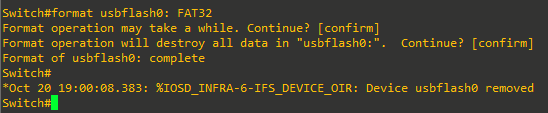
Step 3: Inserted the USB on the PC, copied the cat9k_iosxe.17.12.05.SPA.bin file (version to upgrade the 9300) to the USB and inserted the USB again on the switch:

Step 4: Used the install remove inactive command to clean-up old installation files
Step 5: Copy the image from the USB to the flash:
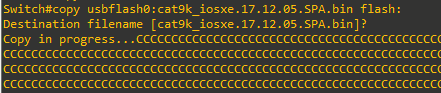
Step 6: Set boot variable,
- Reset boot variable:
Switch(config)#no boot system - Set the boot variable to packages.conf
Switch(config)#boot system flash:packages.conf - To configure the switch to auto-boot:
Switch(config)# no boot manual - Enable break:
Switch(config)#boot enable-break
Step 7: Save config and verify:
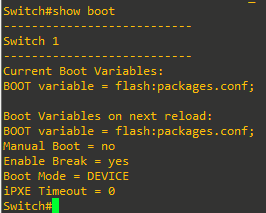
Step 8: Install image to flash:

Press y to save config and proceed. At the following prompt, also confirm:

Once the Add operation is completed (decompression of the .bin), confirm at the next prompt to begin the Activate operation:
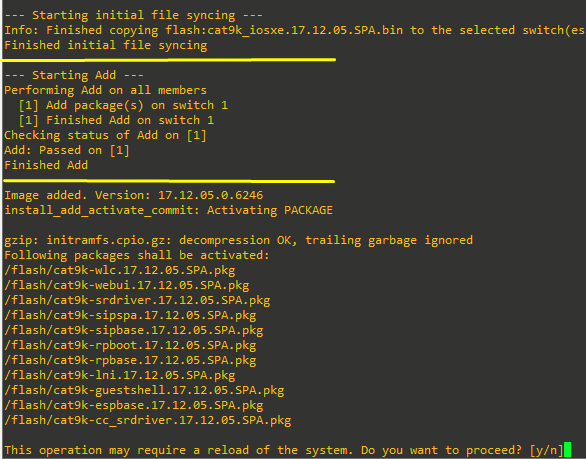
Whole process for reference:
C9300 - BUNDLE to INSTALL
Switch#install add file flash:cat9k_iosxe.17.12.05.SPA.bin activate commit
install_add_activate_commit: START Mon Oct 20 19:43:58 UTC 2025

System configuration has been modified.
Press Yes(y) to save the configuration and proceed.
Press No(n) for proceeding without saving the configuration.
Press Quit(q) to exit, you may save configuration and re-enter the command. [y/n/q]yBuilding configuration...

[OK]Modified configuration has been saved

*Oct 20 19:44:13.547: %INSTALL-5-INSTALL_START_INFO: Switch 1 R0/0: install_engine: Started install one-shot flash:cat9k_iosxe.17.12.05.SPA.bininstall_add_activate_commit: Add                                                                                                                                 ing PACKAGE
install_add_activate_commit: Checking whether new add is allowed ....

This operation requires a reload of the system. Do you want to proceed?
Please confirm you have changed boot config to flash:packages.conf [y/n]y

--- Starting initial file syncing ---
Info: Finished copying flash:cat9k_iosxe.17.12.05.SPA.bin to the selected switch(es)
Finished initial file syncing

--- Starting Add ---
Performing Add on all members
  [1] Add package(s) on switch 1
  [1] Finished Add on switch 1
Checking status of Add on [1]
Add: Passed on [1]
Finished Add

Image added. Version: 17.12.05.0.6246
install_add_activate_commit: Activating PACKAGE

gzip: initramfs.cpio.gz: decompression OK, trailing garbage ignored
Following packages shall be activated:
/flash/cat9k-wlc.17.12.05.SPA.pkg
/flash/cat9k-webui.17.12.05.SPA.pkg
/flash/cat9k-srdriver.17.12.05.SPA.pkg
/flash/cat9k-sipspa.17.12.05.SPA.pkg
/flash/cat9k-sipbase.17.12.05.SPA.pkg
/flash/cat9k-rpboot.17.12.05.SPA.pkg
/flash/cat9k-rpbase.17.12.05.SPA.pkg
/flash/cat9k-lni.17.12.05.SPA.pkg
/flash/cat9k-guestshell.17.12.05.SPA.pkg
/flash/cat9k-espbase.17.12.05.SPA.pkg
/flash/cat9k-cc_srdriver.17.12.05.SPA.pkg

This operation may require a reload of the system. Do you want to proceed? [y/n]y
--- Starting Activate ---
Performing Activate on all members

*Oct 20 19:53:27.790: %INSTALL-5-INSTALL_AUTO_ABORT_TIMER_PROGRESS: Switch 1 R0/0: rollback_timer: Install auto abort timer will expire in 7200 seconds  [1] Activate package(s) on switch 1
  [1] Finished Activate on switch 1
Checking status of Activate on [1]
Activate: Passed on [1]
Finished Activate

--- Starting Commit ---
Performing Commit on all members
  [1] Commit package(s) on switch 1
  [1] Finished Commit on switch 1
Checking status of Commit on [1]
Commit: Passed on [1]
Finished Commit

Send model notification for install_add_activate_commit before reload
[1]: Performing Upgrade_Service
300+0 records in
300+0 records out
307200 bytes (307 kB, 300 KiB) copied, 0.316028 s, 972 kB/s

*Oct 20 19:54:18.128: %IOSXEBOOT-4-FPGA_UPGRADE: (local/local): ### Mon Oct 20 19:54:18 UTC 2025 PLEASE DO NOT POWER CYCLE ### FPGA UPGRADING

                                                                                                                                             *Oct 20 19:54:18.136: %IOSXEBOOT-4-FPGA_UPGRADE: (local/local): Mon Oct 20 19:54:18 UTC 2025 Starting Main board fpga upgrade
Erasing blocks: 16/16 (100%)                                                                                                                                                                                                                                              Erasing blocks: 0/16 (0%)
Writing data: 1024k/1024k (100%)ing data: 0k/1024k (0%)
Verifying data: 1024k/1024k (100%)rifying data: 0k/1024k (0%)

                                  *Oct 20 19:55:09.971: %IOSXEBOOT-4-FPGA_UPGRADE: (local/local): Mon Oct 20 19:55:09 UTC 2025 Main board fpga upgrade 0x0000020A to 0x0000020F successful

                                                                                                                                                                                          *Oct 20 19:55:10.010: %IOSXEBOOT-4-RELOAD: (local/local): !!!Reload the switch to make firmware changes effective

                                                                                                                                                                                                                                                                                                           *Oct 20 19:55:10.017: %IOSXEBOOT-4-FPGA_UPGRADE: (local/local): ### Mon Oct 20 19:55:10 UTC 2025 FPGA UPGRADE COMPLETE ###
                                                                                                                     mount: /tmp/microcode_update/boot_pkg: WARNING: device write-protected, mounted read-only.
  SUCCESS: Upgrade_Service finished
Install will reload the system now!
  PID TTY          TIME CMD
SUCCESS: install_add_activate_commit  Mon Oct 20 19:55:11 UTC 2025

Switch#
*Oct 20 19:55:11.583: %INSTALL-5-INSTALL_COMPLETED_INFO: Switch 1 R0/0: install_engine: Completed install one-shot PACKAGE flash:cat9k_iosxe.17.12.05.SPA.bin
Switch#
Chassis 1 reloading, reason - Reload command
Oct 20 19:55:15.658: %PMAN-5-EXITACTION: F0/0: pvp: Process manager is exiting: reload fp action requested
Oct 20 19:55:17.292: %PMAN-5-EXIvp: Process manager is exiting: rp processes exit with reload switch code
###Power cycling switch for Firmware Upgrade to be in effect###

Initializing Hardware...

Initializing Hardware......

System Bootstrap, Version 17.3.2r, RELEASE SOFTWARE (P)
Compiled Tue 08/25/2020 23:46:12.85 by rel

Current ROMMON image : Primary
Last reset cause     : PowerOn
C9300-24T platform with 8388608 Kbytes of main memory

Preparing to autoboot. [Press Ctrl-C to interrupt]  0
boot: attempting to boot from [flash:packages.conf]
boot: reading file packages.conf
#
##############################################################################################################################################################################################################################################################################################################################################################################################################################################################################################################################################################################################################################


*Oct 20 19:57:46.286: %IOSXEBOOT-4-BOOTLOADER_UPGRADE: (rp/0): ### Mon Oct 20 19:57:46 Universal 2025 PLEASE DO NOT POWER CYCLE ### BOOTLOADER UPGRADING

*Oct 20 19:58:11.901: %IOSXEBOOT-4-flashcp: (rp/0): polaris_adelphi_rommon_sb.bin
                                                                                 MM [1] MCU version 233 sw ver 191
                                                                                                                  MM [2] MCU version 233 sw ver 191


                                                                                                                                                   MCU UPGRADE IN PROGRESS... PLEASE DO NOT POWER CYCLE!!

                                                                                                                                                                                                         Front-end Microcode IMG MGR: found 4 microcode images for 1 device.
                                                                                                                                                                                                                                                                            Image for front-end 0: /tmp/microcode_update/front_end/fe_type_6_0 update needed: no
                                                Image for front-end 0: /tmp/microcode_update/front_end/fe_type_6_1 update needed: yes
                                                                                                                                     Image for front-end 0: /tmp/microcode_update/front_end/fe_type_6_2 update needed: yes
                                                                                                                                                                                                                          Image for front-end 0: /tmp/microcode_update/front_end/fe_type_6_3 update needed: no

                                                                                                                                                                                                                                                                                                              Front-end Microcode IMG MGR: Preparing to program device microcode...
                                                                   Front-end Microcode IMG MGR: Preparing to program device[0], index=0 ...594412 bytes.... Skipped[0].
                                                                                                                                                                       Front-end Microcode IMG MGR: Preparing to program device[0], index=1 ...579456 bytes.
                                                                                                                                                                                                                                                            Front-end Microcode IMG MGR: Programming device 0...rw
  *Oct 20 19:58:17.459: %IOSXEBOOT-4-BOOTLOADER_UPGRADE: (rp/0): Mon Oct 20 19:58:17 Universal 2025 BOOTLOADER UPGRADE SUCCESSFUL
                                                                                                                                 Rrrrrrrw..0%...........................................................................................................10%............................................................................................................20%..........................................................................................................30%.............................................................................................................40%..........................................................................................................50%............................................................................................................60%.............................................................................................................70%..........................................................................................................80%............................................................................................................90%...........................................................................................................100%
                              Front-end Microcode IMG MGR: Preparing to program device[0], index=2 ...24506 bytes.
                                                                                                                  Front-end Microcode IMG MGR: Programming device 0...rrrrrrw..0%....10%....20%......30%...40%....50%......60%....70%.....80%....90%....100%wRr!
                                                                                                                                                                                                                                                                Front-end Microcode IMG MGR: Microcode programming complete for device 0.
                         Front-end Microcode IMG MGR: Preparing to program device[0], index=3 ...90974 bytes.... Skipped[3].
                                                                                                                            Front-end Microcode IMG MGR: Microcode programming complete in 363 seconds


                                                                                                                                                                                                      MCU UPGRADE COMPLETED!!...
Both links down, not waiting for other switches
Switch number is 1

              Restricted Rights Legend

Use, duplication, or disclosure by the Government is
subject to restrictions as set forth in subparagraph
(c) of the Commercial Computer Software - Restricted
Rights clause at FAR sec. 52.227-19 and subparagraph
(c) (1) (ii) of the Rights in Technical Data and Computer
Software clause at DFARS sec. 252.227-7013.

           Cisco Systems, Inc.
           170 West Tasman Drive
           San Jose, California 95134-1706


Cisco IOS Software [Dublin], Catalyst L3 Switch Software (CAT9K_IOSXE), Version 17.12.5, RELEASE SOFTWARE (fc5)
Technical Support: http://www.cisco.com/techsupport
Copyright (c) 1986-2025 by Cisco Systems, Inc.
Compiled Fri 14-Mar-25 02:41 by mcpre


This software version supports only Smart Licensing as the software licensing mechanism.


PLEASE READ THE FOLLOWING TERMS CAREFULLY. INSTALLING THE LICENSE OR
LICENSE KEY PROVIDED FOR ANY CISCO SOFTWARE PRODUCT, PRODUCT FEATURE,
AND/OR SUBSEQUENTLY PROVIDED SOFTWARE FEATURES (COLLECTIVELY, THE
"SOFTWARE"), AND/OR USING SUCH SOFTWARE CONSTITUTES YOUR FULL
ACCEPTANCE OF THE FOLLOWING TERMS. YOU MUST NOT PROCEED FURTHER IF YOU
ARE NOT WILLING TO BE BOUND BY ALL THE TERMS SET FORTH HEREIN.

Your use of the Software is subject to Cisco's General Terms and any
relevant supplemental terms found at
https://www.cisco.com/site/us/en/about/legal/contract-experience/index.html.

You hereby acknowledge and agree that certain Software and/or features are
licensed for a particular term, that the license to such Software and/or
features is valid only for the applicable term and that such Software and/or
features may be shut down or otherwise terminated by Cisco after expiration
of the applicable license term (e.g., 90-day trial period). Cisco reserves
the right to terminate any such Software feature electronically or by any
other means available. While Cisco may provide alerts, it is your sole
responsibility to monitor your usage of any such term Software feature to
ensure that your systems and networks are prepared for a shutdown of the
Software feature.


FIPS: Flash Key Check : Key Not Found, FIPS Mode Not Enabled
cisco C9300-24T (X86) processor with 1301924K/6147K bytes of memory.
Processor board ID
2048K bytes of non-volatile configuration memory.
8388608K bytes of physical memory.
1638400K bytes of Crash Files at crashinfo:.
11264000K bytes of Flash at flash:.
120174592K bytes of USB Flash at usbflash0:.

Base Ethernet MAC Address          : 6c:41:0e:9e:67:00
Motherboard Assembly Number        : 73-18270-04
Motherboard Serial Number          :
Model Revision Number              : A0
Motherboard Revision Number        : A0
Model Number                       : C9300-24T
System Serial Number               :
CLEI Code Number                   :


Press RETURN to get started!


*Oct 20 20:04:34.077: %CRYPTO-5-SELF_TEST_START: Crypto algorithms release (Rel5a), Entropy release (3.4.1)
       begin self-test
*Oct 20 20:04:34.556: %CRYPTO-5-SELF_TEST_END: Crypto algorithms self-test completed successfully
       All tests passed.
*Oct 20 20:04:36.199: %IOSD_INFRA-6-IFS_DEVICE_OIR: Device usbflash0 added
*Oct 20 20:04:36.927: %SMART_LIC-6-AGENT_ENABLED: Smart Agent for Licensing is enabled
*Oct 20 20:04:37.006: %SMART_LIC-6-EXPORT_CONTROLLED: Usage of export controlled features is not allowed
*Oct 20 20:04:40.686: pagp init: platform supports EC/LACP xFSU
*Oct 20 20:04:41.457: ISIS-GRACEFUL-RELOAD: Init State GR_NONE
*Oct 20 20:04:41.504: LACP-GR: infra cb, GR_NONE

*Oct 20 20:04:41.609: %TLSCLIENT-5-TLSCLIENT_IOS: TLS Client is IOS based
*Oct 20 20:04:42.017: %CRYPTO-4-AUDITWARN: Encryption audit check could not be performed
*Oct 20 20:04:42.017: %CRYPTO_ENGINE-4-CSDL_COMPLIANCE_DISABLED: Cisco PSB security compliance has been disabled by platform
*Oct 20 20:04:42.156: %SPANTREE-5-EXTENDED_SYSID: Extended SysId enabled for type vlan
*Oct 20 20:04:42.689: %LINK-3-UPDOWN: Interface Lsmpi18/3, changed state to up
*Oct 20 20:04:42.690: %LINK-3-UPDOWN: Interface EOBC18/1, changed state to up
*Oct 20 20:04:42.690: %LINEPROTO-5-UPDOWN: Line protocol on Interface LI-Null0, changed state to up
*Oct 20 20:04:42.690: %LINEPROTO-5-UPDOWN: Line protocol on Interface LIIN18/2, changed state to up
*Oct 20 20:04:42.690: %LINK-3-UPDOWN: Interface LIIN18/2, changed state to up
*Oct 20 20:04:42.690: %LINK-3-UPDOWN: Interface GigabitEthernet0/0, changed state to down
*Oct 20 20:04:42.691: %LINK-5-CHANGED: Interface Bluetooth0/4, changed state to administratively down
*Oct 20 20:04:42.842: %PNP-6-PNP_DISCOVERY_STARTED: PnP Discovery started
*Oct 20 20:04:42.890: %HMANRP-6-HMAN_IOS_CHANNEL_INFO: HMAN-IOS channel event for switch 1: EMP_RELAY: Channel UP!
*Oct 20 20:04:25.664: %STACKMGR-6-STACK_LINK_CHANGE: Switch 1 R0/0: stack_mgr: Stack port 1 on Switch 1 is cable-not-connected
*Oct 20 20:04:25.664: %STACKMGR-6-STACK_LINK_CHANGE: Switch 1 R0/0: stack_mgr: Stack port 2 on Switch 1 is down
*Oct 20 20:04:25.664: %STACKMGR-6-STACK_LINK_CHANGE: Switch 1 R0/0: stack_mgr: Stack port 2 on Switch 1 is cable-not-connected
*Oct 20 20:04:26.184: %STACKMGR-4-SWITCH_ADDED: Switch 1 R0/0: stack_mgr: Switch 1 has been added to the stack.
*Oct 20 20:04:28.571: %STACKMGR-4-SWITCH_ADDED: Switch 1 R0/0: stack_mgr: Switch 1 has been added to the stack.
*Oct 20 20:04:30.582: %STACKMGR-4-SWITCH_ADDED: Switch 1 R0/0: stack_mgr: Switch 1 has been added to the stack.
*Oct 20 20:04:30.583: %STACKMGR-6-ACTIVE_ELECTED: Switch 1 R0/0: stack_mgr: Switch 1 has been elected ACTIVE.
*Oct 20 20:04:42.918: %NGWC_USB_CONSOLE-6-USB_INSERT: Switch 1: USB cable inserted. Console media-type USB is in effect
*Oct 20 20:04:42.918: %NGWC_USB_CONSOLE-6-USB_REMOVE: Switch 1: USB cable removed. Console media-type RJ45 is in effect
*Oct 20 20:04:42.918: %NGWC_USB_CONSOLE-6-USB_INSERT: Switch 1: USB cable inserted. Console media-type USB is in effect
*Oct 20 20:04:43.295: %HMANRP-6-EMP_NO_ELECTION_INFO: Could not elect active EMP switch, setting emp active switch to 0: EMP_RELAY: Could not elect switch with mgmt port UP
*Oct 20 20:04:43.711: %LINEPROTO-5-UPDOWN: Line protocol on Interface Lsmpi18/3, changed state to up
*Oct 20 20:04:43.711: %LINEPROTO-5-UPDOWN: Line protocol on Interface EOBC18/1, changed state to up
*Oct 20 20:04:43.712: %LINEPROTO-5-UPDOWN: Line protocol on Interface GigabitEthernet0/0, changed state to down
*Oct 20 20:04:43.712: %LINEPROTO-5-UPDOWN: Line protocol on Interface Bluetooth0/4, changed state to down
*Oct 20 20:04:44.001: %SYS-5-CONFIG_P: Configured programmatically by process MGMT VRF Process from console as vty0
*Oct 20 20:04:44.299: %IOSXE_MGMTVRF-6-CREATE_SUCCESS_INFO: Management vrf Mgmt-vrf created with ID 1, ipv4 table-id 0x1, ipv6 table-id 0x1E000001
*Oct 20 20:04:44.303: %SYS-5-CONFIG_P: Configured programmatically by process MGMT VRF Process from console as vty0
*Oct 20 20:04:44.313: %IOSXE_MGMTVRF-6-CREATE_SUCCESS_INFO: Management vrf Mgmt-vrf created with ID 1, ipv4 table-id 0x1, ipv6 table-id 0x1E000001
*Oct 20 20:04:44.313: %SYS-5-CONFIG_P: Configured programmatically by process MGMT VRF Process from console as vty0
*Oct 20 20:04:44.593: %ONEP_BASE-6-SS_ENABLED: ONEP: Service set Base was enabled by Default
*Oct 20 20:04:44.926: %LINEPROTO-5-UPDOWN: Line protocol on Interface Vlan1, changed state to down
*Oct 20 20:04:45.286: %SYS-7-NVRAM_INIT_WAIT_TIME: Waited 0 seconds for NVRAM to be available
*Oct 20 20:04:45.371: %CRYPTO_ENGINE-5-KEY_ADDITION: A key named TP-self-signed-3670212050 has been generated or imported by crypto config
*Oct 20 20:04:45.504: %PKI-6-TRUSTPOINT_CREATE: Trustpoint: SLA-TrustPoint created succesfully
*Oct 20 20:04:45.546: %PKI-6-TRUSTPOINT_CREATE: Trustpoint: TP-self-signed-3670212050 created succesfully
*Oct 20 20:04:46.103: %SYS-5-CONFIG_I: Configured from memory by console
*Oct 20 20:04:46.166: %SYS-5-CONFIG_P: Configured programmatically by process CPP MQC QoS Policy manager from console as vty1
*Oct 20 20:04:46.173: %PLATFORM_FEP-6-FRU_PS_OIR: Switch 1: FRU power supply A inserted
*Oct 20 20:04:46.174: %PLATFORM_FEP-6-FRU_PS_OIR: Switch 1: FRU power supply B inserted
*Oct 20 20:04:46.174: %PLATFORM_FEP-1-FRU_PS_ACCESS: Switch 1: power supply B is not responding
*Oct 20 20:04:46.241: %PLATFORM_FEP-1-FRU_PS_SIGNAL_FAULTY: Switch 1: signal on power supply B is faulty
*Oct 20 20:04:46.250: %CRYPTO-5-SELF_TEST_START: Crypto algorithms release (Rel5a), Entropy release (3.4.1)
       begin self-test
*Oct 20 20:04:46.254: %CRYPTO-5-SELF_TEST_END: Crypto algorithms self-test completed successfully
       All tests passed.
*Oct 20 20:04:46.680: %SSH-5-ENABLED: SSH 2.0 has been enabled
*Oct 20 20:04:46.732: %SYS-5-RESTART: System restarted --
Cisco IOS Software [Dublin], Catalyst L3 Switch Software (CAT9K_IOSXE), Version 17.12.5, RELEASE SOFTWARE (fc5)
Technical Support: http://www.cisco.com/techsupport
Copyright (c) 1986-2025 by Cisco Systems, Inc.
Compiled Fri 14-Mar-25 02:41 by mcpre
*Oct 20 20:04:47.351: %CRYPTO_ENGINE-5-KEY_ADDITION: A key named TP-self-signed-3670212050.server has been generated or imported by crypto-engine
*Oct 20 20:04:48.386: %LINK-3-UPDOWN: Interface GigabitEthernet1/1/1, changed state to down
*Oct 20 20:04:48.388: %LINK-3-UPDOWN: Interface GigabitEthernet1/1/2, changed state to down
*Oct 20 20:04:48.388: %LINK-3-UPDOWN: Interface GigabitEthernet1/1/3, changed state to down
*Oct 20 20:04:48.389: %LINK-3-UPDOWN: Interface GigabitEthernet1/1/4, changed state to down
*Oct 20 20:04:48.390: %LINK-3-UPDOWN: Interface TenGigabitEthernet1/1/1, changed state to down
*Oct 20 20:04:48.390: %LINK-3-UPDOWN: Interface TenGigabitEthernet1/1/2, changed state to down
*Oct 20 20:04:48.390: %LINK-3-UPDOWN: Interface TenGigabitEthernet1/1/3, changed state to down
*Oct 20 20:04:48.391: %LINK-3-UPDOWN: Interface TenGigabitEthernet1/1/4, changed state to down
*Oct 20 20:04:48.401: %LINK-3-UPDOWN: Interface TenGigabitEthernet1/1/5, changed state to down
*Oct 20 20:04:48.401: %LINK-3-UPDOWN: Interface TenGigabitEthernet1/1/6, changed state to down
*Oct 20 20:04:48.403: %LINK-3-UPDOWN: Interface TenGigabitEthernet1/1/7, changed state to down
*Oct 20 20:04:48.403: %LINK-3-UPDOWN: Interface TenGigabitEthernet1/1/8, changed state to down
*Oct 20 20:04:48.404: %LINK-3-UPDOWN: Interface FortyGigabitEthernet1/1/1, changed state to down
*Oct 20 20:04:48.404: %LINK-3-UPDOWN: Interface FortyGigabitEthernet1/1/2, changed state to down
*Oct 20 20:04:48.405: %LINK-3-UPDOWN: Interface TwentyFiveGigE1/1/1, changed state to down
*Oct 20 20:04:48.405: %LINK-3-UPDOWN: Interface TwentyFiveGigE1/1/2, changed state to down
*Oct 20 20:04:48.627: %LINK-3-UPDOWN: Interface Vlan1, changed state to up
*Oct 20 20:04:49.381: %SYS-6-BOOTTIME: Time taken to reboot after reload =  634 seconds
*Oct 20 20:04:49.387: %LINEPROTO-5-UPDOWN: Line protocol on Interface GigabitEthernet1/1/1, changed state to down
*Oct 20 20:04:49.390: %LINEPROTO-5-UPDOWN: Line protocol on Interface GigabitEthernet1/1/2, changed state to down
*Oct 20 20:04:49.390: %LINEPROTO-5-UPDOWN: Line protocol on Interface GigabitEthernet1/1/3, changed state to down
*Oct 20 20:04:49.390: %LINEPROTO-5-UPDOWN: Line protocol on Interface GigabitEthernet1/1/4, changed state to down
*Oct 20 20:04:49.390: %LINEPROTO-5-UPDOWN: Line protocol on Interface TenGigabitEthernet1/1/1, changed state to down
*Oct 20 20:04:49.390: %LINEPROTO-5-UPDOWN: Line protocol on Interface TenGigabitEthernet1/1/2, changed state to down
*Oct 20 20:04:49.391: %LINEPROTO-5-UPDOWN: Line protocol on Interface TenGigabitEthernet1/1/3, changed state to down
*Oct 20 20:04:49.391: %LINEPROTO-5-UPDOWN: Line protocol on Interface TenGigabitEthernet1/1/4, changed state to down
*Oct 20 20:04:49.401: %LINEPROTO-5-UPDOWN: Line protocol on Interface TenGigabitEthernet1/1/5, changed state to down
*Oct 20 20:04:49.401: %LINEPROTO-5-UPDOWN: Line protocol on Interface TenGigabitEthernet1/1/6, changed state to down
*Oct 20 20:04:49.403: %LINEPROTO-5-UPDOWN: Line protocol on Interface TenGigabitEthernet1/1/7, changed state to down
*Oct 20 20:04:49.403: %LINEPROTO-5-UPDOWN: Line protocol on Interface TenGigabitEthernet1/1/8, changed state to down
*Oct 20 20:04:49.404: %LINEPROTO-5-UPDOWN: Line protocol on Interface FortyGigabitEthernet1/1/1, changed state to down
*Oct 20 20:04:49.404: %LINEPROTO-5-UPDOWN: Line protocol on Interface FortyGigabitEthernet1/1/2, changed state to down
*Oct 20 20:04:49.405: %LINEPROTO-5-UPDOWN: Line protocol on Interface TwentyFiveGigE1/1/1, changed state to down
*Oct 20 20:04:49.405: %LINEPROTO-5-UPDOWN: Line protocol on Interface TwentyFiveGigE1/1/2, changed state to down
*Oct 20 20:04:49.405: %LINEPROTO-5-UPDOWN: Line protocol on Interface AppGigabitEthernet1/0/1, changed state to up
*Oct 20 20:04:51.289: %LINK-3-UPDOWN: Interface AppGigabitEthernet1/0/1, changed state to up
*Oct 20 20:04:51.955: %PNP-6-PNP_BEST_UDI_UPDATE: Best UDI [PID:C9300-24T,VID:A0,SN:FCW2347C0QH] identified via (master-registry)
*Oct 20 20:04:51.955: %PNP-6-PNP_CDP_UPDATE: Device UDI [PID:C9300-24T,VID:A0,SN:FCW2347C0QH] identified for CDP
*Oct 20 20:04:51.969: %PNP-6-PNP_DISCOVERY_STOPPED: PnP Discovery stopped (Startup Config Present)
*Oct 20 20:04:56.028: %HMANRP-6-EMP_NO_ELECTION_INFO: Could not elect active EMP switch, setting emp active switch to 0: EMP_RELAY: Could not elect switch with mgmt port UP
*Oct 20 20:05:01.867: %PLATFORM_PM-6-FRULINK_INSERTED: 4x1G uplink module inserted in the switch 1 slot 1
*Oct 20 20:05:02.261: %CRYPTO-6-ISAKMP_ON_OFF: ISAKMP is OFF
*Oct 20 20:05:02.818: %PKI-6-TRUSTPOINT_CREATE: Trustpoint: CISCO_IDEVID_SUDI created succesfully
*Oct 20 20:05:02.823: %CRYPTO_ENGINE-5-KEY_ADDITION: A key named CISCO_IDEVID_SUDI has been generated or imported by pki-sudi
*Oct 20 20:05:02.833: %PKI-6-TRUSTPOINT_CREATE: Trustpoint: CISCO_IDEVID_SUDI0 created succesfully
*Oct 20 20:05:02.834: %PKI-2-NON_AUTHORITATIVE_CLOCK: PKI functions can not be initialized until an authoritative time source, like NTP, can be obtained.
*Oct 20 20:05:02.843: %PKI-6-TRUSTPOINT_CREATE: Trustpoint: TEST_CISCO_IDEVID_SUDI created succesfully
*Oct 20 20:05:02.849: %CRYPTO_ENGINE-5-KEY_ADDITION: A key named TEST_CISCO_IDEVID_SUDI has been generated or imported by pki-sudi
*Oct 20 20:05:02.886: %PKI-6-TRUSTPOINT_CREATE: Trustpoint: TEST_CISCO_IDEVID_SUDI0 created succesfully
*Oct 20 20:05:02.888: %PKI-6-TRUSTPOINT_DELETE: Trustpoint: TEST_CISCO_IDEVID_SUDI deleted succesfully
*Oct 20 20:05:02.889: %CRYPTO_ENGINE-5-KEY_DELETED: A key named TEST_CISCO_IDEVID_SUDI has been removed from key storage
*Oct 20 20:05:02.889: %PKI-6-TRUSTPOINT_DELETE: Trustpoint: TEST_CISCO_IDEVID_SUDI0 deleted succesfully
*Oct 20 20:05:02.890: %PKI-6-TRUSTPOINT_CREATE: Trustpoint: TEST_CISCO_IDEVID_SUDI created succesfully
*Oct 20 20:05:02.896: %CRYPTO_ENGINE-5-KEY_ADDITION: A key named TEST_CISCO_IDEVID_SUDI has been generated or imported by pki-sudi
*Oct 20 20:05:02.911: %PKI-4-CSDL_COMPLIANCE_KEY_SIZE_WARNING: The key size 1024 is a weak key size used in a certificate under trustpoint  TEST_CISCO_IDEVID_SUDI and will be deprecated
*Oct 20 20:05:02.914: %PKI-6-TRUSTPOINT_CREATE: Trustpoint: TEST_CISCO_IDEVID_SUDI0 created succesfully
*Oct 20 20:05:02.916: %PKI-6-TRUSTPOINT_DELETE: Trustpoint: TEST_CISCO_IDEVID_SUDI deleted succesfully
*Oct 20 20:05:02.917: %CRYPTO_ENGINE-5-KEY_DELETED: A key named TEST_CISCO_IDEVID_SUDI has been removed from key storage
*Oct 20 20:05:02.917: %PKI-6-TRUSTPOINT_DELETE: Trustpoint: TEST_CISCO_IDEVID_SUDI0 deleted succesfully
*Oct 20 20:05:02.918: %PKI-6-TRUSTPOINT_CREATE: Trustpoint: CISCO_IDEVID_CMCA2_SUDI created succesfully
*Oct 20 20:05:02.923: %CRYPTO_ENGINE-5-KEY_ADDITION: A key named CISCO_IDEVID_CMCA2_SUDI has been generated or imported by pki-sudi
*Oct 20 20:05:02.956: %PKI-6-TRUSTPOINT_CREATE: Trustpoint: CISCO_IDEVID_CMCA2_SUDI0 created succesfully
*Oct 20 20:05:02.958: %PKI-6-TRUSTPOINT_CREATE: Trustpoint: CISCO_IDEVID_CMCA_SUDI created succesfully
*Oct 20 20:05:02.965: %CRYPTO_ENGINE-5-KEY_ADDITION: A key named CISCO_IDEVID_CMCA_SUDI has been generated or imported by pki-sudi
*Oct 20 20:05:02.981: %PKI-4-CSDL_COMPLIANCE_KEY_SIZE_WARNING: The key size 1024 is a weak key size used in a certificate under trustpoint  CISCO_IDEVID_CMCA_SUDI and will be deprecated
*Oct 20 20:05:02.983: %PKI-6-TRUSTPOINT_CREATE: Trustpoint: CISCO_IDEVID_CMCA_SUDI0 created succesfully
*Oct 20 20:05:17.772: %SMART_LIC-6-REPORTING_REQUIRED: A Usage report acknowledgement will be required in 364 days.
*Oct 20 20:05:22.346: %LINEPROTO-5-UPDOWN: Line protocol on Interface Vlan1, changed state to up
Switch>en
Switch#sh ver
Cisco IOS XE Software, Version 17.12.05
Cisco IOS Software [Dublin], Catalyst L3 Switch Software (CAT9K_IOSXE), Version 17.12.5, RELEASE SOFTWARE (fc5)
Technical Support: http://www.cisco.com/techsupport
Copyright (c) 1986-2025 by Cisco Systems, Inc.
Compiled Fri 14-Mar-25 02:41 by mcpre


Cisco IOS-XE software, Copyright (c) 2005-2025 by cisco Systems, Inc.
All rights reserved.  Certain components of Cisco IOS-XE software are
licensed under the GNU General Public License ("GPL") Version 2.0.  The
software code licensed under GPL Version 2.0 is free software that comes
with ABSOLUTELY NO WARRANTY.  You can redistribute and/or modify such
GPL code under the terms of GPL Version 2.0.  For more details, see the
documentation or "License Notice" file accompanying the IOS-XE software,
or the applicable URL provided on the flyer accompanying the IOS-XE
software.


ROM: IOS-XE ROMMON
BOOTLDR: System Bootstrap, Version 17.3.2r, RELEASE SOFTWARE (P)

Switch uptime is 1 minute
Uptime for this control processor is 9 minutes
System returned to ROM by PowerOn
System image file is "flash:packages.conf"
Last reload reason: PowerOn


This product contains cryptographic features and is subject to United
States and local country laws governing import, export, transfer and
use. Delivery of Cisco cryptographic products does not imply
third-party authority to import, export, distribute or use encryption.
Importers, exporters, distributors and users are responsible for
compliance with U.S. and local country laws. By using this product you
agree to comply with applicable laws and regulations. If you are unable
to comply with U.S. and local laws, return this product immediately.

A summary of U.S. laws governing Cisco cryptographic products may be found at:
http://www.cisco.com/wwl/export/crypto/tool/stqrg.html

If you require further assistance please contact us by sending email to
export@cisco.com.


Technology Package License Information:

------------------------------------------------------------------------------
Technology-package                                     Technology-package
Current                        Type                       Next reboot
------------------------------------------------------------------------------
network-advantage       Smart License                    network-advantage
None                    Subscription Smart License       None
AIR License Level: AIR DNA Advantage
Next reload AIR license Level: AIR DNA Advantage


Smart Licensing Status: Smart Licensing Using Policy

cisco C9300-24T (X86) processor with 1301924K/6147K bytes of memory.
Processor board ID
1 Virtual Ethernet interface
28 Gigabit Ethernet interfaces
8 Ten Gigabit Ethernet interfaces
2 TwentyFive Gigabit Ethernet interfaces
2 Forty Gigabit Ethernet interfaces
2048K bytes of non-volatile configuration memory.
8388608K bytes of physical memory.
1638400K bytes of Crash Files at crashinfo:.
11264000K bytes of Flash at flash:.
120174592K bytes of USB Flash at usbflash0:.

Base Ethernet MAC Address          : 6c:41:0e:9e:67:00
Motherboard Assembly Number        : 73-18270-04
Motherboard Serial Number          :
Model Revision Number              : A0
Motherboard Revision Number        : A0
Model Number                       : C9300-24T
System Serial Number               :
CLEI Code Number                   :


Switch Ports Model              SW Version        SW Image              Mode
------ ----- -----              ----------        ----------            ----
*    1 41    C9300-24T          17.12.05          CAT9K_IOSXE           INSTALL


Switch#

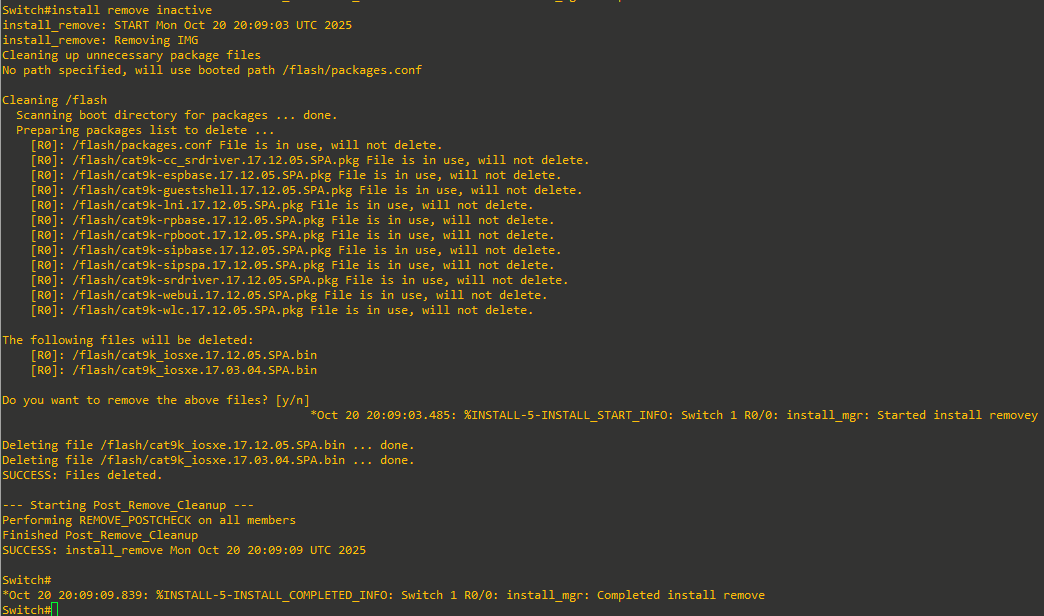
Step 9: Perform install remove inactive for cleanup:
Sources:
Release Notes for Cisco Catalyst 9300 Series Switches, Cisco IOS XE Dublin 17.12.x
https://www.cisco.com/c/en/us/td/docs/switches/lan/catalyst9300/software/release/17-12/release_notes/ol-17-12-9300/upgrading_the_switch_software.html
Interface and Hardware Components Configuration Guide, Cisco IOS XE Dublin 17.12.x (Catalyst 9300 Switches)
https://www.cisco.com/c/en/us/td/docs/switches/lan/catalyst9300/software/release/17-12/configuration_guide/int_hw/b_1712_int_and_hw_9300_cg/configuring_usb_3_0_ssd.html
Just bought a used 3850 with some vlan.dat and stack member leftovers. Switch will always revert to factory default and initial configuration dialog after reload.
https://www.reddit.com/r/Cisco/comments/ldi2pm/just_bought_a_used_3850_with_some_vlandat_and/